How to Create Character Profiles That Stay Consistent
You're halfway through a draft, and the character who felt sharp on page ten now sounds like a cousin of someone you cut in chapter three. Her eye color has drifted, the villain's age no longer matches the timeline, and a side character has picked up the exact habit you meant for the protagonist. That's usually the moment writers realize they don't need more imagination, they need a profile they can use.
A character profile isn't a personality quiz or a backstory dump. It's a working reference document that helps you keep behavior, voice, appearance, and story function aligned across a long draft, revisions, and illustrations. The stronger the profile, the less often you have to stop and ask, “Would this character really do that?”
Table of Contents
- Why Flat Characters Derail Long Drafts
- The Core Fields Every Profile Should Cover
- Calibrating Profile Depth to Page Time
- Capturing Voice, Mannerisms, and Arc
- Using Storyloft to Build and Illustrate the Profile
- Keeping the Profile Alive Through the Draft
Why Flat Characters Derail Long Drafts
The first sign usually isn't dramatic. It's small, like a protagonist who talks with dry wit in chapter one, then turns solemn and generic by chapter twelve. By the middle of a manuscript, writers also notice the same thing with appearance details, one draft says blue eyes, another says hazel, and the supporting cast starts absorbing scraps of traits that belonged to earlier versions of the book.
That drift is exactly what a character profile is supposed to prevent. In the best writing guides, the profile is treated as a detailed reference document, not a loose note card, and that matters because long-form fiction punishes inconsistency fast. A profile keeps continuity across chapters, drafts, and even art direction, which is why it's more useful when it records how the story uses the character, not just how the author imagines them.
Practical rule: if a detail won't change a scene, a relationship, or a decision, it probably doesn't deserve a permanent place in the profile.
Sketch versus reusable profile
A sketch says the character is “brave” or “tall” or “brooding.” A reusable profile says what that bravery looks like under pressure, what tallness means in a crowd, and what brooding sounds like in dialogue. That difference is why guides built around role, basics, physical characteristics, emotional characteristics, and past are more durable than loose trait lists, as outlined in this character-profile workflow.
The same logic applies to different character types. A protagonist usually needs a fuller profile because the reader lives with that person for the entire book. An antagonist needs enough depth to make the conflict believable, but not so much sprawl that the story loses focus. A supporting character often works best with a few specific anchors and one or two memorable behaviors, which keeps the draft from turning every minor player into a second lead. For story structure that depends on strong character pressure, this story-driven approach is the right lens.
The Core Fields Every Profile Should Cover
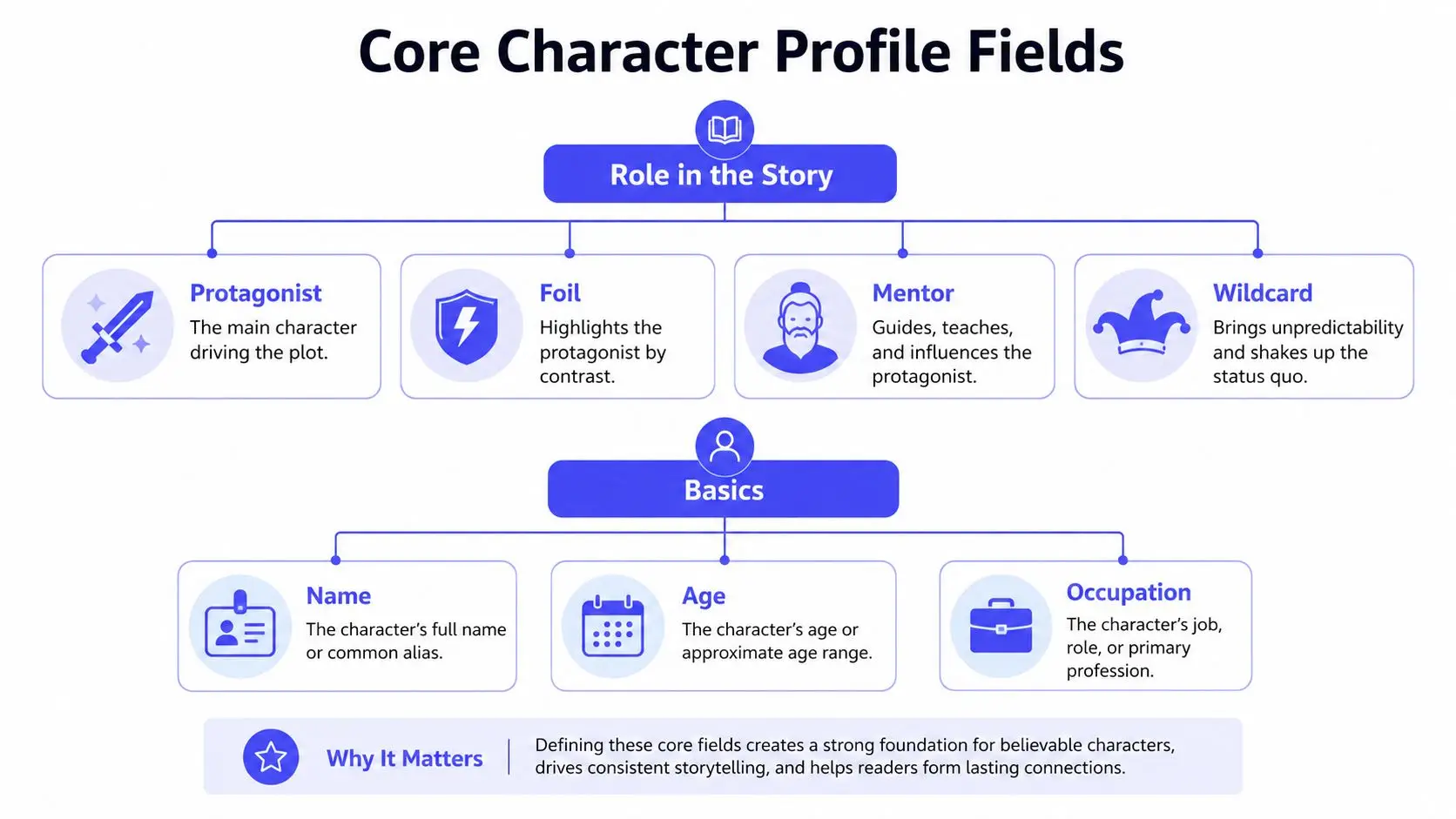
A profile becomes reusable when it answers five jobs at once, role, basics, visible traits, inner patterns, and backstory anchors. That structure matches the way stronger guides build profiles, from the repeated advice to start with the character's role and story function to the broader templates that collect history, personality, and motive before revision begins.
Start with role, not decoration
The first question is what the character does in the book. Protagonist, foil, mentor, or wildcard tells you what to prioritize and what to skip. That's the same logic behind step-by-step profile methods that begin with role, then move into basics, physical traits, emotional traits, and finally past and story function, because role determines which details matter.
Keep the basics lean
Name, age, occupation, geography, and time period belong here. So do relationship status, family setup, and any logistical facts that affect scenes. Writers often overfill this section because it feels safe, but a profile isn't stronger because it's longer. It's stronger when the facts are the ones you'll need on page twenty and page two hundred.
Treat physical traits as functional
Physical detail should show up in the text, not just sit in the notes. Eye color matters less than the thing readers would notice in a scene, posture, gait, grooming, the one accessory that always travels with them, or a distinguishing habit that shapes how other characters react. The old temptation is to list every visible feature. The better move is to choose the details that change how the character enters a room or gets described by someone else.
Use backstory as a cause, not a scrapbook
Backstory earns its place when it explains present behavior. Birth order, a formative loss, work history, a relationship rupture, or a habit learned in childhood can all matter if they change how the character speaks or decides. The strongest profiles I keep are the ones that connect what happened then to what happens now. For motivation-focused outlining, this guide on character motivation is a useful companion.
A compact version can fit a full page and still hold up. For a widowed lighthouse keeper in a coastal mystery, I'd keep her role, age, location, job, the fact that she lives alone, one visual marker like a salt-worn coat, one emotional habit like withholding answers, and one formative loss that explains why she distrusts strangers. I'd cut the family tree, the playlist, the childhood pet names, and every detail that doesn't shape a scene.
Calibrating Profile Depth to Page Time
The most common mistake is treating every character like the lead. That's where profile writing turns into procrastination, because you keep answering questions that the manuscript will never need. Reedsy's guidance is useful here, supporting characters often need only a few vivid details, and templates should help you discover the character rather than dictate them, as noted in their character template guidance.
Use three depth levels
| Profile Depth | Typical Character | Fields Covered | When to Use |
|---|---|---|---|
| Sketch | A walk-on, messenger, crowd figure | Role, one visual cue, one behavior, one purpose | When the character has little page time and only needs to register clearly |
| Standard | Recurring supporting character, rival, ally | Basics, visible traits, emotional pattern, one backstory anchor, one relationship | When the character returns often enough to need continuity |
| Deep | Protagonist, major antagonist, central mentor | Full profile, motivation, conflict, change, speech pattern, arc, key history | When the character drives scenes, subplots, or transformation |
A sketch profile keeps you moving. A deep profile keeps a novel coherent. A standard profile sits in the middle and does most of the work for a cast-heavy book. The point is not to max out every field, it's to match the depth of the document to the amount of story pressure the character carries.
A detective at three depths
At sketch level, the detective might be “Methodical, mid-forties, raincoat, hates interruptions.” That's enough for a cameo, and that's the point. At standard level, you add a past career, a strained relationship with a former partner, and a tendency to ask questions in the wrong order. At deep level, the profile includes the wound behind that control, what failure terrifies him, and how his habits change when the case starts reflecting his own life.
Practical rule: if you don't know whether a field matters, mark it to fill later and keep drafting.
That keeps the structure intact without forcing false certainty. It also respects a hard truth from the drafting process, you often learn who a character is by writing them in pressure, not by polishing the profile until it feels complete. A half-finished profile that supports actual pages is better than a perfect one that keeps the book locked in planning mode.
Capturing Voice, Mannerisms, and Arc
A profile that looks complete on paper can still fail if every character sounds interchangeable. The fix is to write the profile in first-person voice, because that forces the character to self-justify, reveal habits, and expose the blind spots that make them feel distinct. That advice lines up with expert workflow guidance, which warns against overly generic, third-person abstraction and profiles so rigid they can't evolve with the draft, as discussed in this first-person profiling workflow.
Build three short components
The first is a voice sample. For the lighthouse keeper, I'd write a paragraph in her own voice, not mine.
I don't answer questions the first time they're asked. People think that makes me difficult. It usually means I've already learned the cost of being too quick to trust.
The second is a mannerism inventory, but only the ones that can appear on the page. Maybe she dries her hands on her apron before lying, never sits with her back to a window, and taps her ring finger against a mug when she's hiding irritation. Those are not decorative quirks. They're repeatable behavior patterns, so they help the reader recognize her even in a crowded scene.
The third is an arc sketch, want, obstacle, change. She wants to keep the lighthouse and her private life protected. The obstacle is the investigation that keeps dragging her into public view. The change is that she eventually learns the secret she's guarding is shaping the very danger she's trying to avoid.
Troubleshoot the weak spots
Generic voice usually sounds like summary, not personality. Interchangeable reactions happen when each character gets the same emotional tempo, the same jokes, the same level of restraint. Over-rigidity happens when a profile becomes a cage and the draft can't surprise you anymore. If that starts happening, loosen the profile and keep the few rules that matter most, the ones tied to motive, fear, and dialogue.
For writers who want dialogue to do more than deliver information, these dialogue techniques pair well with a voice-based profile.
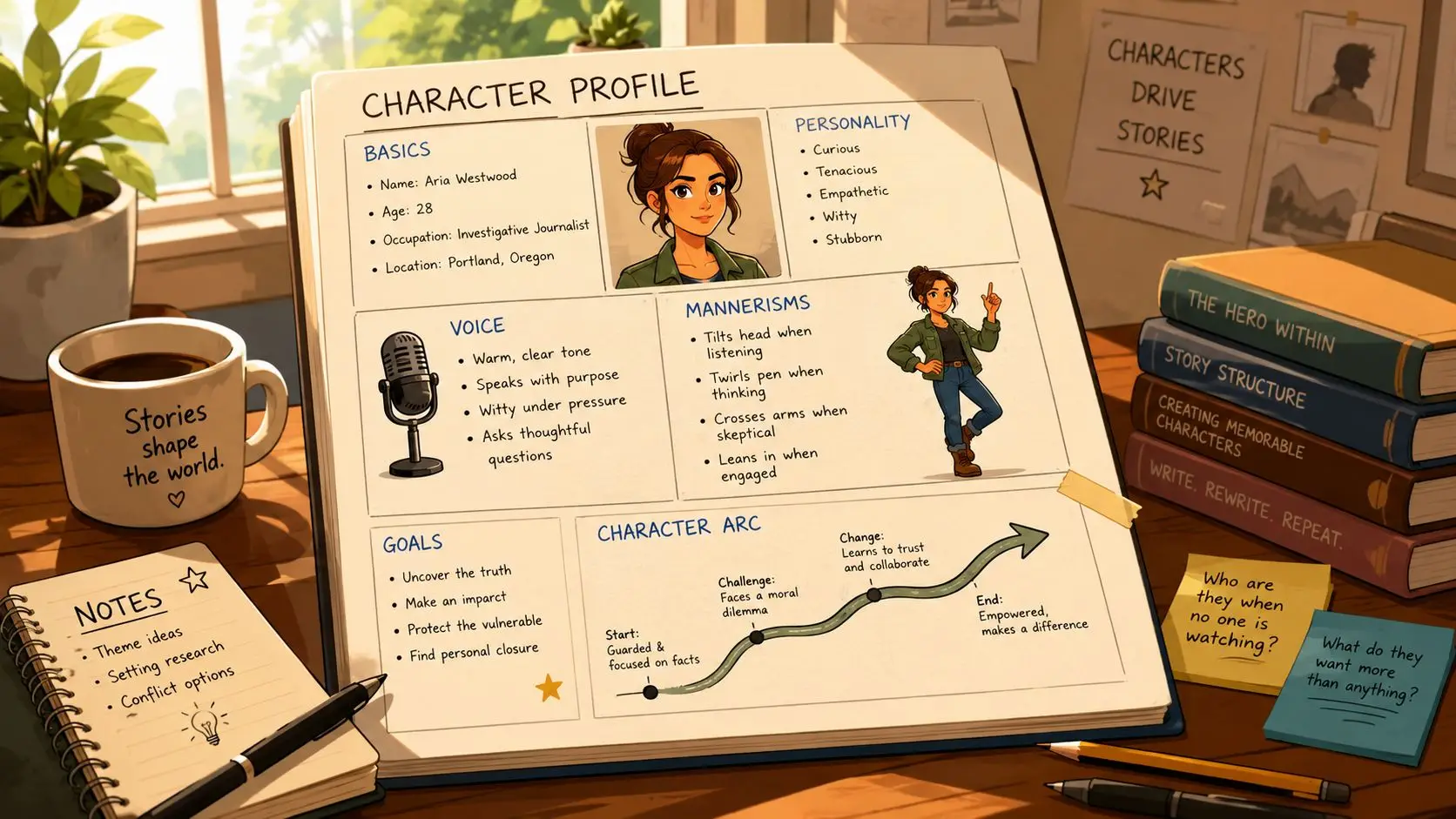
Using Storyloft to Build and Illustrate the Profile
A profile is easier to keep useful when it lives next to the manuscript instead of in a separate folder you forget to open. In Storyloft's workflow, the Character Creator is built to hold persona and behavior details alongside drafting, and its AI assistant Eddy can help generate first-person samples, surface contradictions, and suggest revisions directly in context. The platform also includes character notes and relationship tracking, so the profile isn't stranded away from the pages it's supposed to govern.
Build the character once, then reuse the data
Start by entering the character's role, background, habits, and behavior traits in the Character Creator. Then use Eddy to pressure-test the profile with prompts that ask what the character would avoid, what they'd hide, and what they'd say under stress. That's where a good profile stops being a storage file and starts acting like a decision tool.
A separate writing workflow can help with this same problem, but if you want the profile, manuscript, and visual pipeline in one place, Storyloft is one option that keeps them linked instead of isolated. That matters because a character who behaves one way in prose and looks like someone else in art breaks the reader's trust fast, especially in illustrated books or series fiction. If you're comparing layout and publishing workflows as part of your tool choice, the Draftrank store page is a useful place to review the product listing in context.
Practical rule: if the illustration and the prose disagree, fix the profile before you fix the art.
Carry the same profile into visual consistency
Once the profile is stable, it can feed the illustration suite. The scene creator pulls from selected passages, and style controls help lock in the same face, wardrobe logic, and color sense across multiple images and cover concepts. That gives the writer one character system, not two separate ones, one for prose and one for visuals.
The broader knowledge base on creating and illustrating Storyloft characters and scenes is where that handoff becomes practical. Storyloft also states that user manuscripts are not used to train its AI models, which matters if you're uploading early drafts or unfinished material.
Keeping the Profile Alive Through the Draft
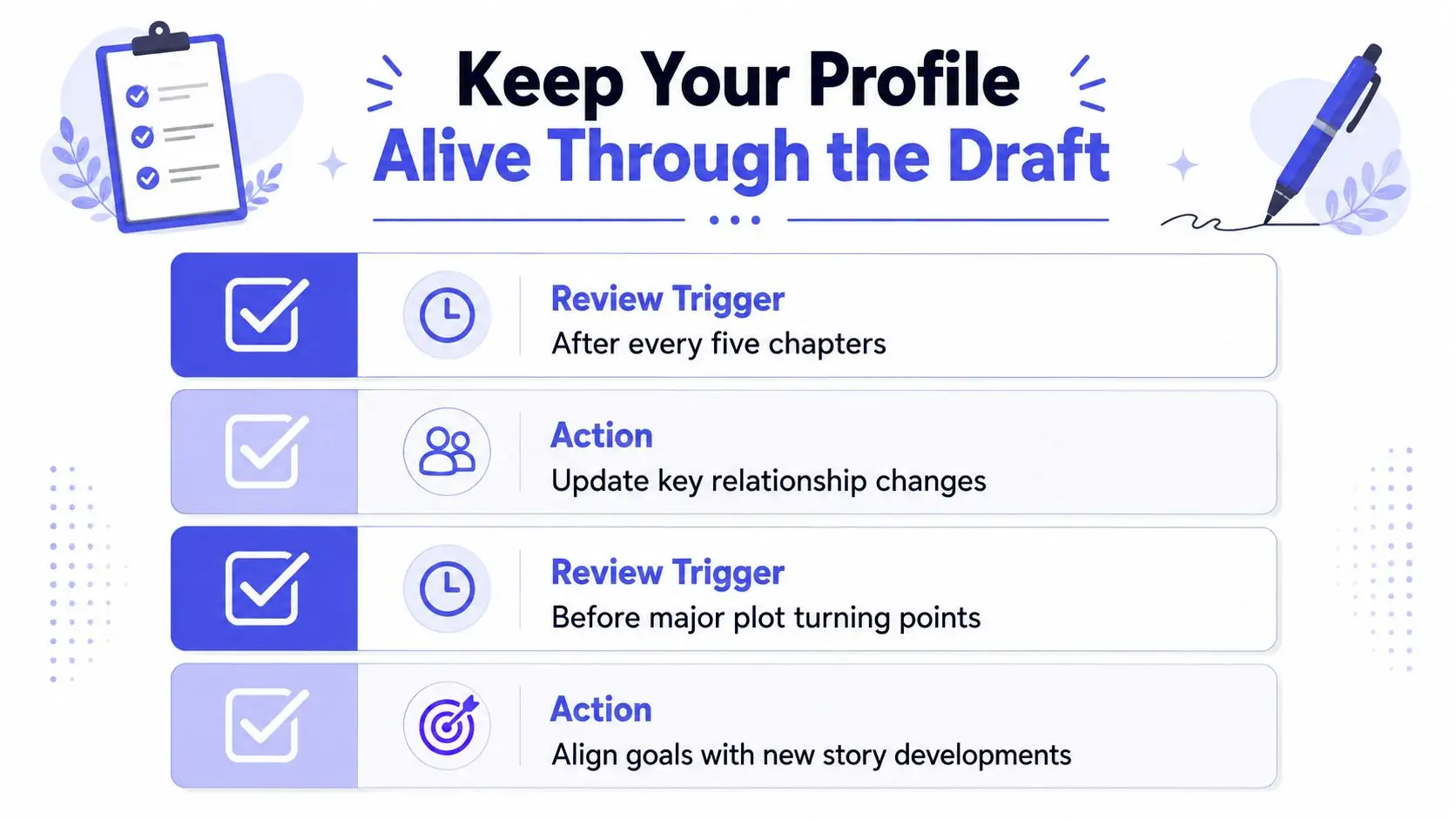
A profile shouldn't freeze on day one. The version you start with is a working hypothesis, and the draft will keep challenging it with new scenes, new relationships, and new tensions. The best habit is to update the profile at predictable moments, after every few chapters, before major turning points, and whenever dialogue starts sounding off.
Use review triggers, not vague intentions
If a character changes allegiance, learns something vital, or gains a new fear, the profile needs the update before the next drafting pass. That keeps continuity tight and prevents the common problem of making the same discovery twice in two different forms. It also helps if you're working with editors or beta readers, because role-based invites let you control who sees the profile and who comments on it.
Use the profile as a revision check
Storyloft's cover-to-manuscript synchronization makes this easier if you're also tracking visual identity. After edits, you can compare whether the face, wardrobe, and overall presentation still match the prose rather than assuming they do. That's especially useful when revisions change how a character carries themselves, because the written version and illustrated version need to keep signaling the same person.
Save this checklist and use it during revisions, profile exists, voice sample written, arc mapped, illustration style locked, review schedule set. If all five are current, the character is probably holding together. If two or three are stale, the draft has started to outrun the profile.
If you want one workspace where your character notes, voice samples, visual consistency, and revision history stay connected, visit Storyloft and build the profile where the manuscript can use it. It's a practical way to keep prose and imagery aligned while you draft, revise, and prepare a book that feels like the same character on every page.