How to Write Better Dialogue with Storyloft Tools
You've revised the same scene six times. The plot point is there. The characters are technically talking. But on the page, everyone sounds like the same person in a different shirt. One line explains too much, the next repeats it, and the emotional turn you felt while drafting has gone flat.
That's the point where most writers start tinkering with surface fixes. They swap in stronger verbs, add more interruptions, sprinkle in pauses, and hope the scene wakes up. Usually it doesn't. Flat dialogue is rarely a wording problem alone. It's usually a structure problem, a voice problem, or a revision problem.
The good news is that dialogue improves fast once you stop treating it like spontaneous conversation and start treating it like scene engineering. Strong dialogue carries purpose, hides subtext, reveals voice, controls pacing, and leaves out what the scene already shows. AI tools can help with drafting and variation, but they also introduce a newer problem: polished sameness. If you use assisted drafting, you need a way to keep the speed without losing the rough edges that make characters sound alive.
Table of Contents
- Introduction to Better Dialogue Writing
- Understanding Key Dialogue Principles
- Crafting Dialogue with Storyloft Tools
- Applying Targeted Revision Techniques
- Building an Editing Checklist and Exercises
- Maintaining Character Voice with AI Tools
- Next Steps with Storyloft Workflows
Introduction to Better Dialogue Writing
A weak dialogue scene usually announces itself in three ways. The exchange runs too long. The characters explain things they already know. The reader could cover the speaker tags and still have no idea who said what.
That combination is common because early drafts are built for discovery, not precision. Writers talk their way into scenes. Characters circle the point before they hit it. A confrontation that should take half a page sprawls because the author is still finding the conflict inside it. That's normal drafting behavior. It becomes a problem only when the draft gets mistaken for the finished scene.
Better dialogue doesn't sound like a transcript. It sounds like pressure shaped into speech.
The practical fix is to stop asking whether a line sounds realistic and start asking whether it changes the scene. A useful line pushes, dodges, threatens, reveals, stalls, or invites. A useless line explains what the reader already understands, repeats the last emotional beat, or fills silence because silence feels risky.
When I'm editing AI-assisted fiction, I see an extra layer on top of the usual problems. The dialogue is often clean, readable, and emotionally bland. The syntax is balanced. The tone is courteous. Distinctive habits disappear. Characters stop interrupting themselves. Their rougher phrasing gets normalized. That's efficient for drafting, but it can hollow out a scene.
The answer isn't to reject AI-assisted drafting. It's to use it with a stronger method. That means knowing the principles that make dialogue work, drafting with clear constraints, revising in separate passes, and applying a voice-correction routine when assisted output starts flattening everyone into the same narrative register.
Understanding Key Dialogue Principles
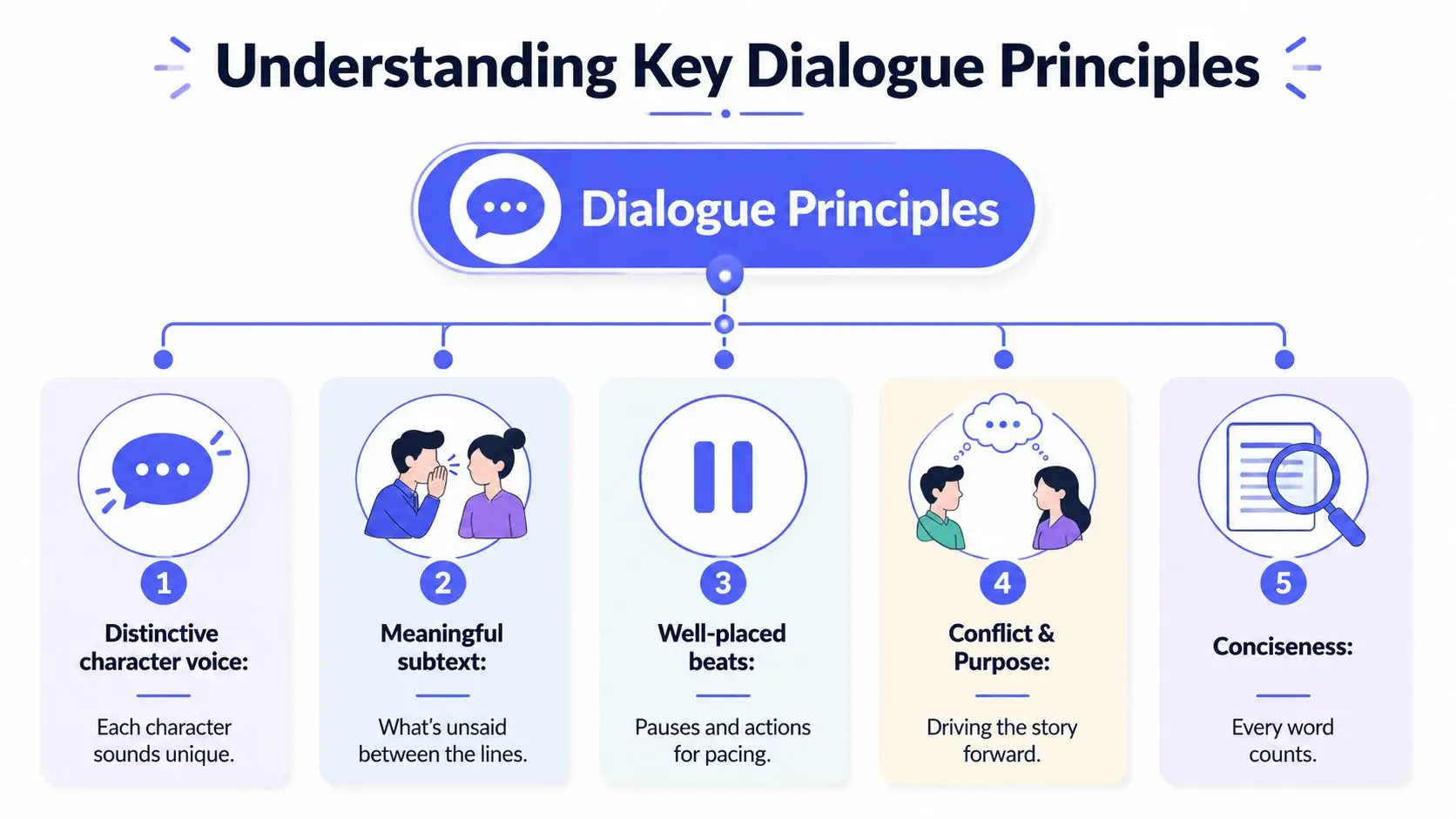
Strong dialogue rests on a handful of repeatable principles. When a scene fails, one of these is usually missing.
Voice must survive without labels
If two characters use the same sentence length, same level of polish, and same emotional habits, tags become a crutch. That's one reason the voice check matters. In approximately 60% of amateur drafts prior to revision, readers can't identify the speaker without tags, according to Arbento's dialogue writing analysis.
That same source lays out a practical audit: Purpose-Subtext-Voice-Pacing-Cut. It's one of the clearest ways to evaluate a scene.
| Audit pass | What to check |
|---|---|
| Purpose | What changes by the end of the exchange |
| Subtext | What each character refuses to say |
| Voice | Whether the speaker is audible without tags |
| Pacing | Whether line length matches tension |
| Cut | Which lines explain what the scene already shows |
A quick drafting test helps. Remove all attributions from a page. If the speakers blur together, don't add fancier tags. Rebuild the voices.
For writers working across formats, a useful parallel sits in how to develop podcast scripts. Audio writing exposes weak voice fast because there's nothing on the page to hide behind. The same pressure improves fiction dialogue too.
Subtext and rhythm do the heavy lifting
Most bad dialogue is too direct. Characters say exactly what they feel, exactly when they feel it, in complete explanatory units. Real people often dodge, deflect, compress, hint, and leave.
That's where beats and rhythm come in. A beat can delay an answer, redirect attention, or sharpen discomfort. Rhythm changes with pressure. Tight scenes shorten. Defensive speakers evade. Angry speakers interrupt. A grieving speaker may go almost blank.
Tags matter too, but only up to a point. Overusing alternatives to said creates friction. Arbento notes that using tags like remarked or exclaimed instead of said can raise cognitive load by 15 to 20% in reader processing, in their analysis at Arbento. The line should carry tone. The tag should mostly stay invisible.
Practical rule: If a line needs an adverb to communicate the feeling, the line or the beat usually isn't doing enough.
A natural place to review these basics in a drafting workflow is Storyloft's article on writing natural dialogue. It aligns with what working editors look for on the page: distinct voices, controlled rhythm, and subtext doing more work than explanation.
Crafting Dialogue with Storyloft Tools
The most useful way to draft with AI is to narrow the task before generation starts. Open-ended prompts produce generic conversation. Character-constrained prompts produce material you can revise.

Start with character constraints, not open-ended generation
Inside Storyloft, the strongest setup for dialogue drafting is to define speaking habits in the character creator before you ask Eddy for lines. Give each character a few sharp constraints instead of a paragraph of biography.
Useful constraints include:
- Sentence shape. One character speaks in clipped fragments. Another stacks clauses and qualifies everything.
- Emotional strategy. One answers with jokes when cornered. Another goes formally polite when angry.
- Vocabulary boundary. One uses trade jargon. Another avoids abstract language and speaks in objects or actions.
- Social behavior. One interrupts. Another waits too long and lets silence do the damage.
Once those are set, generate dialogue inside the scene context rather than in isolation. The scene creator helps because dialogue gets better when the tool sees what the characters want, what's happening around them, and what outcome the exchange needs to produce.
A good prompt is narrow: write a confrontation between A and B where A hides guilt, B wants a confession, and neither says the underlying accusation directly until the end. Keep A defensive and elliptical. Keep B patient but escalating.
Draft inside the scene, then correct attribution and beats
Drafts generated this way still need human correction. The first pass often over-attributes or explains emotion too clearly. That's where tag discipline matters. According to Scribophile's dialogue guidance, tags usually stay clear for only about three consecutive beats, after which writers should switch to action beats or let lines stand alone. That keeps the rhythm from turning mechanical.
Use that as a cleanup pass:
- Keep simple tags early when reader orientation matters.
- Shift to action beats once the exchange is anchored.
- Let obvious lines stand alone if the voices are distinct enough.
- Remove decorative tags that announce emotion the line already carries.
If you want a second opinion during cleanup, Eddy's manuscript-aware suggestions are most useful when pointed at one problem at a time. Ask for attribution cleanup, tension increase, or line-shortening under stress. Don't ask for “better dialogue” in the abstract. The more precise request is usually the better result.
For editorial guidance during that pass, Storyloft's page on Eddy editorial feedback is the relevant reference.
A short craft demonstration helps when you're tuning flow:
Applying Targeted Revision Techniques
Trying to fix conflict, subtext, pacing, and voice at the same time usually muddies the scene. A cleaner method is to revise one dimension per pass.
A raw exchange and three focused rewrites
A strong benchmark comes from the three-pass rewrite method described in Penwise's dialogue toolkit. The scene gets rewritten three separate times: once for conflict, once for subtext, and once for rhythm.
Start with a flat draft:
“You missed the meeting,” Mara said.
“I know. I had a lot going on,” Eli said.
“You should have told me.”
“I'm telling you now.”
“That's not the same thing.”
“I said I'm sorry.”
Nothing is technically wrong, but nothing bites.
Pass one. Increase conflict only. Add resistance and tactic shifts.
“You missed the meeting.”
“It ended without me, didn't it?”
“That wasn't the point.”
“Then say the point.”
“You left me carrying your part.”
“No. You took it.”
Now the scene has pushback. Each line changes the pressure.
Pass two. Increase subtext only. Remove explicit labels and let implication carry the charge.
“You missed the meeting.”
Eli set his keys on the table, one at a time. “Looks like you survived.”
“That folder says otherwise.”
“You opened it.”
“You left it for me.”
Nobody says betrayal, resentment, or guilt. The scene gains texture because the characters avoid the true accusation.
Track revision passes without blurring the scene
Pass three. Reshape rhythm only. Shorten lines under pressure. Add silence. Insert beats.
“You missed the meeting.”
Eli set down his keys. One. Two.
“Looks like you survived.”
Mara held up the folder.
“That says otherwise.”
His hand stopped.
“You opened it.”
“You left it.”
The content hasn't changed much from pass two. The pacing has. Shorter units and beats create compression. Silence becomes part of the dialogue.
That separation matters in an editor. If you try to improve everything at once, you end up putting back lines you should cut. In a manuscript workflow, use comments to note the problem, version history to preserve experiments, and focused drafting views to keep your eye on the exchange instead of the whole chapter. Storyloft's draft editing workspace fits that kind of pass-by-pass revision.
One more habit makes a visible difference. Read the scene aloud after each pass. If a line feels more written than spoken, it usually is.
Building an Editing Checklist and Exercises
Most dialogue doesn't need a burst of inspiration. It needs a repeatable finishing process.
A working checklist for scene edits
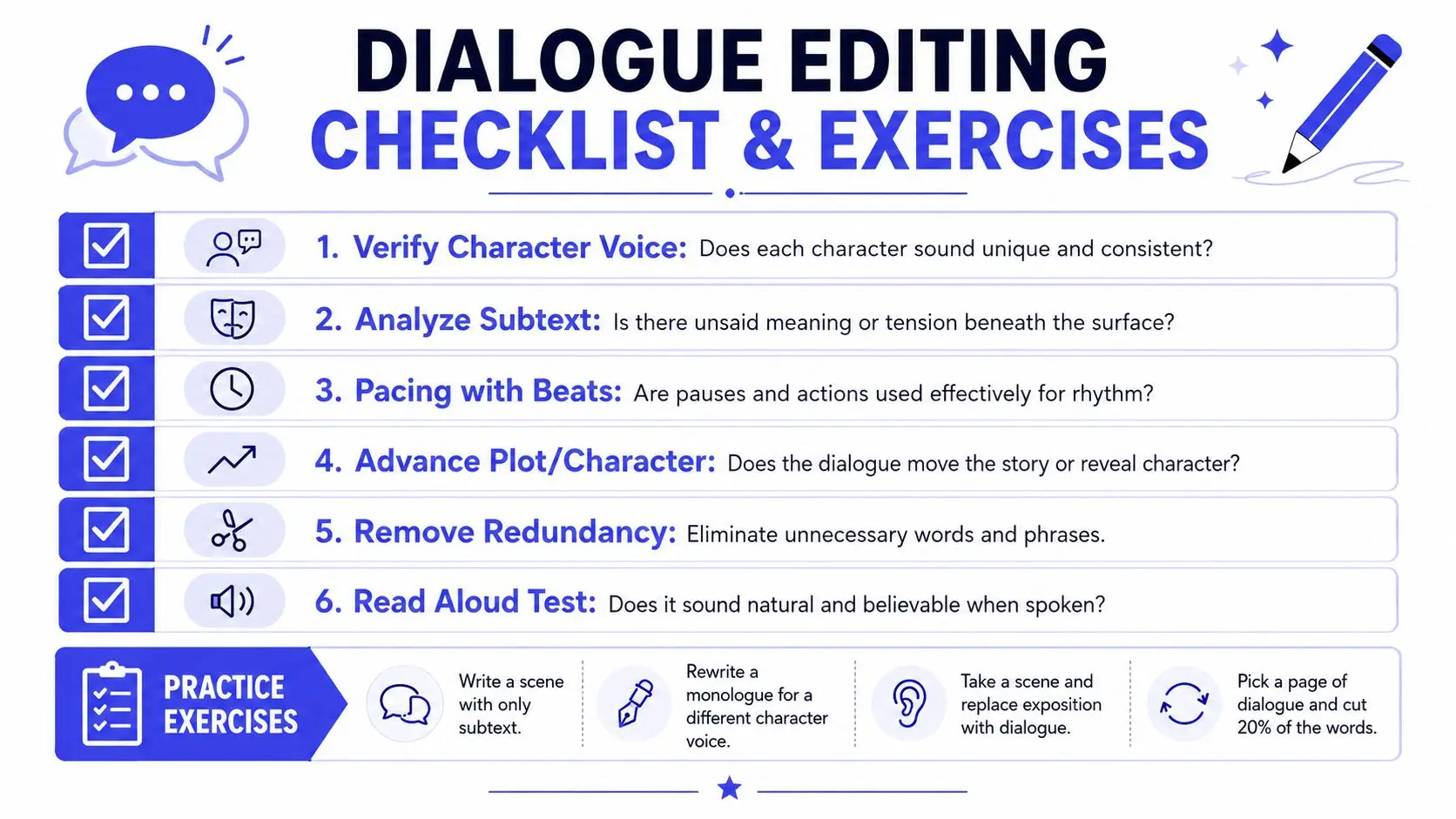
A reliable checklist keeps you from polishing the wrong lines. It also guards against one of the biggest drafting habits in fiction: writing far too much dialogue before discovering what the scene needs. In first drafts, writers often produce three lines of dialogue for every one line that's needed, which means roughly 67% is excess material that revision should cut, as noted in this dialogue revision discussion on YouTube.
Use this checklist on each scene:
- Check scene change: By the final line, something must have shifted. A decision, suspicion, alliance, threat, or emotional position.
- Check voice separation: Cover the names and tags. If the speakers blur, rewrite from character habits outward.
- Check exposure: Cut lines where characters explain information both already know.
- Check beat placement: Insert action only where it changes timing, power, or interpretation.
- Check compression: Trim greetings, restatements, and soft lead-ins.
- Check the ear test: Read it aloud. If you stumble, the syntax is probably too literary for that moment.
Read-aloud testing catches stiffness that silent reading will forgive.
Exercises that build instinct instead of theory
Short drills train better instincts than abstract reminders.
Try these:
- Halve a conversation. Cut a dialogue scene to half its length without changing the scene outcome.
- Remove direct emotion words. Rewrite an argument so nobody says angry, hurt, scared, or sorry.
- Tag only the first beats. Attribute early, then switch to action beats or bare lines after the exchange is anchored.
- Voice swap test. Take one monologue and rewrite it for a different character without changing the information.
These exercises work because they force trade-offs. You can't keep every line and still get sharp pacing. You can't preserve every graceful sentence and still keep character voice rough when the moment demands roughness.
Maintaining Character Voice with AI Tools
AI drafting helps with momentum, but it has a habit of sanding off the edges that make dialogue memorable.
What AI smooths out first
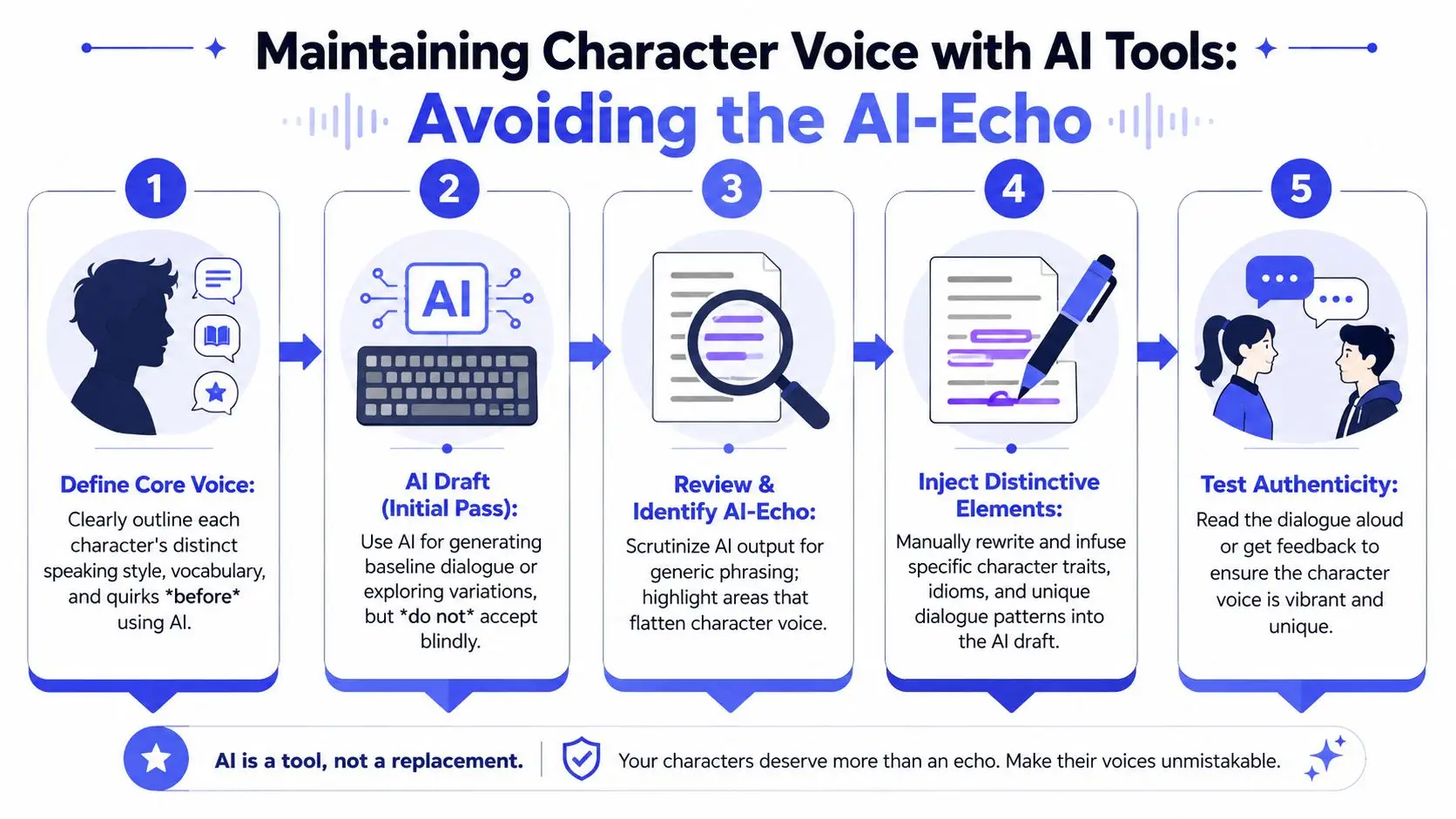
The biggest failure mode is AI-echo. Different characters start sounding like one clean, balanced narrator. That problem matters because assisted drafting is no longer niche. Reedsy notes that 45% of new indie authors now use AI for drafting, while major guides still don't offer a real voice-correction protocol for AI-generated dialogue, in their discussion of dialogue craft and AI use at Reedsy.
The flattening usually hits the same areas first:
- Hesitation patterns get cleaned up.
- Fragments and non-sequiturs get made logical.
- Dialect and slang get normalized.
- Uneven emotional rhythm gets balanced into tidy prose.
That kind of cleanup looks helpful at first glance. It often makes the page easier to read and less true to character.
For writers dealing with AI-assisted phrasing more broadly, this guide on AI text refinement for professionals is useful because it frames refinement as controlled editing rather than passive acceptance.
A practical AI voice-correction protocol
Use a dedicated correction pass after any AI-generated dialogue draft.
Don't ask whether the line reads smoothly. Ask whether this character would say it this way under this pressure.
My working protocol is simple:
| Step | What to do |
|---|---|
| Flag sameness | Highlight places where two characters use similar cadence or emotional polish |
| Restore roughness | Put back interruptions, evasions, repetitions, or unfinished thought |
| Reinsert private language | Add idioms, pet phrases, trade language, or habitual metaphors |
| Break sentence symmetry | If everyone speaks in balanced clauses, disturb the pattern |
| Run the blind read | Remove names and tags, then test whether the speaker is still obvious |
If you use AI to rewrite scenes, keep a stable voice reference nearby. Character profiles, previous chapters, and a short bank of “signature lines” help the model stay closer to the existing speech pattern. Storyloft's article on rewriting scenes with AI without losing voice addresses that exact problem.
Next Steps with Storyloft Workflows
The writers who improve dialogue fastest usually do three things consistently. They draft scenes with tighter constraints, revise in separate passes, and measure improvement scene by scene instead of waiting for a whole manuscript rewrite.
That kind of workflow is easier to sustain when the dialogue process lives where the manuscript already lives. Character notes, scene context, revision history, comments, and goal tracking all matter because dialogue quality often collapses when the writer has to juggle too many disconnected tools. A focused workflow keeps the scene intact while you test alternate lines, trim excess, and compare versions.
Set one concrete target for your next session. Revise a single confrontation for voice separation. Or cut one dialogue-heavy chapter for compression. Or run an AI-echo correction pass on one scene and compare it against your earlier draft without looking at which version came from where. Those are small, measurable edits, and they produce visible gains.
If you want to learn how to write better dialogue, don't wait for your instincts to become perfect before you start tightening scenes. Build the habit of checking purpose, subtext, voice, pacing, and cuts every time. Dialogue gets stronger through repetition, not inspiration alone.
If you want one place to draft scenes, test AI-assisted rewrites, track revisions, and keep character voice notes attached to the manuscript, take a look at Storyloft.