Self Publishing for Free
You've finished the manuscript. Then the doubt starts.
Maybe you've looked at cover quotes, editing rates, formatting software, ISBN fees, and launch checklists and concluded that publishing your book means spending money you don't have. That's the point where a lot of good books stall. The author isn't lazy. The costs just feel scattered, opaque, and hard to justify before a single copy sells.
That's why self publishing for free matters. Today, platforms such as Amazon KDP, Kobo Writing Life, and Draft2Digital let authors register and distribute books without upfront fees, often getting a title live within 24 to 72 hours while preserving rights and royalties, and this setup has removed upfront costs for over 90% of indie authors according to self-publishing market reporting. The barrier to entry is lower than most first-time authors think.
Free doesn't mean effortless, and it definitely doesn't mean every shortcut is smart. It means you can publish without paying at the start, then choose carefully where quality matters most. If you're also comparing creative-control trade-offs in other industries, this piece on deciding on game publishing is worth reading because the same core question comes up: control versus support. For a book-specific walkthrough of the overall process, see self-publishing a book.
Table of Contents
- Introduction to Self Publishing for Free
- Polishing Your Manuscript with Free Tools
- Creating Professional Covers and Illustrations at No Cost
- Formatting Your Ebook and Print Files Without Fees
- Securing Free ISBNs and Choosing Distribution Paths
- Launching Your Book with Low-Cost Marketing Tactics
- Avoid Common Pitfalls and Next Steps
Introduction to Self Publishing for Free
The most common mistake I see is treating “free” as a magic word instead of a publishing model. Free gets your book onto the field. It doesn't write cleaner prose, fix weak metadata, or make a bland cover sell. Authors who do well with self publishing for free understand that difference early.
The good news is that the free model is real. You can draft, revise, format, upload, and distribute without paying a platform fee upfront. You also keep control that traditional routes often reserve for the publisher. That matters if you want to revise a subtitle, test a new cover, change pricing, or push the same manuscript to multiple retailers on your own schedule.
The trade-off is simple. You replace cash with judgment.
Practical rule: Cut costs on tools first, not on reader-facing quality.
If you use free publishing platforms well, you can move fast. If you use them carelessly, you'll publish a book that looks free in the worst way. The rest of the process comes down to three decisions: make the manuscript clean, make the package look credible, and choose distribution in a way that doesn't trap you into a single storefront unless that trade-off is deliberate.
Polishing Your Manuscript with Free Tools
Free publishing falls apart fast if the manuscript still reads like a draft. I have seen authors save money on software, then lose readers in the sample because the prose was repetitive, scenes ran long, or basic errors survived to publication.
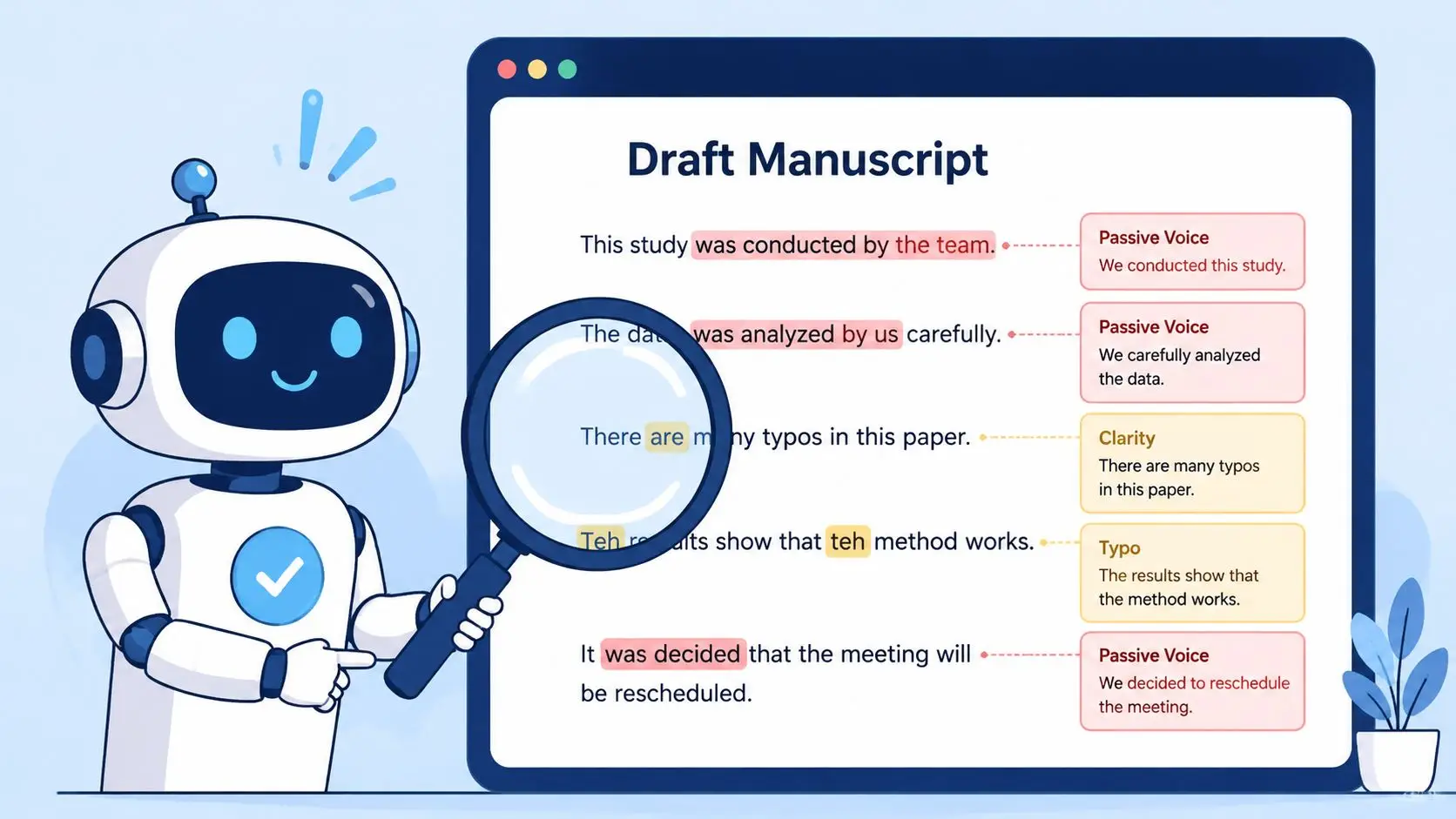
Build a no-cost editing stack
Free AI and grammar tools can do useful cleanup work. They can catch missing words, repeated phrases, weak transitions, and plenty of line-level clutter. They cannot judge pacing, reader trust, or whether a chapter earns its place.
Use them in layers.
- Start with a cleanup pass. Run the draft through a grammar checker or AI assistant to catch obvious sentence problems, repeated wording, and rough phrasing.
- Do a voice pass next. Read the pages aloud, especially dialogue, openings, and chapter endings. If the text sounds generic after tool-assisted edits, put some friction back in. Distinct voice usually has a few edges.
- Review continuity by hand. Check names, timelines, place details, facts, headings, and capitalization choices. Automated tools miss book-length consistency problems all the time.
- Proof in a different format. Export to PDF, load the file onto a tablet, or print a few chapters. Layout changes expose mistakes your drafting screen hides.
A practical free setup might be Google Docs for comments, LibreOffice for a final read, and one integrated drafting workspace such as free help writing a book if you want outlining, drafting help, and revision in one place. The stack matters less than the order. Clean sentences first. Voice second. Continuity last.
One caution. AI cleanup can make every paragraph sound like it came from the same machine. That may not hurt a straightforward how-to guide, but it can flatten memoir, fiction, and any nonfiction that depends on authority or personality.
Use beta readers like a quality filter
Beta readers catch a different class of problem. Software finds grammar errors. Human readers notice boredom, confusion, thin stakes, and arguments that do not land.
Ask focused questions so the feedback is usable.
- For fiction: Where did your attention drop? Which character choice felt unconvincing? Where were you confused about setting, motivation, or timeline?
- For nonfiction: Which section felt vague? Where did the advice repeat itself? Which claim needed an example or clearer proof?
- For both: Where did you almost stop reading? Which page made you want to continue?
Three thoughtful beta readers are usually more useful than ten casual ones. Look for overlap in their notes. If several readers stall in the same chapter, that chapter needs revision even if each person describes the problem differently.
Here is the trade-off authors run into:
| Approach | What it saves | What it risks |
|---|---|---|
| AI-only cleanup | Time and cash | Flattened voice, weak scene logic, missed structural problems |
| Beta readers only | Direct cost | Patchy feedback, slow turnaround, no line-level polish |
| Layered workflow | Convenience | More revision time, stronger final manuscript |
This matters even more if you plan wide distribution. Uploading everywhere costs nothing upfront on some platforms, but every typo, continuity error, and weak opening gets multiplied across retailers, review pages, and sample downloads. Fixing the manuscript before distribution is cheaper than correcting files, metadata, and damaged first impressions later.
Creating Professional Covers and Illustrations at No Cost
Your cover doesn't need to look expensive. It needs to look correct for the genre.
A thriller with soft pastel typography sends the wrong signal. A business book with fantasy-style artwork does the same. Most weak DIY covers fail because the author designed for personal taste instead of shelf competition.
Start with genre signals
Before opening any design tool, study the top books in your category. Don't copy them. Identify the patterns readers already trust.
Look at:
- Typography style: bold sans serif, elegant serif, handwritten, condensed display
- Image treatment: photo-based, illustrated, symbolic, character-led
- Color mood: high contrast, muted, bright, dark, minimal
- Hierarchy: what your eye notices first, second, and third
Then build from free templates or AI-generated layouts. If you use a template, change enough that it feels specific to your book, not like stock art with your title dropped on top. If you use AI imagery, generate several concepts, then choose the one that still reads clearly at thumbnail size.
For authors experimenting with integrated visual workflows, AI book cover design can be one route because it pairs cover creation with manuscript assets and export presets. You can also use standalone free design tools, provided you check retailer size requirements before exporting.
Make illustrations match the book
Interior illustrations, chapter art, and scene images can help, but only when they feel consistent. Pull visual cues from the manuscript itself. A single location, object, or recurring motif usually works better than trying to illustrate every big moment.
Use this quick filter before keeping any free design:
- Does it fit the genre at a glance?
- Can the title still be read as a thumbnail?
- Does the image style match the tone of the writing?
- Would a reader assume this book was made carefully?
If any answer is no, redo it. The cost is still zero. The wasted opportunity isn't.
Formatting Your Ebook and Print Files Without Fees
You finish the manuscript, export a file, upload it, and suddenly the chapter headings jump around, the table of contents does not link, and the print margins are off. That is the stage where a “free” book project starts costing real time.
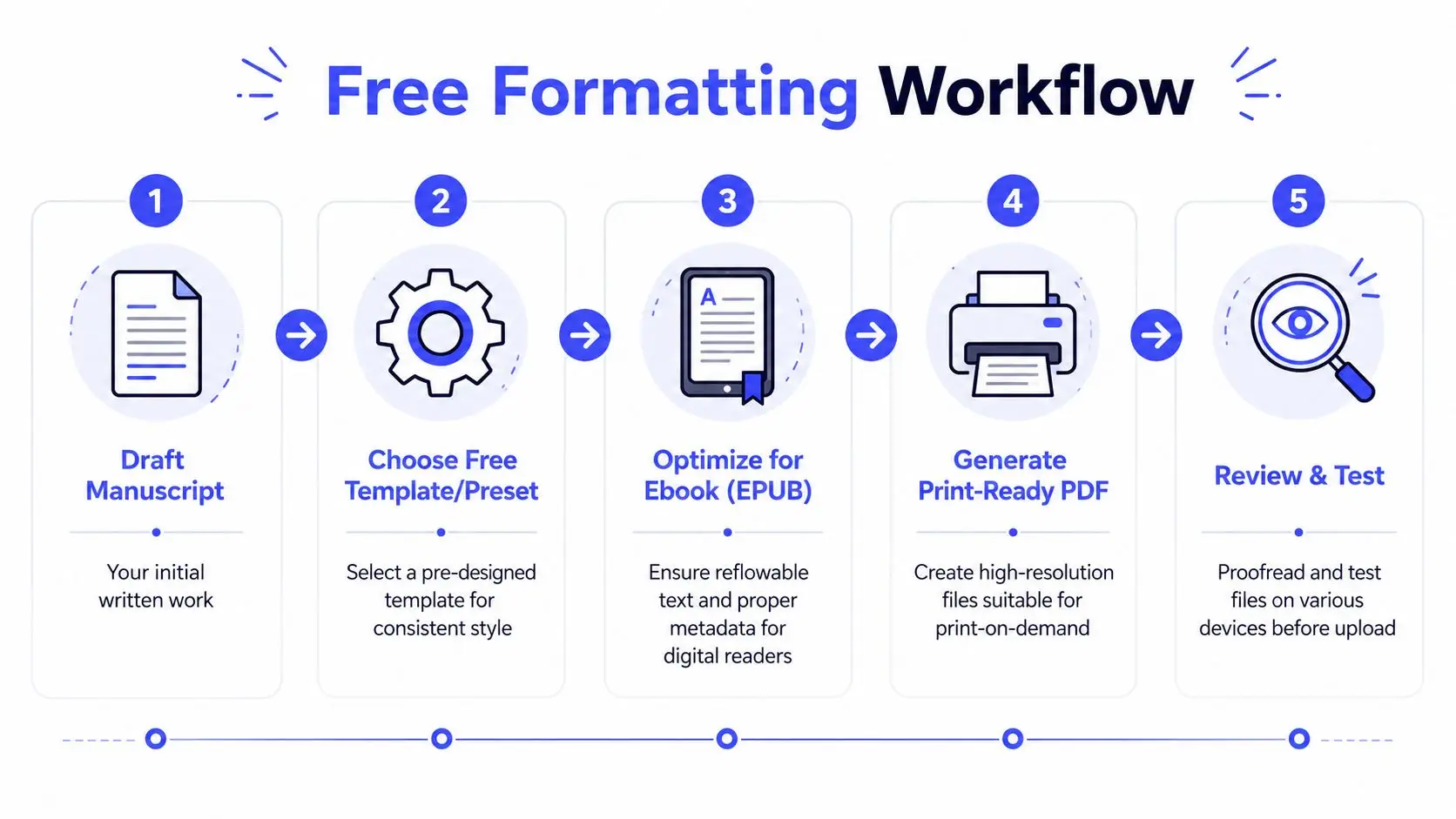
Keep ebook and print as separate jobs
Ebook and print files need different setups from the start. EPUB is reflowable, so readers can change font size and spacing. Print is fixed, so every margin, header, and page break has to stay put.
Trying to force one master file to serve both formats usually creates cleanup work later. For ebooks, use simple structure. Clean chapter titles, a linked table of contents, consistent paragraph styles, and restrained image use. For print, focus on trim size, mirror margins, front matter order, header placement, widow and orphan control, and page-number consistency.
This matters even more if you want wide distribution. Different retailers and aggregators accept different file types, and a file that passes on one platform can still fail elsewhere. Amazon may tolerate one issue that Apple Books, Kobo, Draft2Digital, or an offset printer will flag immediately. Free publishing works better when the files are boring, clean, and easy for every platform to read.
A reliable no-fee workflow looks like this:
- Clean the source file. Remove tabs used for indents, extra spaces, manual line breaks, and random font overrides.
- Use styles instead of manual formatting. Heading levels, body styles, and scene-break styles make exports far more stable.
- Build separate exports. Create an EPUB for ebook distribution and a print-ready PDF for paperback or hardcover.
- Test in more than one place. Preview on a phone, tablet, Kindle Previewer, and a full-size PDF view.
- Fix the source file, not just the export. If one chapter breaks, the root problem is usually in the manuscript formatting.
For a practical walkthrough, this guide to format a book for print and ebook without a typesetter shows the core setup and export steps.
Check the files before upload
Formatting failures are usually small. Readers still notice them.
A bad paragraph indent or a missing scene break will not get a refund request on its own, but a stack of minor errors makes the book feel rushed. That hurts reviews, and it creates extra work if you later decide to push the same files to more stores.
Check these trouble spots before you publish:
- Chapter openings: each chapter should start the same way, with consistent spacing and no stranded heading at the bottom of a page
- Font consistency: one accidental font change can make a paperback interior look homemade
- Image quality: low-resolution graphics often look acceptable on screen and fall apart in print
- Clickable navigation: ebook table of contents links and internal jumps should work cleanly
- Page geometry: margins, gutter, trim safety, and bleed need to match the printer's specs
- Front and back matter: copyright page, title page, acknowledgments, and also-by pages should appear in the right order for each format
A short preflight table keeps the final review focused:
| File type | What to test | Common failure |
|---|---|---|
| EPUB | Reflow, TOC links, chapter spacing | Random line breaks |
| Print PDF | Margins, page order, headers, trim safety | Text too close to edge |
| Cover wrap | Spine fit, barcode area, back cover text | Misaligned spine |
One more trade-off is easy to miss. Free tools can produce clean files, but they usually require more manual checking. Paid formatting software saves time, not magic. If the budget is zero, spend the extra hour reviewing every page and every link before you upload.
Formatting does not require a paid toolchain. It requires patience, clean source files, and separate exports built for each format you plan to distribute.
Securing Free ISBNs and Choosing Distribution Paths
A lot of first-time authors save money on formatting and cover design, then give that savings back by choosing the wrong distribution setup.
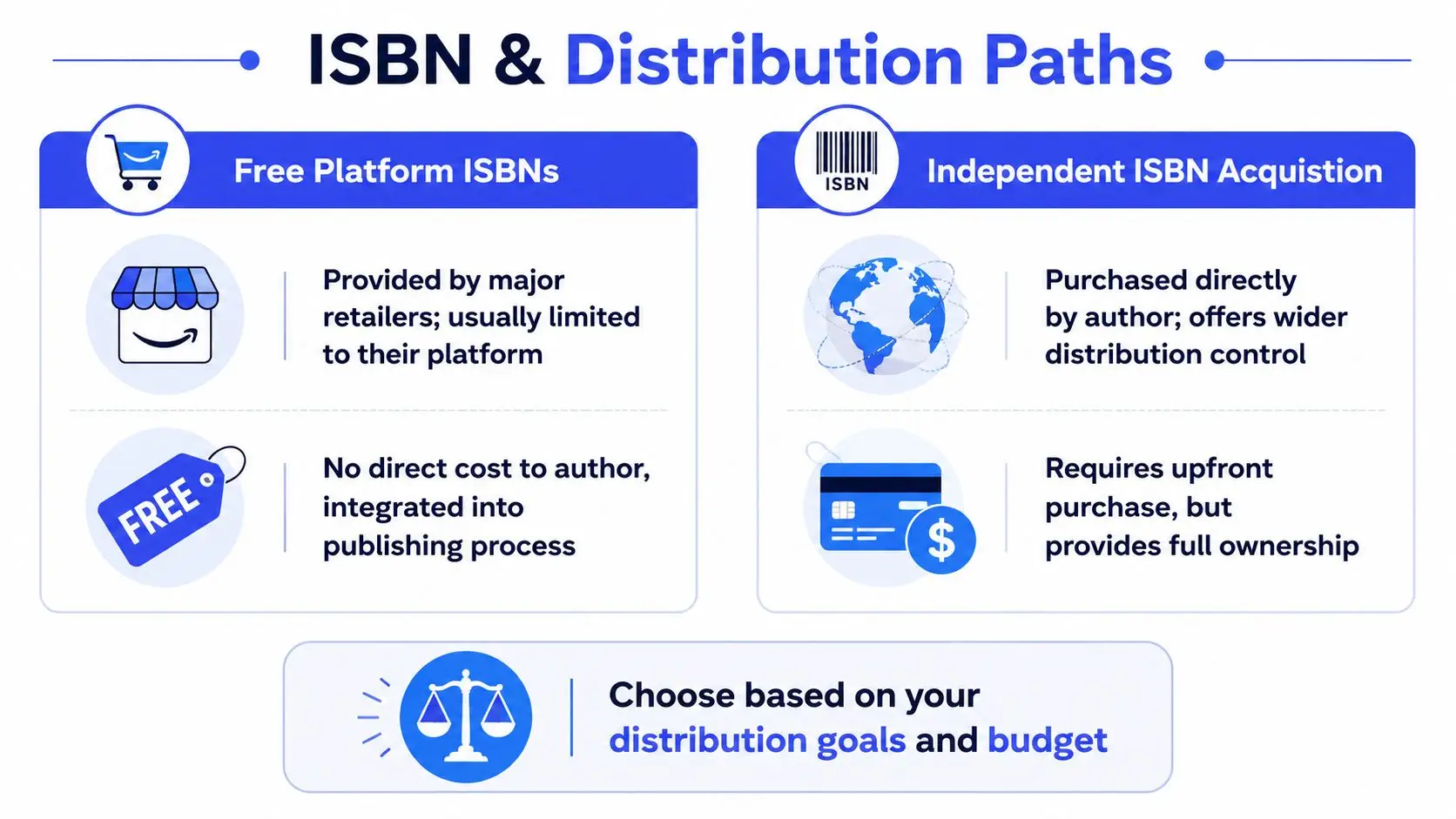
The common mistake is simple. Authors accept the default ISBN and default retailer settings without asking what those choices will cost later. Free publishing can stay free, but only if you understand where control matters and where it does not.
Free platform ISBNs versus owning your own
A free platform ISBN is fine for many books. If you want to get a paperback live fast and keep upfront cost at zero, it does the job.
The trade-off shows up later. Platform-issued ISBNs usually tie that edition to that platform's publishing imprint or metadata system. If you want one consistent publisher name across formats, or you plan to move the print edition to different vendors later, your free option can become restrictive.
In the US, buying your own ISBNs is one of the first real expenses that breaks the “publish for free” promise. That is why I usually advise authors to separate short-term and long-term goals. For a first paperback test, use the free ISBN if needed. For a series, a nonfiction brand, or a book you want in bookstores and library channels, owning the identifier gives you more control.
Use this rule of thumb:
| Choice | Best use case | Trade-off |
|---|---|---|
| Free platform ISBN | First book, tight budget, fast release | Limited control over imprint and future distribution flexibility |
| Independent ISBN | Long-term catalog, multiple formats, wider wholesale plans | Upfront cost |
An ebook often does not require an ISBN on every platform. Print editions usually do. Hardcover, paperback, ebook, and audiobook can each involve separate metadata requirements, so check the platform rules before you upload. Hidden admin costs start here. Not always in cash, but in cleanup work if you have to fix mismatched edition data later.
A short visual explainer helps when you're weighing those paths:
Wide distribution versus exclusivity
The bigger decision is not the ISBN. It is whether you want your book available everywhere or locked into one retailer's ecosystem.
A lot of free publishing guides push Amazon first because it is simple. Simple is useful. Simple also creates dependency. If your book is only sold in one store, one policy change, one account issue, or one category shuffle can cut off most of your sales overnight.
Wide distribution spreads that risk. It also reaches readers who buy from Apple Books, Kobo, Barnes & Noble, Google Play, libraries, subscription platforms, and regional stores that Amazon does not dominate. If you care about building a long-term catalog, wide is usually the safer business choice.
That does not make exclusivity wrong. It makes it specific.
- Choose exclusivity if you want one dashboard, one retailer to optimize, and access to that retailer's exclusive perks
- Choose wide distribution if you want resilience, broader store coverage, library access, and freedom to sell direct
- Choose an aggregator if you want broader reach without managing every storefront separately
Draft2Digital and Smashwords-style distribution can save time, but aggregators take a cut in exchange for convenience. Direct upload to each retailer gives you more control over pricing, promos, and metadata, but it adds admin work. That is the fundamental trade-off many free guides skip. “Free” often means paying with time.
Print has its own split. Amazon KDP Print is easy and cheap to start with, but IngramSpark or similar wholesalers can open doors to bookstores and libraries that do not order heavily from Amazon. Those channels may involve setup friction, stricter file checks, and lower margins after discounts. They can still be worth it if wide availability matters more than keeping everything in one dashboard.
For authors trying to publish everywhere without giving up exclusivity by accident, a practical setup looks like this:
- Upload the ebook directly where it matters most to your audience, or use one aggregator if time is tighter than margins.
- Use KDP Print for Amazon visibility.
- Add a wider print channel if you want bookstore and library reach.
- Keep your metadata consistent across every edition. Title, subtitle, series name, author name, keywords, and description need to match.
- Track your audience outside any retailer by optimizing SEO and email marketing, so distribution changes do not wipe out your reader access.
The last point matters more than many authors realize. Wide distribution works best when readers can still find you directly, no matter where they prefer to buy. That is how you cut costs without handing over all your control.
Launching Your Book with Low-Cost Marketing Tactics
A free book upload isn't a launch. It's inventory.
The books that gain traction usually have readers waiting before release day. That doesn't require a big ad budget, but it does require a plan and repeated contact.
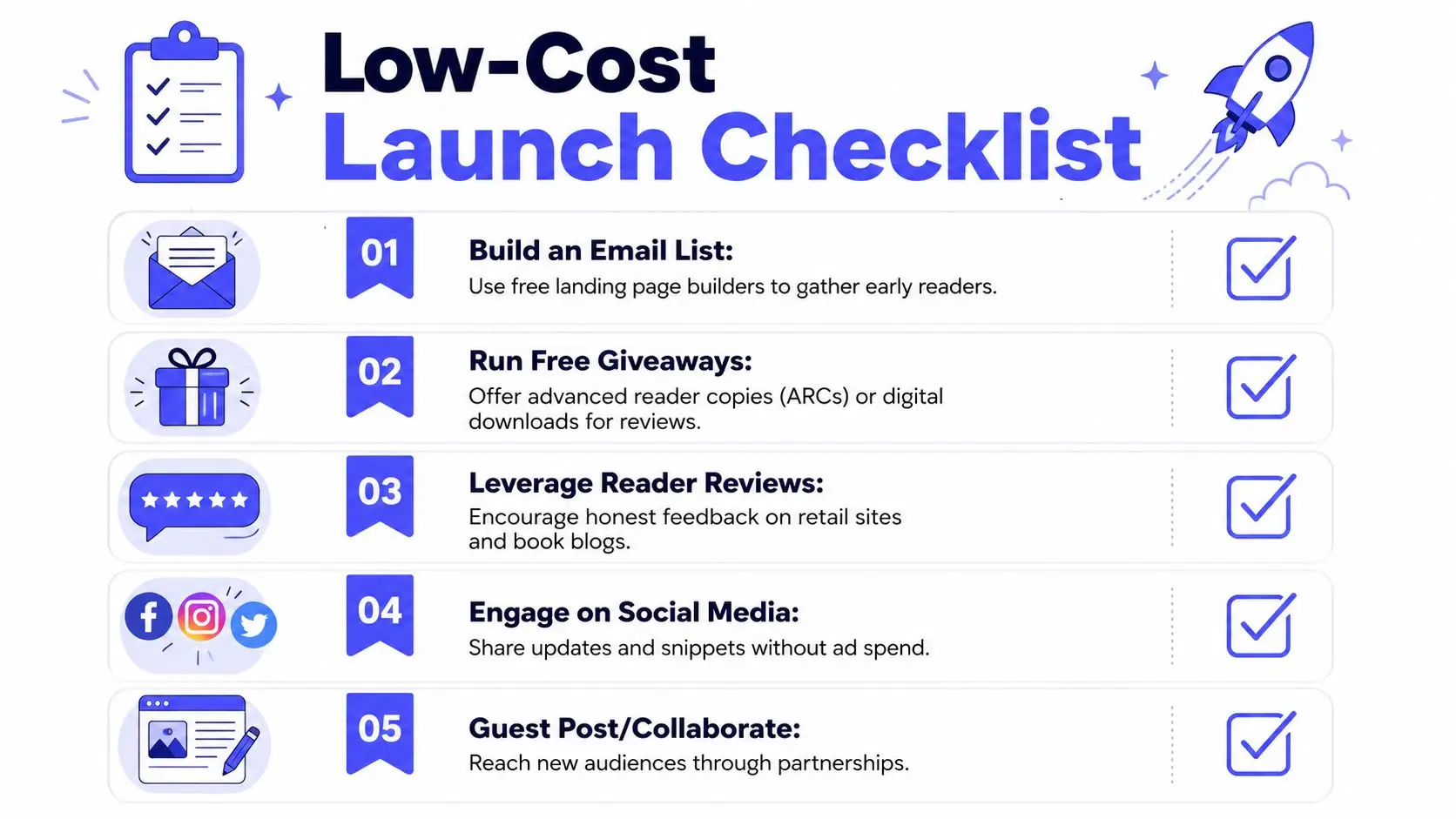
Build launch momentum before release
If you want the book to move on day one, collect interest long before launch week. The benchmark many indie authors use is substantial prelaunch list building. One commonly cited target is aiming for 5,000 email signups before launch when working toward profitable benchmarks tied to a 50,000-reader pool and an estimated 10% conversion rate, because that kind of early activity can help trigger retailer visibility, as discussed by Creativindie's self-publishing benchmark analysis.
That number isn't a rule for every author. It's a reminder that audience building comes before sales velocity.
Try this sequence:
- Set up a simple landing page: offer a sample chapter, checklist, bonus epilogue, or reader magnet
- Recruit early reviewers: send advance copies to people who regularly read in your genre
- Prepare launch assets in advance: cover image, short blurb, author bio, quote cards, retailer links
- Ask for one action at a time: signup first, review second, share third
Use channels you can maintain
Most low-cost marketing fails because authors spread themselves too thin. One good newsletter and one active reader community beat six neglected platforms.
If you want a practical companion on audience building, this guide to optimizing SEO and email marketing is useful because it explains how discoverability and list building support each other instead of competing for your time.
Focus on durable tactics:
- Email first: you own the relationship, unlike a social feed
- Reader groups next: genre communities can produce honest early interest if you participate like a reader, not a spammer
- Collaborations after that: podcast swaps, newsletter mentions, and guest posts can expand reach without ad spend
What doesn't work well is posting “my book is out now” into empty space and hoping an algorithm notices.
Avoid Common Pitfalls and Next Steps
The biggest trap in self publishing for free is assuming free upload equals free success. It doesn't. Data shows 78% of indie authors spend between $500–$2,000 annually on services like editing, cover tweaks, and marketing, even when the publishing itself is free, according to this look at indie author visibility costs.
That doesn't mean you should spend immediately. It means you should expect ongoing costs if the book starts gaining traction. Skip weak shortcuts first. Don't skip the parts readers notice most.
A sensible next step list is short:
- Audit the manuscript one more time
- Choose your distribution model deliberately
- Build a small prelaunch list before release
- Track what readers respond to, then improve the next book
Publishing for free is real. Publishing well still takes care, patience, and a willingness to treat each stage like craft instead of admin.
If you want one place to draft, revise, format, and prepare a book for release, Storyloft is worth a look. It gives authors a free starting point for the writing and publishing workflow, which is useful when you want to cut tool costs without juggling a fragmented setup.