
How to Use a Book Cover Maker to Design a Bestseller-Worthy Cover (Step-by-Step)
Key Takeaways
Creating a professional book cover that drives sales requires strategic design choices grounded in genre research and reader expectations. Here’s what you need to know:
• Genre conventions are non-negotiable: Your cover must share at least 70% of visual cues with bestsellers in your category to avoid confusing potential readers and damaging sales.
• Templates accelerate success: Using customizable templates from platforms like Storyloft or Canva provides professional quality without the designer price tag or months-long wait.
• Print requires technical precision: Set up proper bleed zones (0.125″), safe margins (0.25″), and use CMYK color mode at 300 DPI to avoid costly printing errors.
• Test before launching: A/B test different cover options with your target audience using thumbnail-sized images to measure real click-through rates, not just esthetic preferences.
• AI tools level the playing field: Generate custom character images, back cover copy, and print-quality artwork directly in platforms like Storyloft without hiring multiple professionals.
The difference between a cover that converts and one that fails often comes down to understanding your readers’ visual language and executing technical requirements correctly. Research your genre’s top 100 bestsellers, create a swipe file of successful covers, then use modern book cover makers to implement those proven patterns with your unique creative vision. 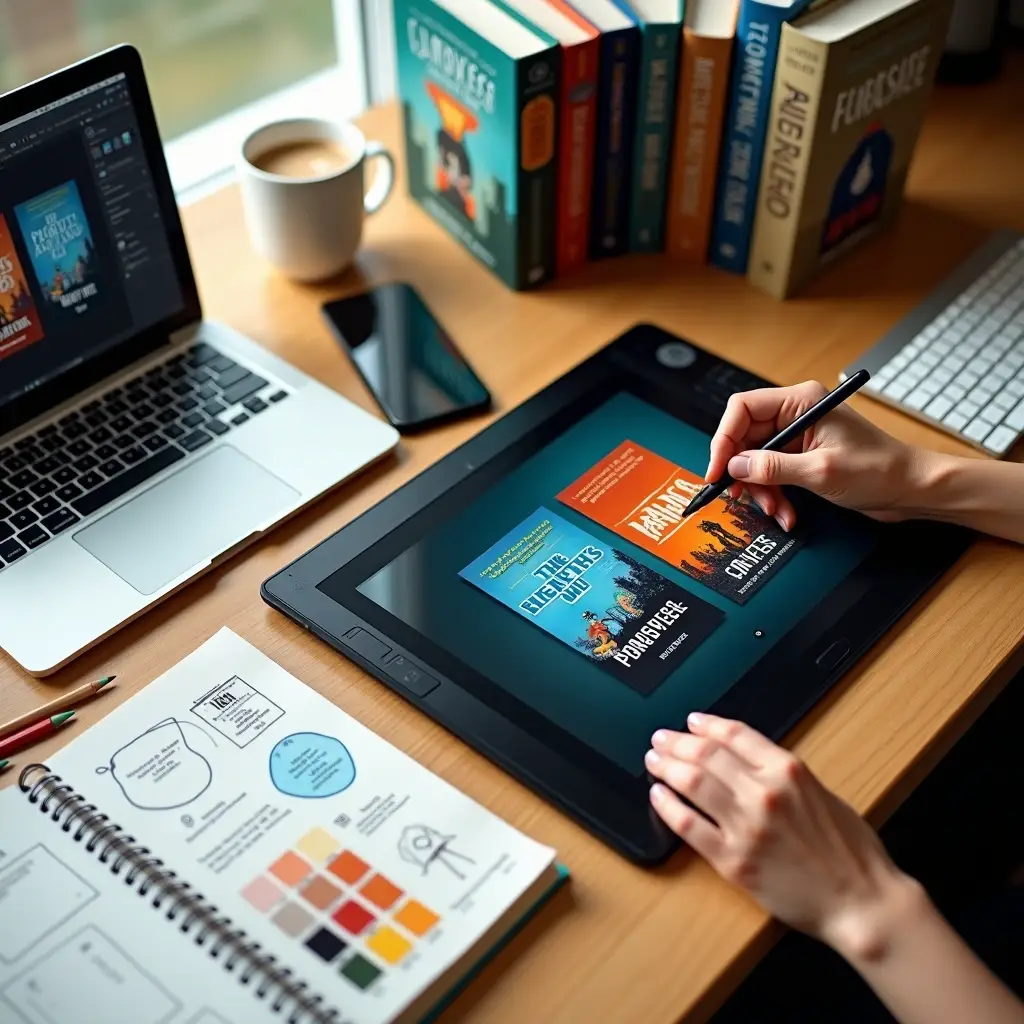 A book cover maker can affect your success in a big way. Self-published authors can double or even triple sales with just a few tweaks of a book cover[24].
But here’s the reality: DIY book cover design feels intimidating. A single misstep can damage your credibility[5]. Learning how to design a book cover doesn’t have to be overwhelming, though.
We’ll walk you through the whole process, whether you’re starting with a book cover template or building from scratch. You’ll find how to make a book cover that catches eyes and turns browsers into buyers while building trust.
Before You Start: Research Your Genre
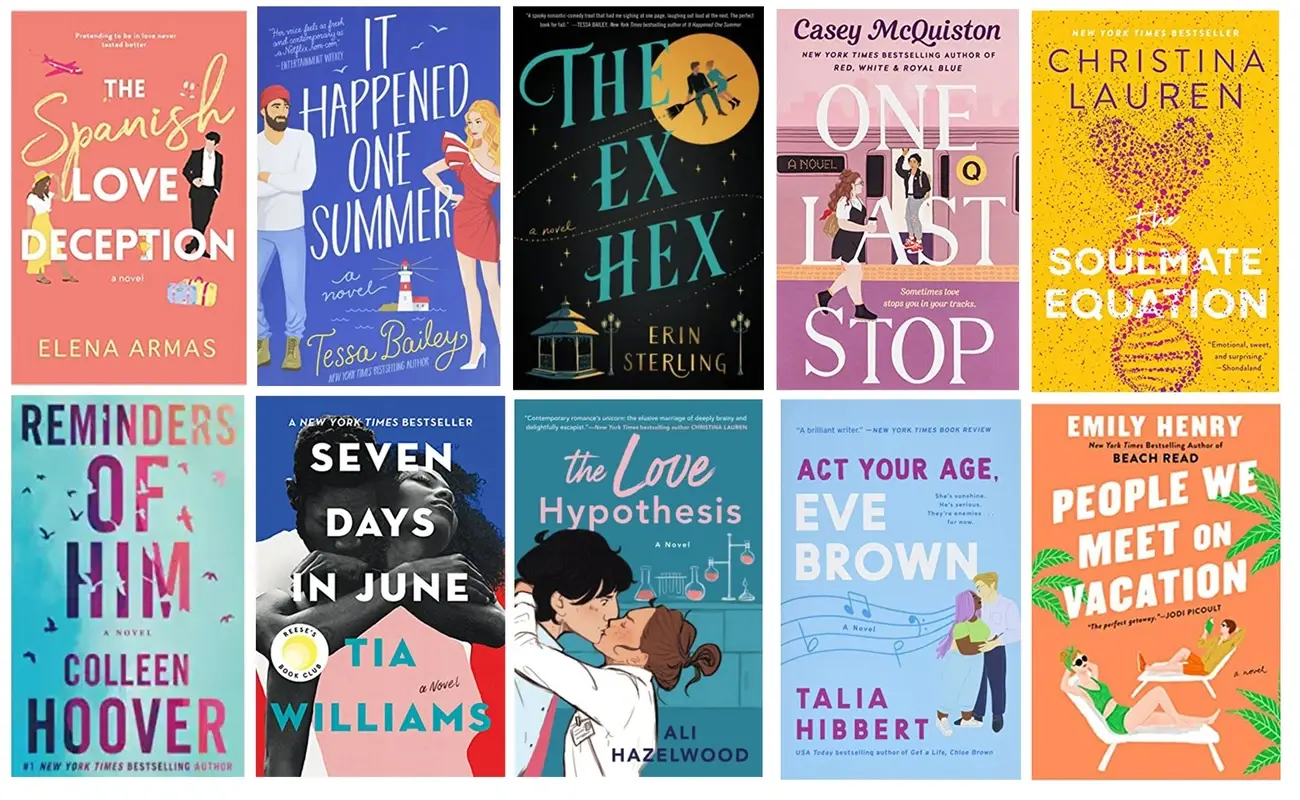
Image Source: Writers In The Storm
“I believe 1000% that it’s because my book covers now scream ‘Hey I’m an awesome thriller, read me!'” — D.F. Hart, Indie Author
Genre conventions act as a visual language between you and potential readers. Each category carries design vocabulary that signals what kind of story waits inside. Romance uses certain color palettes, fonts and imagery. Cozy mysteries feature cartoonish elements or playful color schemes, whereas gritty crime thrillers go dark and moody with bold text[25].
Analyzing Bestseller Covers in Your Category
Readers make split-second decisions based on familiar visual cues. Deviating wildly from these signals creates cognitive dissonance. A bright pink, bubbly design for a grimdark fantasy novel confuses browsers. They assume it’s comedic or lighthearted, only to find brutal war and tortured heroes inside. That mismatch leads to confusion or negative reviews from readers who expected something different[25].
Horror fans skim past minimalistic pastel covers reminiscent of gentle coming-of-age stories. The pastel lovers pick up that same book, only to find gore and nightmares. Your design choices need to match the vibe you’re delivering[25].
Head to Amazon’s Top 100 for your category. Go to cozy mystery, urban fantasy, dark romance, or whatever subgenre fits your book. You’ll begin noticing recurring patterns: moody silhouettes for suspense, illustrated couples for sweet romance, glowing magic swirls for fantasy[5].
Different genres follow distinct visual trends. Thriller and suspense often play with contrasts. They use imagery not associated with danger, then add small details to create the required tension[2]. Fantasy shows more variety since the genre itself has no limits, though illustrated covers dominate[2]. Romance divides roughly into two camps: bold covers and subtle, illustrated designs that imply rather than exclaim. Both rely heavily on typography to increase atmosphere[2].
Creating a Swipe File
A swipe file serves as your personal collection of 10-20 covers in your subgenre that are both top-selling and visually appealing[5]. This becomes your design baseline. Hunt down these covers from bestseller lists and take time to choose your favorites. Screenshot or download them for reference.
Note the major patterns you find. Do you see moody silhouettes? Bright, cartoony vibes? Color combinations that repeat? If your book cover design doesn’t share at least 70% of these visual cues, you risk confusing shoppers[5]. They won’t know if they’re looking at horror or literary fiction.
The fatal mistake happens when authors think cohesion doesn’t matter in their genre, so they do whatever they want. While some genres have wider variety than others, you can always narrow down patterns, even if just by selecting covers you like[5]. Throwing genre conventions out the window makes your experience harder.
Pay attention to whether you’re analyzing traditional or self-published covers. Traditional books don’t rely on their covers as much since they’re designed for bookstore browsing. Self-published books selling on online platforms need their covers to do heavy lifting. Make sure you’re studying real competitors performing in your market[5].
Understanding Your Target Reader Expectations
Readers scan covers and process visual information in seconds. Understanding genre conventions doesn’t mean copying competitors. It means speaking the visual language your target audience already understands[26].
Certain genre signals repeat across categories. Eyes or head and body parts cut off on covers appear in drama, mystery and romance. Human silhouettes show up in mystery genres. Bonneted women signal Christian or Amish books. Lens flares indicate Christian genres. Handwritten typography appears in teen and young adult categories. San-serif fonts indicate modern, futuristic and self-help books, while serif fonts signal serious and historical genres[27].
Your cover makes a promise to readers. Crime novels hint at crime, but throwing a knife or gun on the cover might not be enough. The element needs to add to the promise, not detract from it. Match your cover to the genre’s promise and you’ll reach readers with compatible goals[28].
Professional book cover design starts with full market research. Analyzing bestsellers in your category reveals what works right now. Are illustrated designs trending? Is typography dominating the charts? This research informs decisions[26]. You want to look like those bestsellers, just executed well. Don’t invent if it means losing genre signals[5].
Selecting Your Book Cover Template
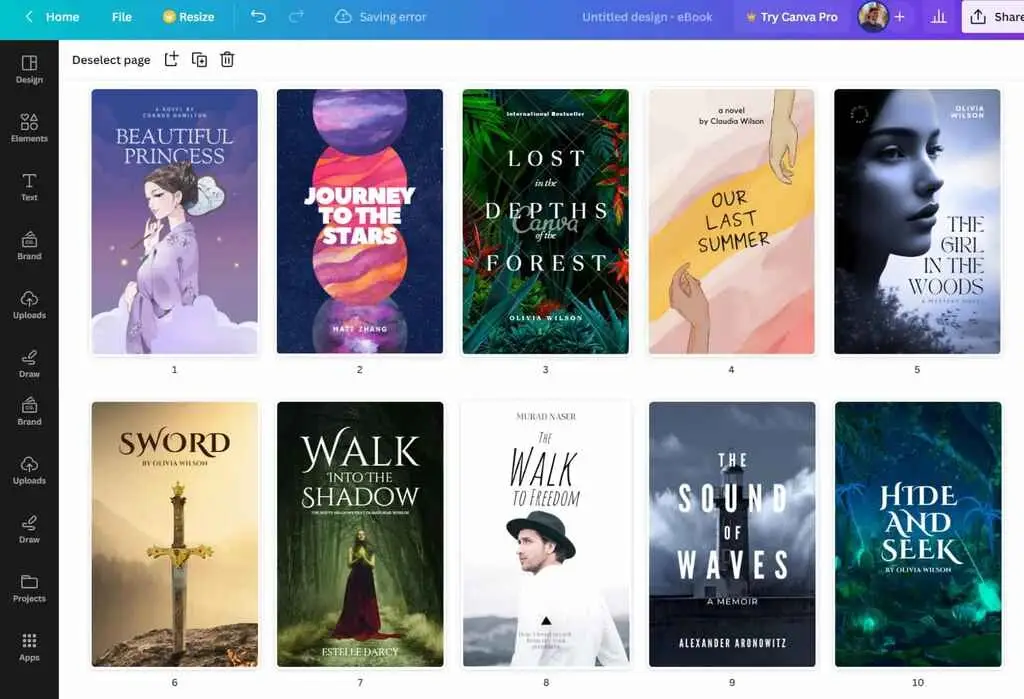
Image Source: Reedsy
Templates bridge the gap between your research and actual execution. You understand what works in your genre, and picking the right template becomes your next move.
Browsing Template Libraries
Multiple platforms offer book cover templates at varying price points. Canva starts at FREE[29], which makes it the default choice for beginners. Book Cover Zone begins at $89.00[30], while Etsy templates start as low as $1.49[30]. Other options are Florida Girl Design at $99.00, Get Premades at $99.00, Kingwood Creations at $60.00, and Paper and Sage at $70.00[30].
Canva prioritizes accessibility with a click-and-edit interface that’s accessible. You’ll find a huge library of book cover templates, stock images, fonts, and graphics[31]. The results look fresh and contemporary right out of the gate. But Canva’s templates are accessible to more people, so leaning on them too much can make your cover feel generic[31]. Treat the templates as a starting point. Not a complete solution.
Storyloft stands out as the best book cover maker on the market when it comes to professional-grade work. It handles both ebook and print covers in the same interface and prevents changes from getting lost between formats. The platform generates print-shop ready CMYK 300 DPI PDFs that work well for high-quality printing. You generate AI artwork in Storyloft, and it produces print-quality images suitable for professional production.
Adobe Express provides templates that are designed by professionals with easy-to-use tools and enables you to create unique covers in minutes[32]. PosterMyWall offers over 10,000 book cover templates[33], though these platforms work better for quick digital designs than print preparation.
Placeit excels when you’re still figuring out what your cover should look like. Its genre-based templates help you learn the visual language your readers expect[31]. The editor stays simple and template-driven: swap in your title, author name, imagery, adjust colors and fonts, then export.
Customizing Pre-Made Designs
Templates differ from premade covers in customization flexibility. Templates are more customizable, while premade covers have more limitations to what can be changed[30]. A book cover template is a pre-designed cover that can be customized and used multiple times by different people[30].
Some websites tell you how many times a design has been downloaded. It has been downloaded too many times? Think about other options[30]. This matters because you don’t want your cover looking similar to dozens of other books.
One-of-a-kind premade covers solve this problem. These designs are sold only once, then removed from the store[34]. You buy it, and it’s yours. The designer will combine your book’s title and author name smoothly to create a publication-ready finish[34].
Customizing pre-made designs requires attention to genre signals from your swipe file. Take a close look at bestseller covers on Amazon in your genre. What makes them stand out? Is it the imagery, background, typography, or fonts? Use your research as a guide to select the perfect book cover design[30].
Starting from Scratch vs. Using Templates
A premade cover or template works well if you’re a novice interested in designing your own book cover[30]. There’s minimal risk because you know the outcome, and there’s enough flexibility built in to add your own flavor to the design[30].
Trial and error aren’t in your game plan? Then a book cover template could be the answer. So many different designs exist that something is sure to get you started in thinking about your creativity[30].
Storyloft provides powerful features for authors who want control without starting from scratch. Eddy, the built-in AI, can write all the back cover marketing copy from your manuscript. You can adjust spine width by pixels or page count. Authors generate imagery for the cover in Storyloft and can even include their characters on the cover. The platform has a library with hundreds of title cover graphics and premium font selections. Custom titles can match the style of your book.
Templates offer the perfect balance of professional quality and budget-friendliness for many authors[34]. Custom designs can take weeks or months. You skip the waitlist with templates and see the mood, colors, and layout right away[34].
Building Your Cover Design Elements
Image Source: Magnific
“There are three responses to a piece of design — yes, no, and WOW! Wow is the one to aim for.” — Milton Glaser, Designer of the I ❤ NY logo
Your cover’s visual elements work together to create immediate effect. Each component carries weight in the final design, from the opening image to the smallest graphic accent.
Uploading or Generating Cover Images
Cover imagery serves as your design’s foundation and affects every future decision, including text positioning[1]. Covers display as thumbnails in online stores, so clarity and effect matter more than intricate details[1].
Stock images, illustrations and custom photography each offer distinct advantages. Stock images provide flexibility in digital editing and cost less than dedicated photo shoots, though you risk other covers using similar images[8]. Illustrations allow almost anything to become possible with the right artist and create truly bespoke imagery[8]. Custom photography delivers 100% unique images but requires a budget investment[8].
Storyloft lets you generate imagery directly in the platform and produces print-quality images suitable for professional production. You can even include your characters on the cover. The built-in library contains hundreds of title cover graphics to improve your design.
Upload images with a minimum resolution of 300 DPI[35]. Verify that all text remains legible without getting cut off or overlapped by other elements[35]. Uploaded files must use accepted formats: JPG, PNG, or TIF/TIFF[35].
Choosing Your Color Scheme
Different colors evoke specific emotional responses and make color selection strategic rather than esthetic[36]. Red signals danger, violence and passion, appearing often on thriller and suspense covers[36]. Blue conveys trust, calm and authority, popular in self-help and business books[36]. Yellow associates with happiness and optimism, ideal for feel-good fiction[36]. Green suggests nature, peace and prosperity[36].
Stick to one main hue plus a contrasting accent[5]. If 80% of epic fantasy covers lean toward cool blues and purples with gold or white text, follow that pattern[5]. Convert your mockup to grayscale to test whether focal elements and title still stand out and confirm your contrast levels work[5].
Avoid more than three dominant colors on your cover[37]. Too many colors create confusion or a cluttering effect since colors help separate elements and draw attention to specific components[9].
Typography: Title and Author Name Placement
Visual hierarchy determines how you arrange the title, author name and subtitle, with attention to the relative size of each element[1]. The title appears 200%-250% larger than the author name for new authors and grabs attention based on content rather than name recognition[10]. Authors with some recognition benefit from a balanced approach, with titles about 100%-150% the size of the author name[10]. Prominent authors can make their name equally large as the title or even 110%-150% larger and capitalize on their reputation[10].
Font choice deserves almost as much thought as the book title itself[1]. A swirly, stylish font suits romance novels but looks misplaced on thrillers or non-fiction[1]. Minimum font size must reach 7pt[35].
Adding Graphics and Design Accents
Graphics and illustrations grab attention and draw readers into learning more[38]. Accent colors create focal points and highlight key elements within a design, guiding the viewer’s eye to the most important parts of the cover[3].
Select one symbolic image rather than cramming in several[39]. Less proves more effective and eye-catching[39]. Icons and vector graphics offer a modern, minimalistic approach and convey ideas in a clean manner[3].
Working with Layers and Backgrounds
Separate your background, focal point and title text into individual layers[5]. This will give effective layering on your cover. Backgrounds can include cityscapes, forests or textured gradients, often darkened or slightly blurred[5]. Place your character or object as the focal point, blend edges and adjust shadows to match the background[5]. Position title and text on top with optimal contrast and avoid busy patches of background[5].
A simple backdrop or block color works nicely[8]. Choose a different color or use shadows to prevent your background from overwhelming other design elements[8].
How to Design a Book Cover for Print
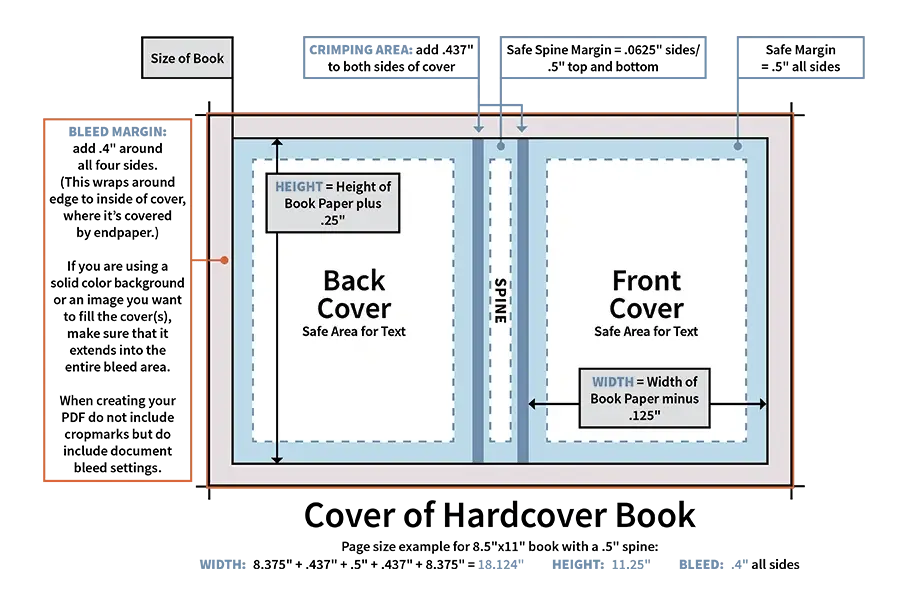
Image Source: One Book at a Time
Print book covers require technical precision beyond what digital designs just need. You’re preparing files for physical production, and several specifications become non-negotiable.
Setting Up Bleed and Safe Zones
Bleed extends your artwork 0.125″ (3.2 mm) beyond the final trim line on all outer edges[12]. This extra buffer prevents white slivers from appearing if the cutting blade drifts slightly during trimming. Even commercial printing equipment can expose raw white paper at your cover’s edge if you skip bleed[13].
Your cover isn’t just a front design. It’s a full spread containing the back cover, spine and front cover, plus bleed surrounding everything[14]. Calculate your total width using this formula: Width = (2 × trim width) + spine width + (2 × bleed). Height = trim height + (2 × bleed)[14].
Safe zones protect critical content from being trimmed away. All text needs to stay at least 0.25″ inside the trim line. This includes your title, author name, spine text and back cover copy[15]. Spine margins need only 0.0625″ on each side, though books with spine widths less than 0.25″ generally skip spine text[15].
Calculating and Adjusting Spine Width by Page Count
Spine width depends on your page count multiplied by paper thickness. Multiply your page count by 0.002252″ for black and white books on white paper[12]. Cream paper uses 0.0025″ per page[12]. A 300-page book on cream paper produces a spine width of 0.75 inches (300 × 0.0025).
Storyloft simplifies this process. You can adjust spine width by pixels or page count, and the platform updates your cover template automatically. The platform generates print-shop ready CMYK 300 DPI PDFs and handles both ebook and print covers in one interface.
Preparing High-Resolution Files
All images must reach a minimum resolution of 300 DPI (dots per inch)[12]. Your cover will appear grainy, pixelated or blurry if you go below this threshold[15]. Images should be sized at 100%, flattened to one layer and placed in your document at this resolution[12].
Understanding CMYK Color Mode
RGB works for screens, but CMYK handles print[16]. RGB (red, green, blue) is additive and creates white if combined. CMYK (cyan, magenta, yellow, black) is subtractive and absorbs light to create colors[16]. Colors shift in unpredictable ways if printers convert RGB files to CMYK automatically[17]. Vivid reds often print orange, and bright greens appear flat[18]. Design in CMYK from the start to maintain color accuracy[17].
Using AI Tools to Enhance Your Cover
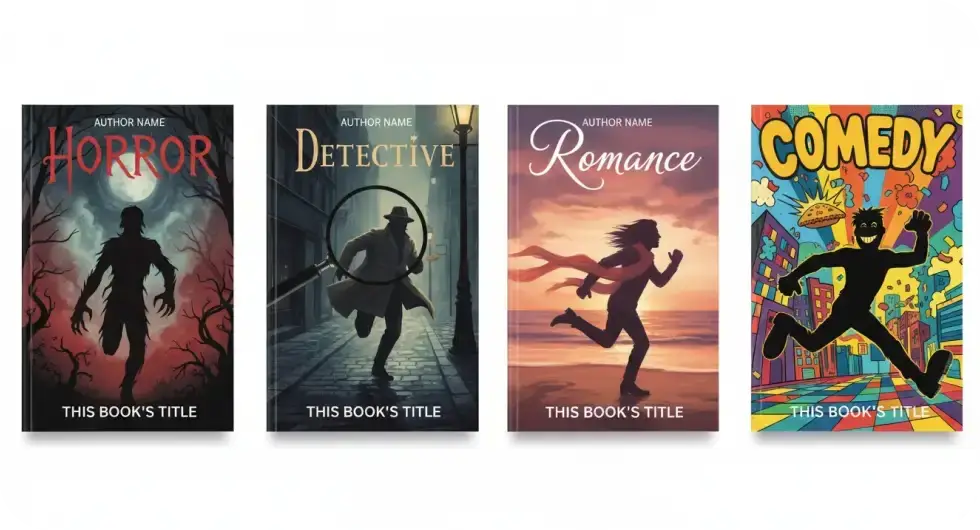
Image Source: Overchat AI
AI-powered tools now handle tasks that once required professional designers, like character illustration and marketing copy generation.
Generating Custom Character Images for Your Cover
Midjourney produces the most visually stunning AI images available for fantasy, sci-fi, romance, and thriller genres[19]. The v6 model handles lighting, composition, and mood well[19]. Ideogram’s unique strength is generating readable text within images for covers where text integrates into the design rather than overlaying[19].
Character generators let you describe appearance, mood, and role. You can then refine details like outfits and expressions[20]. Storyloft allows you to generate imagery for the cover in the platform and even include your characters on the cover. AI artwork generated in Storyloft produces print-quality images suitable for professional production.
Creating Back Cover Marketing Copy Automatically
ChatGPT provides expanded back cover copy when you input setting, protagonist age, and main goals[21]. Outputs rarely nail your exact vision, but they introduce compelling titles and supporting character dynamics[21]. Eddy, Storyloft’s built-in AI, can write all the back cover marketing copy from your manuscript.
Finding the Right Visual Style
Each genre follows distinct visual conventions. Romance uses illustrated couples with warm color palettes, while thrillers need dark backgrounds with bold sans-serif fonts[19]. AI tools now offer preset styles like Modern and Bold that match your book’s genre[19].
Create your next book in Storyloft. Get a free account today. No credit card required.
Testing and Finalizing Your Design
Image Source: Reedsy
Once your book cover design reaches near-completion, feedback from actual readers becomes essential. Friends and family often lack critical distance, especially if they feel obligated to give favorable reviews rather than honest critique[4].
Getting Feedback from Your Target Audience
Poll three distinct groups: your target readers, professional independent authors for business view, and the general public[11]. Your ideal readers can flag whether the cover rings true for them, though they may struggle to state specific problems[4]. Professional authors and editors identify structural issues and offer concrete solutions[4]. Display covers at thumbnail size when testing them and ask which would earn clicks on Amazon[22]. This directs people toward purposeful feedback rather than esthetic priorities[22].
A/B Testing Different Cover Options
BookBub Ads excel at testing covers with unfamiliar audiences. They remove variables present on other platforms[23]. Run similar ad copy with only the cover image changing. Monitor click-through rate as your main metric[6]. Duplicate campaigns by clicking “Copy” on Amazon, then change one element at maximum[6]. Facebook requires a business Page and Ads Manager for split testing[6]. Email providers like Mailerlite offer built-in A/B testing for subject lines and content[6].
Making Final Adjustments
Process feedback by identifying recurring patterns rather than individual opinions[11]. If multiple reviewers mention illegible text or genre confusion, make adjustments[11]. Wait overnight before reacting to criticism with emotion[4]. Then assess which feedback lines up with your book’s intent[4].
Exporting Your Final Files
Save JPG format for ebooks and PDF for print covers[7]. Storyloft generates print-shop ready CMYK 300 DPI PDFs for professional production and handles both formats in one interface. Create your next book in Storyloft. Get a free account today. No credit card required.
Conclusion
You now have everything needed to create a bestseller-worthy book cover. Start by researching your genre conventions and select templates that match those visual signals. Build your design with strategic color and typography choices, and test with readers before you finalize.
As has been noted throughout this piece, professional cover design doesn’t require expensive designers. Storyloft stands out as the best book cover maker on the market and handles everything from AI-generated artwork to print-ready PDFs in one interface. The platform combines Canva’s ease of use with professional-grade output.
Your cover makes promises to readers. Design it well, and those browsers become buyers.
FAQs
Q1. What’s the best software for designing book covers yourself? Canva is the most popular choice for beginners due to its user-friendly interface and free templates. For more advanced control, Adobe Photoshop offers professional-grade features, while Affinity Photo provides similar capabilities at a lower one-time cost. Storyloft stands out as a comprehensive solution that handles both ebook and print covers in one platform, generating print-ready files automatically.
Q2. Should I design my own book cover or hire a professional? While you can create your own cover using templates and design tools, hiring a professional is often recommended unless you have design experience. Your cover is your primary marketing tool, and a poorly designed or off-genre cover can significantly hurt sales. If you choose to design it yourself, study bestselling covers in your specific genre carefully and get feedback from your target readers before publishing.
Q3. How do I make sure my book cover matches my genre? Research the top 100 bestsellers in your specific category on Amazon and create a swipe file of 10-20 covers that perform well. Look for recurring patterns in color schemes, typography, imagery, and overall style. Your cover should share at least 70% of these visual cues to signal the right genre to potential readers and meet their expectations.
Q4. What resolution and file format do I need for print book covers? Print covers require a minimum resolution of 300 DPI (dots per inch) to avoid pixelation. Save your files in CMYK color mode rather than RGB to ensure accurate color reproduction. You’ll also need to include bleed (0.125″ beyond trim lines) and keep all important text within safe zones (at least 0.25″ inside trim lines). Export as PDF for print and JPG for ebooks.
Q5. Can I use AI tools to create my book cover? Yes, AI tools can enhance your cover design process. You can use AI to generate custom character images, create background artwork, and even write back cover marketing copy. Tools like Midjourney excel at creating visually stunning images for various genres, while platforms like Storyloft allow you to generate print-quality AI artwork directly within the cover design interface.
References
[1] – https://www.writersdigest.com/writing-articles/the-anatomy-of-a-book-cover-a-guide-for-authors
[2] – https://bookbrush.com/what-book-covers-sell-best-a-review-of-best-selling-book-covers/
[3] – https://www.adobe.com/express/discover/ideas/cover/book
[4] – https://clearsightbooks.com/getting-feedback-on-your-book-tips-to-do-it-wisely/
[5] – https://litreactor.com/columns/how-to-design-a-book-cover
[6] – https://bookcoverhub.com/blog/master-a-b-testing-for-your-book-cover-design/
[7] – https://www.kdpcommunity.com/s/question/0D58V000083ZVU0SAO/book-cover-export?language=en_US
[8] – https://reedsy.com/blog/guide/book-cover-design/how-to-design/
[9] – https://janefriedman.com/the-key-elements-of-eye-catching-book-cover-design/
[10] – https://bookcoverzone.com/blog/author-or-title-what-takes-precedence-on-a-book-cover/
[11] – https://medium.com/@SukhiJutla/book-cover-design-how-to-get-feedback-to-create-an-awesome-design-bfee7b1bad6e
[12] – https://kdp.amazon.com/help/topic/G201953020
[13] – https://www.publishingxpress.com/blog/how-to-use-full-bleed-in-book-cover-design/?srsltid=AfmBOoq0hggv247BmLSsN09Dlyee7faMmRQAN_OGwAPaEfXZBjf0UxXk
[14] – https://www.erelisdesign.com/post/book-cover-bleed-trim-safe-area
[15] – https://onebookpub.com/preparing-files-book-covers/
[16] – https://prcbookprinting.com/why-printing-your-book-with-cmyk-is-a-must-explained/
[17] – https://abhiprints.com/the-ultimate-guide-to-color-mode-rgb-vs-cmyk-for-printing/
[18] – https://www.fastprint.co.uk/blog/cmyk-vs-rgb-printing-what-is-the-difference-when-designing.html
[19] – https://www.inkfluenceai.com/blog/best-ai-ebook-cover-generators-2026
[20] – https://venngage.com/ai-tools/book-character-generator
[21] – https://medium.com/@jonathang1969/using-ai-to-write-back-cover-copy-for-an-unwritten-novel-49923547506a
[22] – https://smallbluedog.com/book-covers-processing-feedback.html
[23] – https://insights.bookbub.com/boosted-series-sales-testing-cover-designs/
[24] – https://kindlepreneur.com/book-cover-software-designers-services/
[25] – https://www.creativindiecovers.com/book-covers-that-command-attention-book-design-secrets-from-a-bestselling-author/
[26] – https://hillshiremedia.co/blog/key-elements-great-book-cover-design/
[27] – https://www.ooliganpress.com/cover-trends-and-how-at-the-waterline-compares/
[28] – https://jamigold.com/2013/10/how-book-covers-appeal-to-readers/
[29] – https://www.canva.com/create/book-covers/
[30] – https://www.thebookdesigner.com/should-you-use-a-book-cover-template/
[31] – https://reedsy.com/blog/book-cover-design-software/
[32] – https://www.adobe.com/express/create/cover/book
[33] – https://www.postermywall.com/index.php/l/book-cover
[34] – https://thebookcoverdesigner.com/product-category/premade-book-covers/
[35] – https://kdp.amazon.com/help/topic/G201113520
[36] – https://lucidbooks.com/the-psychology-of-color-in-book-cover-design/
[37] – https://miblart.com/blog/color-theory-in-book-cover-design/
[38] – https://www.visme.co/book-cover-maker/
[39] – https://www.printivity.com/insights/book-cover-colors-that-sell-best
