I Tested the Best AI Writer Tools in 2024
Last March, I stared at a blinking cursor for three hours. My deadline was near, and I had a lot to do. My coffee was cold, and my ideas were old. That’s when I decided to use an ai writer.
I tested every major ai writing tool for eight months. I tried Jasper AI, Copy.ai, Writesonic, and Rytr. I wanted to see which one could help me work faster and better.

I checked how easy each tool was to use. I looked at the quality of their first drafts and SEO features. I also tested their research and customization options.
Some big names didn’t impress me. But some smaller tools did great. It’s clear that not all ai writers are the same.
This is my honest review of what worked and what didn’t. I found out which tools are worth using every day.
Key Takeaways
- No single AI content generator excels at every type of writing — choosing the right tool depends on your specific needs.
- Content quality varies dramatically between platforms, even when using identical prompts and instructions.
- The best artificial intelligence writing tools combine strong first-draft generation with built-in SEO optimization and research features.
- Free plans and trials exist across most platforms, making it easy to test before committing your budget.
- Human editing remains essential — every ai writer I tested produced content that still needed a careful review.
- Pricing structures range from under $10 per month to enterprise plans exceeding $500, with value not always tied to cost.
- Integration with tools like WordPress, Google Docs, and marketing platforms can save hours of manual work each week.
My Journey Into the World of AI Writing Tools
I tested dozens of AI content tools for months. My goal was to find the best ones. I looked at tools for marketers and writers, testing each one.
Why I Decided to Test AI Writers
The AI writing market grew fast in 2024. With so many tools, choosing was hard. I wanted to help others pick the right tool.
My Testing Methodology and Criteria
I checked each tool in seven areas. I gave each tool the same time and attention.
| Criteria | What I Measured | Weight |
|---|---|---|
| Usability | Learning curve, interface design, onboarding | 20% |
| Content Quality | Accuracy, readability, originality | 25% |
| Feature Depth | Templates, integrations, customization | 15% |
| Pricing | Plans, free tiers, cost per word | 10% |
| Performance | Speed, consistency, reliability | 10% |
| Research Capability | Data sourcing, fact-checking, citations | 10% |
| Data Quality | Up-to-date info, relevance, depth | 10% |
What I Was Looking for in an AI Writing Assistant
I wasn’t looking for a tool to replace human writers. I wanted software that boosts creativity and handles analysis. The best tools should fit into workflows, increasing output without losing authenticity.
Understanding What Makes a Great AI Writer
Not every AI text creation tool is the same. After weeks of testing, I found clear differences. I want to share what makes an intelligent writing assistant truly stand out.
Essential Features Every AI Content Generator Should Have
I made a checklist of must-have features. A good AI writer does more than just text. Here’s what I looked for:
- Topic brainstorming and idea generation
- Reliable information gathering from trusted sources
- Fast draft creation with multiple tone options
- Built-in SEO optimization tools
- Editing and grammar-check capabilities
- Audience customization settings
- Multi-language support
- Content summarization for repurposing
Any intelligent writing assistant missing more than two of these features felt incomplete during my tests.
The Role of Natural Language Processing in Writing
Natural Language Processing (NLP) is key for AI tools. It lets them understand context and user intent. A 2024 report by Grand View Research shows the NLP market will grow fast.
Balancing Automation with Human Creativity
I learned AI can’t replace a human touch. The best results come when I use AI as a starting point. Then, I add my own insights.
The magic happens when AI handles the heavy lifting and you bring the soul.
AI text creation speeds up my work. My creativity adds meaning. This balance is what you’ll see in my reviews.
My Experience with Semrush’s Content Toolkit
Semrush surprised me. I knew it as a top SEO tool. But its Content Toolkit uses AI in a new way. It mixes real-time search data with smart writing tools. This gives you a full blog post process in one place.
Testing the SEO Brief Generator
The SEO Brief Generator uses competitive SERP data to guide your writing. Just enter a keyword, and it gives you a detailed plan. It includes top-ranking page insights, suggested headings, and related terms.
The Topic Finder tool also suggests new ideas. Each idea comes with keyword volume and difficulty scores. This helps you choose topics with good traffic potential.
Real-Time Data Integration for Content Optimization
Semrush’s Content Optimizer is a standout feature. It checks your draft against live SEO benchmarks as you write. You can see where your content needs improvement.
It helps with readability, keyword density, and word count. Plus, it supports custom brand voice. This keeps your tone consistent in every piece.
Publishing Directly to WordPress
I loved the direct WordPress publishing feature. You can write, optimize, and publish all from one dashboard. It saves time by including AI image generation.
| Feature | Details |
|---|---|
| Free Trial | 7 days |
| Unlimited Plan | $60/month |
| WordPress Integration | Direct publishing |
| Brand Voice | Custom settings supported |
| AI Image Generation | Included |
Semrush is a top choice for AI-powered content creation. Its pricing, features, and ease of use are great. Next, I’ll explore Jasper AI’s offerings at the enterprise level.
Deep Dive into Jasper AI for Enterprise Teams
Jasper AI caught my eye as an ai writer for big teams and marketers. It has over 50 content templates for blog posts and ads. I tested it a lot, and the results were mixed.
Jasper learns your brand voice and writing style fast. You can train it with your content. It also makes images and plans full campaigns from one brief. This saves a lot of time for marketing teams.
The Blog Post workflow needs a lot of details. You must know your audience, outline, and keywords. Jasper makes drafts quickly. But, the text often sounds like an outline and lacks a personal touch. SEO content needs a lot of editing to be ready.
Here’s a quick look at Jasper’s pricing tiers:
| Plan | Monthly Cost | Users Included | Best For |
|---|---|---|---|
| Creator | $49/month | 1 seat | Solo marketers and freelancers |
| Pro | $69/month per seat | Up to 5 users | Small to mid-size marketing teams |
My main thoughts on Jasper as an ai writer:
- Brand voice training makes it stand out
- It saves hours with multi-channel campaigns
- SEO for long pieces is not its strong point
- Text needs editing to sound natural
Jasper is great for teams needing speed and consistency. But, it’s not a replacement for editors. Switching from Semrush to Jasper is like trading SEO for teamwork tools. It’s a good choice depending on what you value more.
Testing Copy.ai for Marketing and Sales Automation
Copy.ai is a top pick for artificial intelligence writing tools. It does more than just write text. It’s great for teams that need to work fast and do a lot. I tested Copy.ai a lot before trying Jasper or Anyword.
Creating Complex Workflows with AI
The workflow builder in Copy.ai really stood out. It uses AI models like GPT-3.5 and GPT-4. I set up sequences that sent personalized messages automatically. This cut down my work a lot. Plus, it has over 100 copywriting templates to get you started.
Personalized emails powered by AI automation deliver 29% higher unique open rates and 41% higher unique click rates compared to generic sends.
Multi-Channel Campaign Generation
I made eight LinkedIn posts in under a minute with Copy.ai. It can translate into 25+ languages, which is great for global campaigns. It’s easy to use for social media and emails too.
Integration Capabilities with Marketing Tools
Copy.ai works well with many marketing tools and CRMs. It’s great for sales teams to score leads and forecast. The trial was smooth, and here’s a quick price guide:
| Plan | Monthly Cost | Best For | Key Feature |
|---|---|---|---|
| Free Trial | $0 (14 days) | Individual testers | Full platform access |
| Pro | $36 | Solo marketers | Unlimited AI content generation |
| Team | $186 | Marketing and sales teams | Advanced workflow automation |
Copy.ai is a top choice for teams focused on automation. It’s highly recommended based on my testing.
My Results with Anyword’s Predictive Performance Scoring
Anyword is different from other writing tools because it scores your copy before you publish. It uses a predictive score to show how well your text will connect with your audience. I found this feature very useful and sometimes surprisingly right.
Data-Driven Copy Creation
Anyword is great for short content like emails, landing pages, and social media ads. It creates many versions and shows how each will do. You can also adjust the tone and audience for each piece.
“The best copy isn’t written by instinct alone — it’s shaped by what the data already tells us works.”
But, Anyword’s Blog Wizard for long articles didn’t impress me as much. The content felt broken and sounded too robotic. For long articles, I prefer tools like Semrush or Jasper.
Testing Ad Campaign Optimization
Anyword really stands out when it comes to ad campaigns. I tested it with a mock campaign and got many versions with different targets. The top ads matched what I thought would work best.
Here’s a quick look at Anyword’s prices:
| Plan | Monthly Cost | Best For |
|---|---|---|
| Starter | $49/month | Freelancers and solo marketers |
| Data-Driven | $99/month per seat | Marketing teams needing predictive scores |
| Business | $499/month | Large teams running multi-channel campaigns |
If you’re into ad campaigns and short marketing pieces, Anyword is a good choice. It’s not the best for long content. But for quick campaign boosts, it’s worth it.
Exploring Writesonic’s All-in-One Platform
Writesonic caught my eye because it tries to pack everything into a single platform. It has an AI article writer, a chatbot builder called Botsonic, a conversational intelligent writing assistant named Chatsonic, and even an image generator called Photosonic. It’s ambitious, and I wanted to see if it could deliver.

The blog constructor gave me solid control over my content. I could customize interlinking, choose heading structures, and set citation preferences. The Competitor Keywords feature was a nice touch — it scans rival pages and ensures your target phrases show up in the draft. For AI text creation at scale, that kind of built-in SEO awareness is a real time-saver.
My test results were mixed. I scored a 67 content score using the integrated SurferSEO suite. The output read as generic in spots and felt fragmented between sections. It needed human editing to sound cohesive and natural. The free trial gives you 25 credits to experiment, which is enough to form your own opinion before committing.
Here’s a quick look at Writesonic’s pricing and key features:
| Plan | Monthly Cost | Key Features | Best For |
|---|---|---|---|
| Free Trial | $0 | 25 credits, basic AI text creation | Quick testing |
| Small Team | $19/month | Article writer, Chatsonic, SEO tools | Freelancers and solopreneurs |
| Enterprise | $500+/month | Full suite, Botsonic, priority support | Large marketing teams |
Writesonic works well as a starting point for drafts. It’s a capable intelligent writing assistant when paired with manual refinement. If you need an all-in-one toolkit and don’t mind polishing the output, it’s worth exploring — at the $19 tier. Compared to Anyword’s predictive scoring approach, Writesonic leans more toward volume and versatility. Budget-conscious writers may want to see what Rytr offers next.
Budget-Friendly Options I Discovered with Rytr
I tested Writesonic and wanted to see budget options. Rytr stood out with its easy interface and low cost.
Rytr has over 40 use cases and 20+ tones. It also has document management and lets you create custom use cases. It’s great for short content like social media posts and ads.
Multi-Language Support Testing
Rytr supports over 30 languages at a low price. I tested it in Spanish, French, and German. It’s good for short content, but check it with a native speaker for detailed work.
Comparing Features at Different Price Points
Rytr’s pricing is easy to understand. Here’s what each plan offers:
| Plan | Monthly Cost | Characters/Month | Best For |
|---|---|---|---|
| Free | $0 | 10,000 | Trying the platform |
| Saver | $9 | 100,000 | Freelancers on a budget |
| Unlimited | $29 | Unlimited | Regular content creators |
Rytr isn’t for long-form content. But for quick, everyday writing, it’s a great choice. At $9 a month, it’s a great deal.
Next, I’ll look at creative writing tools like Sudowrite and Storyloft. They’re for fiction and storytelling.
Creative Writing with Sudowrite and Storyloft
Not every ai writer is for marketers or bloggers. Some tools are for storytellers. I tested Sudowrite and Storyloft for creative writing. I was impressed by what they offer to fiction and nonfiction authors.
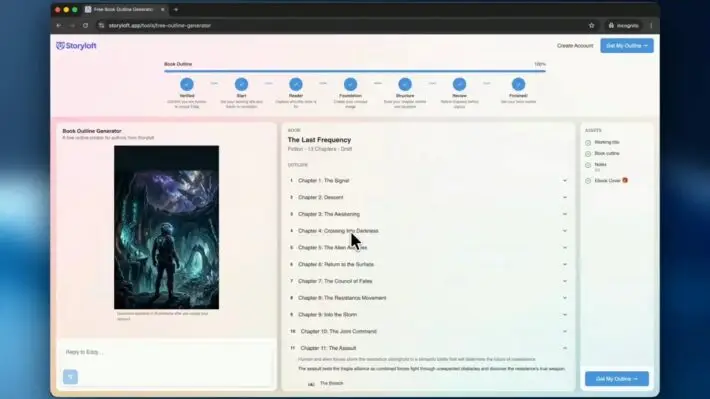
Storyloft’s Manuscript-Aware AI Features
Storyloft stands out because it reads and understands your manuscript before suggesting changes. It’s not just a generic tool. It knows your characters, plot, tone, and story structure. When I asked for scene ideas, they fit my story perfectly.
Author Voice Preservation Technology
Storyloft’s Author Voice Preservation feature amazed me. It analyzed my writing style and kept AI suggestions consistent with my voice. The output sounded like me, not a robot. The Author Plan includes manuscript management, notes, and goal tracking, along with monthly AI usage.
Testing Fiction vs Nonfiction Capabilities
Sudowrite is great for brainstorming and drafting. Its Story Bible feature helped me plan my story before writing drafts. It’s perfect for creative projects, not just SEO content.
Here’s a quick pricing comparison:
| Platform | Plan | Monthly Price | Best For |
|---|---|---|---|
| Sudowrite | Hobby & Student | $19 | Casual fiction writers |
| Sudowrite | Professional | $29 | Serious novelists |
| Sudowrite | Max | $59 | High-volume authors |
| Storyloft | Author Plan | Varies | Manuscript-focused writers |
Both tools show that creative writing AI has grown a lot. Next, I’ll compare ChatGPT and other generic tools.
ChatGPT and Generic AI Tools in My Testing
I had to test ChatGPT, the famous AI tool from OpenAI. It’s free, easy to use, and does lots of things. But, being versatile doesn’t always mean it’s the best.
I tested ChatGPT with tools like Google Gemini and Claude. I wanted to see how they compare to specialized tools. They’re good for ideas, emails, and quick answers. But, they’re not perfect for SEO blog posts, keeping a brand voice, or content for specific industries.
“ChatGPT is like a Swiss Army knife — it does many things well, but a chef still needs a proper set of knives.”
Here’s what I found:
- ChatGPT makes good first drafts but doesn’t help with SEO.
- It’s hard to keep a consistent brand voice.
- It doesn’t work well with publishing platforms like WordPress.
- Generic AI tools need more editing to look polished.
| Feature | ChatGPT (Free/Plus) | Specialized AI Content Generator |
|---|---|---|
| SEO Optimization | Manual, prompt-dependent | Built-in keyword targeting |
| Brand Voice Consistency | Requires repeated instructions | Saved brand profiles |
| Publishing Integrations | None | WordPress, CMS platforms |
| Content Templates | User-created prompts only | 50+ pre-built templates |
ChatGPT is great for beginners or those on a budget. But, for serious content creators, specialized tools are better. The difference between generic and specialized tools became clear during my tests.
Comparing AI Text Creation Speed and Quality
Speed and quality don’t always go together. I tested each platform and found big differences. Here’s what I learned about automated writing software.
First Draft Generation Times
Copy.ai amazed me by making 8 LinkedIn posts in under 60 seconds. Jasper was fast too, but its drafts felt like outlines. Writesonic took longer because it guides you through steps before writing.
Each tool has its own speed and quality trade-offs.
Content Quality Scores Across Platforms
Speed is important, but quality matters more. I used tools to check the writing’s quality. Here’s what I found:
| Platform | Draft Speed | Content Quality Score | Best Use Case |
|---|---|---|---|
| Copy.ai | Under 1 minute | 60 | Social media and short-form copy |
| Jasper | 30–45 seconds | 62 | Enterprise marketing drafts |
| Writesonic | 2–3 minutes | 67 | Long-form blog content |
| Semrush AI | 1–2 minutes | 71 | SEO-focused articles |
Writesonic’s slower process got it a 67 content score. The extra steps seem to improve quality.
SEO Optimization Effectiveness
Semrush’s AI really stood out. It uses real-time data for SEO while you write. Most tools, like Jasper and Copy.ai, don’t have this.
If you care about search rankings, Semrush’s live SEO data is a big advantage.
- Semrush offers real-time keyword and competitor analysis during drafting
- Writesonic includes basic SEO suggestions but no live SERP data
- Copy.ai focuses on conversion copy rather than organic search performance
Pricing Analysis and Value for Money
Price was a big factor in my testing. Each AI text creation tool had its own pricing. Some were very affordable, while others were pricey. Here’s what I found to help you choose the best tool for your budget.
Monthly Subscription Comparisons
The prices varied a lot. Rytr was the cheapest, with a free plan and a $9/month Saver tier. Semrush’s content toolkit was the most expensive at $60/month for unlimited access. Here’s a quick look at the costs:
| Tool | Plan Name | Monthly Price |
|---|---|---|
| Rytr | Saver | $9 |
| Writesonic | Small Team | $19 |
| Copy.ai | Pro | $36 |
| Jasper | Creator | $49 |
| Anyword | Starter | $49 |
| Semrush | Unlimited | $60 |
Enterprise plans from Jasper, Copy.ai, and Anyword need a custom quote from their sales teams.
Free Trial Offerings I Tested
I tried every free trial I could find. The trials were different:
- Semrush — 7-day free trial
- Jasper — 7-day free trial
- Copy.ai — 14-day free trial
- Writesonic — 25 free credits
- Rytr — Free plan with limited usage
Copy.ai gave me the most time to explore its features. Rytr’s free plan is good for occasional users.
Cost Per Word Analysis
Writesonic and Rytr were the best value for cost per word. Writesonic’s $19/month plan made each word very affordable. Semrush costs more but its SEO data is worth it for content marketers.
Real-World Applications I Found Most Useful
After weeks of testing, I wanted to share how these tools help me every day. AI-powered content creation is best for tasks you do over and over. Here are three areas where I saw a big difference in my work.
Blog Post Creation Workflows
Semrush was great for writing blogs. It let me go from finding topics to publishing a post all in one place. The tool’s natural language processing made my first drafts look good.
Social Media Content Generation
Copy.ai and Rytr were my top choices for social media. Copy.ai had many options like AIDA and PAS for different posts. Rytr’s many templates helped me make posts fast for LinkedIn, Instagram, and Twitter.
Jasper was also good for multi-channel campaigns. It helped me keep my messages the same across different platforms.
Email Marketing Copy Development
Anyword helped a lot with email subject lines and body copy. It showed me how well my emails would do before I sent them. Copy.ai made creating email sequences easy.
| Use Case | Best Tool | Key Strength |
|---|---|---|
| Blog Post Creation | Semrush | End-to-end workflow with WordPress publishing |
| Social Media Posts | Copy.ai | Multiple copywriting frameworks |
| Social Media Templates | Rytr | Diverse platform-specific templates |
| Multi-Channel Campaigns | Jasper | Extensive template library |
| Email Subject Lines | Anyword | Predictive performance scoring |
| Email Sequences | Copy.ai | Automated workflow builder |
Each tool was chosen for its strength in a specific task. Knowing where to use each saved me time and improved my work.
Common Pitfalls and Limitations I Encountered
No ai writer is perfect, and my testing showed some big frustrations. Each tool had quirks that could slow you down or lower your content quality.
I found a robotic tone in Jasper and Anyword’s outputs. The text felt stiff and needed lots of editing to sound natural. Writesonic, on the other hand, had a problem with long-form content. It sometimes came out in pieces that didn’t fit together well.
Copy.ai’s workflow builder is powerful but hard for beginners. It was complex and took hours to learn. Rytr was easy to use but struggled with long content. It also had downtime during my tests, which was a problem.
SEO optimization was a big issue for most platforms. Only Semrush’s tool offered real-time keyword suggestions. The others made it hard to guess search intent and where to put keywords.
Creative writing tools had their own problems. Sudowrite didn’t have a plagiarism checker, and I had to guide it to avoid repeating ideas. AI-generated images looked generic and not good for branded content.
| Tool | Primary Limitation | Severity (1-5) |
|---|---|---|
| Jasper | Robotic, unnatural tone | 4 |
| Writesonic | Fragmented long-form output | 3 |
| Copy.ai | Steep learning curve for workflows | 4 |
| Rytr | Poor long-form support and downtime | 3 |
| Sudowrite | No plagiarism checker, plot repetition | 3 |
| Anyword | Stiff copy requiring heavy edits | 4 |
Every automated article generator I tested required some level of human oversight to produce publish-ready content.
The main lesson? Use these tools as helpers, not as the only solution. Knowing their weaknesses helped me create better workflows and set realistic goals for content creation.
Conclusion
After trying out many artificial intelligence writing tools, I found no single winner for every need. Semrush’s Content Toolkit is my top choice for solo marketers and small teams. It’s great for SEO-driven blog content.
Jasper AI is the best for big teams needing lots of content outlines and short copy. Copy.ai is perfect for large marketing and sales teams because of its workflow automation.
For teams focused on ads, Anyword’s predictive scoring is unbeatable. But it’s not good for long-form content. Writesonic has lots of features but needs work on content generation.
Rytr is the best budget option for simple tasks. Storyloft and Sudowrite are great for fiction and creative writers. They offer unique features I didn’t see elsewhere.
My advice is to choose a tool that fits your needs. Each AI content generator has its own strengths and weaknesses. Try a free trial, test it yourself, and see what works for you.
If you’re stuck on your writing projects, tools like the Ahrefs Conclusion Generator can help. The AI writing tool world is always changing. The right tool today can save you hours every week.
FAQ
What is an AI writer, and how does it differ from a generic AI tool like ChatGPT?
An AI writer is a tool made for creating content. It has features like SEO and customizing your brand’s voice. I found that tools like Jasper AI and Semrush’s Content Toolkit are better than ChatGPT. They offer more features and work better for specific tasks.
Which AI content generator is best for SEO-optimized blog posts?
A: Semrush’s Content Toolkit is the best for SEO blog posts. It uses real-time SEO data and AI to create content. It has tools like a Topic Finder and an SEO Brief Generator. It also publishes to WordPress.
The Unlimited Plan costs /month with a 7-day free trial. It’s great for solo marketers and small teams.
How much do AI writing tools cost, and are there free options available?
Prices vary a lot. Rytr has a free plan and a Saver plan for /month. Writesonic’s Small Team plan starts at /month.
Copy.ai Pro is /month, and Jasper Creator and Anyword Starter are /month. Semrush’s Unlimited Plan is /month. Free trials range from 7 to 25 days.
Can automated writing software really replace human writers?
No, AI tools can’t replace human writers. They’re best used to help with ideas and SEO. I found that AI-generated content often sounds robotic.
The best results come from using AI for ideas and then adding human touch.
Which AI-powered content creation tool is best for social media and short-form marketing copy?
A: Copy.ai is great for social media. It can create 8 LinkedIn posts in under 1 minute. Anyword is best for ads and emails, with a predictive scoring feature.
Rytr is budget-friendly, offering 40+ use cases. Jasper and Copy.ai are top choices for creating content across channels.
Are there AI writing tools designed for fiction and creative writing?
Yes! Storyloft is made for creative writers. It has a manuscript-aware AI and preserves your writing style. Sudowrite helps with brainstorming and creating drafts, starting at /month.
But Sudowrite lacks a plagiarism checker and needs ongoing guidance.
What essential features should I look for in an AI content generator?
Look for features like topic idea generation and SEO optimization. Editing and proofreading are also key. Customization and multi-language support are important too.
Tools like Copy.ai support 25+ languages. Look for brand voice support and content scoring. The best tools are easy to use and fit your workflow.
How fast can machine learning copywriting tools generate content?
Speeds vary. Copy.ai is the fastest, making 8 LinkedIn posts in under 1 minute. Jasper AI generates quickly but needs editing.
Writesonic takes longer but often produces generic content. Remember, speed doesn’t always mean quality. Human review is always needed.