Character Design Template: A Guide to Visual Consistency In
You're halfway through a manuscript, the cast is locked, and one chapter later your lead suddenly feels like a different person. The jawline changed in the art notes, the coat details drifted, and the voice in the dialogue no longer matches the face on the page. That's usually the moment a character design template stops being a nice extra and starts acting like a production asset.
Table of Contents
- Why Your Characters Drift Off-Model Mid-Manuscript
- Essential Fields Every Character Design Template Needs
- Building Your Template from Thumbnails to Turnaround Sheet
- Adapting Your Template Across Fiction Genres
- Implementing Templates Inside Storyloft
- Maintaining Character Consistency Across a Long Project
Why Your Characters Drift Off-Model Mid-Manuscript
A lot of drift starts with good intentions and bad memory. You sketch a protagonist once, jot down a few personality notes, then keep writing as if your brain will hold every visual and behavioral detail for 120,000 words. It won't, and that's exactly why production teams moved from loose notes to standardized model sheets in animation and comics, where artists needed a character to stay visually stable across many scenes and hands. The modern character design template grew out of that need for consistency, then expanded into a reference system that now bridges concept art and narrative planning, not just drawing.
That bridge matters because long-form work creates pressure from both sides. The art side wants repeatable proportions, silhouette, color logic, and expression cues. The writing side wants the character to keep the same history, communication style, and emotional pattern even after the plot starts stretching them. A template gives both sides the same source of truth, which is why a disciplined sheet beats scattered notes when the project starts compounding.
Practical rule: if a detail matters enough to fix in chapter 2, it matters enough to record in the template before chapter 20.
The fastest way to see the difference is to compare a loose character note file with a production-ready profile. A loose note says “stern detective, dark coat, tired eyes.” A working template says what the silhouette does at a glance, which views have been locked, what the signature expression set is, and how the character behaves under stress. That extra structure is what keeps cover art, scene illustrations, and prose descriptions from pulling in different directions. For a useful writing-facing example of that broader profile approach, see the character description example, which shows how visual and narrative fields can sit in the same system.
This is also where workflow tools save time in a very real way. If a team already knows the character's stable traits, they can slash campaign prep time by avoiding repeated rebriefs and inconsistent revisions. The point isn't speed for its own sake. The point is reducing the number of times someone has to fix a mismatch that should've been documented once.
Essential Fields Every Character Design Template Needs
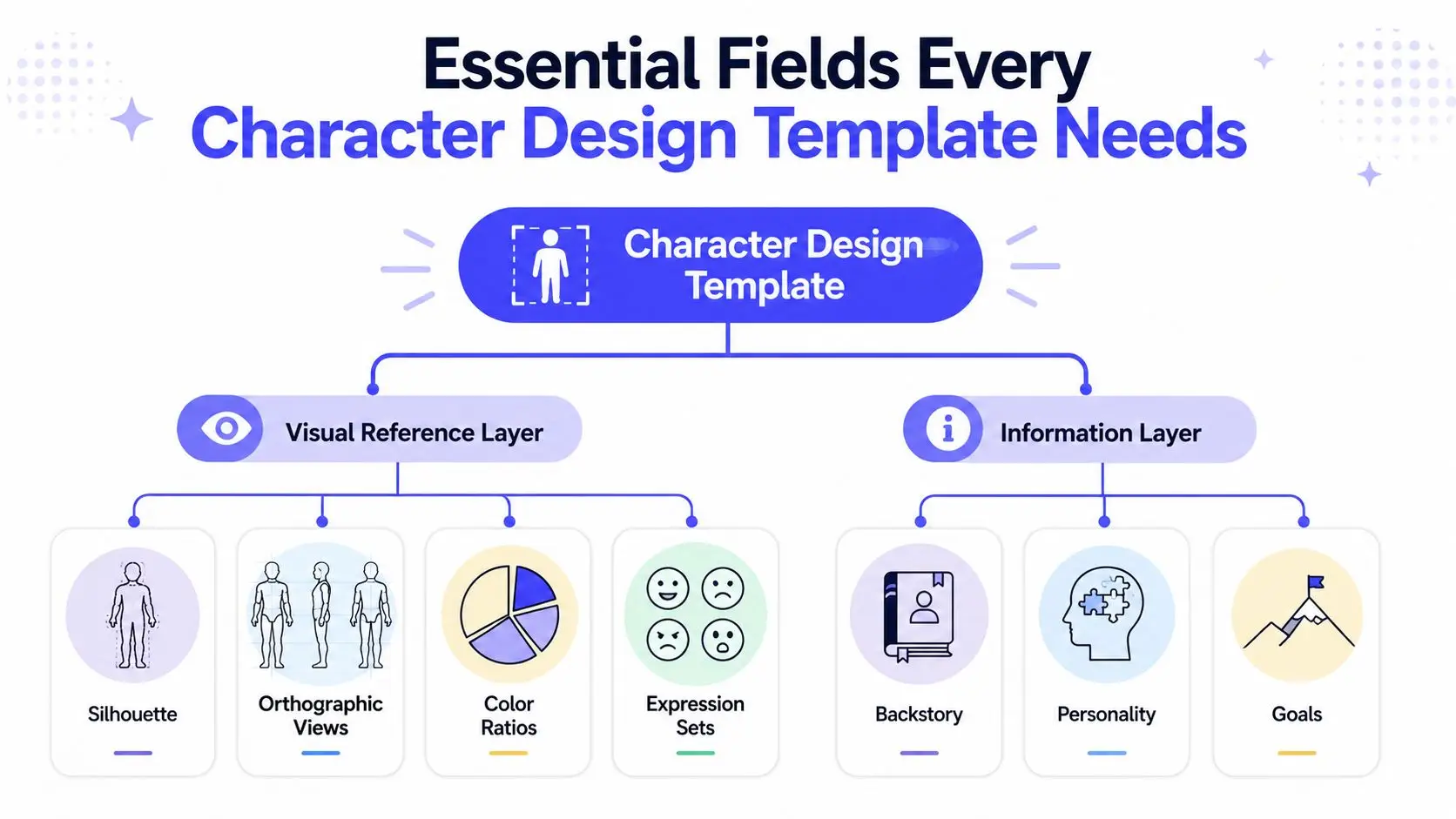
A useful template works in two layers. The first is the visual reference layer, the part that keeps the character drawable. The second is the information layer, the part that keeps the character believable across scenes, moods, and formats. If you only build the first layer, the character can look correct and still feel wrong. If you only build the second, the writing may stay consistent while the art keeps drifting.
Visual reference fields that should not be skipped
Start with silhouette, because recognition usually begins there. Then add orthographic views, front, profile, back, and three-quarter, so the body reads the same from every angle. Professional templates also use 3 to 5 key expressions and a 60/30/10 color ratio for primary, secondary, and accent colors, which keeps the sheet practical instead of decorative.
That structure is useful because it compresses a lot of information into a repeatable reference. A front view alone leaves room for guesswork. A full view set cuts that guesswork down and helps teams keep proportions, spacing, and color hierarchy aligned across illustration passes, cover comps, and AI-assisted generation. If your design is meant to survive multiple hands, this is the part that does the heavy lifting. A good companion resource for that workflow is the creator workflow for AI characters, especially if you're translating a design into repeated scene outputs.
Information fields that keep the character from going flat
The narrative side needs history, personality, communication style, mental health cues, and growth. One widely circulated template organizes exactly those categories, and that breadth is the point. A character who looks consistent but has no recorded behavior logic will still drift in tone, posture, and status markers once the story gets complicated.
The best sheets don't just say who the character is. They say what that character does when pressure hits.
For writers, that means the template should capture what kind of speech feels natural, what social role the character occupies, and what change the story is asking them to survive. For illustrators, it means the face, costume logic, and stance have a reason behind them. If you want a compact place to organize those notes, the novel worldbuilding and character notes guide is a useful model for keeping reference material in one system.
Building Your Template from Thumbnails to Turnaround Sheet
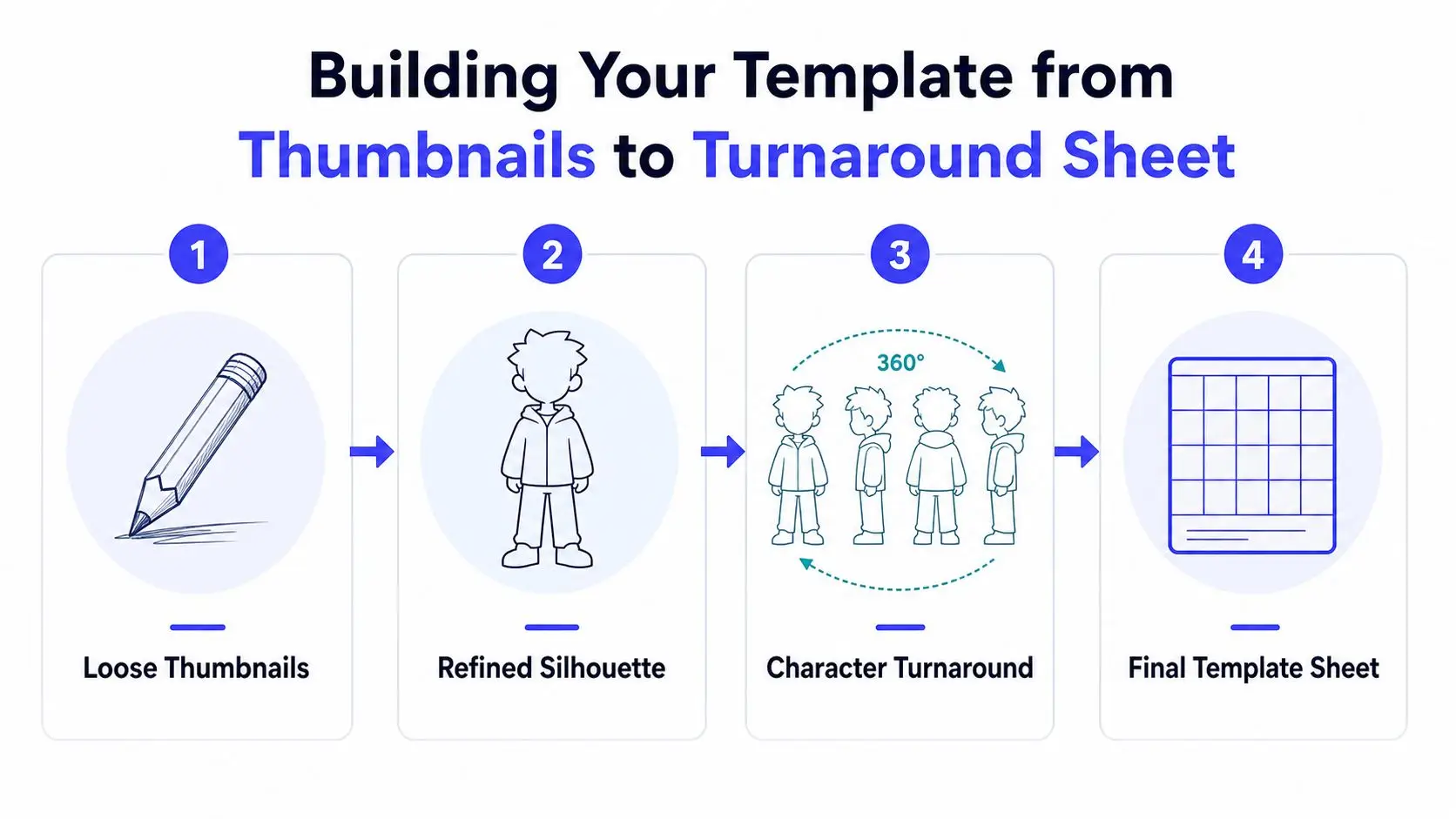
A character design template does its best work when you build it from the roughest decisions outward. Start with loose thumbnails, then narrow the design only after the silhouette reads clearly at small scale. That order matters because early polish locks you into choices before you know whether the character is readable. A drawing can look finished and still fail the moment it gets shrunk into a thumbnail, a cover comp, or an AI-generated scene pass.
Start with many tiny options
Begin with rough thumbnails, not polished drawings. Keep them loose enough to compare body shape, clothing mass, and pose language without getting attached to rendering. At this stage, the key question is whether you can identify the character instantly from shape alone.
A quick grayscale check helps. If the design still reads in grayscale or at thumbnail size, the silhouette, contrast structure, and focal areas are doing real work. If the character falls apart once details disappear, the template needs clearer shape hierarchy before you move on. That is usually where a design breaks, not because it is unattractive, but because it is unreadable across formats.
Lock the views only after the form holds up
Once one silhouette wins, test it in front, three-quarter, side, and back views. Many turnaround workflows ask for five views or equivalent rotation coverage because illustrators, animators, and AI-assisted asset generation all need the same form to hold from every angle. If the design changes meaningfully between views, the template is still underdefined.
A production sheet should also say what must stay fixed. Proportions, alignment, spacing, and recurring details need to be written down so later revisions do not mutate the character. For teams that build characters through software, the Storyloft AI character creator for writers can sit inside that workflow instead of replacing it, which helps keep the visual notes tied to the same reference system the manuscript uses.
Once the form is stable, add detail sparingly. Keep the design tied to function, not decoration. The character should look like someone who belongs in the story world, with enough visual logic that the same person still reads correctly in a manuscript note, a cover illustration, or when you need to view 3D models from all angles before finalizing the sheet.
Adapting Your Template Across Fiction Genres
A template should be flexible enough to survive genre, but not so vague that every book gets the same character sheet. Fantasy, sci-fi, romance, children's books, and thrillers all ask for different emphasis. The core structure stays recognizable, but the weight shifts. That's where a lot of authors get stuck, because they build one sheet for one story and then try to reuse it everywhere without changing the priorities.
| Template Field Priorities by Genre | Fantasy | Sci-Fi | Romance | Children's | Thriller |
|---|---|---|---|---|---|
| Field Category | Costume logic and material culture matter most | Tech specs, gear function, and UI cues matter most | Expression set and body language matter most | Strong silhouette, simple shapes, clear color blocks | Readability, status cues, and controlled restraint matter most |
| Visual Focus | Armor, fabrics, regional markers | Devices, interfaces, utility placement | Facial nuance, posture, intimacy signals | Instant recognition, friendly proportions | Tension in pose, practical clothing, concealment |
| Information Focus | Social role, class, lore, ritual behavior | Occupation, systems knowledge, tech habits | Emotional history, attachment style, communication rhythm | Personality beats, behavior rhythms, moral clarity | Motivation, secrecy, pressure responses |
| What to Minimize | Random decoration with no world logic | Surface chrome that lacks function | Costume noise that distracts from the relationship | Over-complex detail and grim visuals | Flashy styling that weakens realism |
Fantasy and sci-fi need different kinds of specificity
Fantasy templates usually benefit from documenting material culture. Clothing should reflect region, status, occupation, and ritual, not just aesthetic taste. A cloak, clasp, or weapon can carry social information, so the sheet should state what each element means in-world.
Sci-fi demands a different sort of discipline. Gear should have visible function, interfaces should match the technology level, and clothing should support mobility, maintenance, or institutional identity. The silhouette still matters, but readers also look for evidence that the design belongs inside a system. If a sci-fi detective looks too much like a superhero, the costume is probably speaking louder than the story.
Romance, children's books, and thrillers shift the emphasis again
Romance lives or dies on expression and body language. A template for that genre should give more space to face, posture, and emotional states than to heavy costume logic. Children's books usually need cleaner shapes, stronger recognition, and fewer small details that collapse on the page. Thrillers often work best when the design feels controlled, practical, and slightly guarded, because excess ornament can soften the tension.
The mistake is not choosing the wrong genre fields. The mistake is giving every field equal weight.
The core decision rule is simple. Ask which elements must stay visible in the scenes you'll write and illustrate. Then build the template around those pressures instead of trying to capture everything at once. A lean, genre-specific sheet beats a bloated one that nobody uses.
Implementing Templates Inside Storyloft
A template only helps if it sits inside the workflow where the manuscript, the illustration brief, and the cover plan already live. Storyloft combines those pieces in one place, so the character data doesn't have to bounce between separate apps and notes. That matters when you're updating a lead across scenes, illustrations, and cover drafts, because the fewer places you have to edit, the fewer places inconsistency can creep in.
Set the character once, then reuse the same profile
The practical move is to define the persona and behavior fields first, then tie them to the visual profile. Storyloft's character creator allows authors to define personas and behaviors, which supports consistent character imagery across illustrations generated within the platform. That's useful because the character profile stops being a static note and becomes a reusable production object.
You can also treat the profile as the handoff point between the manuscript and the art tools. Keep the signature pose, color hierarchy, and expression set inside the same character record the story uses. If the book cover studio or scene creator is pulling from the same profile, you reduce the odds that one asset shows a different temperament from another.
Use the platform as a living reference folder
Storyloft's broader toolset matters. The manuscript editor, illustration suite, scene creator, and book cover studio all sit in the same environment, so you're not rebuilding the same reference in separate tools. A character can move from draft pages into scene illustrations and then into cover design without losing the context that makes them feel like the same person.
If you want a concrete walkthrough of the illustration workflow, the Storyloft knowledge base guide for characters and scenes shows how the character record can feed scene-level output. That kind of integration is useful for long projects because it turns the template into a live reference, not a document you forget after setup.
Maintaining Character Consistency Across a Long Project
A finished template is only as good as your habits around it. Long projects drift because nobody checks the sheet often enough, then someone updates a costume, swaps a facial expression, or changes a status marker without carrying the rest of the design along. The fix is a short maintenance routine, not a heroic memory.
Use a consistency checklist every time the character appears
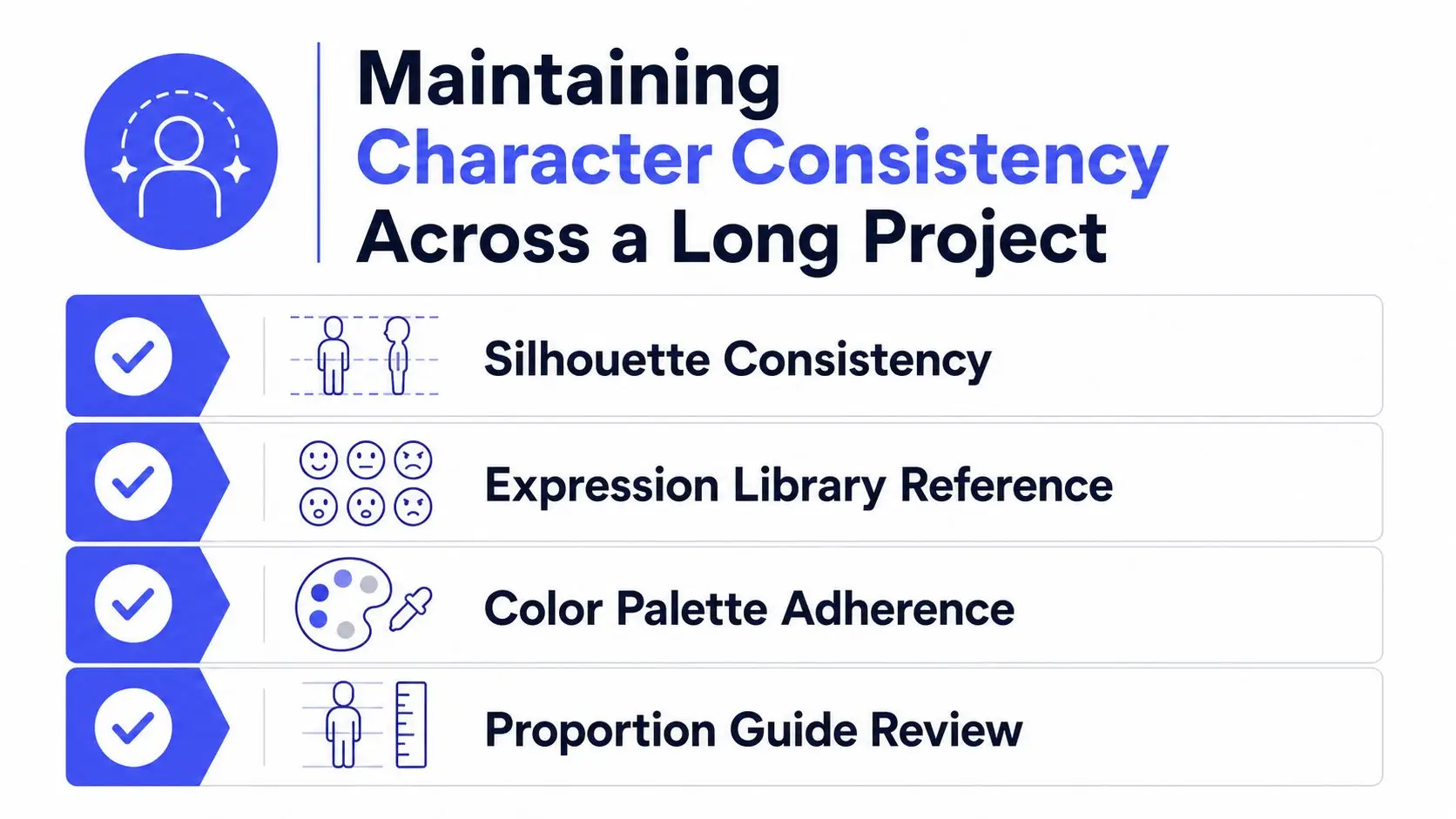
Check silhouette readability first. If the outline has changed enough that the character reads differently at a glance, the design has slipped. Then verify the expression library, the color palette, and the proportion guide before approving the scene or illustration.
A second pass should test behavior, not just anatomy. The character's posture, speech style, and status cues need to match the role they're playing in that scene. A person can be drawn correctly and still feel off-model if the costume logic or body language contradicts the narrative function.
Treat revisions like versioned assets
When a design changes, record what changed and why. That keeps later scenes from reverting to an older version. It also protects you from the common trap of polishing one image until it no longer matches the rest of the project.
A template should stay alive, but it shouldn't drift casually. Periodic audits help, especially when different people are touching illustration, manuscript, and cover work. If the character's emotional state, wardrobe, or visual hierarchy changes, update the sheet first and the downstream assets second.
If the template isn't the reference everyone checks, it's just a pretty file.
The final habit is simple. Cross-reference the character sheet before every major illustration pass, and keep the psychological notes beside the visual ones. That way the character stays recognizable not only in shape, but in presence, which is the part readers remember longest.
Storyloft gives you a single place to keep character profiles, manuscript pages, illustration tools, and cover work aligned. If you're tired of fixing the same consistency problem in three different apps, visit Storyloft and see how a living character record can keep your cast on-model from draft to final release.