How to Write a Treatment That Gets Read
You've got a strong premise, a full screenplay in your head, and a producer asking for “a treatment.” Then the uncertainty starts. How long should it be? Should it sound like a short story? Do you include dialogue? Do you summarize every scene, or only the major turns?
The mistake is searching for one universal template. A treatment works when it helps a specific reader make a specific decision. It lets you prove that the story holds together, show how the project feels, and reveal what still needs solving before anyone commits to a screenplay, a development pass, or a production conversation.
Table of Contents
- What a Treatment Actually Is and Why You Need One
- Choosing the Right Length and Format for Your Buyer
- Locking the Logline and Building the Beat Sheet
- The Structural Beats Every Treatment Must Hit
- Voice, Tense, and Density Decisions That Change Everything
- A Worked Example From Premise to Page
- Revising and Pitching Your Treatment With Confidence
What a Treatment Actually Is and Why You Need One
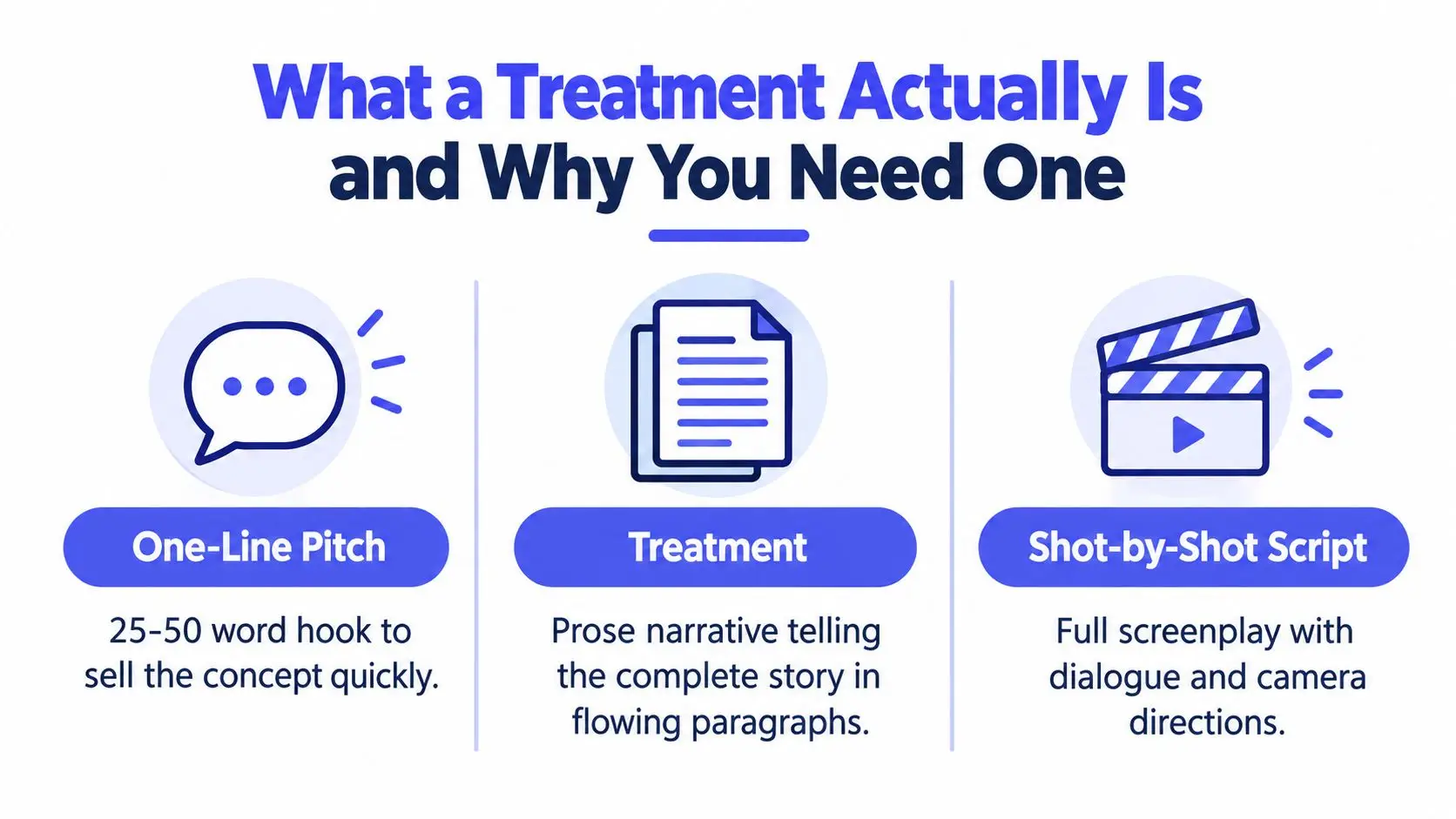
A producer opens your treatment before committing to a script, development meeting, or pitch. Within a few pages, the reader needs to understand the protagonist's problem, the pressure that changes the plan, and the ending. A treatment is a prose narrative document that tells the complete story, from opening setup through resolution. It sits between a one-line pitch and a screenplay: the pitch creates curiosity, the treatment demonstrates the story, and the script delivers the scene-by-scene experience through formatted action and dialogue.
Use a treatment as a decision document, not a format exercise. Its length, tense, scene density, and amount of dialogue should serve the person reading it and the decision they must make.
Working writers use treatments before drafting for practical reasons:
- Story testing: A weak motive, missing turn, or unearned ending becomes visible before weeks go into screenplay pages.
- Pitching: Producers, showrunners, directors, and financiers can assess the complete story before reading a full script.
- Alignment: Co-writers and directors can discuss structure, character movement, and tone from one shared document.
- Approval: A producer can respond to the core plan before the project enters a more expensive development stage.
A treatment differs from an outline, beat sheet, and spec script. An outline often maps scenes through bullets or short notes. A beat sheet records structural milestones with even less narrative texture. A spec script presents the formatted screenplay, including slug lines, action, dialogue, and the precise progression of scenes.
The distinction affects what you include. A producer asking for a treatment usually wants more than a bulleted synopsis. They need to see whether cause and effect hold together and whether you understand the finished project's experience. The guidance on synopsis mistakes to avoid is useful here, particularly its focus on clarity, control, and removing unnecessary detail.
Decision-document rule: Every paragraph should answer a question the buyer would otherwise ask: what changes, why the protagonist acts, what the stakes are, or how the story ends.
Treatments have deep roots in screen storytelling. During the silent era, writers used prose treatments or scenarios to plan visual stories and intertitles. The arrival of sound in 1927 helped establish the screenplay as the industry's primary drafting document, as described in this history of film treatments. The treatment endured because it gives decision-makers the whole story without requiring a production-ready script.
Choosing the Right Length and Format for Your Buyer
A treatment is a decision document, so its length follows the reader's decision. Ask who will read it, what they already know, and what they need to approve before choosing a page count or layout.
A producer assessing a feature package may need the dramatic engine, character arcs, reversals, set pieces, and ending. An agent reading an attachment needs a faster download that makes the project easy to represent. A grant body may need the story alongside artistic intent, audience, and production context. One template cannot serve all three readers.
Published guidance places feature treatments across a broad range, often 5 to 25 pages depending on the project, as noted earlier. UCLA materials describe feature-film treatments at 5 to 15 pages, short films at 1 to 3 pages, and television or season-level treatments at around 20 pages or more, depending on format and use in its film treatment guidance. These ranges describe different decisions, not a reason to add filler.
| Project Type | Buyer or Stage | Target Length |
|---|---|---|
| Feature film | Producer or studio development | 5 to 15 pages |
| Feature film | Early pitch or internal story test | 2 to 10 pages |
| Short film | Development or submission | 1 to 3 pages |
| Television project | Pilot plus broader series direction | Up to around 20 pages or more |
| Documentary | Commissioning, grant, or development review | Project-dependent, with enough detail to establish access and narrative direction |
Follow the buyer's stated requirements. A requested page limit overrides personal preference. If no limit appears, begin with the shortest version that proves the protagonist's journey, major reversals, ending, and tone. A buyer should not have to search through atmosphere to find the project's commercial or artistic case.
Format choices that signal control
Keep the page visually quiet. Use a readable professional typeface, consistent spacing, sensible margins, page numbers, and a title block with your name and contact information. A treatment is not a pitch deck. Decorative images, elaborate fonts, and heavy design usually compete with the story unless the recipient has requested a visual package.
A clean treatment shows that the writer knows what belongs on the page and what belongs in the pitch conversation.
Write the full ending. Stopping at the climax makes the buyer guess whether the emotional consequences resolve and whether the final choice earns its weight. Third-person, present-tense prose remains a reliable default because it keeps the story immediate and readable, but the voice can change with the stage and reader, as outlined in UCLA's treatment document. Include dialogue only when a line defines the project's voice, clarifies a choice, or demonstrates a relationship that summary cannot convey.
Locking the Logline and Building the Beat Sheet
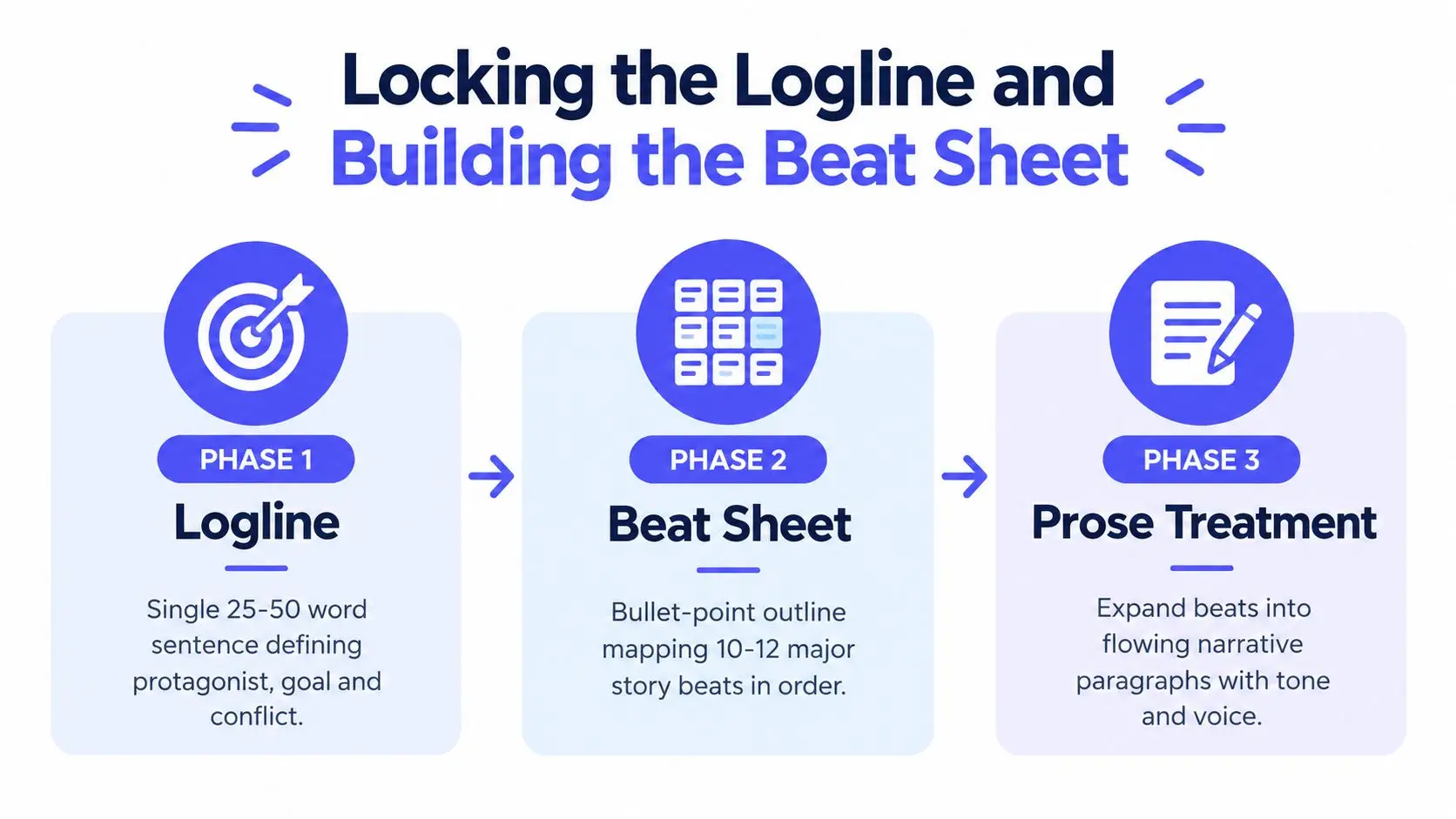
Don't begin with paragraphs. Begin with the story's structural spine. A reliable workflow moves from logline to synopsis to beat sheet to prose treatment, with each stage answering a harder question.
Phase one builds the logline
Write a compact sentence that identifies the protagonist, the central conflict, the goal, and the stakes. It should make the story's engine visible without explaining every subplot.
For example:
After losing his job, a rideshare driver accepts one final long-haul fare, but the passenger's secret forces him to choose between reaching safety and exposing the crime waiting at the destination.
Test the sentence by removing each major clause. If the story still sounds unchanged, the logline isn't carrying enough information. Say it aloud. If you can't communicate the premise comfortably during a brief elevator ride, simplify the language before expanding the story.
Phase two forces cause and effect
Turn the logline into a paragraph that reveals the ending. This prevents the common habit of describing only the setup and promising that the rest will be exciting. A useful paragraph should show what the protagonist wants, what blocks that goal, how the pressure changes the plan, and what final choice resolves the central conflict.
Phase three maps the beats
Build a numbered beat sheet before drafting prose. Keep each beat to one line and make the sequence show escalation. The exact number can vary, but a feature treatment often becomes easier to control when the beat sheet identifies the major shifts rather than every scene.
Your checkpoints are simple:
- Logline: It names the protagonist, conflict, goal, and stakes.
- Synopsis: It reveals the ending and makes the causal chain visible.
- Beat sheet: It escalates without orphan scenes or unexplained turns.
- Prose draft: It preserves the beat order while adding tone and selective detail.
Expert guidance similarly recommends locking the logline, expanding it into a three-act beat sheet, defining the intended audience, and revising from the top down in this treatment workflow. You can also use a dedicated beat-sheet planning workspace to keep the structural notes separate from the prose draft.
Use the video below as a visual companion to the planning process.
The Structural Beats Every Treatment Must Hit
A treatment doesn't need to preserve every screenplay scene. It does need to preserve the story's major changes. A producer should be able to skim the document and still understand why the protagonist reaches the final confrontation as a different person.
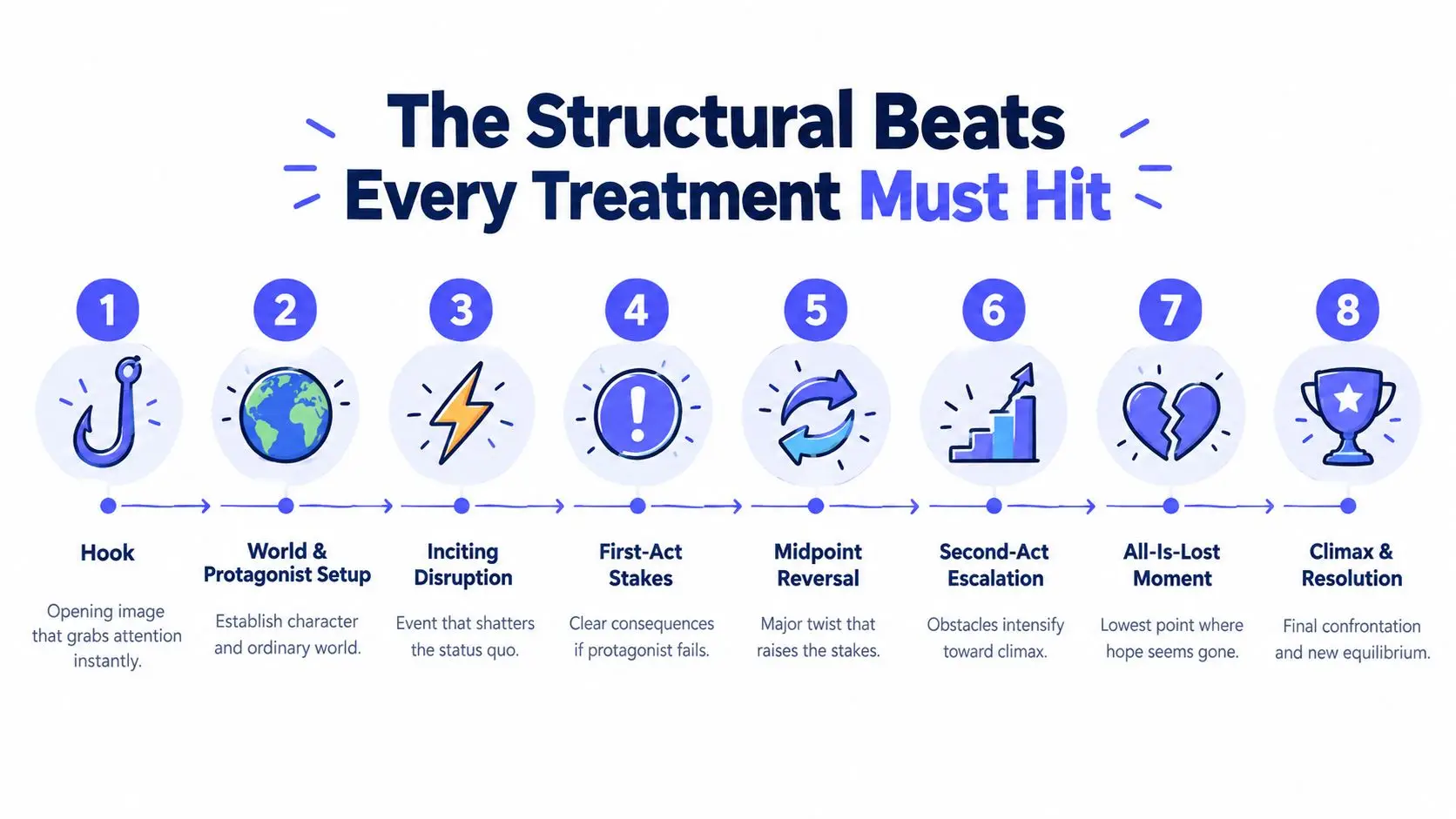
Use the following beats as story-level shifts, not scene headings:
- Hook: Open with an image, problem, or contradiction that creates immediate curiosity. “At dawn, the driver finds a bloodied suitcase in the back seat before his passenger arrives.”
- World and protagonist setup: Establish the ordinary life and the personal pressure already shaping the lead. “Recently fired and behind on rent, Marcus accepts every fare, even the ones that feel wrong.”
- Inciting disruption: Introduce the event that makes the old routine impossible. “The passenger asks Marcus to cross state lines without logging the trip.”
- First-act stakes: Clarify what failure will cost. “When Marcus discovers the passenger is being hunted, turning back would put both men in the hands of the people following them.”
- Midpoint reversal: Change the meaning of the journey or expose information that raises the pressure. “The passenger isn't fleeing a robbery. He stole evidence from the company that fired Marcus.”
- Second-act escalation: Force the protagonist into increasingly difficult choices. “Roadblocks appear, the car begins to fail, and Marcus learns that his former supervisor is coordinating the pursuit.”
- All-is-lost moment: Remove the obvious escape route and make the protagonist confront his own failure. “The car is seized, the passenger disappears, and Marcus's recorded statement makes him look like the accomplice.”
- Climax and resolution: Make the final choice express the protagonist's internal change, then show the new condition afterward. “Marcus returns for the evidence instead of running, exposes the scheme, and accepts the consequences of telling the truth.”
Some treatments divide these shifts into more granular beats, including the protagonist's decisive choice before the climax. That's appropriate when the emotional turn needs room. The principle remains the same: each beat must justify the next one.
For a more detailed structural framework, use this three-act structure guide, but don't mistake act labels for story movement. “Act Two” isn't a beat. The midpoint reversal inside it is.
If a beat feels thin, don't decorate it with atmosphere. Ask what decision, discovery, or consequence should make the next beat unavoidable.
Two failures appear often. Writers delay the hook while explaining the world, then resolve the emotional conflict before the physical climax, leaving the final confrontation hollow. Put pressure on the protagonist early, and reserve the decisive emotional release for the moment when action and character choice collide.
Voice, Tense, and Density Decisions That Change Everything
A treatment's style tells the reader how to imagine the finished project. The strongest choice isn't the most literary or the most compressed. It's the choice that answers the reader's immediate question.
| Style Choice | Development Treatment | Pitch Treatment | Contest Submission |
|---|---|---|---|
| Tense | Past tense can clarify the complete arc | Present tense creates immediacy | Use the tense that best carries voice and readability |
| Prose density | Moderate detail, with clear causal links | Lean paragraphs focused on premise and turns | Energetic prose without missing the ending |
| Scene coverage | Summarize sequences rather than every scene | Spotlight the scenes that sell the concept | Include enough story movement to prove control |
| Dialogue | Rare, used only when indispensable | One or two brief lines may establish tone | Use sparingly and only when the line carries character or premise |
Literary prose versus production compression
Short-story prose can make a treatment pleasurable to read, especially for a character-driven drama. It can also become indulgent. Production-document compression makes logistics and structure easy to scan, but it can drain the project of personality.
Choose moderate density for development. The reader needs the arc, not a miniature novel. For a pitch meeting, lean into vivid summaries of the scenes that demonstrate the project's identity.
Present tense versus past tense
Present tense creates movement: “Marcus crosses the bridge and sees the roadblock.” It can also flatten the sense of completed causality if every sentence sounds like an isolated event. Past tense can make the treatment feel more like a controlled account of the finished story, which helps when the reader is evaluating the entire arc.
Scene density and dialogue
Block paragraphs are efficient when several connected scenes perform one function. Scene-by-scene summaries help when location, escalation, or sequence design is part of the selling point. Dialogue should earn its space. Include it when the line reveals a relationship, establishes a distinctive tone, or captures the premise better than summary can.
For a deeper discussion of how word choice shapes the reader's experience, see this guide to narrative voice. Match voice to genre through rhythm and observation, not imitation. A thriller can be clipped without pretending to be a famous thriller writer. A comedy can be dry, frantic, or absurd without turning the treatment into a string of jokes.
A Worked Example From Premise to Page
Start with a premise that contains pressure and movement: a recently fired rideshare driver agrees to take one last long-haul fare across three states.
A loose logline might read:
A fired rideshare driver takes a passenger on a long trip and discovers that the passenger is in danger.
That gives us a situation, but not enough story control. Tighten it:
After losing his job, a rideshare driver accepts one final long-haul fare, then learns his passenger stole evidence from a criminal employer and must decide whether to deliver him to safety or protect himself.
The second version identifies the protagonist's pressure, the passenger's problem, the conflict, and the choice that can define the ending.
Beat sheet
- Marcus loses his rideshare account after refusing to hide a customer complaint.
- He accepts a late-night fare from Eli, who insists on crossing state lines.
- Marcus finds evidence that Eli is being pursued.
- Eli reveals that he stole records from Marcus's former employer.
- A pursuit forces them off the main highway.
- Marcus discovers his former supervisor is involved.
- Eli is captured and Marcus is blamed.
- Marcus returns for the evidence and broadcasts it before the final confrontation.
Compressed treatment sample
Marcus waits outside a closed service station, staring at the message that permanently disables his rideshare account. He needs money, but he also needs to believe that losing the job wasn't a moral failure. When a fare appears for a destination across three states, he accepts without checking the passenger's name.
Eli enters carrying one small bag and gives Marcus a route that avoids the highway. He speaks calmly, but he keeps watching the mirrors. At the first rest stop, Marcus finds a hidden drive beneath the passenger seat. Eli admits he took company records proving that drivers were being punished for reporting dangerous customers. The company wants the drive back, and Eli knows Marcus is the only driver who might understand why the evidence matters.
The journey becomes a series of forced compromises. Marcus deletes the trip from his phone, lies at a checkpoint, and lets Eli sleep while he drives through the night. At the midpoint, Marcus recognizes the voice coordinating the pursuit. His former supervisor isn't trying to recover stolen property. He's trying to erase the complaint system that destroyed Marcus's livelihood.
A roadblock separates the men. Eli is taken, and Marcus is arrested when the company frames him as the courier. Rather than accept a private settlement, Marcus escapes with help from a driver he once ignored and returns to the service station where the evidence was hidden. He uploads the records during the confrontation. The company's scheme becomes public, but Marcus still loses his account. This time, he leaves by choice, carrying the evidence instead of running from it.
The opening and ending earn their own space because they establish the protagonist's wound and final choice. The pursuit and roadblock compress into broader paragraphs because they serve the same escalation. If this were a short film, the story would likely focus on the single drive and the final decision. A limited series could expand the employer, the passenger, and the driver network. A documentary treatment would replace invented plot turns with access, subjects, evidence, and a credible path through the material. The spine stays recognizable, but the decision document changes with the buyer.
Revising and Pitching Your Treatment With Confidence
The first draft proves that you know the story. Revision proves that you know what the reader needs.
Print the treatment or move it into a format that lets you read without constantly editing. Read it aloud. Awkward rhythm, repeated information, inflated sentences, and vague transitions become much easier to hear than to see.
Run the cause-and-effect audit
Take each major beat and ask three questions:
- Trigger: What directly causes this event?
- Choice: What does the protagonist decide or do in response?
- Consequence: What new problem makes the next beat necessary?
If a beat has no answer, it may be backstory disguised as plot. If several beats produce no change, compress them. Treatment writing rewards control, not accumulation.
Strip out adjectives that tell the reader how to feel. “A devastating betrayal” is weaker than an action that makes the betrayal visible. “A terrifying house” is weaker than a detail that changes how the protagonist enters it. The prose should carry tone, but the events must carry the proof.
Clean the document before sending
Use a readable professional format, consistent margins, page numbers, and a clear title block. Keep the logline near the beginning, include your name and contact information, and introduce character names clearly on first reference. Treat the PDF as the safer final-reading format when you want the layout preserved. Use DOCX only when the recipient requests an editable file or plans to add development notes.
The recipient changes the pitch package:
- Requested by a producer: Follow the requested length and format exactly. The treatment should answer the production questions that producer is likely to raise.
- Attached to a query: Keep it concise and make the email's premise match the document's opening.
- Sent to a director: Give more attention to character movement, tone, and the choices that define the visual experience.
- Used for audio or adjacent formats: Adapt the treatment to emphasize voice, sound, access, or performance where those elements drive the project. Writers exploring audio forms can also browse these podcast script ideas for NJ creators for a useful reminder that format should follow the audience's experience.
Before you export, check the following:
- Page one: Title, writer name, contact information, and logline appear clearly.
- Story: The ending is present and the protagonist's final choice is understandable.
- Structure: Every major turn follows from an earlier decision or discovery.
- Style: Tense, density, and dialogue choices match the reader and stage.
- Language: Remove repetition, filler adjectives, camera directions, and unnecessary scene transitions.
- File: Open the final PDF on another device and confirm that headings, page breaks, and contact details display correctly.
A treatment can also benefit from the same compression discipline used in a book synopsis workflow, but don't turn it into a generic summary. The document must still make the reader feel the project's particular engine, voice, and ending.
Storyloft gives writers a focused place to plan, draft, revise, organize research, and manage long-form projects without scattering the work across disconnected tools. Use its planning workspace and manuscript-aware editing tools to turn your treatment's structural spine into a controlled draft, then visit Storyloft to start building the project.