Novel Writing Planner: Build Your Book from Idea to Draft
You're at the kitchen table with a promising premise, a handful of character notes, and several documents that each contain a different version of the same story. You know the opening scene. You can see the ending in flashes. Between those points, however, the novel feels like a pile of loose parts.
A novel writing planner gives those parts a working structure. It helps you manage the book as a long project with research, drafting, revision, deadlines, and changing energy levels. You don't need a rigid system that dictates every sentence. You need a reliable place to decide what matters now, record what you've already decided, and adjust the workload when real life interrupts.
Table of Contents
- Why Every Novelist Needs a Planner
- What a Novel Writing Planner Actually Does
- Core Features of a Strong Planner
- Planning Styles and How They Shape Your Workflow
- Choosing or Building the Right Planner
- Integrating the Planner Into Your Writing Routine
- Putting It All Together
Why Every Novelist Needs a Planner
At first, scattered notes feel productive. You write a character secret on a sticky note, save a setting detail in a phone app, outline a confrontation in a document, and sketch a possible ending on an index card. Each fragment seems useful. Later, you can't remember which version is current, whether the character has already learned the secret, or why the confrontation was supposed to happen.

A planner acts as the load-bearing surface for those decisions. It gives the premise, characters, scenes, research, and revisions a shared home, so you aren't rebuilding the story's foundation every time you sit down to draft.
A novel is a project before it becomes an artifact
A finished novel looks like one object, but writing it involves several kinds of work. You're solving plot problems, checking continuity, gathering information, drafting prose, reviewing earlier choices, and protecting time to continue. Those tasks compete for attention even when you're working alone.
Without a planner, your memory becomes the filing system. That might be manageable for a short writing experiment, but a long manuscript creates more relationships to track. A character's goal affects a scene. That scene changes the timeline. The timeline affects another character's entrance. During revision, one small change can require several connected edits.
Research on outlining and writing cognition links external organization with lower working-memory demands and greater attention for sentence-level composition, as summarized in this review of outlining and writing processes. The practical benefit is simple: when the planner stores what you already know, your drafting session can focus on what happens next.
Practical rule: If you've had to search through more than one place to answer a basic question about your own novel, your planning system needs a central home.
A useful planner also makes planning less intimidating. The guide to how much planning to do before writing a book can help you choose a level of preparation that supports your process without turning preparation into avoidance.
What a Novel Writing Planner Actually Does
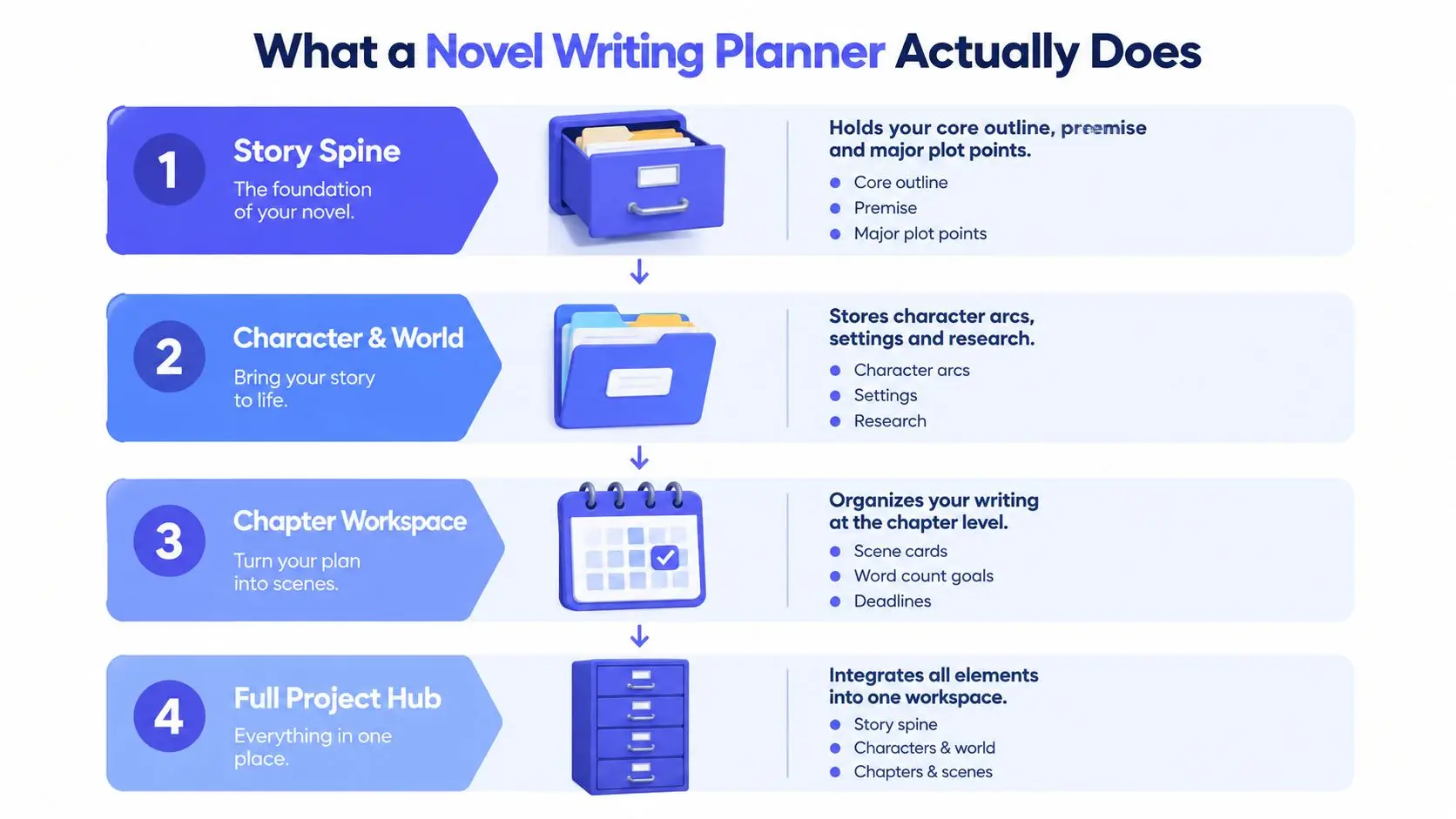
Think of a planner as a filing cabinet for the book. The first drawer contains the story spine. Other drawers hold character records, setting research, scene plans, deadlines, and revision notes. You can start with one drawer and add the others only when the project demands them.
Start with the story spine
The simplest useful planner is a one-page outline containing:
- Premise: Who is the story about, and what problem disrupts their life?
- Central conflict: What force, person, belief, or circumstance resists the protagonist?
- Major turns: Which events change the direction of the story?
- Ending: What decision, consequence, or transformation brings the story to a close?
This page gives you a destination without requiring every road to be mapped. A mystery writer might record the crime, the investigator's false assumption, the discovery that changes the case, and the final reveal. A romance writer might note the meeting, the growing connection, the rupture, and the choice that makes reconciliation possible.
Add structure when the story needs it
The next tier is a beat sheet with chapter summaries. Each chapter can include its purpose, viewpoint character, major event, conflict, and resulting change. This level helps you see whether the middle keeps moving or whether several chapters repeat the same emotional function.
The most developed version is a complete project workspace. It links scene cards to chapters, character profiles to scenes, research notes to setting details, and revision tasks to specific passages. It absorbs more of the mental bookkeeping that would otherwise interrupt drafting.
The planner isn't the novel. It's scaffolding, like temporary supports around a building. You can change it, remove parts of it, and discover new rooms as you work.
You can build this system in a notebook, spreadsheet, binder, or writing app. The format matters less than whether you can find information quickly and update it without friction.
Core Features of a Strong Planner
A strong planner answers practical questions quickly. What does this scene change? What does this character want here? Which research detail supports the setting? What still needs revision? Four components provide the foundation.
Plot beats keep the story from drifting
Plot beats mark the structural turns that change the protagonist's situation. They don't need to follow a formula mechanically, but they should show movement from the opening disruption toward escalating consequences and a meaningful ending.
Use beats during outlining to test the story's direction. Use them again during revision to find a sagging middle, an unearned reversal, or a climax that doesn't answer the central conflict. A beat is useful when it records a change, not merely an event.
Scene cards turn structure into work
A scene card translates a broad beat into a draftable unit. Include the viewpoint character, immediate goal, obstacle, conflict, outcome, and any consequence that points toward the next scene.
For example, “the detective investigates the harbor” is too vague to guide a writing session. “The detective questions a dockworker to identify the missing boat, but recognizes the dockworker's voice from a threatening call, and leaves with a false location” gives you pressure, movement, and a reason to continue.
Scene cards also expose duplication. If two planned scenes both involve the protagonist discovering the same kind of clue, you can combine them before spending time drafting both.
Character sheets protect consistency
A character sheet should help you write behavior, not just collect trivia. Record the character's want, fear, wound, habits, relationships, speech patterns, and boundaries. Add the belief they hold at the beginning and the belief the story will challenge.
Consult the sheet when a character feels flat or makes a decision that seems convenient. Ask whether the action follows from their history and current pressure. A useful character record should make the least surprising choice easier to find.
Research binders keep questions out of the drafting session
Research notes belong in a labeled binder, not scattered among scene drafts. Store setting references, historical facts, terminology, timelines, source links, and unresolved questions where you can retrieve them without abandoning the manuscript.
The workflow for organizing characters, worldbuilding, and research beside your manuscript offers a practical model for keeping reference material close to the writing without mixing it into the prose itself.
Supporting features complete the system. A progress tracker shows what's drafted, revised, or blocked. A word-count dashboard makes output visible. A revision checklist prevents broad structural work from getting lost beneath line edits.
| Component | What It Tracks | When to Use It |
|---|---|---|
| Plot beats | Major changes in direction and stakes | Outlining and structural revision |
| Scene cards | Goals, conflict, outcomes, and consequences | Daily drafting |
| Character sheets | Motivations, traits, relationships, and voice | Planning and continuity checks |
| Research binders | Facts, sources, timelines, and world details | Before and during drafting |
| Progress tools | Word targets, status, and unfinished tasks | Weekly reviews and deadline planning |
Planning Styles and How They Shape Your Workflow
Not every writer should use a planner in the same way. Some authors want the route mapped before they begin. Others discover the route by walking. Many need a destination and a few landmarks, then prefer to improvise the roads between them.
Planning research identified 10.6% of writers as “Planners,” 38.9% as “Hybrid Planner/Discoverers,” and 48.4% as “Discoverers” in the examined dataset, according to research summarized in this overview of novel-writing software. The useful lesson isn't that one style wins. It's that a planner should support different relationships with uncertainty.
| Style | Core Need | Planner Features Used Most | When Planning Happens |
|---|---|---|---|
| Plotter | Confidence in the route | Beat sheets, chapter cards, timelines | Mostly before drafting |
| Discovery writer | A place to capture discoveries | Character notes, idea parking lot, loose ending | During drafting and revision |
| Hybrid writer | Stable direction with creative freedom | Major beats plus flexible scene cards | Before drafting, then continuously |
A plotter might outline every chapter before writing the first page. That can reduce hesitation, but the outline should remain editable. If a character behaves in a more convincing way than expected, the plan needs to record the change rather than punish it.
A discovery writer can use a lighter planner. Store the premise, known characters, unanswered questions, and emerging scenes. The planner becomes a parking lot for possibilities, not a contract. It prevents valuable discoveries from disappearing while leaving the story open.
Hybrid writers often plan the story spine and discover the connective tissue. They might know the inciting incident, midpoint reversal, crisis, and ending, while allowing individual conversations and transitions to develop at the desk. The plotter versus pantser comparison can help you recognize which balance feels sustainable.
Review your past writing rather than choosing a label based on personality. Did detailed outlines make drafting easier, or did they make you stop caring about the story? Did free discovery produce energy, or did revision become a search for the plot? Build around the evidence of how you work.
Choosing or Building the Right Planner
The best format is the one you'll update while the novel is changing. A beautiful system that takes too long to maintain becomes another form of resistance.
Match the format to the work
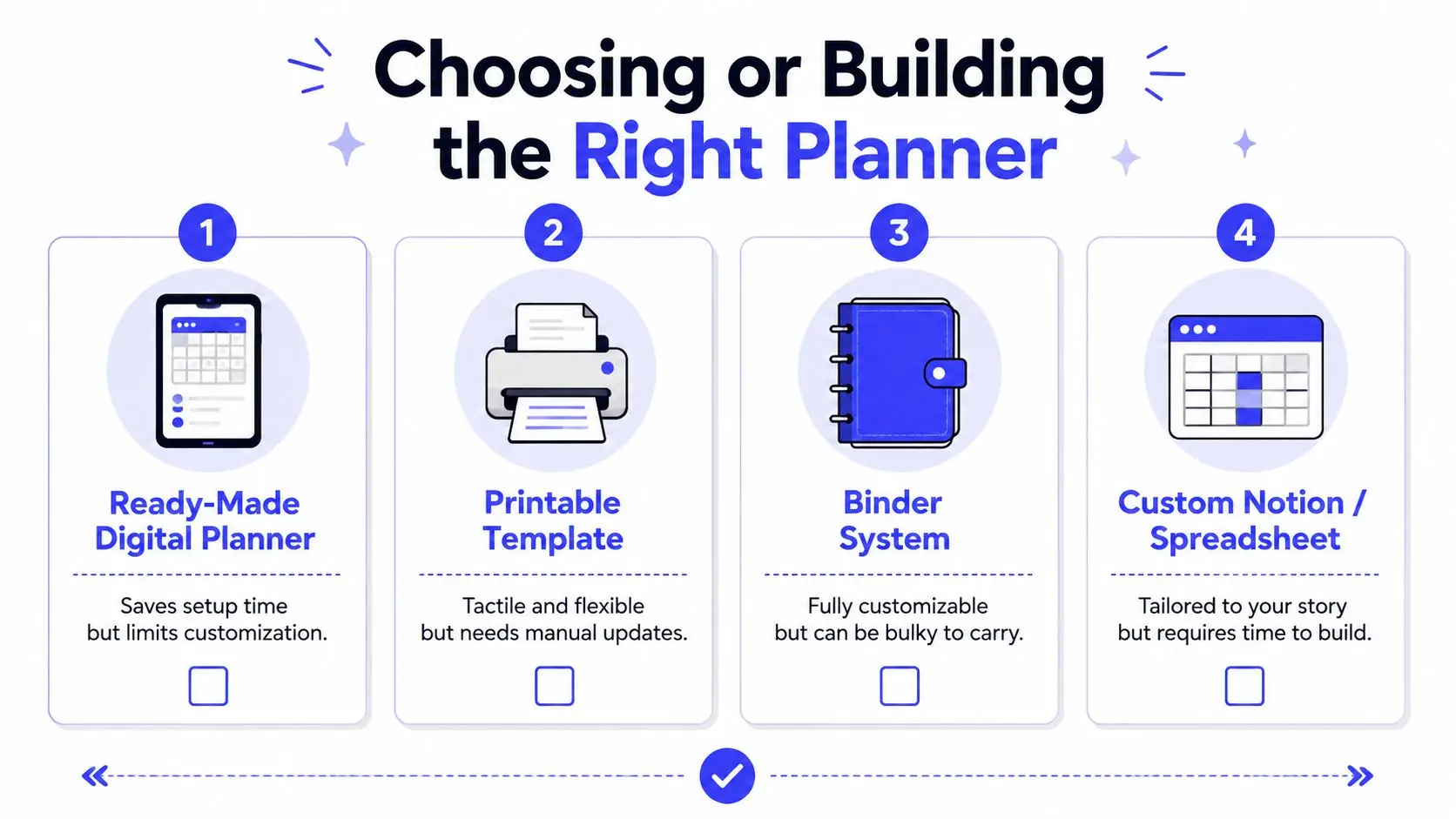
A ready-made digital planner gives you structure immediately. It may include fields for beats, characters, scenes, and goals, but you'll need to accept its assumptions about how a book should be organized.
Printable templates suit writers who think better with pen, paper, and visible annotations. They're flexible and easy to rearrange, but updates require copying or replacing pages. A binder with printed sheets and sticky-note scene cards gives spatial thinkers more freedom, although it's less convenient when you write away from home.
A custom Notion, Scrivener, or Google Sheets setup can match your exact process. The tradeoff is setup time. You'll need to decide the fields, links, labels, status markers, and archive structure before the system becomes useful.
Use this checklist before choosing:
- Writing volume: If you plan to manage several projects, search, duplication, and reusable templates matter more.
- Collaboration: Co-writers, editors, and beta readers need permissions, comments, and a shared current version.
- Budget: Start with the simplest format that handles your immediate planning problem.
- Technical comfort: Choose a system you can maintain without turning every update into a software project.
- Access needs: Cloud access helps when you move between devices or writing locations.
Evaluate any planner in a short trial. Look for plot beat fields, useful character depth, practical scene cards, research organization, and revision tracking. Then test whether you can locate a character detail and update a scene status without breaking your concentration.
Integrating the Planner Into Your Writing Routine
A planner only works when it appears inside your writing rhythm. If it sits on a separate shelf, it becomes an archive instead of a working tool.
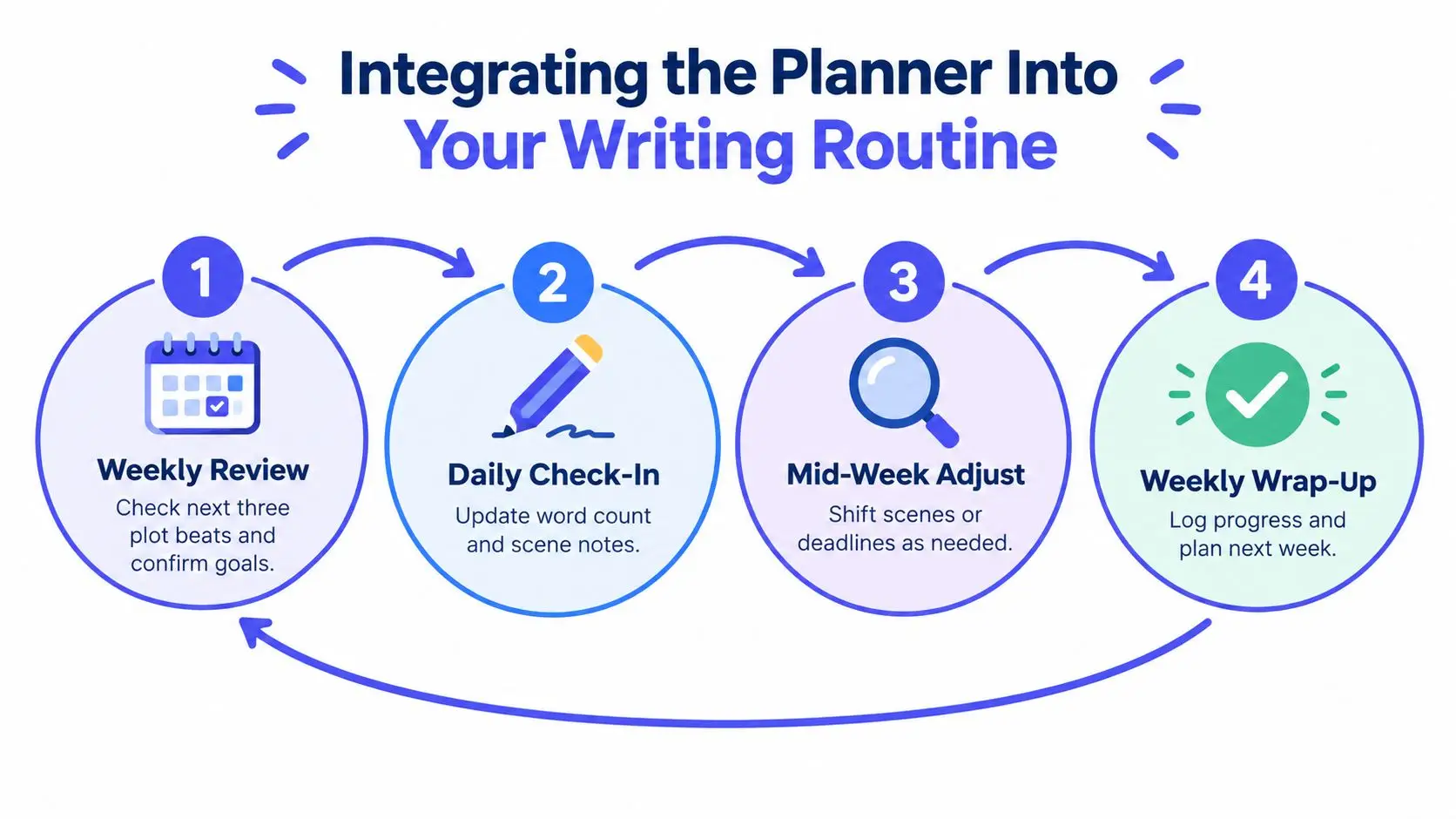
Start the week by reviewing the next three plot beats and selecting the scenes that serve them. Assign those scenes to actual writing windows, not imaginary stretches of free time. A part-time author with short sessions might plan one scene card per session, while a sprint writer might assign daily word targets across several cards.
Use a flexible production loop
A useful status flow is planned, drafted, revised, and complete. Move each scene through those stages as its condition changes. Don't mark a scene complete just because you typed the final sentence. If it still contains a continuity question or a missing emotional turn, leave a visible revision task.
Academic writing guidance from the University of California, Irvine writing center connects regular writing habits and accountability with stronger productivity. Apply that principle without turning your planner into a punishment system. A streak can encourage return visits, but a missed session should trigger a reschedule, not a judgment.
For writers with small windows, divide the work by action:
- Drafting session: Write the scene's central exchange or turning point.
- Research session: Resolve one setting or continuity question.
- Planning session: Adjust the next card after the previous scene changes direction.
- Revision session: Fix one defined issue in a completed scene.
Midweek, compare the plan with the manuscript. If a scene took a different turn, move the affected cards and deadlines. If research expanded into a distraction, record the unresolved question and return to the draft.
Collaborators need a shared source of truth. Put plot decisions, character changes, feedback, and ownership in the planner instead of leaving them in disconnected messages. At the weekly wrap-up, record what changed, move completed scenes into revision, and set the next review point. The writing routine guidance from Storyloft provides another way to connect goals with repeatable sessions.
Putting It All Together
Before drafting, make six operational decisions:
- Define the project: Write the working genre, intended audience, and central promise in one sentence.
- Set the spine: Record the inciting incident, major escalation, crisis, climax, and ending.
- Profile viewpoint characters: Give each one a clear want, obstacle, pressure point, and relationship to the central conflict.
- Label the research: Create separate areas for setting, timeline, terminology, sources, and questions you still need to resolve.
- Run a realistic trial: Use the planner during your actual writing windows for a week, then remove fields you avoid and strengthen fields you use.
- Schedule the rhythm: Choose fixed days for scene-card review, progress updates, and revision handoffs.
A long manuscript doesn't fail only because the idea is weak. It often stalls because the writer has to make too many decisions before each session can begin. Treat the planner as workload management, and creative decisions become easier to retrieve, revise, and sequence.
If you're coordinating several content workflows alongside your book, AI content strategy for video teams offers a useful comparison point for thinking about repeatable production systems, shared assets, and review stages.
Storyloft brings manuscript drafting, planning binders, research notes, character tools, goals, collaboration, editing, illustration, cover design, and publishing workflows into one cloud-based workspace. Visit Storyloft to test whether its planning and long-form writing tools fit the way you want to build your novel.