How to Publish an Ebook: A 2026 Indie Author’s Guide
You've finished the manuscript, or maybe you're one chapter away from the finish line and already feeling the pressure of what comes next. The draft looks solid on your screen, but publishing brings a different set of questions, file formats, cover files, metadata fields, pricing choices, and the uneasy feeling that one small mistake could make the launch messy.
That's the reality of how to publish an ebook in 2026. The opportunity is real, but so is the competition. In the U.S. alone, 2.6 million self-published titles with ISBNs were released in 2023, up 7.2% year over year according to Booketic, which means discoverability depends on professionalism from the first upload onward. A unified workflow matters because the old pattern of bouncing between separate apps for drafting, editing, design, and formatting can slow everything down and create avoidable errors.
If you're organizing your manuscript, revision notes, and launch assets in one place, start with the finish-line mindset in this manuscript completion guide.
Table of Contents
- From Final Draft to First Steps
- Polishing Your Manuscript to Professional Standards
- Creating Your Ebook's Visual Identity
- The Technical Core of Your Ebook
- Navigating Distribution Channels and Pricing
- Your Ebook Launch Checklist and Beyond
From Final Draft to First Steps
The best moment in indie publishing is also one of the most dangerous. You type “The End”, feel the rush, and then realize the draft still needs to survive public scrutiny, where readers notice weak editing, poor layout, and sloppy positioning fast.
That's why the modern answer to how to publish an ebook starts before the upload screen. The market is crowded, and the practical response is to treat the manuscript like a product, not just a file. Professional editing, formatting, and positioning matter because a crowded marketplace makes amateur-looking books easy to overlook.
What the first pass should actually include
A clean workflow begins with a clear handoff from drafting to revision. Instead of scattering notes across separate apps, keep the manuscript, comments, and revision targets in one environment so nothing gets lost in the shuffle. That matters whether you're working alone or sharing chapters with beta readers.
Practical rule: if a launch step creates file duplication, version confusion, or repeated copy-paste work, it's usually adding risk instead of value.
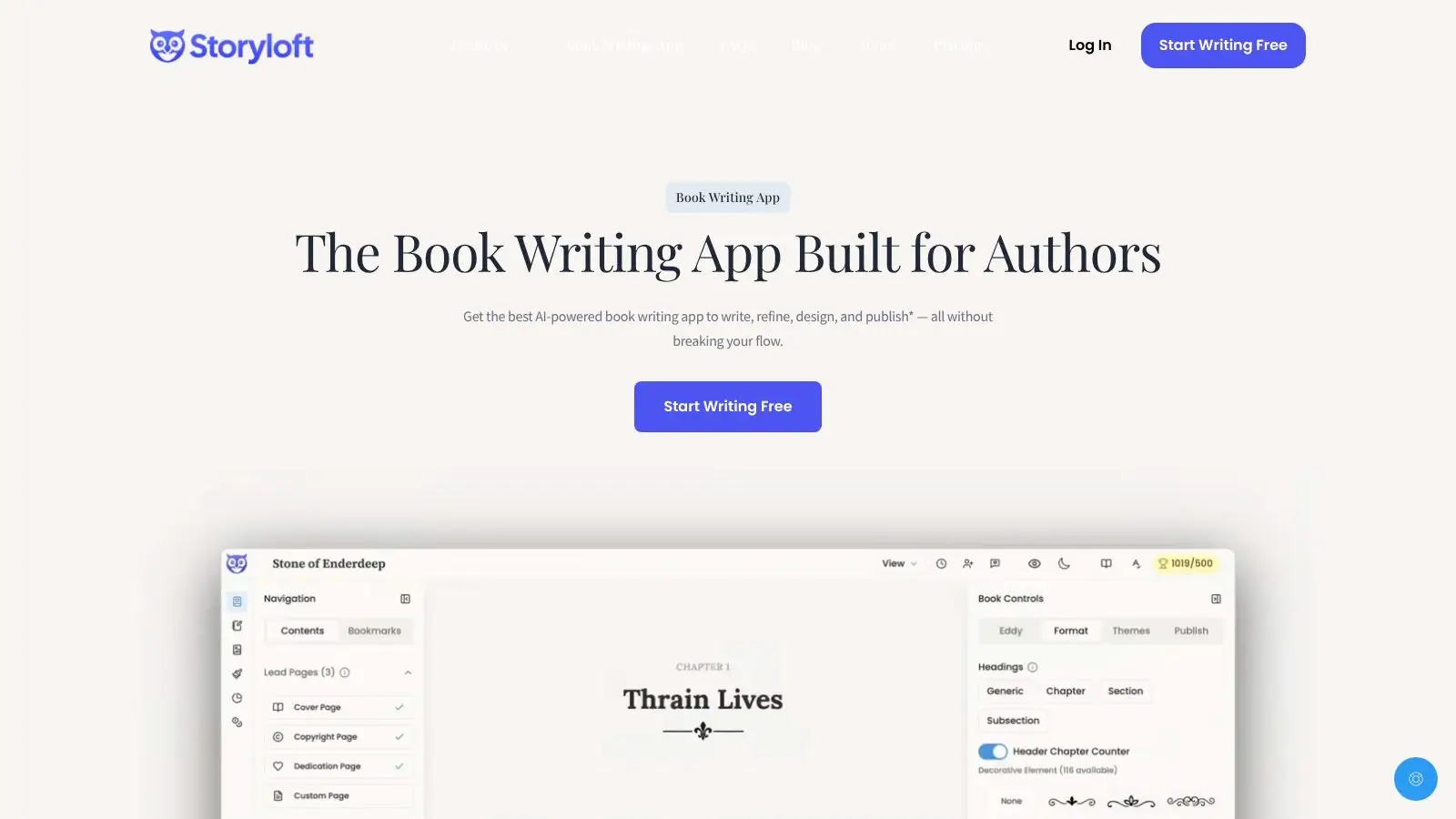
An efficient system helps because every downstream decision depends on the source manuscript. If your text changes after formatting, cover sizing, or metadata planning, you'll spend time undoing work that should've been stable the first time. A unified platform such as Storyloft can reduce that back-and-forth by keeping manuscript work, cover prep, and export preparation in one place, instead of forcing you to stitch the project together later.
The first job, then, is simple but foundational. Get the manuscript into a state where every later step has something solid to build on.
Polishing Your Manuscript to Professional Standards
A raw draft isn't ready because it feels finished to you. It's ready when another reader can move through it without getting pulled out by typos, clunky sentences, or structural gaps. In a market where low-quality AI-generated ebooks are flooding marketplaces and expert-led books need to stand out, rigorous editing is part of credibility, not polish for its own sake as noted in Learning Revolution's 2026 guidance.
Edit in layers, not in one blur
The strongest editorial process has more than one pass. Developmental editing checks the shape of the book, whether the argument holds together, whether scenes earn their place, and whether the reader's attention is being managed well. Line editing follows the sentence level, where rhythm, repetition, voice, and clarity either improve the reading experience or drag it down.
Copyediting comes after that. It catches mechanical errors, consistency problems, and small issues that still matter because ebook readers experience them line by line. Skipping straight from a rough draft to export is how writers end up publishing avoidable flaws.
If you're working with AI-assisted revision tools, use them for targeted help, not for surrendering the manuscript's voice. Tools like Eddy inside Storyloft can help surface repetitive phrasing, tone inconsistencies, and weak transitions directly in the document, which is useful because the edits stay attached to the actual manuscript instead of living in a separate report.
Use feedback without letting it scatter the book
Beta readers are most useful when you give them a focused job. Ask for reactions to pacing, clarity, trust, and confusion points, not just “any thoughts.” That keeps feedback usable instead of vague.
A manuscript becomes publishable when revision has a purpose. Random tinkering usually makes voice less consistent, not more.
Human editing still earns its place when the draft has conceptual issues, when the prose needs a serious structural pass, or when the book's credibility depends on precision. The more ambitious the book, the less you want to rely on surface-level cleanup alone. If you're comparing your workflow against a guided process, this professionally edited workflow resource is a useful benchmark for what a clean handoff looks like.
The point is not to over-edit into sterility. It's to make the final manuscript feel intentional, trustworthy, and easy to read. That's what readers pay for when the file is an ebook instead of a rough idea.
Creating Your Ebook's Visual Identity
Cover art is not decoration. It's the first sales filter, especially in thumbnail view, where a reader decides in seconds whether your book looks like it belongs in the market. A cover that matches the genre and reads clearly at a small size does more work than a beautiful design that loses its message when shrunk.
Build for the thumbnail first
Genre expectations matter more than personal taste here. Romance, thriller, fantasy, business, and nonfiction all signal different things visually, and the cover has to communicate the right promise immediately. Typography should be legible, the focal point should survive small-screen viewing, and the overall composition should feel aligned with the book's category.
That's why many authors create the cover after they've settled the book's market position, not before. You want the design to match the audience you're trying to reach, not just your favorite color palette.
Storyloft's Book Cover Studio can fit into that process by letting you work from AI-generated layouts or custom imagery that's already tied to the manuscript's tone. If you prefer to keep everything in one system, that reduces the friction of exporting assets back and forth between separate design tools. These cover design best practices are worth using as a quality check, especially if you're trying to keep the cover genre-aware rather than generic.
Keep the interior visually calm
Interior design matters less for dramatic flair and more for readability. Ebook interiors need spacing, hierarchy, and consistent styling so the reader isn't distracted by awkward line breaks or clashing section treatments. If the book includes illustrations, the visual language should stay consistent from one image to the next.
A scene-based illustration workflow can help nonfiction authors, children's writers, and genre writers maintain consistency without outsourcing every visual element. Storyloft's illustration tools and character controls can support that kind of continuity when the manuscript calls for it.
When the design work is done, the ebook should feel like one coherent package, not a set of files assembled at the last minute. Readers can tell the difference.
Later, when the file is ready for export and upload, you'll want a quick way to preview how visuals behave in the finished product. That's where the design phase ends and the technical phase begins.
The Technical Core of Your Ebook
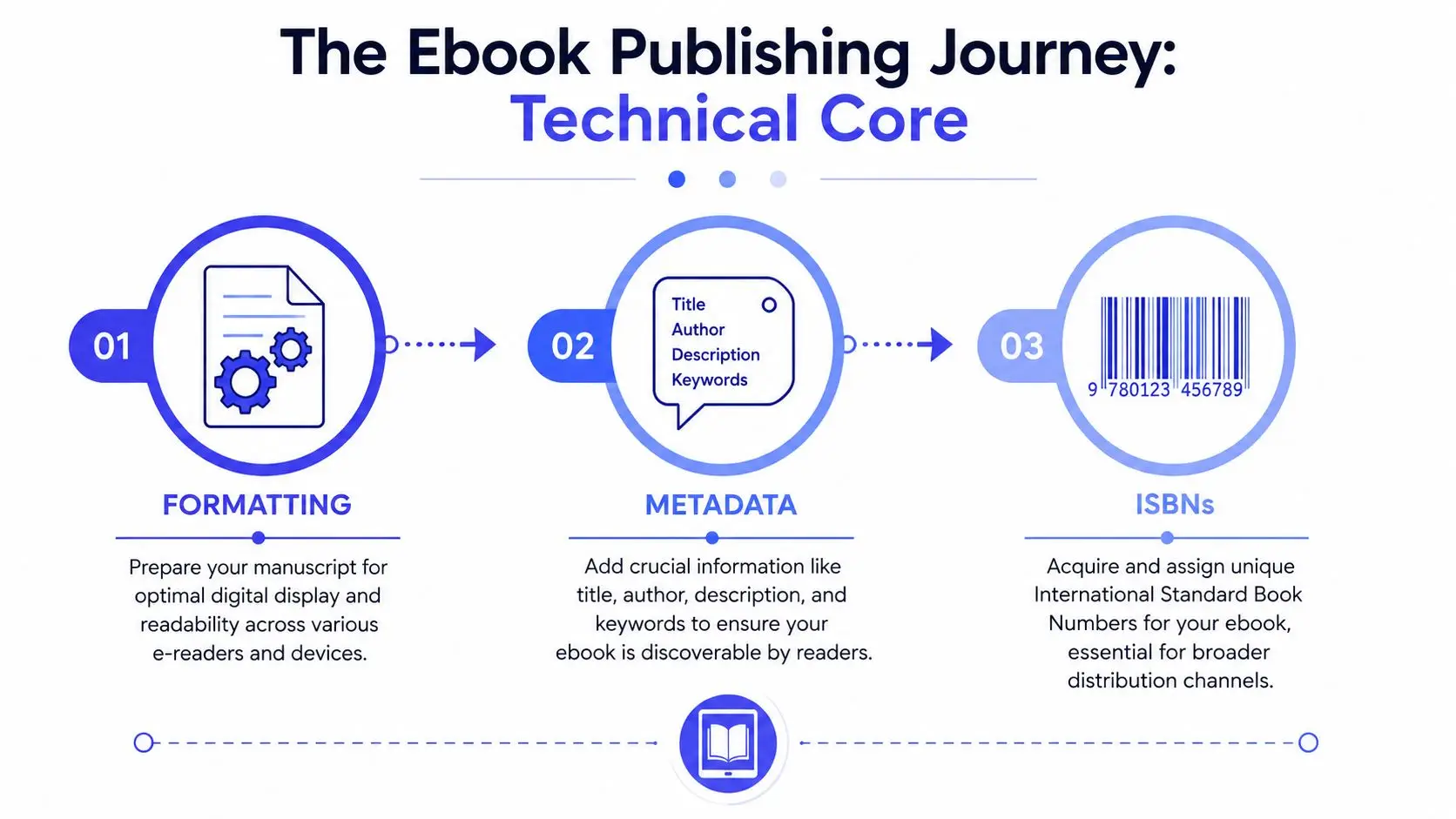
The technical side of ebook publishing is where good manuscripts can still go wrong. File type, metadata, and identifier management sound boring until a bad conversion breaks headings, a weak description hurts discoverability, or a missing detail delays the upload.
Format the file before the platform formats it for you
Professional formatters often deliver a Kindle-ready KPF or pre-formatted Word file, but the key idea is the same. The file needs to open cleanly before it hits the retailer dashboard. Before uploading to KDP, confirm the exported file displays correctly in Kindle Previewer or a similar preview tool so layout problems show up before publication, not after as recommended in SelfPublishing.com's ebook publishing guide.
That validation step matters because many upload problems aren't text problems, they're structure problems. Broken paragraph styles, weird spacing, misplaced images, and bad heading hierarchy can all survive a casual glance and still hurt the reader experience.
If your manuscript also needs a compact distribution copy for email or web use, a separate resource on how to compress a PDF for email or web can help you keep file sizes practical without sacrificing readability.
Treat metadata like a storefront asset
Metadata is not admin work. It's what tells platforms and readers what the book is, who it's for, and how it should be surfaced. Title, author name, description, keywords, and categories all affect whether your ebook gets found by the right audience.
A lot of authors rush this step because they'd rather get to the upload button. That's a mistake. If the listing doesn't match the book's actual positioning, the best formatting in the world won't help you reach readers who are a fit.
Manage identifiers and exports in one place
ISBN handling depends on your distribution plan, but the practical issue is simple. Keep track of which identifier belongs to which format, and don't mix up the ebook version with any paperback or later edition. If you're building from a unified environment, export and identifier generation can be tied to the same manuscript state, which lowers the chance of version drift.
For a cleaner handoff from manuscript to file, this Word-to-EPUB formatting workflow can serve as a good internal model. The fewer conversions you need, the fewer places errors can hide.
The technical core is not glamorous, but it's where professionalism becomes visible. If the file is clean, the next problem is no longer “Can it upload?” It becomes “Where should it sell, and at what price?”
Navigating Distribution Channels and Pricing
The distribution decision shapes what comes next. Some authors want the reach and promotional tools that come with Amazon exclusivity. Others want to go wide and appear across multiple storefronts, which can be a better fit when they want broader retailer coverage or a longer-term audience spread.
Choose reach or concentration based on the book's goals
Amazon KDP Select gives access to certain promotional benefits in exchange for exclusivity, which can be a reasonable choice for some launches. Going wide means distributing through multiple retailers so the book can live beyond Amazon's ecosystem. Both approaches have trade-offs, and the right answer depends on your audience, your genre, and whether long-term platform concentration or broader availability matters more to you.
A practical mistake is treating distribution like a single yes-or-no question. It's really a positioning decision. If your readers are concentrated in one ecosystem, exclusivity may make sense. If your buyers are spread across several storefronts, wide distribution gives you more room.
Price for markets, not just for conversion math
Pricing is where many guides get shallow. Amazon KDP supports separate marketplace pricing, but a lot of authors still rely on simple currency conversion and leave money on the table in major international storefronts. That can mean missing opportunities in places like the UK, EU, and Canada, where a direct conversion doesn't always produce the smartest local price as discussed in Scribe Media's pricing guidance.
Practical rule: don't assume one list price should travel unchanged across every market. Local storefronts deserve their own decision.
The same logic applies to royalty planning. Price affects both reader psychology and platform economics, so a launch price shouldn't be picked casually. If you're launching internationally, the cleanest approach is to think in storefronts, not just in one currency.
Keep the upload path simple
A single, integrated workflow can make this easier because formatting, cover prep, and export happen in one place instead of spreading across three or four different apps. Storyloft is one example of a platform that keeps those publishing pieces together, which can reduce the chance of uploading the wrong version or mismatching the file with the metadata.
That kind of cohesion matters most when you're juggling multiple marketplaces. The fewer moving parts, the easier it is to keep the book consistent everywhere it appears.
Your Ebook Launch Checklist and Beyond
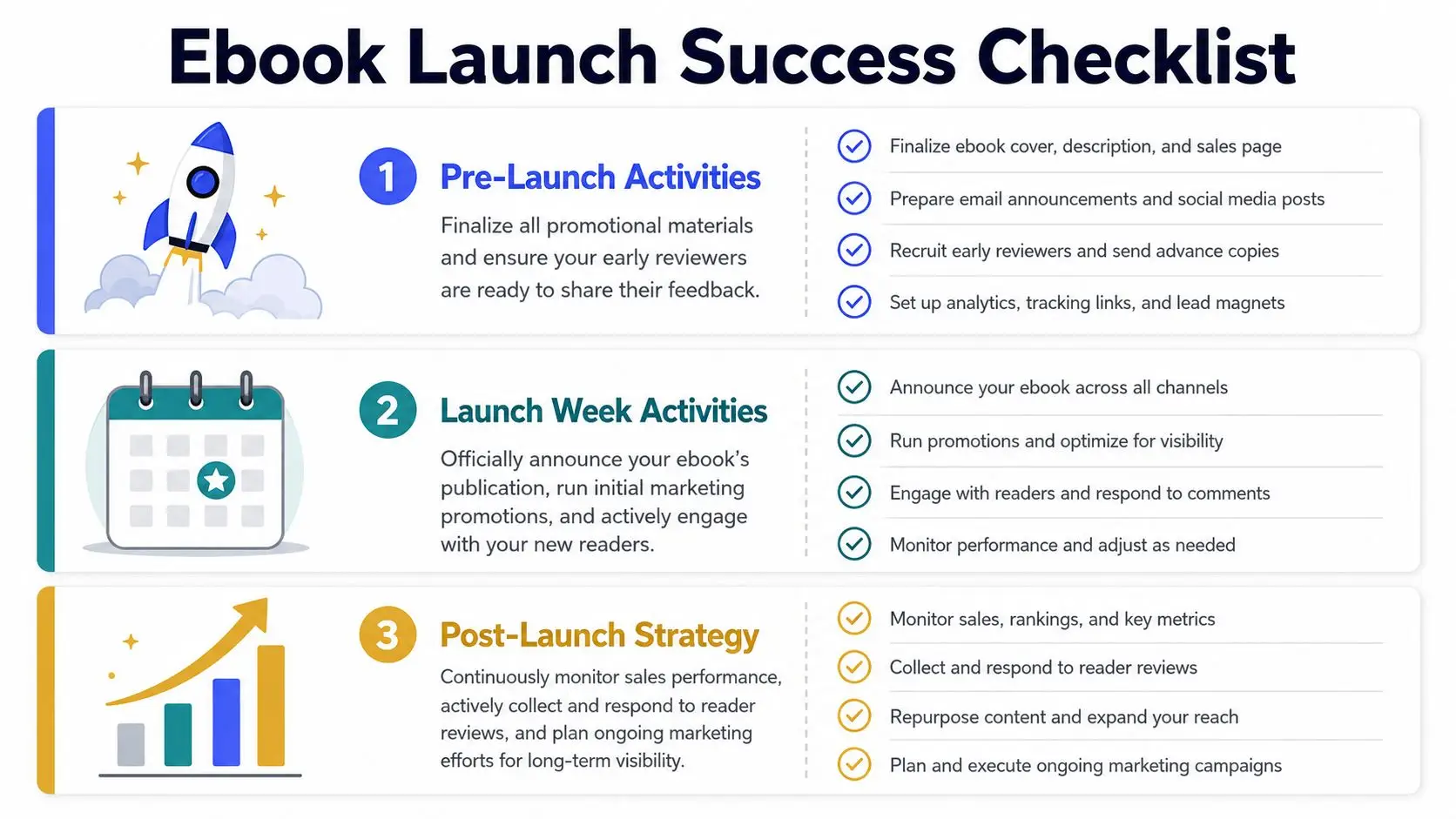
Hitting publish is a starting gun, not a finish line. The launch window is where small coordination mistakes become public, and where good preparation pays off.
Pre-launch work that keeps the launch from wobbling
Before the book goes live, verify the final file on an actual e-reader or a reliable preview tool. That final read-through catches formatting issues that can slip past desktop review. Then make sure the metadata is complete, the cover is attached, and the listing copy says exactly what you want the marketplace to say.
It also helps to line up your early reviewers and your audience touchpoints before you submit. If your launch content is ready in advance, you can announce the book with confidence instead of rushing to assemble posts after the page goes live. For repurposing launch material into multiple posts, SleekPost's content repurposing tips can help you turn one announcement into several platform-ready variations without rewriting everything from scratch.
Time your announcement around marketplace lag
Amazon can take almost 72 hours to show a book on the Amazon Marketplace after submission according to the launch guidance cited in the brief. That delay matters because a marketing post that goes out too early can send readers to a page that isn't live yet. A smarter plan is to keep your launch messaging ready, then push once the listing is confirmed.
Marketing works better when the book is actually visible. Sounds obvious, but a lot of launch frustration comes from announcing too soon.
Keep the first month active
After launch, keep collecting early reviews, watch how readers respond, and stay ready to adjust your marketing angle. Don't treat the debut as a one-day event. Keep the book visible through follow-up posts, reader outreach, and whatever promotional rhythm fits your audience.
A practical workflow makes this easier because you're not rebuilding assets every time you want to promote the title again. You already have the manuscript, the cover, the description, and the export trail in one place, so the book can keep moving instead of stalling after release.
If you want a simpler path from draft to marketplace, open Storyloft and build your ebook in one workflow, from editing and design through export and launch prep. Start with the manuscript, keep every asset connected, and make the publishing process feel like one project instead of five separate ones.