Best AI Tools for Writing I’ve Tested in 2024
Last spring, I stared at my laptop with 60,000 words open. I had ChatGPT ready to help with a plot hole. But what I got back was not what I expected.
The tone was wrong, and the characters didn’t sound like themselves. My detective now sounded like a self-help guru. This made me realize AI tools aren’t made for book writers.
They’re for marketers who write blog posts or social media. As an ai book writer, I needed something that gets my story. Not just the last bit I copied.

I tested every AI writing tool I could find. I spent months looking at features, prices, and results. Jasper, Sudowrite, and ProWritingAid were some I tried. But Storyloft stood out to me.
Storyloft reads your whole manuscript before helping. It knows your characters, tone, and plot. It doesn’t just write text. It writes text that fits your story. For me, this was a big deal.
In this article, I’ll share what I learned. I’ll talk about features, prices, and my experience with these tools. This guide is for anyone writing fiction or nonfiction.
Key Takeaways
- Most AI writing tools are designed for short-form content, not full-length books or manuscripts.
- Storyloft offers manuscript-aware AI that reads your entire draft before making suggestions, keeping your story consistent.
- The best AI writing tools for authors preserve your unique voice instead of replacing it with generic output.
- Storyloft’s Author Plan includes goal tracking, notes, formatting tools, and monthly AI usage allowances at a reasonable price.
- Artificial intelligence writing software can boost creativity and save time without taking control away from the writer.
- An ai book writer benefits most from tools that understand characters, tone, and story structure across an entire project.
Introduction to AI Writing Tools
Writing a book is exciting, but hitting a wall can be tough. I’ve been there, staring at a blank page. That’s when AI writing tools come in. They’ve changed how I write, from brainstorming to editing.
What Are AI Tools for Writing?
AI writing tools are software that use artificial intelligence. They help you create, edit, and organize text. They do more than just check spelling.
Today’s tools can brainstorm ideas, build outlines, and research topics. They also edit drafts and help when you’re stuck.
Some tools, like Claude, can handle a lot of text. Others, like AI novel generators, are made just for fiction writers. They help with characters and world-building.
The Growing Need for AI in Writing
New AI writing platforms launch almost every week. This shows writers want better tools. A 2024 survey by the Authors Guild found nearly 30% of authors use AI tools.
The need for AI in writing keeps growing. The publishing world is more competitive than ever. Readers want polished, engaging books fast.
Having the right AI tools can help you write better and faster. In the next sections, I’ll share the tools I tested this year.
Overview of Storyloft
Storyloft stood out to me in 2024 among AI writing tools. It’s not just another content mill. It’s made specifically for book authors, which makes a big difference.
Purpose-Built for Authors
Most AI tools focus on blogs, ads, or social media. Storyloft is different. It uses a machine learning engine to understand your manuscript before suggesting anything. This means the AI starts with your work, not from scratch.
The Author Voice Preservation technology really caught my eye. It checks your tone, sentence patterns, and word choices. Every suggestion it makes fits how you write. No more awkward paragraphs that don’t match your book.
“I wanted an AI that could think like a writing partner, not a content generator. Storyloft gave me exactly that.”
Unique Features of Storyloft
Storyloft has tools that go beyond just writing text. Here’s what I found impressive:
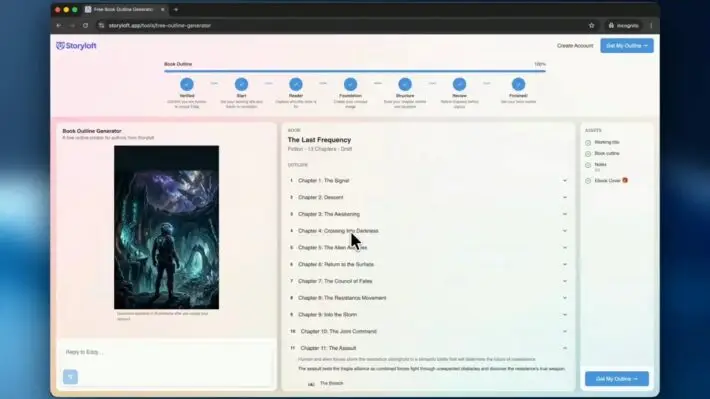
- Manuscript-aware AI that tracks characters, plot threads, and timelines
- Outlining tools for both fiction and nonfiction projects
- Idea generation prompts tailored to your genre
- Editing and formatting assistance built into the writing workflow
- Illustration workflow support for visual projects
As algorithmic storytelling software, Storyloft does context better than others. It remembers Chapter 3 when you’re writing Chapter 12. This kind of continuity is rare.
In the next section, I’ll explore how these AI capabilities work during a writing session.
Manuscript-Aware AI Capabilities
Storyloft really impressed me by actually reading my manuscript before helping. Most AI tools start from scratch. But Storyloft dives deep into your project first.
Understanding Your Manuscript
When I uploaded my draft, Storyloft didn’t just look at the surface. It understood my characters, their relationships, and the story’s tone. This deep understanding changed how I used the tool.
Here’s what the system tracks:
- Character names, traits, and emotional arcs
- Plot threads and subplots across chapters
- Tone shifts and pacing patterns
- Setting details and world-building elements
Every suggestion felt relevant to my work. It was like having a writing partner who knew every page.
Maintaining Continuity and Context
Using automated tools for long projects can be tough. Characters get mixed up. Plot points don’t match. The tone changes too much.
Storyloft fixes this. Its AI checks your manuscript before making new suggestions. I tested it with a scene in the middle of my novel. It remembered a detail from 30,000 words ago.
The best writing tool is one that respects the story you’ve already built.
For novel-length projects, this AI continuity is essential. It saved me hours of checking my work. And the results were always smooth.
Author Voice Preservation Technology
I was worried about losing my voice with AI writing tools. I’ve worked hard to make my writing unique. I didn’t want an AI to make it sound boring.
Consistency in Your Writing Style
Today’s top AI tools learn from your writing. They get your sentence rhythm and word choices. Claude, for example, writes in a way that feels remarkably human, perfect for fiction.
Sudowrite is different. It’s made just for fiction. It knows about scenes, characters, and pacing. It’s great for writing without worrying about what others think.
Avoiding Generic AI Output
Bad AI tools sound the same. They use the same words and phrases over and over. But new tech keeps your writing unique.
Let’s look at how different tools keep your voice consistent:
| Feature | Claude | Sudowrite | ChatGPT (GPT-4) |
|---|---|---|---|
| Natural Fiction Tone | Excellent | Excellent | Good |
| Scene Structure Awareness | Good | Excellent | Moderate |
| Uncensored Content Support | Limited | Full | Restricted |
| Voice Matching Accuracy | High | High | Moderate |
| Custom Fiction Model | No | Yes | No |
With the right AI tools, your writing will always sound like you. This is now possible.
Essential AI-Powered Features
The top AI writing tools have many features to help at every step. They go beyond just writing text. From starting your book to finishing it, the right tools can change how you work.
Outlining Tools for Structure
A good outline is key for any book. Storyloft uses AI to help plan chapters and scenes. Novelcrafter has a powerful system for organizing your work.
These tools save a lot of time before you start writing. They give you a clear plan instead of a blank page.
Idea Generation Assistance
Writer’s block is common. Now, AI tools help with ideas. Sudowrite and Novelcrafter offer tools to spark your creativity.
The best writing tool isn’t the one that writes for you — it’s the one that sparks your imagination when you need it most.
Editing and Formatting Support
Editing can take a long time. These platforms make it faster with smart tools. Here’s what each offers:
| Feature | Storyloft | Novelcrafter | Sudowrite |
|---|---|---|---|
| AI-Powered Outlining | Yes | Codex-Based | Yes |
| Brainstorming Tools | Yes | Custom Prompts | Yes |
| Revision Assistance | Yes | Prompt-Based Editing | Yes |
| Find and Replace | Basic | Basic | Project-Wide |
| Illustration Workflows | Yes | No | No |
Sudowrite introduced project-wide find and replace in December 2025. Storyloft is special for its illustration workflow. These tools help keep your writing style consistent.
Workflow Support for Fiction and Nonfiction
Writing a fantasy novel or a business guide needs the right tools. AI publishing tools work best when they match the type of project. Let’s look at what I found for each type.
Tools for Fiction Projects
Fiction writing needs creativity, world-building, and deep characters. The right tools can help you overcome writer’s block and keep your story tight. Here are three tools I tested:
- Sudowrite — At $22/month for the Professional tier, it creates human-like prose. It’s great for expanding scenes and adding descriptions.
- Novelcrafter — Priced at $14/month for the Artisan tier, it has a codex system. You can store character details, plot threads, and lore in one place.
- Raptor Write — A free tool from Future Fiction Academy. It’s perfect for writers on a budget who want basic AI-assisted drafting.
Tools for Nonfiction Projects
Nonfiction needs a different approach. Research, clarity, and SEO are as important as the writing. I found several AI tools built for these needs.
| Tool | Monthly Cost | Best Feature | Ideal For |
|---|---|---|---|
| Novelcrafter | $14 | Codex adapted for research storage | Research-heavy books |
| CopyAI | $24 | Grammar checker and sentence simplifier | Business and self-help writing |
| WriteSonic | $39 | Marketing copy templates | Promotional and sales content |
| Frase IO | $38 | SEO research and content optimization | Blog posts and online articles |
Each tool on this list has a unique purpose. My advice is to match the tool to your project type. This will help you write faster and better. It also pairs well with editing and formatting features.
Subscription Details of Storyloft
Before trying any AI writing software, I like to know what I’m getting. Storyloft’s pricing is clear and simple. Let’s look at what you get and how AI is used.
Monthly Plan Features
Storyloft’s Author Plan is a monthly deal. It gives you full access to the writing platform. You get manuscript management, notes, goal tracking, and formatting tools.
This plan is like a toolkit for writing books. Everything you need is in one place. You don’t have to switch between apps.
The platform itself is strong. It has a good writing environment, project setup, and export options. The AI adds extra features to this solid base.
Here’s how Storyloft compares to other tools I’ve tried:
| Tool | Starting Price | Primary Focus |
|---|---|---|
| Storyloft (Author Plan) | Monthly subscription | Full manuscript platform + AI |
| Sudowrite | Varies (200K bonus credits via Kindlepreneur) | AI novel generator features |
| ChatGPT Plus | $20/month | General-purpose AI assistant |
| Claude Pro | $20/month | General-purpose AI assistant |
| Novelcrafter (Artisan) | $14/month | Fiction writing with AI integration |
AI Usage Allowances Explained
Every subscription has a monthly AI usage allowance. This covers all AI features like brainstorming and editing. It’s like a tank that refills every month.
This AI tool is special because it uses your book’s context. You’re not wasting credits on generic stuff. Every AI interaction is tailored to your manuscript.
Most writers find this allowance covers a productive month. These AI tools work well for both fiction and nonfiction. So, the value is across genres.
My Experience with Storyloft
I tested Storyloft for weeks on a fiction and a nonfiction project. I wanted to see how it compares to other tools. Here’s what I learned.
Getting Started and Setting Goals
The setup was easy and quick. I started my first project in under five minutes. Storyloft asked about my genre, word count, and pace.
I uploaded a 40,000-word draft to test its features. The AI got character names, plot threads, and settings right. This made the setup feel personalized.
Using AI for Brainstorming and Rewrites
Brainstorming was my favorite part. I asked the AI for subplot ideas. It suggested directions that fit my story well. This is top-notch AI for authors.
The best writing tool is one that knows your story as well as you do — and helps you see angles you missed.
I tested rewriting weak scenes. The results were impressive. Here’s a quick look at how it did:
| Task | Time Without AI | Time With Storyloft | Quality Rating (1–10) |
|---|---|---|---|
| Scene Expansion | 90 minutes | 25 minutes | 8 |
| Character Development | 60 minutes | 20 minutes | 9 |
| Dialogue Rewrite | 45 minutes | 15 minutes | 7 |
| Plot Brainstorming | 120 minutes | 30 minutes | 9 |
These results show Storyloft can save a lot of time. The output still needs editing, but it’s a big help. This is just the beginning of the benefits I’ll share next.
Benefits of Using AI Tools for Writing
Writing a book or blog post takes energy, focus, and time. The right AI tools can change everything. They help from the start to the final draft, offering more than just spell-checking.
Enhancing Creativity and Productivity
Writer’s block is a big challenge. Algorithmic storytelling software helps by offering new ideas quickly. It turns a simple concept into many directions to explore.
Tools like eesel AI can create complete content from one prompt. They include images, charts, and data. HubSpot’s Content Writer helps with blogs, emails, and social media, with SEO tips. These tools let me focus on being creative, not on formatting.
Time-Saving Advantages
Speed is key when deadlines are near. AI editing has cut my revision time in half. It spots mistakes, suggests changes, and formats content instantly.
Here’s how AI tools save time in writing:
| Writing Task | Without AI Tools | With AI Tools |
|---|---|---|
| Brainstorming Ideas | 1–2 hours | 10–15 minutes |
| First Draft Creation | 4–6 hours | 1–2 hours |
| Editing and Revision | 3–4 hours | 1 hour |
| SEO Optimization | 1–2 hours | 15–30 minutes |
| Formatting for Publishing | 1 hour | 10 minutes |
These time savings add up quickly, helping authors with many projects. With platforms like Storyloft, the benefits are even clearer for both fiction and nonfiction.
Comparison with Other AI Writing Tools
The market for artificial intelligence writing software has grown a lot lately. I wanted to see how Storyloft compares to others. So, I looked at their prices, features, and real-world value.
How Storyloft Stands Out
Most tools like ChatGPT Plus and Claude Pro are powerful. But they’re not made for long books. Storyloft was made just for writing books. It keeps track of characters, plot, and voice in your manuscript.
Tools like Sudowrite and Novelcrafter are close. Sudowrite is for fiction and lets you write freely. Novelcrafter lets you change models easily. But Storyloft does it all in one place.
Pricing and Value Proposition
Here’s a quick look at what each tool costs and offers:
| Tool | Starting Price | Key Strength | Best For |
|---|---|---|---|
| Storyloft | $19/month | Manuscript-aware AI with voice preservation | Fiction and nonfiction authors |
| Sudowrite | $22/month | Fiction-focused with uncensored content | Creative fiction writers |
| Novelcrafter | $14/month | OpenRouter integration with all models | Tech-savvy writers wanting flexibility |
| ChatGPT Plus | $20/month | GPT-4o, image generation, Canvas editing | General-purpose writing tasks |
| Claude Pro | $20/month | Exceptional prose quality, 200K context window | Long-form content and editing |
| Inkfluence AI | Free–$19.99/month | Complete ebook workflow with cover design | Self-publishers on a budget |
For me, the real value of AI writing tools is simple. Does it get my book? Storyloft is the only one that truly does. Its ability to understand my book saves me hours.
User Testimonials and Reviews
Real writers’ feedback is more powerful than any list of features. I looked into what authors say about their favorite AI tools. Their experiences show how these tools work in real life.
What Other Authors Are Saying
Reddit writers love Novelcrafter’s Codex. It makes sure every detail in a series is the same. This is a big deal for anyone using an AI novel generator.
Sudowrite users call it “a ghostwriter for boggled brains.” It helps when you’re stuck. Claude is praised for writing that sounds natural and needs little editing.
Christina Boufis talked about Marlowe on the Authors.ai testimonials page:
Honestly, I’m pretty blown away by Marlowe’s analysis. It really understood the themes, my voice, the characters, and its suggestions for revision were spot on and delivered in a friendly way. Pretty amazing and intuitive.
Success Stories with Storyloft
Storyloft users see big improvements in their work. They finish drafts in weeks, not months. The AI keeps their voice while speeding up writing.
| AI Tool | Standout Praise from Users | Best Use Case |
|---|---|---|
| Storyloft | Voice preservation and manuscript awareness | Full-length fiction and nonfiction drafts |
| Novelcrafter | Codex feature for world-building consistency | Series with complex lore |
| Sudowrite | Creative unblocking and brainstorming | Overcoming writer’s block |
| Claude | Natural prose requiring minimal edits | Clean first-draft generation |
Each AI tool has its own special feature. Storyloft is unique because it treats your whole manuscript as context. I’ll compare prices in the next section.
Conclusion: Is Storyloft Right for You?
Storyloft is a top choice for authors this year. It’s perfect for writers who want their AI to get their story. The voice and context features are great for all kinds of writing.
Final Thoughts on AI Tools for Writing
Storyloft is not the only good option. Sudowrite is great for fiction writers who want freedom. Novelcrafter offers control and flexibility. Claude by Anthropic is top-notch for machine learning books.
Free tools like Raptor Write are perfect for beginners. Each tool is made for different writers.
Embracing AI in Your Writing Journey
The best books use AI but still have human touch. You bring the ideas and judgment. AI helps you work faster.
If you’re curious about AI writing tools, now is the time to try. Find the tool that works best for you.
FAQ
What exactly are AI tools for writing, and how do they help authors?
A: AI writing tools are like digital helpers. They aid in brainstorming, outlining, and editing. They also help when you’re stuck.
Most artificial intelligence writing software was made for marketers, not authors. But Storyloft is different. It has AI that reads and understands your manuscript before suggesting changes.
What makes Storyloft different from generic AI content creation tools?
Storyloft is special because it’s made for authors, not just content. It has manuscript-aware AI that gets your story before helping you.
It also keeps your writing style consistent with Author Voice Preservation technology. Plus, it offers tools for outlining, idea generation, and editing. It’s a true AI-assisted writing platform.
How does manuscript-aware AI actually work?
Storyloft’s manuscript-aware AI reads your manuscript before offering suggestions. This keeps your story consistent.
It’s great for long stories because it prevents mistakes. Unlike other AI tools, it keeps your story’s tone and characters right.
What is Author Voice Preservation, and why does it matter?
A: Author Voice Preservation keeps your writing style consistent. Without it, AI writing can sound generic.
Claude is better at sounding like a human writer than GPT models. Sudowrite has its own model for fiction. Storyloft ensures the AI suggestions sound like you.
What AI-powered features does Storyloft include for authors?
Storyloft has tools for outlining, idea generation, and editing. It’s designed for authors, not just content creators.
Novelcrafter and Sudowrite offer deep features for writers. Storyloft keeps your project coherent with its manuscript-aware AI.
Which AI tools work best for fiction versus nonfiction projects?
For fiction, try Sudowrite or Novelcrafter. They handle characters and plot well. For nonfiction, CopyAI and Frase IO are good.
Storyloft works for both fiction and nonfiction. It keeps your project consistent.
How much does Storyloft cost, and what’s included in the subscription?
The Author Plan costs /month. It includes manuscript management and formatting tools.
ChatGPT Plus and Claude Pro also cost /month. Sudowrite starts at /month. The value depends on your needs.
How can I use AI tools for brainstorming and overcoming writer’s block?
AI tools help with ideas and overcoming writer’s block. Claude is great for fiction writing.
Novelcrafter is useful for specific prompts. Gemini Advanced offers deep research and Google integration. These tools make writing easier.
How do AI writing tools enhance creativity and save time?
AI tools aid in writing and brainstorming. They help overcome writer’s block and generate ideas.
eesel AI and HubSpot Content Writer are examples. They make writing faster and easier. AI tools enhance creativity and save time.
How does Storyloft compare to other AI writing tools in pricing and features?
Storyloft has unique features like manuscript-aware AI. Sudowrite offers uncensored content for fiction.
Novelcrafter offers flexibility with OpenRouter integration. ChatGPT Plus and Claude Pro are also good options. Storyloft stands out for its features.
What are real authors saying about these AI writing tools?
Authors praise Sudowrite and Novelcrafter. Claude is known for its natural-sounding prose.
eesel AI and Gemini Advanced have gained popularity. Writers appreciate their features. The right AI tool can transform your writing.
Which AI writing tool is right for me as a beginner or experienced author?
Storyloft is great for all authors. It has manuscript-aware AI and voice preservation.
Sudowrite is best for uncensored content. Novelcrafter offers flexibility. Claude is known for its natural-sounding prose.
For beginners, try free options like Raptor Write. The best AI tools combine human expertise with AI efficiency. Try a few to find the right one for you.