Discover the Best Writer App for Your Creative Needs

I’ve been searching for the perfect book writing software for years. Every new manuscript meant juggling different programs. One for writing, another for editing, and a third for formatting.
Switching between them was a huge distraction. I’d spend hours trying to export files, sync changes, and keep track of versions.
Do you feel the same way? You’re not alone in this struggle.
Most writing tools for authors promise a lot but end up frustrating. I tried many platforms, each claiming to be the best. But none of them met my expectations.
That was until I found Storyloft. It changed everything. This AI-powered platform combines writing, editing, illustration, and formatting in one place. It’s perfect for modern authors who need a complete solution.
The right creative writing software won’t write your book for you. But it can make your workflow smoother and help you reach your goals faster.
Key Takeaways
- Finding the right writer app significantly improves your creative workflow and productivity
- Jumping between multiple tools wastes time and breaks your writing focus
- Storyloft offers an all-in-one platform combining writing, editing, and formatting features
- AI-powered tools can streamline the book creation process without replacing your creativity
- The best writing software integrates multiple functions into a single workspace
- Modern authors need specialized tools designed for long-form creative projects
My Journey to Finding the Perfect Writer App
When I began writing my first novel, I thought finding the right novel writing app would be simple. I imagined a tool that would organize my thoughts and make writing smooth. But, I spent years trying different solutions, hoping to find the perfect one.
My struggles began when I got serious about writing. I had research in bookmarks, notes in various apps, and chapters in folders. Nothing seemed to connect.
I couldn’t find what I needed when I needed it. Important details and historical facts got lost in digital chaos.
So, I downloaded every author productivity tool I could find. I read reviews, watched videos, and tried each platform. It was exhausting.
One app promised great organization but felt unnatural. Another had beautiful design but lacked needed features. I spent a weekend learning Scrivener, only to find it too complex for me.
Technology often worked against me. I lost a chapter once due to a sync failure. The backup I thought existed? It didn’t. I had to rewrite it from memory, and it never felt the same.
What really annoyed me about most writing software was:
- Steep learning curves
- Features I’d never use
- Clunky collaboration tools
- Formatting options that required technical skills
- Expensive subscriptions with unfulfilled promises
I used Google Docs for simplicity and more complex tools for organization. This meant constantly copying and pasting. My writing workflow became about managing software, not writing.
Every new project made me wonder if there was a better novel writing app. Should I try another one or stick with what I knew?
I accepted that maybe the perfect tool didn’t exist. Maybe I’d always need multiple apps and complicated workarounds. Maybe that was just part of being a writer.
But a part of me refused to give up. I kept searching, hoping someone had created something that truly understood what writers need.
What I Really Needed in a Writer App
When I stopped chasing after every new feature, my writing life changed. I found that most apps were made for bloggers, not authors working on big books. I needed something that would help me finish my novel.
I made a list of must-haves based on my struggles. These were not just nice-to-haves but essentials for writing my novel.
A Distraction-Free Writing Environment
Every little thing, from notifications to pop-ups, broke my flow. I wanted a place where I could just write without distractions.
True distraction-free writing meant a clean interface. It should let me focus on my words, not fight with formatting.
I found that the best writing environment was invisible. The tech should fade away, leaving only me and my story.
Smart Organization for Complex Projects
Managing a novel is different from writing a blog. I had to keep track of chapters, characters, locations, and more.
Word processors quickly became digital disaster zones. I’d lose track of my work, notes, and plot threads.
I needed tools built for long-form writing. I wanted to see my project structure and navigate chapters easily.
| Writing Need | Traditional Word Processor | What I Actually Required |
|---|---|---|
| Chapter Management | Multiple documents scattered across folders | Unified view with drag-and-drop organization |
| Research Storage | Separate apps or browser bookmarks | Integrated notes accessible while writing |
| Character Tracking | External spreadsheets or notebooks | Built-in character profiles linked to scenes |
| Version Control | Manual file naming and backup | Automatic versioning with revision history |
Tools That Support the Entire Writing Process
Writing a book is more than typing words. I needed writing process tools for brainstorming, drafting, and editing.
My workflow included outlining, drafting, tracking revisions, and editing. Switching between apps wasted hours every week.
I wanted a platform that integrated all these stages. It should let me move smoothly from outlining to writing without changing apps.
The right platform would support me from start to finish. It would help me from the first idea to a polished manuscript.
These three needs became my criteria for evaluating writing apps. If an app didn’t offer distraction-free writing, organization, and process tools, it wasn’t worth it. This made my search simpler but also more frustrating when I found few apps that met all these needs.
Why Most Writer Apps Left Me Frustrated
My desk was cluttered with tabs and software that didn’t work together. Every app promised to make writing easier, but they caused more problems. I lost hours to writing software problems.
I wanted to love the tools everyone recommended. But after months, I realized they were more obstacles than solutions.
The constant struggle wore me down. I spent more time managing tools than writing my story.
The Exhausting App-Switching Problem
My workflow was like a puzzle with pieces that didn’t fit. I wrote chapters in Scrivener, exported them to Google Docs, and then formatted in Vellum.
Character notes were in Evernote, and research in Dropbox. Cover art concepts were in email and messaging apps.
Every transition was a chance for errors. I once spent two hours finding the latest Chapter 7. Another time, my editor reviewed an outdated draft for a week.
The mental effort was exhausting. I had to remember which tool had which part of my project. Opening my laptop meant dealing with a dozen apps, each with its own quirks.
I tried simpler tools to reduce complexity, but they lacked the features I needed. The trade-off between simplicity and functionality was impossible to solve.
| Writing Task | Fragmented Approach | Time Lost Weekly | Main Problems |
|---|---|---|---|
| Drafting chapters | Scrivener for writing, export to Docs for sharing | 3-4 hours | File version confusion, formatting loss during export |
| Managing feedback | Email, Google Docs comments, separate tracking sheet | 2-3 hours | Scattered comments, difficulty prioritizing changes |
| Character development | Evernote notes, Pinterest boards, separate image files | 2 hours | Information disconnected from manuscript context |
| Formatting for publication | Export from Scrivener, import to Vellum, manual fixes | 4-5 hours | Repeated formatting corrections, inconsistent styling |
That table shows real hours from my real workflow. Every week, I lost 11-14 hours moving information between platforms. That’s nearly two full workdays lost to admin tasks.
AI Tools That Felt Generic and Unhelpful
I was excited about AI writing assistant tools. I thought they could help me write better and faster.
The reality was disappointing. These AI tools didn’t understand my manuscript as a whole.
I’d ask for dialogue suggestions for a character, and the AI writing assistant would give advice that contradicted the character’s personality. The tool hadn’t “read” my book—it was just responding to text snippets.
The best writing tools disappear into your workflow. The worst ones demand constant attention and deliver little value.
The suggestions felt like they came from someone who’d never read my story. Grammar corrections were fine, but creative help was useless. When I needed brainstorming support for a plot problem, the AI writing assistant offered generic story beats that had nothing to do with my narrative.
I wanted an AI that understood my characters, plot threads, and writing style. Instead, I got a glorified spell-checker with delusions of grandeur.
Collaboration Features That Barely Worked
Working with beta readers and editors should strengthen your manuscript. With most apps, it felt like herding cats through a maze.
I sent my beta readers a link to a shared document, but half of them couldn’t figure out how to leave comments. The other half left feedback in different formats—some used comments, others edited directly, and one sent me a separate document with notes.
Version control became a nightmare. When my editor and I worked simultaneously, the collaborative writing platform would create conflicting versions. I’d spend hours merging changes manually and hoping I didn’t miss anything important.
Tracking who said what and when felt impossible. Important feedback got buried in comment threads. I’d implement a change, then weeks later discover another comment suggesting the opposite—one I’d completely missed.
The tools marketed themselves as collaborative writing platforms, but the reality was clunky at best. Permissions were confusing. File sharing required multiple steps. Collecting feedback felt like archeology—digging through layers to find useful insights.
I wasn’t asking for miracles. I just wanted a system where collaboration felt natural instead of forced. Where my team could easily access what they needed without technical headaches. Where I could manage feedback without losing my mind.
These frustrations weren’t just annoying—they were actively harming my writing. Time lost to technical problems was time stolen from creativity. The stress of managing multiple disconnected systems left me mentally exhausted before I even started writing.
I knew there had to be a better way. I just hadn’t found it yet.
How I FINALLY Discovered Storyloft
When I searched for “all-in-one writing software,” Storyloft popped up. It gave me hope. I was tired of switching between apps for writing and formatting.
I was a bit skeptical at first. Many tools promised a lot but didn’t deliver. But Storyloft’s website really caught my eye. It talked about the exact problems I faced every day.
Storyloft claimed to be a full book creation platform. It said it could handle writing, AI, character art, and formatting. It sounded too good to be true.
I spent an hour reading about its features. It had everything I needed, from manuscript tools to AI and formatting. It seemed perfect.
The best tools don’t just solve problems; they transform how we work entirely.
When I signed up, I was really excited. I’d been disappointed before, but I felt Storyloft might be different. The interface was clean and focused.
It wasn’t full of random features. It was made for authors, with every tool designed for writing books. It was all about the book-writing process.
Exploring Storyloft, I felt a lot of excitement. The editor wasn’t just a blank page. The organization system wasn’t just folders. The AI tools were special, made for writers.
That first night, I felt a relief I hadn’t felt in months. Maybe I’d found the perfect writing solution. Maybe I could stop using five apps and just write my book.
What Makes Storyloft Different from Other Writer Apps
Storyloft stands out because it combines everything a book author needs. I used to switch between many programs, each solving one problem but causing others. Storyloft changed my experience for the better.
Most writing software tries to be all things to all people. They add features for different types of writers, making the software bulky. It’s like using a Swiss Army knife when you need a precise tool for your craft.
A Complete Platform Built for Book Authors
Storyloft was made for book authors, focusing on what we really need. It’s not just about adding features for marketing. It’s about solving real problems for authors.
The manuscript editor gets chapters, not just documents. It has tools for organizing novels, like character databases and world-building notes. It also knows how to format books for print or ebooks.
I can work on my manuscript from start to finish without switching tools. Writing, editing, illustrating, and formatting all happen in one place. This keeps my creative flow uninterrupted.
General writing apps treat all projects the same, whether it’s a blog post or a novel. They weren’t made for authors, and it shows in their workflow.
Everything I Need Without the Clutter
Storyloft impressed me with its clean and intuitive interface. It’s packed with powerful tools, but they’re hidden until you need them.
When I’m writing, I see a clean space. My character database is a click away when I need it. Formatting controls appear when I need them, keeping everything organized.
Finding the right balance is rare in writing software. Most apps overwhelm you or simplify too much. Storyloft gets it just right, combining power and simplicity.
I don’t waste time navigating complicated menus. The tools I use daily are easy to find. Specialized functions are organized, making everything accessible without clutter.
Seamless Integration That Saves Hours Every Week
Storyloft’s features work together smoothly, saving me hours a week. I used to spend hours managing files between different programs.
Now, my manuscript stays in one place while I work on it. No more exporting files or copy-pasting between apps. This makes everything easier and less stressful.
When I create character artwork, it’s linked to my database. My editor’s changes are easy to see in context. Formatting is automatic, knowing my book’s structure. This integration makes my work flow smoothly.
I’ve saved a lot of time using Storyloft. Tasks that took an hour now take just five minutes. This is the result of removing small inefficiencies from my workflow.
The difference isn’t just convenience. It’s the ability to stay focused on my story, not on technical tasks. This focus improves the quality of my work.
How I Write and Organize My Entire Manuscript in One Place
Before Storyloft, organizing my manuscript was a hassle. I’d write in one app, outline in another, and store research notes in a third. This constant switching broke my creative flow and made tasks feel overwhelming.
Storyloft changed everything with its chapter organization approach. Now, I write, plan, and research all in one place. This saved me a lot of time every day.
Having the right writing organization tools is key. It keeps my creative momentum going. I no longer waste time searching for notes I made weeks ago.
Effortless Chapter Management
The chapter management in Storyloft is intuitive. I can see my manuscript structure in a sidebar. This makes navigating and creating new chapters easy.
The drag-and-drop feature is a game-changer. I can move chapters around without hassle. It’s all about visual chapter organization.
Splitting and merging chapters is a breeze. This flexibility as a manuscript editor makes revisions smooth.

Keeping All My Research and Notes Organized
Organizing research used to be a nightmare. I had notes scattered across different apps. Finding the right info was a challenge.
Storyloft’s note system changed this. Now, I keep everything with my manuscript. This makes referencing character profiles and plot ideas easy.
The writing organization tools in Storyloft are more than just storage. I can link notes to specific chapters. This keeps my research organized and accessible.
I also appreciate how the system categorizes content. World-building details and plot notes stay organized. This structure matches my brain’s way of working.
Building and Refining My Outline
I need outlining tools that are flexible. Storyloft offers just that. I can start with a basic outline and add details as I go.
The outline grows with my story. I can make changes without feeling stuck. This approach supports my creative process.
The outline view helps me see my manuscript structure. I can spot issues and make adjustments. This keeps my story flowing smoothly.
What makes this feature special is its connection to my manuscript. Changes in the outline reflect in the writing. This keeps my planning and writing in sync.
Storyloft is the first tool that fits my workflow. It makes writing, organizing, and planning enjoyable. This unified approach has transformed my productivity.
The AI Assistant That Actually Understands My Writing
Most AI tools feel like talking to someone who hasn’t read your book. But Storyloft’s AI assistant actually knows my story. I’ve tried generic AI writing assistants like ChatGPT for brainstorming and editing. They helped with basic tasks but never understood my specific manuscript.
The first time I asked for help, the AI’s difference was clear. It didn’t give me generic writing advice. It referenced my characters by name, remembered plot points, and suggested ideas that fit my world-building rules.
This wasn’t magic. It was manuscript-aware AI in action. It changed how I work with artificial intelligence as a writing tool.
What Manuscript-Aware AI Means for My Work
When I first heard about “manuscript-aware AI,” I wasn’t sure what it meant. The concept sounded impressive, but I needed to see it in action.
Storyloft’s AI reads my entire manuscript before responding. It doesn’t just analyze the single paragraph I’m working on right now.
The AI remembers everything I’ve written. When I introduce a character in chapter three, it remembers that character’s personality, backstory, and motivations throughout the entire manuscript.
This memory extends to multiple elements of my story:
- Character names and relationships across all chapters
- Plot threads and story arcs that develop over time
- World-building rules and details I’ve established
- Timeline consistency and chronological accuracy
- Tone and pacing patterns throughout my narrative
I no longer worry about the AI suggesting something that contradicts what I wrote fifty pages ago. It tracks everything.
Context-Aware Suggestions That Make Sense
The practical benefits of this story context became obvious when I started asking for specific help. If I request suggestions for improving a dialogue scene, the AI considers how each character has spoken throughout my manuscript.
For example, I was struggling with a confrontation scene between my protagonist and antagonist. When I asked the AI for dialogue suggestions, it didn’t just give me generic conflict lines.
Instead, it suggested dialogue that matched each character’s established speech patterns. My protagonist’s lines reflected her cautious, analytical personality. The antagonist’s responses aligned with his manipulative communication style from earlier scenes.
The AI also caught a plot inconsistency I’d missed. It flagged a contradiction in the timeline I established in chapter two and suggested a correction that maintained narrative flow.
Keeping My Voice Authentic While Getting Help
My biggest concern about using any AI writing assistant was losing my authentic voice. I’ve spent years developing my writing style, and I didn’t want AI-generated text to make my work sound generic or robotic.
Storyloft addresses writing voice preservation in a way that genuinely surprised me. The AI doesn’t try to replace my voice. It learns from my writing style and offers suggestions that enhance it.
After the AI reads my manuscript, it picks up on my sentence structure preferences, word choice patterns, and rhythmic tendencies. When it suggests rewrites or new content, those suggestions sound like refined versions of my own writing, not like someone else wrote them.
I always have complete control. Every suggestion can be accepted, modified, or rejected. The AI acts as a writing partner who understands my style, not as a replacement for my creative decisions.
Over time, I noticed the AI adapted to my preferences. When I consistently chose certain types of suggestions and rejected others, the system learned what kinds of help I valued most.
Smart Assistance for Brainstorming and Editing
Beyond maintaining story context and preserving my voice, the manuscript-aware AI helps me tackle two of the most challenging parts of writing: generating fresh ideas and refining rough drafts. These tasks used to consume hours of my time.
The difference between generic AI tools and Storyloft’s approach became most apparent during these creative processes. Generic tools gave me ideas that sounded interesting but didn’t fit my story. Storyloft’s AI generates suggestions that actually work within my established narrative.
Generating Ideas That Fit My Story
When I hit a creative block, I used to spend days staring at my screen or pacing around my apartment. Now I can have productive brainstorming sessions with the AI that understand my story’s context.
During one session, I was struggling with my midpoint plot twist. I asked the AI for complication ideas that would raise the stakes for my protagonist. Instead of generic “what if” scenarios, it suggested plot developments based on:
- Character relationships I’d already established
- Unresolved tensions from earlier chapters
- My story’s thematic concerns
- World-building elements I’d introduced but hadn’t fully explored
One suggestion involved a supporting character I’d almost forgotten about. The AI noticed this character had motivations that could create an organic conflict at this point in the story. That suggestion became the foundation for three chapters I’m really proud of.
Rewrites That Sound Like Me
Editing used to mean reading the same paragraph twenty times, making tiny adjustments, and never feeling completely satisfied. The AI’s rewrite suggestions changed this exhausting process.
When I ask for help strengthening a weak paragraph, the AI provides alternatives that maintain my writing style. The rewrites use similar sentence structures to my other work. They incorporate vocabulary that matches my typical word choices.
I recently revised a descriptive passage that felt flat. The AI suggested three different versions, each with a slightly different emphasis. All three options sounded like something I would write—just better than my first draft.
The suggestions included stronger sensory details, more active verbs, and tighter phrasing. But they didn’t change the fundamental voice or tone I’d established. I selected the version I liked best, made a few personal tweaks, and moved forward.
This collaborative approach to editing saves me tremendous time while keeping my manuscript authentically mine. The AI acts as a skilled editor who knows my style intimately, not as a ghostwriter trying to take over my project.
Creating Character Art and Illustrations Without Leaving the App
Creating character art used to be hard for me without art skills. I couldn’t afford to hire artists for every character. Quotes ranged from $50 to $300 per illustration.
Learning design software seemed too hard for me. But then I found Storyloft’s integrated illustration capabilities. It changed how I see my characters.
Now, I can make character art, scene illustrations, and more in one place. I write my manuscript and create visuals all in Storyloft.
Generating Consistent Character Artwork
Using Storyloft’s tools for the first time was amazing. I described my protagonist’s look, and in minutes, I had a visual representation that matched my mind.
The AI understands my character descriptions. It uses what I’ve written to start the artwork. This saves me from rewriting descriptions elsewhere.
I can pick everything from facial features to clothes and emotions. The system gives me many options. I choose the one that fits my vision best. It’s like AI art generation platforms, but Storyloft’s tools are top-notch.
What I loved most was how easy it was to tweak illustrations. If something was off, like hair color or expression, I could adjust it without starting over.
Maintaining Visual Continuity Across My Book
Keeping characters looking the same was key for me. Traditional software often made characters look different in each image. This broke the reader’s immersion.
Storyloft fixed this with character reference templates. Once I approve a character’s look, the system remembers it. Every illustration of that character looks the same.
This consistency is true across scenes and situations. My protagonist looks the same whether she’s in a tense scene or a quiet moment. The setting and expression change, but her look stays the same.
| Method | Cost | Time Required | Consistency Level |
|---|---|---|---|
| Hiring Professional Illustrators | $150-300 per image | 2-3 weeks per illustration | Moderate (depends on artist) |
| Learning Design Software | $20-50/month subscription | 100+ hours learning curve | Low (manual recreation) |
| Commissioning Multiple Artists | $100-250 per image | 1-4 weeks per piece | Very Low (style variations) |
| Storyloft Integrated Tools | Included in platform | Minutes per illustration | High (automated consistency) |
The cost and quality difference was huge. I saved thousands and got better consistency than hiring separate artists.
Adding Professional Illustrations Effortlessly
Adding illustrations to my manuscript was easy. The tools connect directly to my manuscript layout. I can add illustrations to chapter headers or create reference pages with a few clicks.
These illustrations work great in ebooks and print. Storyloft adjusts image quality and placement for me. I don’t worry about technical stuff.
I started using illustrations in many ways:
- Character reference sheets at the beginning to help readers visualize the cast
- Chapter header images to set the mood
- Key scene illustrations at important moments
- Location sketches to establish settings
The illustrations made my manuscript look more polished. Beta readers said it made the book feel more immersive. They connected more with the story because of the visuals.
What used to be hard now happens in one place. This integration removes the traditional barriers that kept authors from adding illustrations.
For writers intimidated by illustrations or couldn’t afford artists, this feature is a game-changer. I have the tools I always wanted without the technical hassle.
Professional Formatting That Used to Intimidate Me
Book formatting was a big hurdle for me. I had written a lot and made my characters complex. But when I thought about making my book real, I lost confidence.
The technical stuff was hard. I needed different formats for print and ebooks. I worried about margins, headers, and page numbers. Every formatter seemed to need expensive book formatting software or a pro.
Then I found Storyloft. It handles all the formatting inside the same platform where I write. No need to export files or learn new software. It’s all part of my writing workflow.
Creating Print-Ready Layouts in Minutes
My first try at print formatting took three days. I used software and watched tutorials but made mistakes. When I uploaded to my print service, they rejected it for errors I didn’t get.
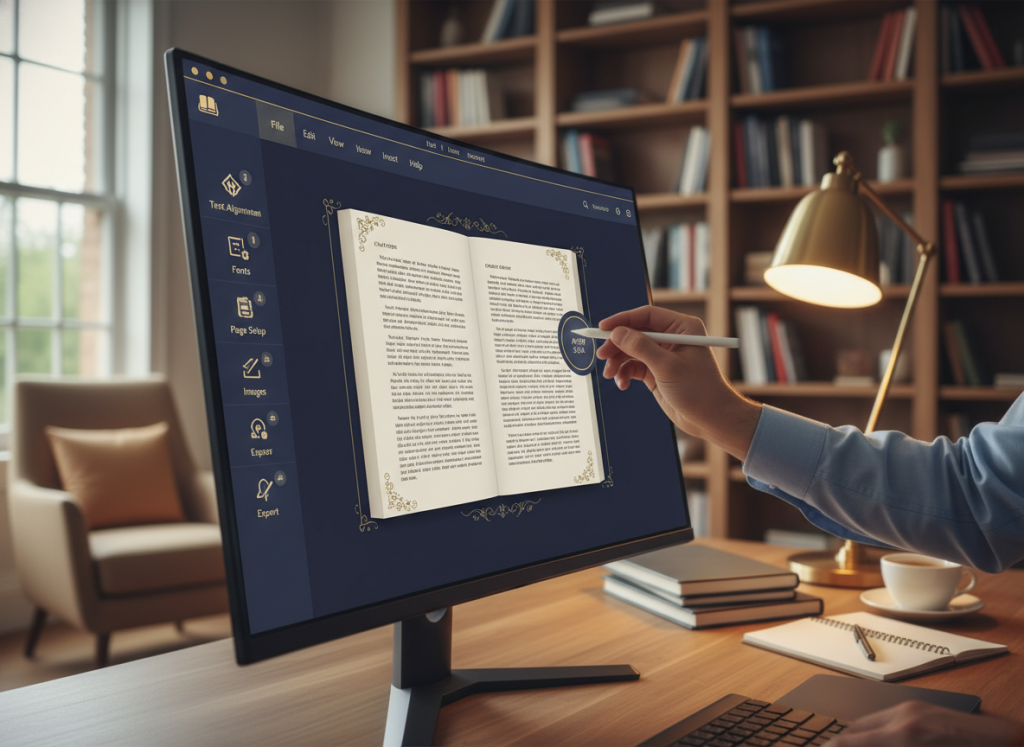
Storyloft changed everything. It has templates for print-ready layouts. I picked a template that fit my genre, and the software took care of the rest.
The system does everything that used to confuse me. It sets margins, creates running headers, and handles page numbers. It even adds blank pages where needed.
The preview feature was amazing. I could see my printed book before sending it to the printer. I checked each page, making sure it looked right. If I needed to change something, I could do it instantly.
Ebook Formatting Without Technical Headaches
Ebook formatting was even more mysterious. I knew my book had to look good on Kindle, Nook, and Apple Books. Each platform had its own rules. Some said I’d need to learn HTML or CSS.
The ebook formatting tools in Storyloft solved this problem. It creates files that work on all major platforms. I don’t need to know code or technical stuff. The software does it all for me.
I tested my ebook on different devices before publishing. It looked great on my Kindle, iPad, and phone. The formatting adjusted for screen sizes, and chapter headings were consistent.
One feature I love is the table of contents. Storyloft makes it clickable, so readers can jump to chapters easily. It’s based on my chapter structure.
Customizing My Book’s Look Without Design Skills
I wanted my book to look unique but wasn’t a designer. I couldn’t even make a good PowerPoint. Designing chapter headers or choosing fonts seemed impossible.
Storyloft has templates and customization options. I could change fonts, spacing, and chapter title styles. The interface was easy to use, even for me.
I tried different font combinations for my historical novel. I chose elegant serif fonts and adjusted spacing for better flow. I even designed custom chapter headers.
The platform has a style library with design elements. I used small decorative flourishes and elegant drop caps. These details made my book look professional without needing design software or a designer.
| Formatting Aspect | Traditional Approach | Storyloft Solution | Time Saved |
|---|---|---|---|
| Print Layout | Export manuscript, learn Vellum or InDesign, manually set margins and headers | Select template, automatic formatting with preview | 8-12 hours |
| Ebook Files | Use separate conversion tools, manually code HTML/CSS, test across devices | Generate EPUB/MOBI files automatically with built-in validation | 6-10 hours |
| Design Customization | Hire designer or learn graphic design software for headers and styling | Use built-in style library and intuitive customization tools | 5-8 hours |
| Format Updates | Re-export entire manuscript, reformat from scratch for changes | Update once, automatically applied to all formats | 3-5 hours per revision |
Storyloft’s formatting features are liberating. When I make changes, the formatting updates automatically. I don’t have to re-export files or start over.
This integration saved me hours during my final revisions. My editor suggested changing two chapters. In my old workflow, this would have meant reformatting everything. With Storyloft, I just moved the chapters, and everything updated instantly.
Professional formatting no longer intimidates me. What used to take days now takes minutes. I can create print-ready layouts and ebook files that look professional. And I do it all in the platform where I write.
Working with Beta Readers, Editors, and My Agent
Collaboration used to be a headache until I found a collaborative writing platform. It made getting feedback easy. Before, I spent hours managing emails and tracking comments.
Now, with Storyloft, I invite everyone to see my work easily. They can comment without any hassle.
Inviting Beta Readers to Review Chapters
The beta reader management feature changed my approach to feedback. I can invite beta readers with just their email. They see exactly what I want them to.
I love controlling who can comment and who can just read. This keeps feedback organized.
No more exporting Word documents or sharing Google Drive links. Everything stays in Storyloft. My beta readers find it easy to help.
I can see who’s read what and who’s commented. This helps me follow up and avoid confusion.
Collaborating with My Editor in Real Time
Editorial collaboration got much easier with Storyloft. My editor works directly in my manuscript. She can highlight passages and suggest changes.
This real-time collaboration saves us a lot of time. We used to export chapters and manually transfer changes.
Seeing editor suggestions in context saves nearly 40% of editing time.
Now, my editor and I work together in the same place. We can discuss changes immediately. This conversation history is very helpful.
The revision tracking feature shows all changes. I never lose previous versions. This gives me peace of mind.
Sharing Progress with My Literary Agent
My literary agent loves the transparency Storyloft offers. She has view-only access to my project. She can check my progress anytime.
This strengthens our relationship. She sees I’m making progress. This builds her confidence in our partnership.
She can’t accidentally make changes. The permission system keeps her from messing with my manuscript. She can leave comments for me to review.
Before, I sent her updates via email attachments. Now, she stays informed effortlessly. I can focus on writing.
Managing Feedback Without Losing Track
Storyloft makes managing feedback from multiple people easy. When you’re getting comments from many, organization is key.
Storyloft lets me filter feedback by person, chapter, or date. I can mark comments as resolved. This prevents me from losing important suggestions.
| Collaboration Feature | Before Storyloft | With Storyloft | Time Saved |
|---|---|---|---|
| Beta Reader Management | Email attachments, version confusion | Direct platform invites with permission control | 3 hours per review cycle |
| Editorial Collaboration | Export to Google Docs, manual transfer back | Real-time editing in manuscript context | 5 hours per week |
| Agent Updates | Quarterly email reports with attachments | Continuous view-only access | 2 hours per quarter |
| Feedback Organization | Scattered across emails and documents | Centralized, filterable comment system | 4 hours per month |
The comment threading feature helps me keep track of conversations. We can discuss suggestions without switching to email. This makes our communication more efficient.
I also appreciate being able to prioritize feedback. If my editor marks something urgent, I can address it right away. This system adapts to my workflow.
This organized approach to manuscript collaboration has improved my relationships. My beta readers feel heard. My editor and agent appreciate the streamlined process.
The collaborative writing platform in Storyloft has made feedback rounds productive. I no longer dread them. I look forward to the insights my team provides.
My Complete Journey from Idea to Published Book
Starting my latest manuscript, I didn’t know how publishing tools would change my process. Before, I used six apps to go from outline to manuscript. Now, everything happens in one place.
This change wasn’t just about being more organized. It changed how I create and how fast I bring ideas to life.
How My Workflow Transformed with Storyloft
I started with brainstorming, capturing ideas and character sketches. Instead of using many places, I kept everything in one system.
Outlining was easier too. I built my structure with research notes. I could check character profiles while writing chapters without switching apps. This made me more productive.
Drafting chapters was different. I wrote in a distraction-free space with world-building details close by. Checking details was easy.
Beta reader feedback and editor revisions were handled smoothly. I even made character artwork to help describe my characters better.
Formatting was no longer scary. Storyloft handled both print and ebook layouts. I actually enjoyed seeing my manuscript become a professional book.
The Publishing Process Became Actually Enjoyable
I never thought I’d say publishing was enjoyable. My previous books were stressful.
With Storyloft, my book came together beautifully. Creating print-ready files took minutes. The ebook formatting worked on every device. I had complete creative control without needing to be a formatting expert.
Submitting my files to publishers was less stressful. I knew my manuscript looked professional. No more worries about formatting problems.
I could focus on creative decisions like choosing fonts. The publishing tools gave me professional results without the need for a steep learning curve.
Time and Money I Saved Along the Way
The practical benefits were huge. I tracked my time to compare with my previous books.
Not switching apps saved me about eight hours every week. Over six months, that’s nearly 200 hours. My productivity doubled.
The financial savings were impressive too. I saved money on separate subscriptions, formatting services, and illustration tools:
| Expense Category | Traditional Approach | With Storyloft | Savings |
|---|---|---|---|
| Writing and editing software | $180/year | Included | $180 |
| Professional formatting services | $350 per book | Included | $350 |
| Character illustration commission | $200-400 | Included | $300 |
| Organization and project management tools | $120/year | Included | $120 |
| Total Annual Savings | $850-1,050 | Single subscription | $950+ |
The reduced stress was priceless. I trusted my publishing tools completely. The creative process stayed creative from start to finish.
My writing workflow changed from a struggle to a smooth journey. Every stage supported the next naturally. I enjoyed the whole process, not just the drafting.
Who I Think Should Use Storyloft
Storyloft is great for many writers, but some will find it really helpful. I’ve seen it change the way writers work. Here are the types of authors who will get the most out of Storyloft.
Starting Your First Novel Without Feeling Overwhelmed
Writing your first novel can feel overwhelming. You’re faced with many choices about software and tools. It’s hard to focus on your story.
Storyloft makes this easier. It’s one app that does everything. You only have to learn one system, not five.
First-time authors love how Storyloft lets them write, outline, and format in one place. It guides you without being too strict. You can focus on your story while Storyloft handles the tech stuff.
Learning Storyloft is worth it. It makes your first book and future projects easier.
Experienced Authors Ready for Greater Efficiency
Seasoned authors know their workflow. But they also know how much time they waste switching apps. I’ve been there too.
Storyloft doesn’t make you start over. It consolidates your workflow into one powerful platform. This saves you time with every book.
Experienced authors love how Storyloft prepares manuscripts with top-notch tools. It keeps your creative process flowing while cutting out the boring stuff. Many say it has reignited their creative enthusiasm by removing tedious tasks.
The platform grows with you. Whether you’re writing your third or thirtieth book, you’ll see big efficiency gains.
Adapting to Your Publishing Path
Storyloft works for self-publishers and traditional authors alike. Its flexibility is key, no matter your publishing path.
For self-publishers, Storyloft has everything you need. It formats your book, designs covers, and supports direct publishing. You get everything you need in one place.
For traditionally published authors, Storyloft is great for manuscript prep and collaboration. It makes working with agents, editors, and publishing teams easy. You can share chapters, track changes, and keep your formatting professional.
Storyloft doesn’t force you into one publishing path. It adapts to your choices. Many authors use it for both self-published and traditionally published projects.
| Writer Type | Primary Benefits | Key Storyloft Features | Expected Outcomes |
|---|---|---|---|
| First-Time Novelists | Eliminates tool overwhelm and decision fatigue | Integrated platform, templates, AI guidance, unified learning curve | Focus on storytelling instead of technical decisions |
| Seasoned Authors | Streamlines existing workflows and saves time | Professional manuscript tools, efficiency features, multi-book support | Increased productivity and renewed creative enthusiasm |
| Self-Publishers | Complete publishing process in one platform | Book formatting, cover design, publishing tools, market-ready output | Professional results without multiple subscriptions |
| Traditional Authors | Professional collaboration and manuscript preparation | Agent/editor collaboration, revision tracking, industry-standard formatting | Seamless workflow with publishing professionals |
Storyloft is best for authors who want everything in one place. If you prefer specialized tools or managing subscriptions, it might not be for you. But if you want to write more and worry less about tech, Storyloft can change your game.
Writers at all levels and in every publishing path have found success with Storyloft. It meets you where you are and grows with your career.
Conclusion
My search for the best writer app ended when I found Storyloft. It’s not just one tool. It’s a complete platform that understands your entire writing process.
Storyloft changed my writing life by combining everything in one place. No more switching between apps for outlining, drafting, editing, and publishing. Its AI truly gets your story. The collaboration tools work well. And the formatting tools make your books look great without the need for expensive designers.
Storyloft offers more than just convenience. I finish projects faster and save money on subscriptions. My writing stays consistent because everything is in one place.
Not every writer will find Storyloft perfect. Some might prefer their current workflows. Others might not need all these features yet.
For me, finding Storyloft brought back my love for writing. The technical hurdles disappeared. The overwhelm went away. I could focus on telling stories, not managing tools.
If you’re facing the same frustrations, try Storyloft. The learning curve is worth it. Every project becomes easier. Your approach to writing might change like mine did.
The right tools don’t just make writing easier. They make it joyful again.
FAQ
What makes Storyloft different from other writer apps like Scrivener or Google Docs?
Storyloft is made for book authors. It has everything you need in one place. This includes writing your manuscript, AI help, character art, and tools for working with others. It also formats your book for print and ebook.
Unlike Scrivener, Storyloft doesn’t need you to export your work for formatting. And unlike Google Docs, it has special features for writing books. You can do everything from starting your story to making it ready for publication without switching apps.
Does the AI in Storyloft replace my writing or change my voice?
No, Storyloft’s AI helps enhance your writing, not replace it. It understands your story and writing style before suggesting changes. You always have control over these suggestions.
The AI gets to know your preferences over time. It offers ideas that fit your story, not just any story. This makes your writing better without losing your unique voice.
Can I use Storyloft if I’m working with a traditional publisher or self-publishing?
Yes, Storyloft is great for both traditional and self-publishing. It has tools for self-publishing, but it also works well with publishers and agents. You can share your work, get feedback, and export files for publishers.
It fits into different publishing workflows. This makes it easy to work with anyone in the publishing world.
How difficult is Storyloft to learn compared to other writing software?
Storyloft is easy to learn, even for someone like me who’s not tech-savvy. It’s more intuitive than tools like Scrivener. You can start writing right away and learn more as you go.
Learning one tool is better than using many. It saves you time and makes writing easier.
Does Storyloft work offline, or do I need constant internet connectivity?
Storyloft works both online and offline. You can write without internet and sync your work when you’re back online. This is great for writing in places with no WiFi.
Your work is safe, even if you lose internet. This was a big problem with some tools I used before.
Can I import my existing manuscript from Word or Scrivener into Storyloft?
Yes, Storyloft lets you import manuscripts from Word and Scrivener. When I switched, I brought my novel and research notes with me. It kept my formatting and chapter order, so I didn’t have to start over.
How much does Storyloft cost compared to buying multiple separate tools?
Storyloft’s price is less than what you’d pay for many tools together. This includes Scrivener, Vellum, AI assistants, cloud storage, and collaboration tools. It saves you money and time.
Not having to switch apps and deal with file exports is a big time-saver. It helps you write more efficiently.
Can I create character illustrations even if I have no artistic ability?
Yes, Storyloft’s AI can create character art for you. Just describe what you want, and it will make it happen. I have no artistic skills, but the AI makes my characters look great.
It ensures your characters look consistent across different illustrations. This would be hard for me to do on my own.
How does collaboration work with beta readers who aren’t familiar with Storyloft?
You can invite beta readers with just a link. They don’t need to sign up for Storyloft. You control what they can see and do.
They can leave feedback right where it matters. This makes getting feedback much easier than emailing files back and forth.
Does Storyloft handle formatting for both Kindle and print books?
Yes, Storyloft makes your book look great in print and ebook formats. It creates PDFs for print and EPUB and MOBI files for ebooks. You can see how your book will look in each format and make changes easily.
What happens to my manuscript if I decide to stop using Storyloft?
You can export your manuscript from Storyloft in Word and plain text formats. This means you can take your work with you if you leave. It gives you peace of mind when you start using Storyloft.
Can Storyloft help with series management if I’m writing multiple books?
Yes, Storyloft is great for managing a series. It keeps your notes and storylines organized across books. The AI remembers your story, helping you avoid mistakes.
This makes writing a series much easier. You can focus on your story without worrying about keeping everything straight.
Is Storyloft suitable for non-fiction books or just fiction?
Storyloft works well for both fiction and non-fiction. Its features, like chapter organization and research tools, are useful for any book. The AI helps with clarity and flow, no matter the genre.
It adapts to your writing style. This makes it a versatile tool for any kind of book.
How secure is my manuscript in Storyloft’s cloud storage?
Storyloft uses top security to protect your work. It’s backed up automatically, giving you peace of mind. You can always get back to previous drafts if needed.
This security and reliability were key reasons I chose Storyloft. It lets me focus on writing without worrying about my work’s safety.