Collaborative Writing Tool Guide for Authors in 2026
You and a co-author finish a chapter late at night. By morning, your inbox contains three attachments with names such as Chapter_4_FINAL, Chapter_4_FINAL2, and Chapter_4_editor_notes. One file has the stronger ending, another contains the latest character change, and a third includes comments that no one can connect to a specific paragraph. Before anyone can improve the story, the team has to reconstruct its history.
A collaborative writing tool changes that sequence. Instead of treating a manuscript as an attachment, it treats the manuscript as a shared workspace where authors, editors, illustrators, and reviewers can contribute, discuss, revise, and prepare the final book. The important question isn't whether several people can type in the same document. It's whether the tool helps them understand who changed what, why the change happened, and what should happen next.
Table of Contents
- What a Collaborative Writing Tool Really Does
- From Solo Apps to Shared Workspaces
- Core Features That Power Shared Writing
- Collaboration Models and Permission Tiers
- Security and Privacy Considerations
- How to Choose the Right Tool for Your Workflow
- Author Use Cases and Daily Workflows
What a Collaborative Writing Tool Really Does
A collaborative writing tool lets multiple contributors work on manuscript content inside one synchronized environment. Writers can draft, editors can suggest revisions, reviewers can leave passage-specific comments, and project owners can control what each person is allowed to change. The manuscript remains the central object, rather than becoming a collection of files exchanged through email and chat.
That distinction matters. A chat app can host useful conversations, but feedback can become detached from the sentence it discusses. Cloud storage can keep files in one place, but it doesn't automatically explain which draft is authoritative. A single-author word processor with a share button may permit access without providing the structure needed for a serious team.
The manuscript is more than a text box
Long-form projects need more than live typing. A useful platform should give the book a recognizable structure, such as chapters, sections, scenes, notes, and supporting research. Every contributor should have a persistent identity, so the revision history shows whether a sentence came from the co-author, editor, or reviewer.
Comments should stay attached to the relevant passage. A note about a character's motivation belongs beside the paragraph where that motivation appears, not in a separate message that someone must interpret later. Threaded discussions also let the author resolve a question without deleting the record of how the decision was made.
Version history supplies the other half of the system. Collaborative writing research describes a workflow in which contributors edit independently, compare differences, merge changes, and preserve a shared history when files come together. The approach helps reduce overwrite risk and makes accountability clearer in distributed co-authoring, as detailed in this research on version control in collaborative writing.
Practical rule: If a tool shows the current words but can't show the path those words took, it supports shared editing, not full manuscript collaboration.
The best way to test a platform is to follow one revision from beginning to end. Ask whether you can identify the contributor, inspect the previous wording, read the discussion, restore an earlier state, and export the accepted version without manually stitching files together. Those signals replace coordination rituals with an auditable workflow, giving authors more time to solve narrative problems instead of file-management problems.
From Solo Apps to Shared Workspaces
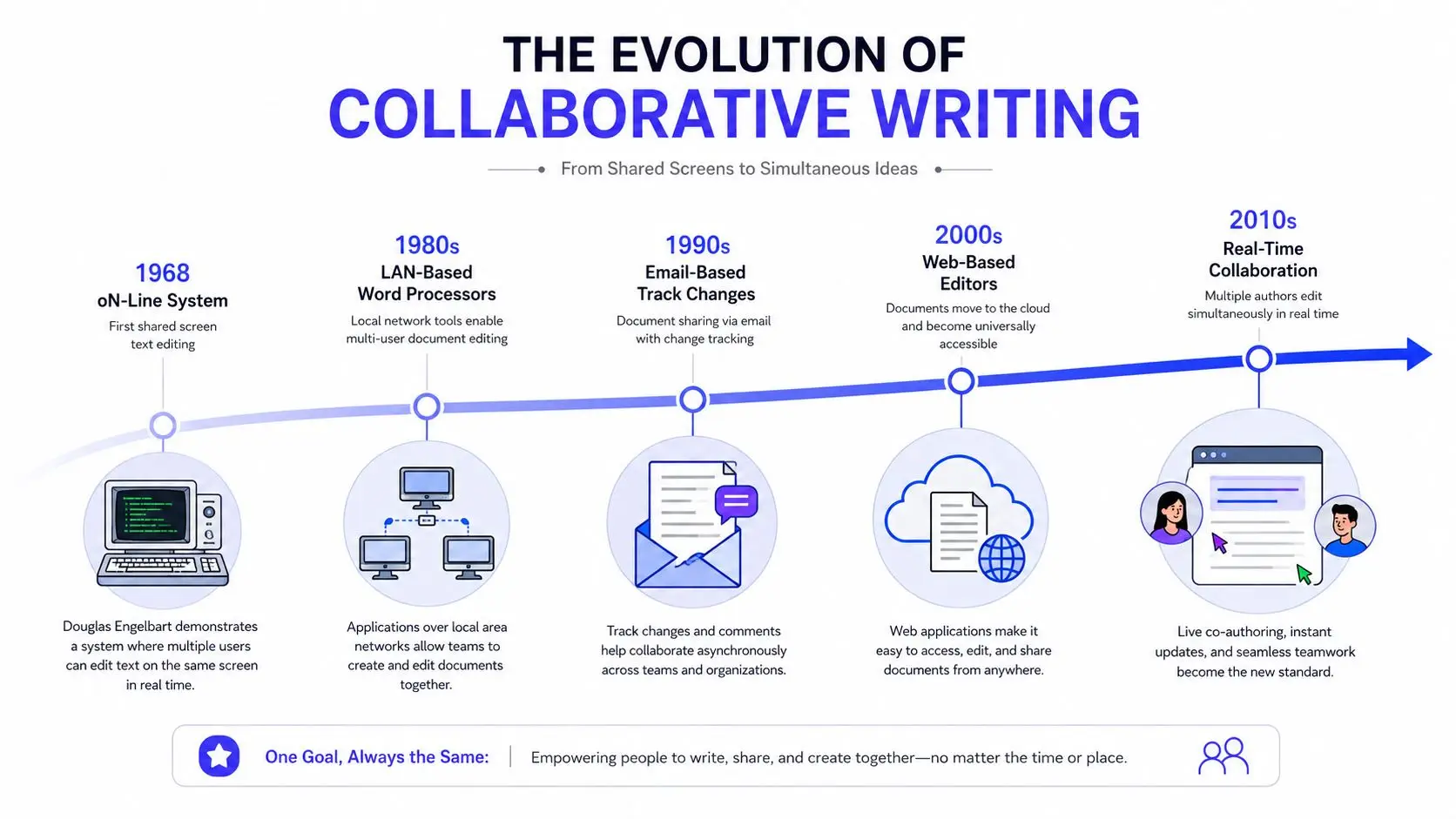
Collaborative writing didn't begin with a cloud document. In 1968, Douglas Engelbart's “Mother of All Demos” presented an early concept for real-time collaborative editing. The demonstration showed how networked computers could support shared work, planting an important idea for writers who would eventually edit documents across locations. A historical account of cloud collaboration identifies that demonstration as a major milestone in the development of shared-document workflows, alongside later software advances described in this overview of collaborative software history.
The attachment era created a hidden editorial job
For many authors, collaboration later meant emailing word-processor files with Track Changes enabled. The method was familiar, but it created a second task alongside writing: someone had to decide which attachment contained the current draft. Comments could be resolved in one file while the author continued writing in another. Merging edits often meant comparing documents manually and asking contributors to repeat work.
The 1991 release of Instant Update for Mac OS and Microsoft Windows represented another major step in document collaboration, according to Smartsheet's account in the historical source above. Instead of waiting for a file to be sent back, users could work with updates synchronized between clients. The technology moved collaboration closer to a shared live document.
The web made shared editing ordinary
Web-based editors later made simultaneous co-authoring accessible to a much broader audience. Writers could open one document, see changes as they happened, and leave comments where the issue appeared. The practical shift was substantial, but a flat shared document still left authors responsible for organizing chapters, research, character information, and production materials.
Specialized author platforms extend the shared-editor foundation with manuscript-aware structures. A novel can include chapter-level access, planning notes, series information, scene metadata, and publication outputs. The manuscript becomes a living project with connected stages, not just a long page where everyone types.
The adoption of shared-document workflows also reflects a wider workplace shift. Gartner projected that by 2020, 80% of enterprise and midsize businesses would have at least one content collaboration platform, a forecast recorded in the historical market source above. That progression explains why authors now expect collaboration software to handle more than basic file sharing.
Core Features That Power Shared Writing
A serious collaborative writing tool rests on several technical pillars. They work together, but each solves a different failure that appears when a manuscript has several active contributors.
Four pillars authors should inspect
Shared editing gives collaborators a common working surface. Presence indicators, contributor names, and visible cursors help co-authors understand where other people are working. That awareness doesn't eliminate every conflict, but it reduces accidental interference when two people open the same chapter.
Version control records the manuscript's evolution. A useful system should let authors inspect prior states, compare revisions, identify milestones, and restore an earlier passage without undoing unrelated work. The version-control model described in the University of Victoria research is especially relevant to long-form writing because it combines parallel work with differences, merging, and shared history.
Annotation layers turn feedback into an organized editorial process. Comments should attach to passages, support replies, and remain connected to the document state in which they were created. Research on annotation-based collaborative writing describes activity-oriented annotations, annotation version control, in-situ communication, and cross-role feedback. That model treats a comment as a governed object, not a disposable note, which improves traceability when authors and reviewers work on different schedules. You can explore a related approach to structured knowledge sharing in this resource on PledgeBox for crowdfunding teams.
Manuscript-aware AI should assist without erasing authorial responsibility. Narrative projects need more than generic grammar correction. Useful assistance may include brainstorming, continuity checks, targeted style suggestions, and voice-aware revisions, while the human contributor remains able to inspect and accept or reject each change.
| Pillar | What It Does | Why It Matters for Authors |
|---|---|---|
| Shared editing | Shows contributors working in one manuscript | Keeps co-authors oriented and reduces accidental overlap |
| Version control | Preserves, compares, and restores revisions | Protects earlier work and clarifies editorial decisions |
| Annotation | Anchors comments and suggestions to passages | Keeps feedback specific, searchable, and resolvable |
| Manuscript-aware AI | Applies contextual writing assistance | Supports revision while preserving human judgment |
The distinction between a short document and a book is practical. A long manuscript multiplies the effect of a missing comment, an overwritten scene, or an unnoticed continuity change. That's why these features should be treated as working infrastructure, not decorative extras.
Collaboration Models and Permission Tiers
Not every writing team needs the same pace or access rules. A pair of co-authors drafting side by side may want live cursors and immediate updates. An author working with an editor across time zones may need a quieter workflow built around comments, suggestions, and review queues.
| Model | Pace | Best For | Conflict Risk |
|---|---|---|---|
| Real-time co-editing | Immediate | Co-writers drafting together | Higher if contributors edit the same passage |
| Asynchronous collaboration | Staggered | Editors, reviewers, and distributed teams | Lower during drafting, but unresolved suggestions can accumulate |
| Role-tiered collaboration | Flexible | Projects with authors, editors, illustrators, and beta readers | Controlled through permissions and staged access |
Match access to responsibility
Real-time collaboration feels natural during a shared writing session. It also creates a risk that two people will rewrite the same sentence before either sees the other's intention. Chapter ownership, editing boundaries, and dependable version history help manage that risk.
Asynchronous collaboration suits teams whose schedules don't overlap. An editor can leave a comment, a reviewer can suggest a replacement, and the author can respond when ready. This model works best when the tool distinguishes open, resolved, and rejected feedback, so the team doesn't mistake an old note for current instruction.
Role-tiered collaboration adds permission control to either pace. An owner might give a co-author full editing rights, an editor permission to revise, an illustrator access to relevant references, and a beta reader comment-only access. Suggestion mode preserves the spirit of traditional Track Changes while keeping the original wording available.
Research on collaborative work in other creative fields also shows why teams need explicit roles and shared context. This discussion of collaborative music AI insights offers a useful comparison for authors thinking about how human contributors and AI systems can work within a common process.
Permission principle: Give each contributor the narrowest access that still lets them complete the current task, then expand access when the manuscript reaches the next production stage.
For a practical setup, authors can follow this guide to inviting collaborators to a Storyloft manuscript. The important habit applies to any platform: review permissions before sharing, not after a collaborator has already changed the wrong chapter.
Security and Privacy Considerations
A cloud writing tool isn't automatically safe because it has a padlock icon or a familiar brand name. Your manuscript may contain unpublished ideas, client information, research notes, personal details, or material covered by a publishing agreement. The provider's storage, access, and AI policies deserve the same attention as its editing features.
Questions to ask before uploading a manuscript
Look for encryption while drafts move between your device and the service, and ask how the provider handles files at rest. Read the data-ownership terms closely. Some policies grant broad rights to process user content, while others state that the author retains ownership and limit how the provider may use the manuscript.
AI introduces another point of confusion. A tool may offer an assistant without clearly explaining whether user content can be used to train models. Authors should look for an explicit opt-in policy, or a clear exclusion that keeps manuscripts out of training. The author guide to safe AI writing tools provides a useful set of questions for evaluating privacy, training, and manuscript control.
The practical checklist should include:
- Access records: Confirm whether administrators can see who opened, edited, or exported a chapter.
- Revocation: Check whether you can remove a departing collaborator immediately.
- Authentication: Look for strong account protection, including two-factor authentication.
- Sharing controls: Avoid tools that rely on unrestricted links when you need named access.
- Recovery: Ask how backups, restoration, and deleted content are handled.
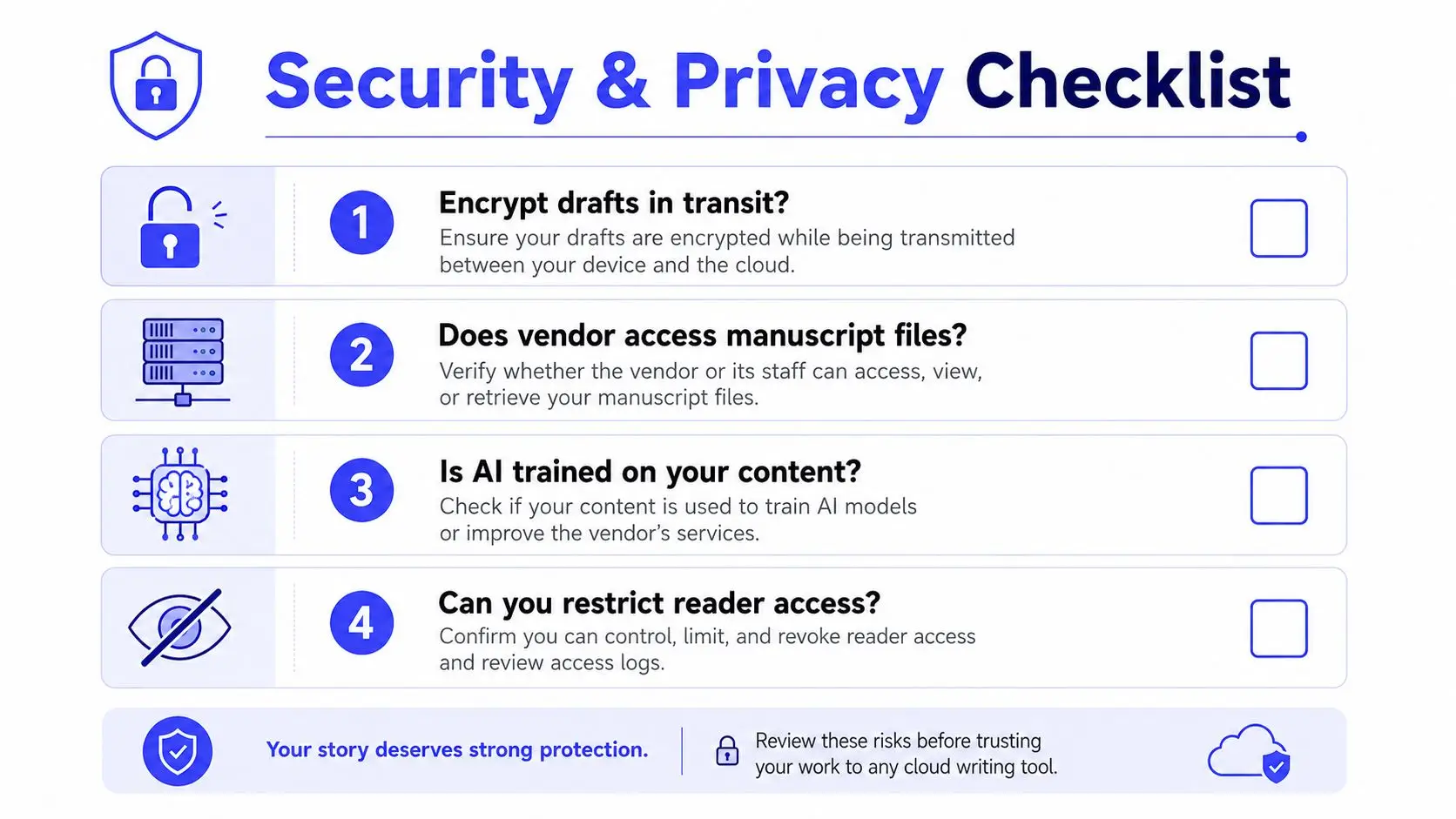
Privacy test: If you can't explain what happens to your manuscript after you press Save, you haven't finished evaluating the platform.
Publishing houses and literary agents may ask authors how sensitive material is handled, particularly when AI-assisted editing enters the workflow. Transparent terms, controllable access, and a usable audit trail make collaboration more professional. Security isn't a feature to inspect after choosing the tool. It belongs in the first comparison.
How to Choose the Right Tool for Your Workflow
Start with the work, not the feature page. Write down who will contribute, what they need to change, how often reviews happen, and where the manuscript must go when the book is ready. A solo novelist inviting occasional beta readers has a different requirement from a co-writing team managing research, illustrations, and print production.
Run the same test on every candidate
Use this order when evaluating platforms:
- Collaboration fit: Decide whether your team needs live co-editing, asynchronous review, or both.
- Permission depth: Check for view, comment, suggest, and edit roles, ideally at chapter or project level.
- History quality: Open an old revision and test whether you can compare and restore it.
- Export fidelity: Inspect ebook and print outputs, including typography, chapter breaks, images, and front matter.
- Workflow connections: Look for research organization, illustration requests, cover work, and publishing preparation.
- Security and AI policy: Read the ownership, training, access, and deletion terms.
- Practical reliability: Test the platform on your ordinary devices and network conditions.
- Cost clarity: Understand what happens when the project grows or usage reaches a plan limit.
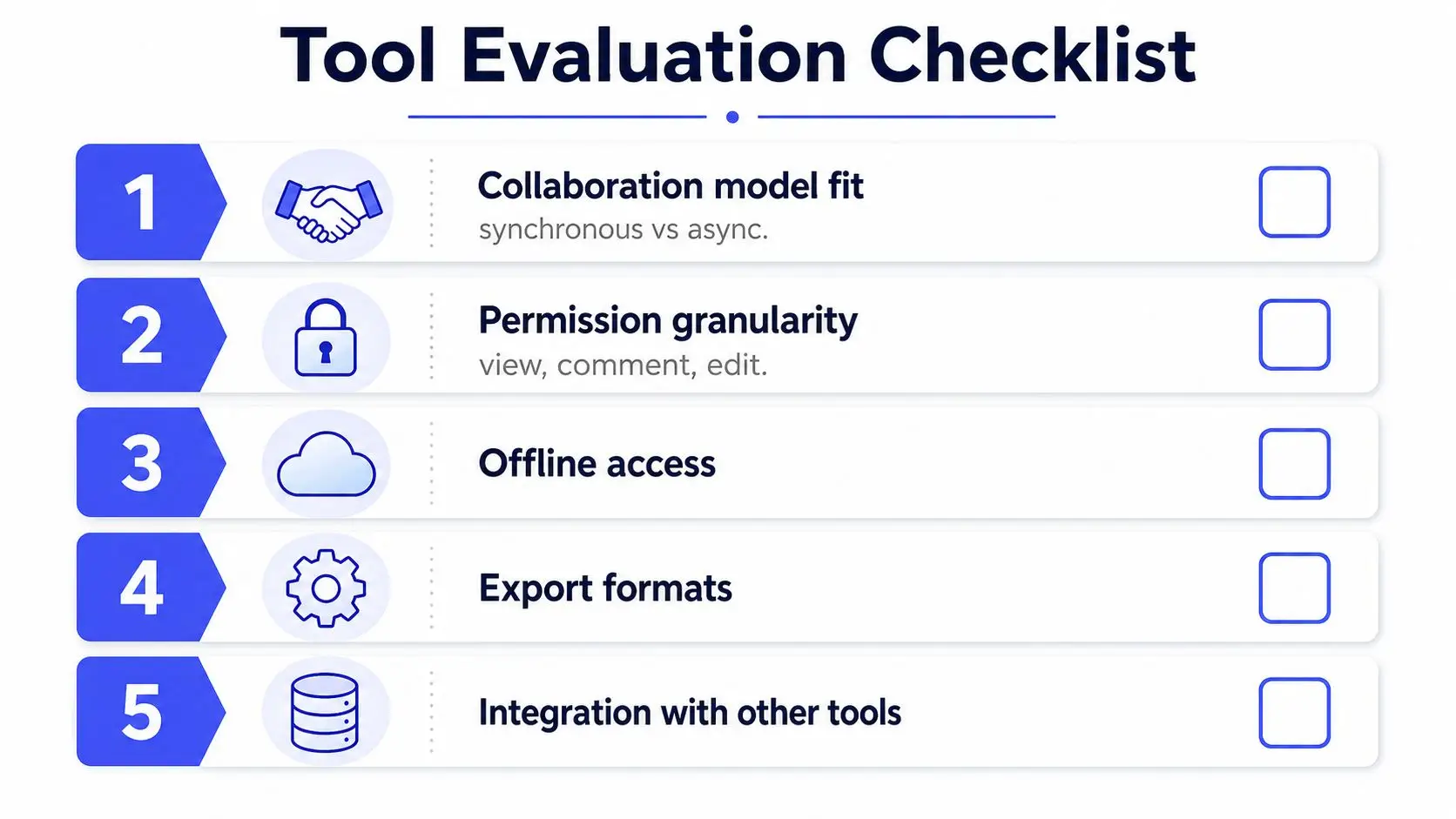
The central decision is often fragmented stack versus integrated workspace. In a fragmented stack, the author drafts in one application, discusses changes in chat, stores research elsewhere, commissions illustrations through another service, designs the cover in a separate suite, and formats the final book in a publishing tool. Each application may work well alone, but the author becomes the integration layer.
An integrated platform keeps the manuscript at the center and connects drafting, research, illustration, cover design, formatting, and export around it. Storyloft is one example of this manuscript-centric approach, combining long-form drafting, AI-assisted editing, collaboration, illustration, cover design, and publishing workflows in one application. Its stated privacy posture says user manuscripts aren't used to train AI models, but authors should still read current terms before uploading sensitive work.
For a quick decision, score each criterion as strong, acceptable, or missing. Then test the two highest-risk areas, usually version recovery and export quality, with a real chapter rather than a demonstration document. More features won't fix a workflow that loses context.
Author Use Cases and Daily Workflows
A tool becomes easier to judge when you follow an author's actual day. The same platform can support very different patterns, depending on whether the author needs occasional feedback, continuous co-writing, editorial review, or production help.
Four practical manuscript patterns
The solo novelist drafts independently and keeps the main text private until a review stage. They can invite beta readers to selected chapters, ask for inline comments, and use suggestion mode to separate reader reactions from accepted revisions. Chapter-level sharing prevents a reviewer from wandering through unfinished material that isn't ready for feedback.
The co-writing duo alternates chapters or scenes. Live presence indicators show where each writer is working, while chapter boundaries reduce accidental overlap. If both writers need to touch a shared passage, version history and merge support provide a way to compare decisions instead of arguing over which attachment is current.
The author and editor loop follows a repeatable cycle. The author submits a revision pass, the editor adds margin notes and targeted queries, and the author answers or resolves each thread before another pass begins. A persistent record helps the pair distinguish an open structural issue from a suggestion already accepted in the manuscript.
The self-publisher needs collaboration beyond prose. After the final draft, the project may require interior illustrations, a cover handoff, typography choices, and formatted ebook or paperback output. An integrated environment can keep those production decisions connected to the active manuscript rather than scattering them across unrelated files.
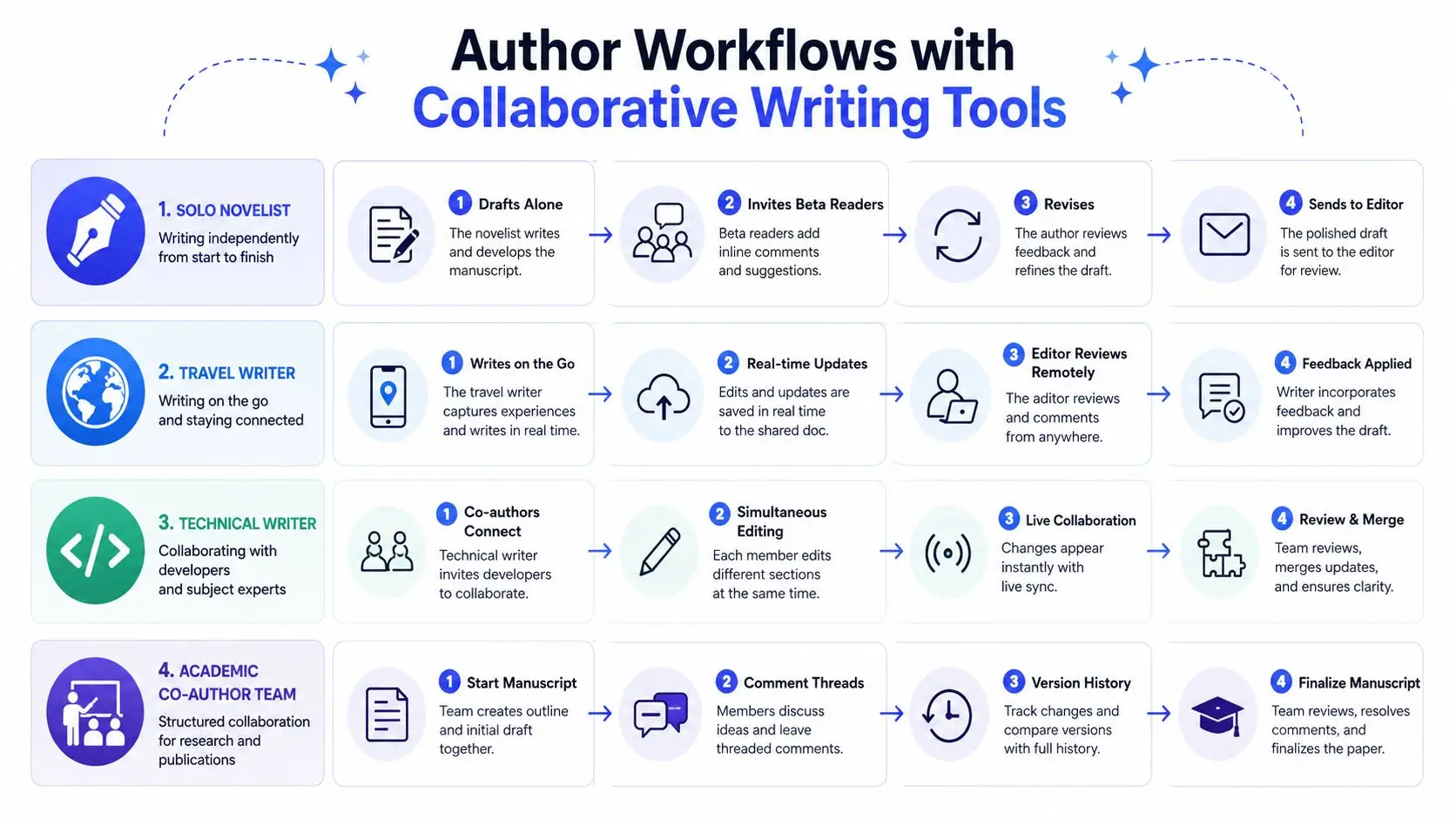
Storyloft illustrates this broader workflow with chapter-level collaboration, integrated illustration requests, cover designer handoff, and publishing export. Its manuscript editor also connects drafting with notes, comments, edit history, planning materials, and AI-assisted revision. Authors who want to inspect the editing stage can review how editing a draft works in Storyloft, then compare those steps with the process they use today.
The important test isn't whether every task happens in one screen. It's whether contributors can move from one stage to the next without losing the manuscript's structure, decisions, or ownership.
Choose a collaborative writing tool by tracing your real project from first outline to final export. If your current process makes you copy, rename, download, and reconcile files at every stage, an integrated manuscript workspace may remove more friction than another standalone editor.
Storyloft brings manuscript drafting, AI-assisted editing, role-based collaboration, illustration, cover design, and publishing workflows into one cloud-based workspace for authors. Visit Storyloft to see whether its manuscript-centric approach fits the way you and your collaborators plan, revise, and publish your next book.