All-in-One Book Writing Software

Book Writing Software Built Around Your Entire Book

Storyloft brings writing, research, editing, worldbuilding, illustration, formatting, cover design, and publishing into one connected workspace.

AI that understands your book, helps you make it better, and leaves the writing to you.

$0 today. $39/month after 14 days. Cancel anytime.

Storyloft All-in-One Book Writing Software Write, research, edit, design, format, and publish a book in one connected author workspace.
Manuscript-aware AI Context stays with the book
Print + Ebook One manuscript, finished formats

One Connected Author Workspace

One manuscript. Every stage stays connected.

Storyloft is an all-in-one book writing app for authors. It combines a long-form manuscript editor, manuscript-aware AI, research and citations, worldbuilding, book illustration, professional formatting, cover design, and print and ebook publishing tools in one workspace.

Also built in: chapter organization, writing goals, comments, collaboration, version history, role permissions and project assets.

Long-Form Manuscript Editor

A writing workspace built for books.

A book is more than one very long document. Storyloft keeps chapters, sections, notes, comments, formatting, writing goals, and revision tools organized around the manuscript as it grows.

Stay organized across a full manuscript. Manage chapters and sections without losing sight of the whole book.
Keep supporting material close. Notes, research and comments stay available without taking over the writing space.
Make progress visible. Word goals, streaks and project progress help turn writing sessions into a finished manuscript.
Storyloft Long-Form Book Writing and Manuscript Editor Write and organize full-length books with chapters, manuscript navigation, notes, formatting, and author-focused writing tools.

Eddy AI Book Editor

AI that reads the manuscript, not just the prompt.

Eddy works inside the book with access to manuscript context, characters, research and your writing style. Ask for feedback, explore an idea, examine a passage or improve a weak section without moving your work into another chatbot.

Manuscript-aware feedback. Suggestions can account for the larger book instead of treating every passage as an isolated prompt.
Protect your writing voice. Voice-aware editing is designed to strengthen what you wrote without flattening it into generic AI prose.
You stay the author. Eddy helps you analyze, question, research and refine. You decide what belongs in the book.
Explore Eddy and AI book editing →
Eddy, Storyloft's Manuscript-Aware AI Book Editor Get manuscript-aware research, analysis, editing, and revision help from AI that supports your writing without taking over your voice.

Research, Sources & Citations

Research without leaving your book behind.

Keep research, sources, notes, citations and endnotes beside the manuscript. Eddy can help investigate a topic and surface source-backed information while the supporting material remains connected to the project.

Keep evidence with the manuscript. Research and reference material stay attached to the book instead of disappearing across browser tabs and separate apps.
Turn sources into usable citations. Citation and endnote workflows help move research from discovery into the finished manuscript.
Useful for fiction too. Historical context, locations, technology and other source material can be researched alongside creative work.
Storyloft Book Research, Sources, and Citation Tools Research topics, organize sources, create citations and endnotes, and keep supporting evidence connected to your manuscript.

Worldbuilding Software for Authors

Build the world inside the manuscript.

Storyloft World Builder connects characters, locations, factions, timelines, magic systems, technology and story canon directly to the book. Organize the details, map their relationships and keep them useful while you write.

Build structured lore. Create characters, places, factions, systems, histories, objects and rules that belong to the project.
See how everything connects. Relationship maps and visual views reveal connections across people, places, events and ideas.
Protect continuity. Storyloft can compare the manuscript with established lore and help surface details that may no longer agree.
Explore Storyloft World Builder →
Storyloft Worldbuilding Software for Authors Build and connect characters, locations, factions, timelines, lore, and story relationships directly alongside your manuscript

Visual Creation

Illustrate the story. Visualize the evidence.

Fiction and nonfiction need different kinds of visuals. Storyloft keeps both connected to the book.

Storyloft character illustration studio for creating consistent book characters

Book Illustration

Keep characters and scenes visually consistent.

Create, refine and organize character and scene illustrations inside the project so the visual identity of the book stays connected from one chapter to the next.

Explore book illustration →
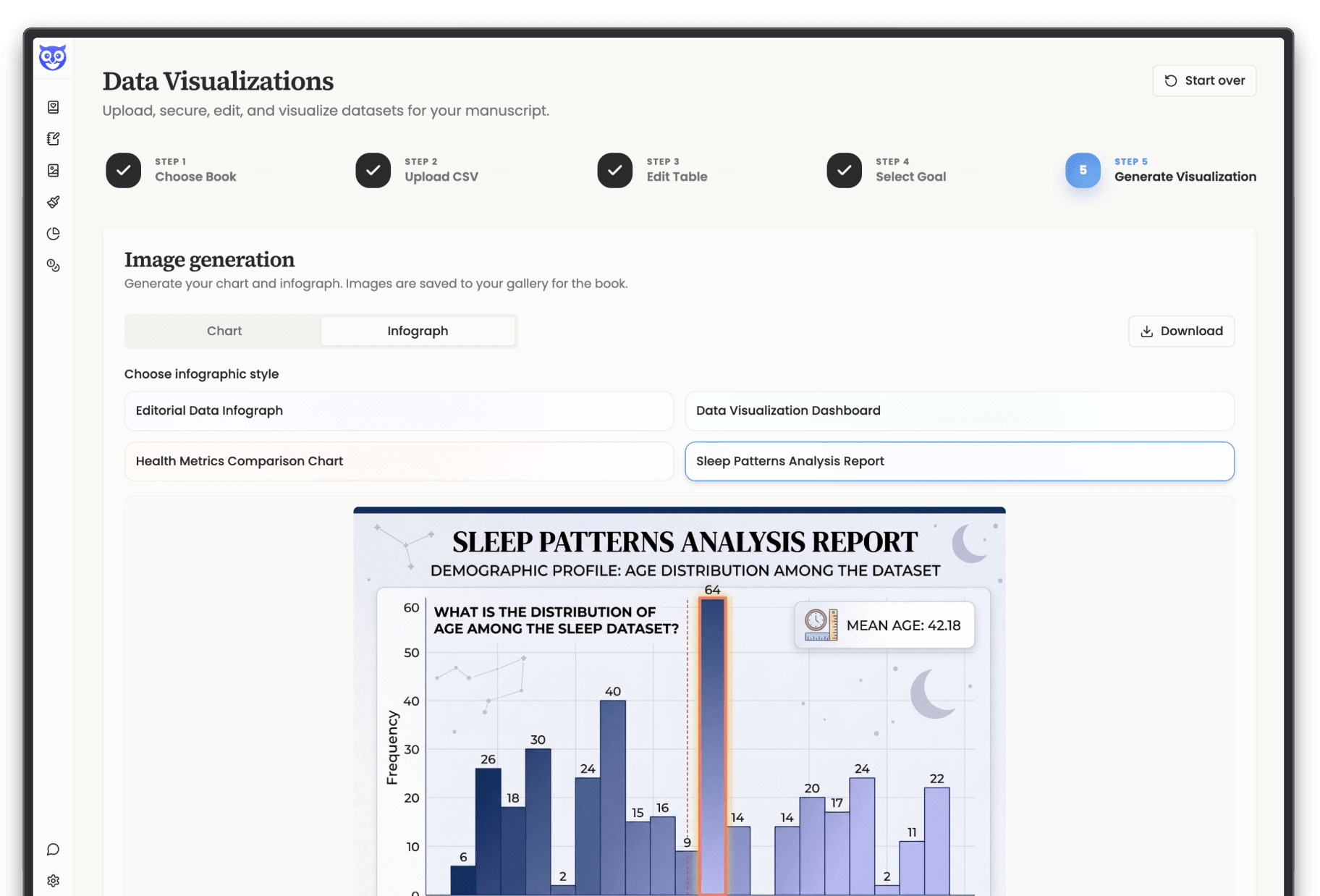
Storyloft AI data visualization and infographic generator for nonfiction authors

Charts & Infographics

Turn research data into something readers can see.

Upload data, explore AI-generated insights and turn useful findings into charts or publication-ready infographics that remain attached to the manuscript.

Explore data visualization →

Automatic Book Formatting

Make it look like a book before you export.

Storyloft understands book structure, not just document styling. Themes, chapters, page geometry, front matter, notes, tables of contents, print interiors and covers stay connected as the manuscript changes.

Professional book themes. Coordinate typography, headings and manuscript styling without rebuilding every chapter manually.
Real print geometry. Manage trim size, margins, gutters, page numbers, chapter starts and the details expected in a printed book.
Connected cover design. Create ebook and print covers while keeping the design tied to the actual dimensions of the book.
Explore automatic book formatting →
Storyloft professional book themes and manuscript formatting controls
Storyloft print book cover design studio

Print + Ebook Publishing

One manuscript. Multiple finished editions.

Prepare professional print and ebook files without rebuilding the manuscript in another application. Storyloft keeps the underlying book structure connected while adapting the output for different publishing formats.

Print-ready PDF. Preview real book pages and prepare interiors for professional print workflows.
Structured EPUB. Create a reflowable ebook edition with the manuscript structure, images, notes and front matter carried through.
Revise the book once. Changes to the manuscript can flow forward instead of forcing you to maintain several disconnected versions.
Storyloft print-ready book PDF and ebook publishing export interface

And That Was the Short Version

Eddy found a few more things.

Comments, version history, writing goals, collaboration, character tools, illustration galleries, chapter management and plenty of smaller details are built in too. Keep going for the complete feature list.

What book writing software should do

Book writing software that replaces the tool pile

Book writing software is the program you use to draft, organize, and finish a book. Most authors end up juggling a word processor, a notes app, research tabs, an image generator, a formatting tool, and a cover designer. Storyloft puts all of it in one workspace that knows your manuscript.

Word processorNotes appResearch tabsWorldbuilding wikiImage generatorFormatting toolCover designerEditor feedback
One manuscript, one workspaceYour characters, sources, chapters, art, and edits stay connected, so nothing gets lost between apps and the AI always has the full picture of your book.

That matters most in the messy middle of a draft, when you are moving between writing, checking a fact, fixing continuity, and thinking about how the finished book will look.

Software for writing a book

Built for novelists and nonfiction authors

The best software for writing a book depends on the book. Storyloft covers both ends, with the same core workspace and different tools leaning forward for each kind of author.

If you write fiction

Keep characters, places, timelines, and the rules of your world next to the chapter you are writing. Ask Eddy, the AI editor, to read the whole manuscript and flag continuity slips, pacing problems, and thin scenes, while the sentences stay yours.

Illustrate characters and settings, then format and export the finished novel. See worldbuilding for authors and the AI book editor.

If you write nonfiction

Gather research with cited sources inside the book, so every claim traces back to where it came from. Turn data into clean infographics, and get structural feedback on whether your argument builds the way you think it does.

Then format the manuscript for print and ebook without leaving the project. See infographics for books and book formatting software.

Compare your options

How Storyloft compares with other book writing apps

Most book writing apps are great at one stage and leave you to cover the rest elsewhere. Here is what each popular tool is mainly built for, and where authors usually need a second tool.

ToolMainly built forWhere you usually need something else
StoryloftWriting, research, AI editing, worldbuilding, illustration, formatting, cover design, and publishing in one workspaceLittle. The tools share your manuscript, so the AI and every stage see the same book
ScrivenerDrafting and organizing long manuscriptsCover design, illustration, and AI feedback on the whole book
AtticusWriting and formattingCover design, research, and worldbuilding
VellumFormatting finished manuscriptsDrafting, research, and covers, since you write elsewhere first
SudowriteAI-assisted fiction draftingFormatting, covers, and a full manuscript workspace
ReedsyA free book editor plus a marketplace for hiring professionalsDeeper research, worldbuilding, and AI that reads your whole book

Tool names link to our detailed side-by-side comparisons. This table reflects each product's main focus as we understand it. Features and pricing change, so check each tool's own site before you decide. Looking for a broader roundup? See our guide to the best writing software for authors.

Questions authors ask

Book writing software FAQ

What is the best book writing software?

The best book writing software is the one that fits how you work. If you want a single place to write, research, edit, illustrate, format, and publish, an all-in-one tool like Storyloft saves you from juggling apps. If you only need a drafting space, a simpler editor may be enough. To compare the main programs side by side, see our guide to the best writing software for authors.

Can I write and format a book in the same app?

Yes. Storyloft includes book formatting and cover design, so you can write the manuscript and prepare the finished book without exporting between tools. You can export to EPUB, PDF, and DOCX when you are ready. More on book formatting.

Does the AI write my book for me?

No. Storyloft's AI reads your manuscript and helps you improve it with feedback, research, and suggestions, but the writing stays yours. Your work is never used to train AI.

Is Storyloft a book writing app or software?

Both. It is a full book writing platform that runs in your browser, so there is nothing to install. Start a project, and your manuscript, research, and artwork stay together in one place.

Is it good software for writing a novel and for nonfiction?

It is built for both. Novelists get worldbuilding, character art, and continuity feedback. Nonfiction authors get cited research, infographics, and structural feedback on their argument. If you write fiction, our novel writing software guide compares planning, drafting, and revising tools by job.

How much does Storyloft cost?

You can start with a 14-day free trial, with $0 due today. After that, Pro is $39 per month, or you can choose the $399 Lifetime plan. There is a 30-day money-back guarantee. See the pricing page for details.

Can I use Storyloft to publish my book?

Storyloft prepares your book for publishing, with formatting, cover design, and export to EPUB, PDF, and DOCX. You then upload the finished files to the retailer or printer you choose.

How is Storyloft different from Scrivener or Atticus?

Scrivener is strong for drafting and Atticus for writing and formatting. Storyloft adds AI that reads your whole manuscript, built-in research with sources, worldbuilding, illustration, and cover design, all connected to the same book.

Ready when you are

See what your book feels like in Storyloft.

Bring in a manuscript or start with a blank page. Try Storyloft free for 14 days and experience a calm, focused workflow with your own book.

14-day free trial $0 today
$0
For your first 14 days Start with the book you're actually writing.
  • Write and organize your manuscript
  • Work with Eddy alongside your book
  • Create book covers and illustrations
  • Save and organize notes with your book
  • Prepare your book for print and ebook
Start my free trial

$0 today. $39/month after 14 days. Cancel anytime.

Pro $39/month Lifetime $399 once See plans
14 days free Every feature unlocked Your manuscript stays yours Cancel anytime
All Features

Discover all you can do with Storyloft

No bloat. No distractions. Just the tools that actually move your book forward.