How to Make a Story Outline That Actually Works
You've written your way deep into a novel, then opened a blank chapter and realised you no longer know what should happen next. The premise still has energy. The characters still interest you. But the draft has become a corridor with no doors, and the 40,000 words behind you don't tell you which direction leads out.
That's where a useful story outline earns its place. It isn't a ceremonial prewriting exercise, and it isn't a miniature version of the novel. It's a design tool that helps you decide what needs to be known now, what can remain open, and which problems should be solved in the draft rather than in advance. Historical writing guidance supports this staged approach, preliminary research comes before the first outline, notes inform a later revision, and the final structure grows from accumulated material rather than a single burst of invention (this university research guide explains the process).
Table of Contents
- Why Most Outlines Fail Before the First Scene
- Starting From a Single Sentence Premise
- Choosing the Right Story Structure for Your Idea
- Building a Scene List That Drives the Draft
- Weaving Character Notes and Research Into the Outline
- Keeping the Outline Alive Through Revisions
- Your First Outline This Week and Common Questions
Why Most Outlines Fail Before the First Scene
Most failed outlines aren't too short. They're built at the wrong depth.
A discovery writer often jumps from a promising idea straight to a chapter list. That leap creates false precision. You're trying to decide scene order before you know what the central conflict can force the protagonist to do. A plotter can make the opposite mistake, fixing every beat before testing whether the premise has enough pressure to sustain a full story.
I treat outlining as a choice between three layers:
- Premise layer: What is this story about, and why can't the protagonist walk away?
- Beat layer: What irreversible turns carry the character from setup to climax?
- Scene layer: Who is present, what changes, and what conflict escalates in each unit?
Each layer answers a different question and carries a different cost. The premise layer is cheap to change. The scene layer is expensive because it creates commitments about pacing, research, point of view, and continuity.
Practical rule: Don't outline at scene level while you're still arguing with the premise.
Before you write another page, identify the argument you're having. If you're asking whether the protagonist's goal matters, return to the premise. If the goal works but the ending feels vague, work at beat level. If you know the ending but keep losing track of entrances, exits, and information reveals, build a scene list.
A practical project outline can also help separate these layers from the general clutter of tasks, notes, and decisions. The principles behind project planning with Fluidwave apply well here, especially the distinction between a useful overview and a pile of disconnected details. Your outline should reduce uncertainty, not disguise it with formatting.
Starting From a Single Sentence Premise
Begin with one sentence containing a protagonist, conflict, and stakes. Don't try to sound literary. Try to make the sentence create consequences.
Here's a workable example:
A disgraced lighthouse keeper investigates a wreck that killed her brother, only to discover the missing ship was deliberately sunk by the town leader who controls her future.
The sentence gives us a character, a wound, an investigation, an antagonist, a setting, and a personal cost. It also suggests a midpoint revelation, the moment when the wreck stops being an old tragedy and becomes an active conspiracy.
Test your sentence with four questions:
- Can you name the opposing force? “The town” is atmosphere, not an antagonist. Give the pressure a person, institution, creature, or opposing value.
- Can you identify a turning point? The premise should imply a discovery or decision that changes the investigation.
- Does the sentence suggest a setting? A lighthouse, a remote harbour, a courtroom, and a failing space station generate different kinds of obstacles.
- Could you pitch it aloud? If the sentence needs a paragraph of explanation, the story's engine may still be hidden.
A vague hook such as “a grieving lighthouse keeper investigates a wreck” gives you mood and motion, but not enough design information. Tighten it by adding the force resisting her, the truth she'll uncover, and what she'll lose if she succeeds or fails. The story brainstorming guide from Storyloft can help when you have several attractive fragments but no clear collision between them.
Pulling beats from the premise
Once the sentence survives the pressure test, extract beats without adding decorative ideas. The premise already contains more structure than it appears to.
- Inciting turn: The keeper finds evidence that the wreck wasn't an accident.
- Midpoint reversal: She learns the town leader ordered the sinking, and her brother may have helped conceal it.
- Climactic choice: She must expose the truth publicly, knowing the revelation will destroy her brother's reputation and her own place in the town.
These beats aren't a complete outline. They're load-bearing points. The first changes the protagonist's question, the second changes her understanding of the conflict, and the third forces a choice that proves what she values.
If you can't pull consequential beats from the premise, don't compensate with more character biographies or scene ideas. Rewrite the sentence until it contains a chain of pressure. A strong premise doesn't predict every event, but it makes certain events difficult to avoid.
Choosing the Right Story Structure for Your Idea
Structure is a scaffold, not a loyalty test. The right method depends on the problem your story needs solved.
Three-act structure is useful when you need clean cause and effect. It gives you a beginning that establishes the unstable situation, a middle that complicates the protagonist's response, and an ending that resolves the central conflict. It's a dependable diagnostic tool, but it can flatten an ensemble if every character has to serve one dominant arc.
Save the Cat beats helps when pacing and turning points are the main concern. Its beat vocabulary makes it easier to see whether the protagonist's goal, midpoint pivot, and final pressure arrive with enough force. The risk is mechanical imitation. Literary fiction, quiet character studies, and stories built around ambiguity can feel falsely shaped when forced into genre timing.
The snowflake method expands from a compact premise into increasingly detailed summaries, character material, and scene plans. It suits character-driven projects, layered worlds, and multi-POV novels because each major strand can grow without disappearing from view. Its weakness is seductive overplanning. You can produce impressive documents before you've proved that the central conflict works.
| Structure | Best For | Main Weakness | Detail Level |
|---|---|---|---|
| Three-act structure | Clear causal arcs and focused protagonists | Can flatten ensemble stories | Beat to chapter |
| Save the Cat beats | Genre pacing and visible turning points | Can impose formula on flexible fiction | Beat-focused |
| Snowflake method | Character-driven, expansive, or multi-POV projects | Encourages detail before the premise is stable | Premise to scene |
Use the method that answers your current question, not the method associated with your genre shelf. A mystery may need three-act clarity if the investigation is tangled. A romance may benefit from beat-level pacing, but a dual-POV family saga may need snowflake-style expansion to keep emotional and plot strands aligned.
For nonfiction or business storytelling, the same principle applies. A LinkedIn ghostwriting ebook strategy from BAMF is likely to need a promise-led structure and a clear progression of ideas, rather than a fiction beat sheet. Structure should follow reader movement.
For a broader explanation of how structural choices affect narrative movement, use this guide to structuring a story. Then choose one framework and test it against your premise. If the scaffold makes the story clearer, keep it. If it merely labels material you already understand, stop expanding it.
Building a Scene List That Drives the Draft
Beats become useful when they turn into scenes with jobs. I usually begin with compact scene units, often around 1,000 words, while recognising that the finished manuscript may combine or divide them. The point isn't to impose a word-count quota. It's to stop one scene from carrying an entire act's worth of vague intention.
Give every row four fields:
- Scene number
- One-line action
- POV character
- Conflict that must escalate by the ending
Use this premise: a disgraced forensic accountant discovers that a drowning was faked.
| Scene # | One-line Action | POV | Conflict to Escalate |
|---|---|---|---|
| 1 | The accountant receives a call about the drowning and notices a financial discrepancy in the victim's records. | Accountant | Refusal versus curiosity |
| 2 | At the lakeside, the accountant compares the physical evidence with the police report. | Accountant | Evidence contradicts the official account |
| 3 | The accountant interviews the widow, who performs convincing grief but slips on a detail about the victim's final day. | Widow | Grief versus suspicion |
The third row changes POV for a reason. The widow's internal conflict can reveal pressure that the accountant wouldn't see, but it also creates a new continuity obligation. If you can't justify the switch, keep the accountant as POV and let the widow's contradiction emerge externally.
A scene fails when nothing becomes harder, clearer, or more dangerous by the last line. It may contain beautiful description or sharp dialogue, but those qualities don't replace movement. Merge it with a neighbouring scene if it repeats the same conflict. Cut it if the information can arrive without changing a relationship, revealing a necessary fact, or increasing pressure.
Keep the rows in a spreadsheet, card system, or planning workspace. Don't write miniature prose chapters. The stripped-down format exposes missing cause and effect when you read the complete list in one sitting. A beat sheet template from Storyloft can provide a starting frame, but the test remains yours: every scene must alter the conditions of the next one.
Weaving Character Notes and Research Into the Outline
The outline shouldn't contain every useful fact about the book. It should point to those facts when they become relevant.
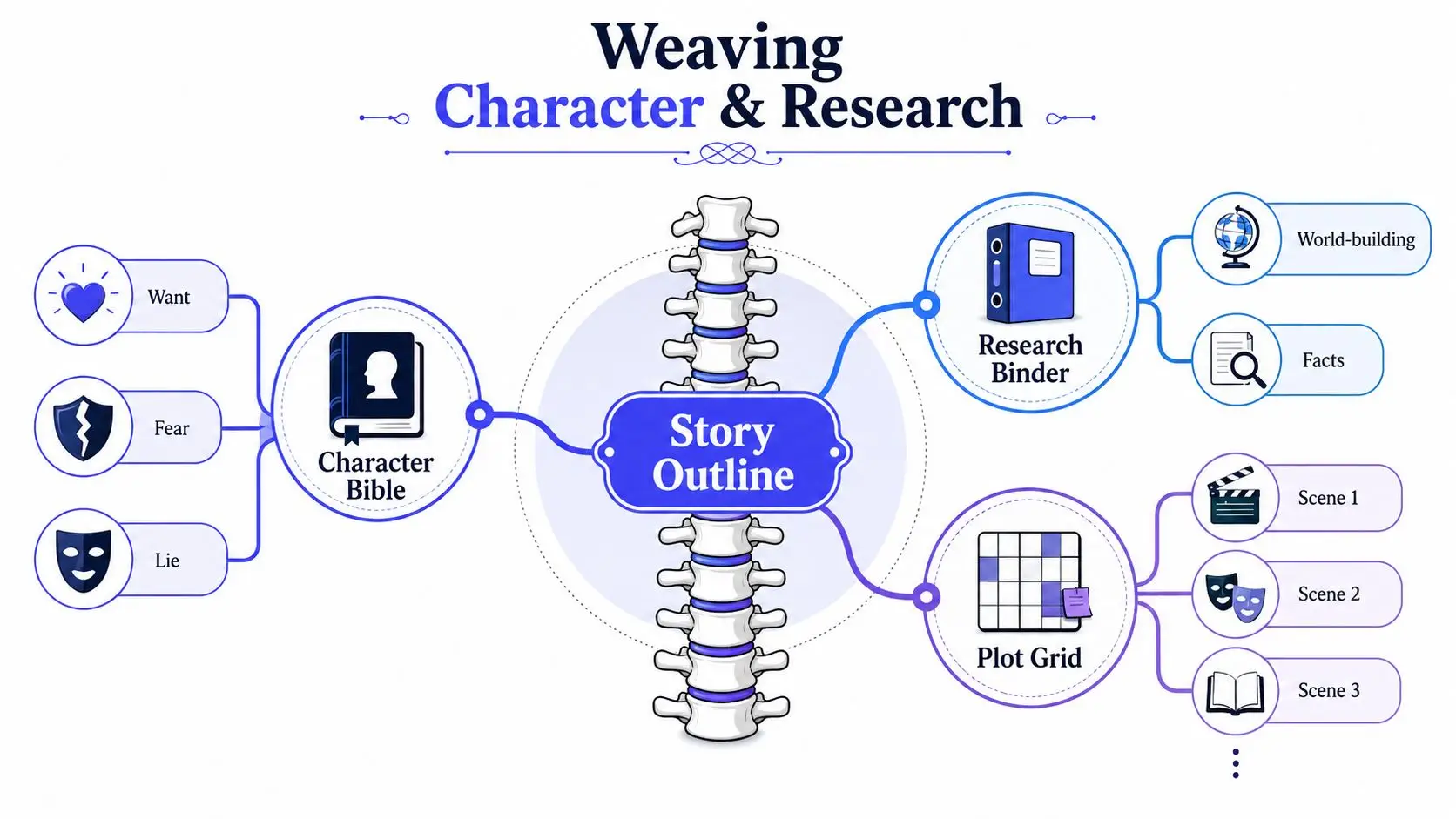
I use three linked artifacts:
- Character bible: Each important character gets a want, fear, and lie, plus behaviour that makes those traits visible.
- Research binder: Sources receive short tags, so a technical detail can be retrieved without searching the entire archive.
- Scene list: Each row carries the character and research tags needed for that moment.
The scene list becomes the spine. The other documents attach to it. For example:
Scene 2, [ACCT], (depth-chart), visits the lakeside and tests whether the reported location matches the water conditions.
The character tag reminds you that the accountant notices patterns compulsively, perhaps by aligning objects or correcting figures under stress. The research tag points to the relevant note about water depth, currents, or forensic interpretation. You don't need to paste the entire research binder into the outline. You need enough indexing to prevent convenient discoveries that the story hasn't earned.
Let research change the scene
Suppose your research note indicates that the water evidence wouldn't support the neat conclusion the police report presents. The accountant shouldn't announce, “The drowning was faked.” A more credible scene ending might be a refusal to sign the preliminary report because the physical conditions contradict the stated sequence.
That new final line changes the preceding beat. The inciting event may no longer be “the accountant finds a discrepancy.” It may be “the accountant is asked to certify a conclusion they know is impossible.” The outline has done more than store information. It has allowed research to alter the story's causal design.
Character notes work the same way. If the widow's established lie is that she believes control can prevent loss, her interview shouldn't turn into a generic confession. She may overmanage the room, correct the accountant's terminology, or offer a rehearsed timeline before being asked. Those choices create conflict while remaining consistent with the person you designed.
The Storyloft guide to organising character notes and worldbuilding offers a useful way to think about those materials as connected working references rather than isolated files. Your outline is the index. The bible and binder hold the depth.
Keeping the Outline Alive Through Revisions
A prewriting outline becomes obsolete the moment the story changes unless you update it. That doesn't make outlining pointless. It makes the outline a living document whose level of detail changes with the manuscript's needs.
During discovery, keep scenes to one line and leave the beats loose. You're testing possibility, not documenting a finished book. During structural revision, expand each scene into action, conflict, POV, and consequence. Rewrite major beats as causal chains, so you can see not only what happens but why the next event becomes possible.
During line edits, the outline serves as a checklist. Compare each promised turn with the prose. If a character's arc is supposed to turn during a confrontation, locate the exact scene where that transformation occurs. If you can't point to it, the outline is wrong, or the draft is missing a structural event.
Three failure modes appear repeatedly:
- Abandonment: The writer stops consulting the outline after the opening chapters. Update it whenever the draft makes a meaningful change.
- Scripture: The writer protects the outline even when a better character choice appears. Mark the change, then revise every dependent scene.
- Second novel: The outline grows into pages of atmosphere, dialogue, and backstory. Remove anything that doesn't guide a drafting or revision decision.
The outline should record commitments, not replace the manuscript.
A practical test is to read the outline aloud in ten minutes. That benchmark comes from the need for a compact structural summary, not from a universal rule about book length. If the story isn't audible, you probably have a catalogue of ingredients rather than a sequence of consequences.
The historical model is useful here. One university template separates a narrative into five major sections, introduction, background, full narrative, analysis, and conclusion, with approximate page ranges for each (see the narrative-writing template). Fiction won't copy that allocation, but the underlying lesson holds: a scalable outline has major blocks, specific subpoints, and enough structure to guide drafting without swallowing it.
Your First Outline This Week and Common Questions
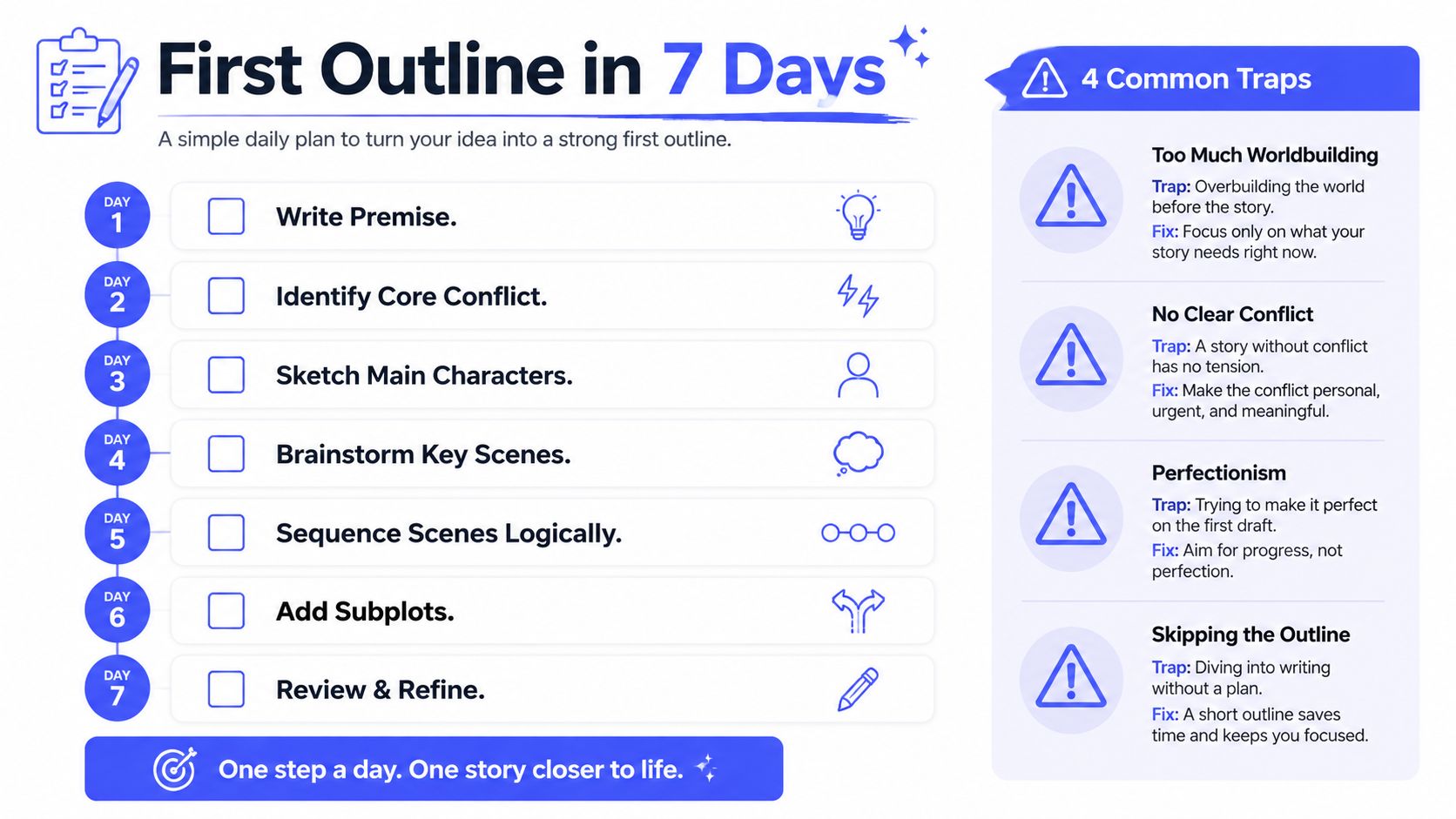
Use this seven-day pass to move from idea to a 15-scene outline:
- Day 1: Write and pressure-test the premise sentence.
- Day 2: Identify the core conflict and extract the major turns.
- Day 3: Draft character anchors, including want, fear, and lie.
- Day 4: Brainstorm scenes that force the protagonist to act.
- Day 5: Sequence the scenes by cause and effect.
- Day 6: Add essential subplots, research tags, and POV decisions.
- Day 7: Read the outline aloud and revise gaps, repetitions, and weak escalations.
Do discovery writers need outlines? They need direction, but that direction may be a premise and a few beats rather than a scene map. What if the ending stops working? Replace it and trace the consequences backward. How long should outlining take? Long enough to expose structural problems, not so long that the outline becomes a substitute for drafting. Can a pantser avoid outlining entirely? You can avoid the document, but you'll still make decisions about character, sequence, stakes, and causation.
Stop outlining before every detail is solved. Overplanning kills momentum as reliably as underplanning kills direction.
Storyloft gives writers a planning workspace for outlines, binders, tags, character notes, research, and manuscript drafting in one application. If you want to turn this week's premise into a connected outline and keep it available beside the draft, visit Storyloft and start building the story's working spine.