
How to Choose KDP Category Keywords That Actually Sell Books in 2026
How to Choose KDP Category Keywords That Actually Sell Books in 2026
Key Takeaways
Choosing the right KDP category keywords isn’t just about visibility—it’s about strategic positioning that can multiply your book’s discoverability and sales potential.
• Categories and keywords serve different purposes: Categories organize your book on virtual shelves while keywords connect it to search queries, and you need both working together to maximize visibility and sales.
• Strategic keyword placement unlocks bonus categories: Beyond your 3 direct category slots, smart use of your 7 backend keyword boxes can trigger additional category placements Amazon assigns automatically.
• Competition varies wildly across categories: Reaching #1 requires anywhere from 6 to 5,000 daily sales depending on the category, making competitive research essential before selecting your targets.
• Use the three-slot strategy: Allocate one category for content relevance, one winnable subcategory for bestseller badges, and one bonus category to maximize your reach without spreading too thin.
• Avoid common keyword mistakes: Don’t repeat words from your title or category names in keyword boxes, skip quotation marks that limit indexing, and focus on natural search phrases readers actually use.
• Test and optimize continuously: Update your keywords every 24-72 hours based on performance data without affecting reviews or rankings, giving you ongoing opportunities to improve visibility.
The difference between books that sell and books that languish often comes down to these strategic choices. With 54% of KDP categories being duplicates and 27% being unrankable ghost categories, knowing which keywords trigger the right placements separates successful authors from those still guessing. 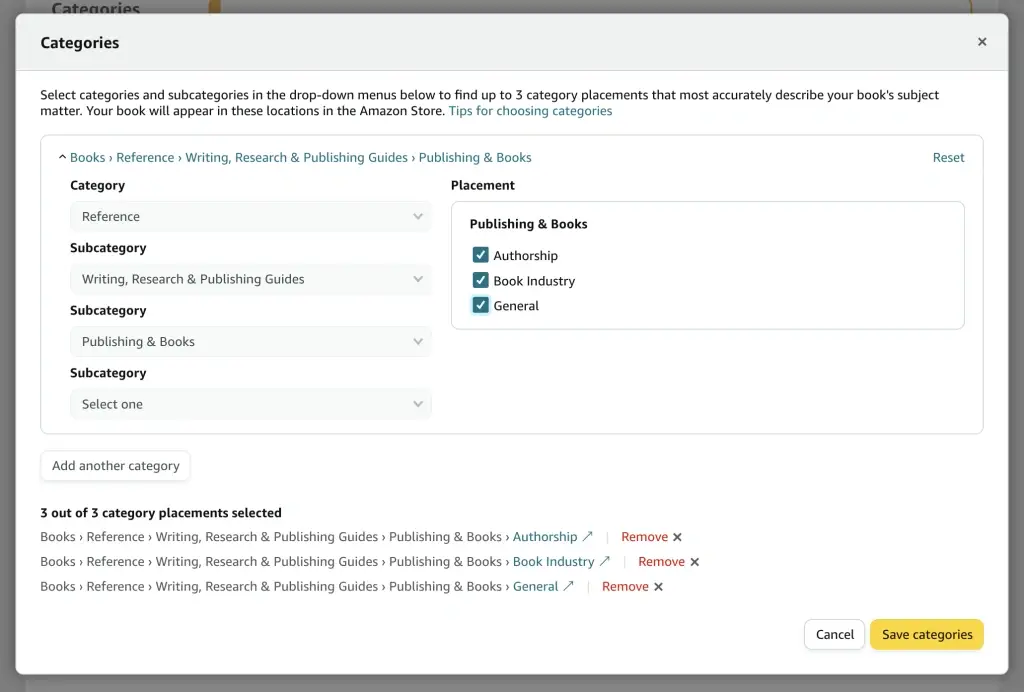 Here’s something wild: holding the #1 spot in different KDP categories takes anywhere from 6 sales a day to 5,000. That’s an 800× difference on the same platform[2].
Over 12 million books compete for attention on Amazon[2]. Choosing the right kdp category keywords can make or break your book’s success. Most authors pick categories at random. Smart ones treat them like strategic weapons.
The difference? Understanding how amazon kdp category keywords work. You need to know which kdp categories give you the best shot at visibility without drowning in competition.
We’ll walk you through finding the perfect kdp category list for your book and show you kdp keywords examples that work. You’ll learn how to combine kdp keywords and categories for maximum sales.
Ready to stop guessing? Let’s get started.
What Makes Category Keywords Different (And Why They Sell Books)
“Books are a uniquely portable magic.” — Stephen King, American author of horror and supernatural fiction
Categories and keywords aren’t interchangeable. They do separate jobs, and understanding this split matters.
A category puts your book on a shelf. A keyword surfaces it in search results[10]. Categories organize. Keywords connect. A book ranked #1 in its category can still be invisible in search if the kdp keywords and categories don’t line up[10].
Amazon gives you 3 category slots during setup[11]. But keywords unlock bonus placements. Use phrases like “cozy cat mystery small town” in your seven keyword boxes, and Amazon might shelve you in additional browse categories you never selected[2]. This isn’t guaranteed, but it extends your reach beyond that 3-slot limit.
Here’s where it gets interesting: you pick a specific subcategory and automatically get listed in all upstream categories[12]. Pick “Space Fleet” and you appear in “Military Science Fiction” and “Science Fiction & Fantasy” without using extra slots.
The catch? 54% of kdp categories are duplicates of others, and 27% are ghost categories you can’t rank in[4]. Amazon also reserves the right to move your book based on your metadata signals[11]. Strong amazon kdp category keywords keep you anchored where you want to be. They reinforce your placement through both categorical and linguistic signals[10].
Categories give you browsing traffic. Keywords give you search traffic. You need both working together.
Finding Category Keywords That Match Your Book
“It is best to think of them, not as single words, but as search phrases — that is to say, groups of words that your ideal reader is likely to search for.” — David Kudler, Author and publishing expert
Start with books you know already work. Find 5-10 titles like yours that sell well[2]. Go to each book’s Amazon product page, scroll to Product Details, and check the Best Sellers Rank section. You’ll see which categories they occupy[2].
A book might show: #2,345 in Kindle Store, #12 in Medical Thrillers, #18 in Psychological Thrillers[2]. Those are your starting points.
Check if you can actually compete. Go to each target category’s bestseller list and click on the #1 and #20 ranked books[2]. The #20 book has a BSR under 10,000? That category is very competitive. BSR of 10,000-50,000 means moderately competitive. Over 50,000? Achievable for most authors[2].
Recent data shows you could crack the top 10 with fewer than 10 daily sales in 9 categories and fewer than 30 daily sales in 26, while holding #1 took 1,000+ daily sales in 25[2]. Winnable categories exist, but they’re rare.
Use your three slots with care. Pick one category for relevance (close content match) and one winnable pick (smaller subcategory where a few sales earn the bestseller badge)[5].
Tools like BookBeam’s Category Explorer help you filter through thousands of categories using competitiveness data[6]. A BSR around 80,000 to 100,000 means at least 1-2 sales daily[6].
Implementing Your Category Keywords for Maximum Visibility
Log into your KDP dashboard and pull up your book’s keyword section. You get seven boxes with 50 characters each[1]. Use them wisely.
Fill 1-2 boxes with category anchoring terms[3]. These phrases tell Amazon where to shelve your book. If you chose “Space Marine” as a category, include keywords like “military science fiction space fleet” in one box. Amazon will move your book to different categories if your kdp keywords and categories don’t line up[7], so anchor yourself.
Amazon indexes all word variations on its own[3]. Type “dragon war mage” and you rank for “war dragon,” “mage dragon,” and every combination. Skip quotation marks[1][8]. They limit indexing to exact phrases only.
Characters get wasted when you repeat words from your title or category names[1][7]. Amazon already indexes those. Use your keyword slots for new terms readers search.
Combine phrases the way readers search[1]. Readers search “cozy cat mystery small town,” not “town small cat cozy mystery.”
Publisher Rocket shows you which keywords Amazon associates with specific categories[7]. Click the keywords button next to any category and grab the phrases Amazon recognizes.
Update your amazon kdp category keywords anytime without affecting reviews or rankings[9]. Changes take 24-72 hours to index[9]. Track what works and swap what doesn’t.
Conclusion
You’ve got everything you need to choose kdp category keywords that sell books. Pick categories strategically, not randomly. Anchor your keywords to match those categories. Track your results and adjust what doesn’t work.
Most authors never bother with this level of detail. That’s your advantage. Start with one book and test these strategies. Watch your rankings climb. Smart category choices today mean more sales tomorrow.
FAQs
Q1. How do I select the most effective keywords for my KDP book? Start by researching 5-10 successful books similar to yours and check their category placements in the Product Details section. Use your seven keyword boxes strategically with category-anchoring phrases, combine words logically as readers would search them, and avoid repeating terms already in your title or subtitle. Focus on phrases that trigger specific categories while maintaining search relevance.
Q2. Can authors still make money with Amazon KDP in 2026? Yes, KDP remains profitable in 2026, but success depends on strategic category selection and keyword optimization. Some categories require as few as 6 daily sales to reach #1, while others need 5,000. The key is finding winnable categories with BSR rankings above 50,000 and using proper category keywords to maximize visibility without drowning in competition.
Q3. What’s the difference between categories and keywords on Amazon KDP? Categories organize your book on virtual shelves and provide browsing traffic, while keywords surface your book in search results and generate search traffic. Amazon gives you 3 category slots during setup, but strategic keywords can unlock additional category placements beyond this limit. Both work together—categories for organization, keywords for discoverability.
Q4. How can I find the right book categories quickly for my KDP publication? Use tools like KDP Category Searcher or BookBeam’s Category Explorer to filter through thousands of categories efficiently. Check the Best Sellers Rank of books ranked #1 and #20 in your target categories—if the #20 book has a BSR over 50,000, that category is achievable. Pick one category for relevance, one winnable subcategory, and one bonus category to maximize your chances.
Q5. What are common mistakes to avoid when choosing KDP category keywords? Don’t waste character space repeating words from your title, subtitle, or category names since Amazon already indexes those. Avoid using quotation marks as they limit indexing to exact phrases only. Don’t pick categories randomly—ensure your keywords align with your chosen categories, or Amazon may move your book. Remember that 54% of KDP categories are duplicates and 27% are ghost categories you can’t rank in.
References
[1] – https://kdp.amazon.com/help/topic/G201298500
[2] – https://manuscriptreport.com/blog/kdp-category-selection-guide
[3] – https://kindlepreneur.com/7-kindle-keywords/
[4] – https://publishdrive.com/how-to-choose-keywords-for-amazon-kdp.html
[5] – https://publishrank.io/learn/categories/best-kdp-categories-for-new-books
[6] – https://bookbeam.io/amazon-book-sales-calculator/
[7] – https://kindlepreneur.com/amazon-book-keyword-rules/
[8] – https://reedsy.com/blog/guide/kdp/amazon-keywords/
[9] – https://www.kdpeasy.com/blog/kdp-backend-keywords-guide
[10] – https://manuscriptreport.com/blog/amazon-kdp-keywords
[11] – https://kdp.amazon.com/help/topic/G200652170
[12] – https://spoonbridgepress.com/kdp-keywords-and-categories/
