Document Organization Software: A Practical Guide
You know the feeling. You're mid-revision, one browser tab has a chapter outline, another has interview notes, a third has a folder full of screenshots, and the one source you need has somehow disappeared into a pile of “final_final” files. For long-form writing, that kind of mess isn't a small inconvenience, it can break momentum, scramble research, and make a manuscript feel larger than it is.
Document organization software exists to stop that spiral. For authors, it's less about “saving files” and more about keeping research, drafts, visuals, and revision history in one workable structure, so the project stays legible even when it grows.
Table of Contents
- The Moment Every Author Dreads
- What Document Organization Software Actually Does
- Core Features That Matter to Writers
- An Author Workflow From Research to Revision
- Integrated Platforms vs Stitched-Together Toolchains
- Why the Data Model Matters More Than the Interface
- A Practical Checklist for Choosing Your Tool
The Moment Every Author Dreads
A writer opens a chapter draft at 11:40 p.m. and realizes the key interview quote isn't in the note file they expected. It's in a PDF saved under the wrong project name, the character sketch lives in a different app, and the revision they meant to compare against is buried in an older export. They've got the scene in their head, but the supporting material has scattered itself across the desk like loose pages in a windstorm.
That's the cost of disorganization. It isn't just ugly folders. It's the time spent re-creating work you already did, the hesitation before pressing save, and the quiet worry that a reference or change got lost somewhere between drafts.
For authors, the problem gets worse because long projects contain more than text. You're managing research notes, images, source excerpts, outlines, chapter drafts, cover ideas, and correction cycles. A normal file browser can store all of it, but it can't tell you what belongs together, what changed, or which version was the one you trusted.
Practical rule: if you can't open a project and instantly see its moving parts, the project is running on memory instead of structure.
That's where document organization software enters the picture. It gives a book project a working memory, not just a place to sit. In the next stage, the useful question isn't “Where do I save things?” It's “How does the system know what this file is, how it relates to the manuscript, and whether I can still find the exact state I need later?”
What Document Organization Software Actually Does
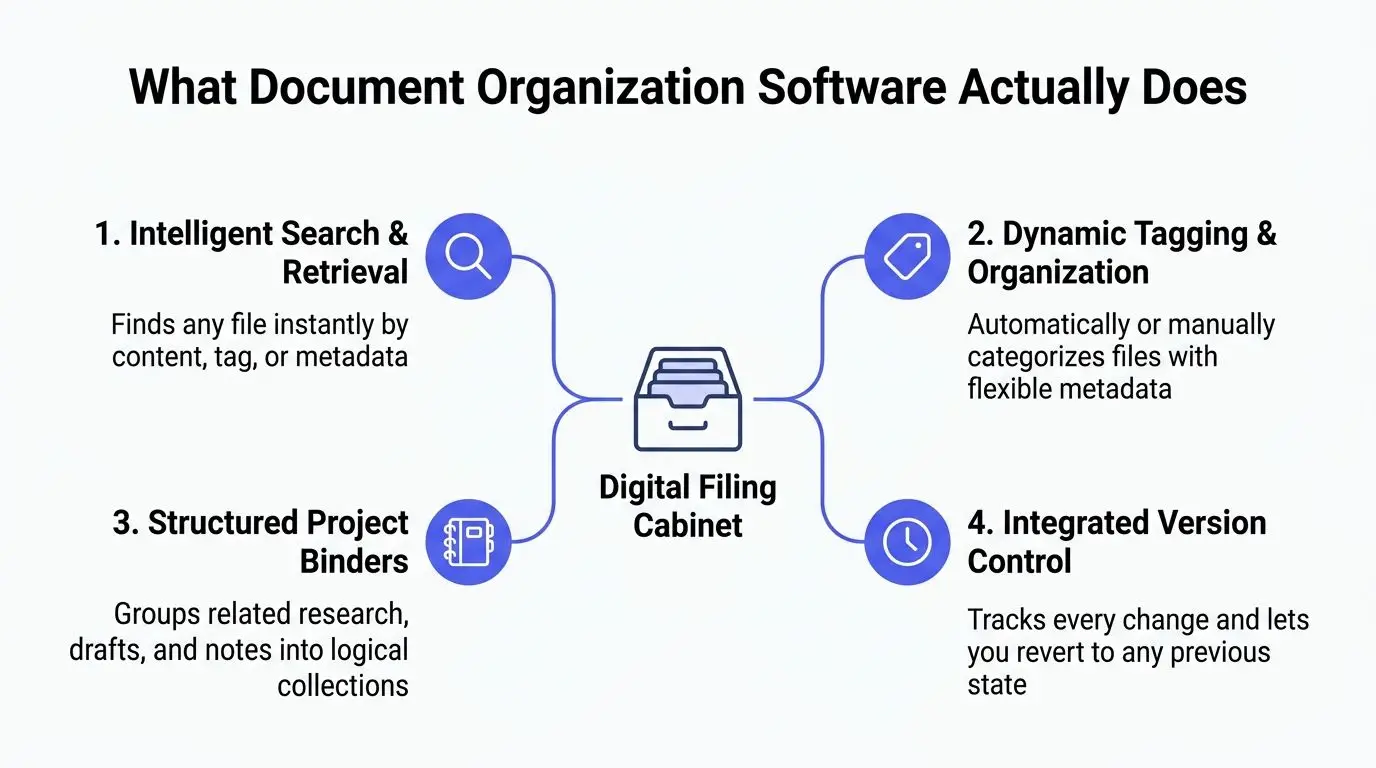
At the simplest level, document organization software is a centralized place to store and retrieve files. But the important part isn't the folder icon on the screen. The important part is the system underneath it, the part that lets you search by keyword, tag, author, or content instead of hunting through filenames one by one, as Microsoft describes in its document management overview. That distinction matters for authors because a manuscript project rarely stays neat for long. Microsoft's document management explanation makes clear that the system is built around retrieval and workflow, not just storage.
The four mechanisms that make it work
The first mechanism is metadata. Metadata is information about a file, such as topic, character, scene, source type, or draft stage. Instead of forcing every useful fact into the filename, the software stores those facts as structured fields. That's what makes a binder of 200 files searchable in a useful way.
The second mechanism is full-text indexing. The software reads the content inside your files and builds an index so a phrase buried in a note, outline, or PDF can still be found later. For a writer, that means you're not relying on memory to remember whether a quote was in a doc, an email, or a clipped webpage.
The third is OCR, or optical character recognition. OCR turns scanned pages and image-based documents into searchable text. If you've ever photographed a handwritten note or saved a scanned article, OCR is the difference between “I have it somewhere” and “I can search it.”
The fourth is version control. That keeps earlier states of a file available when revision goes sideways. For long-form writing, version control is what lets you recover the paragraph you deleted at 1 a.m. and didn't mean to lose.
If you want a plain-English companion for arranging digital files before you choose software, AIDictation's file organization tips are useful because they show how naming, grouping, and retrieval habits support the software itself.
Core Features That Matter to Writers
Writers don't need every possible document feature. They need the ones that reduce friction during research, drafting, and revision. The best way to evaluate document organization software is to ask whether it handles the author's actual day, not the vendor's product demo.
Search, tags, and project binders
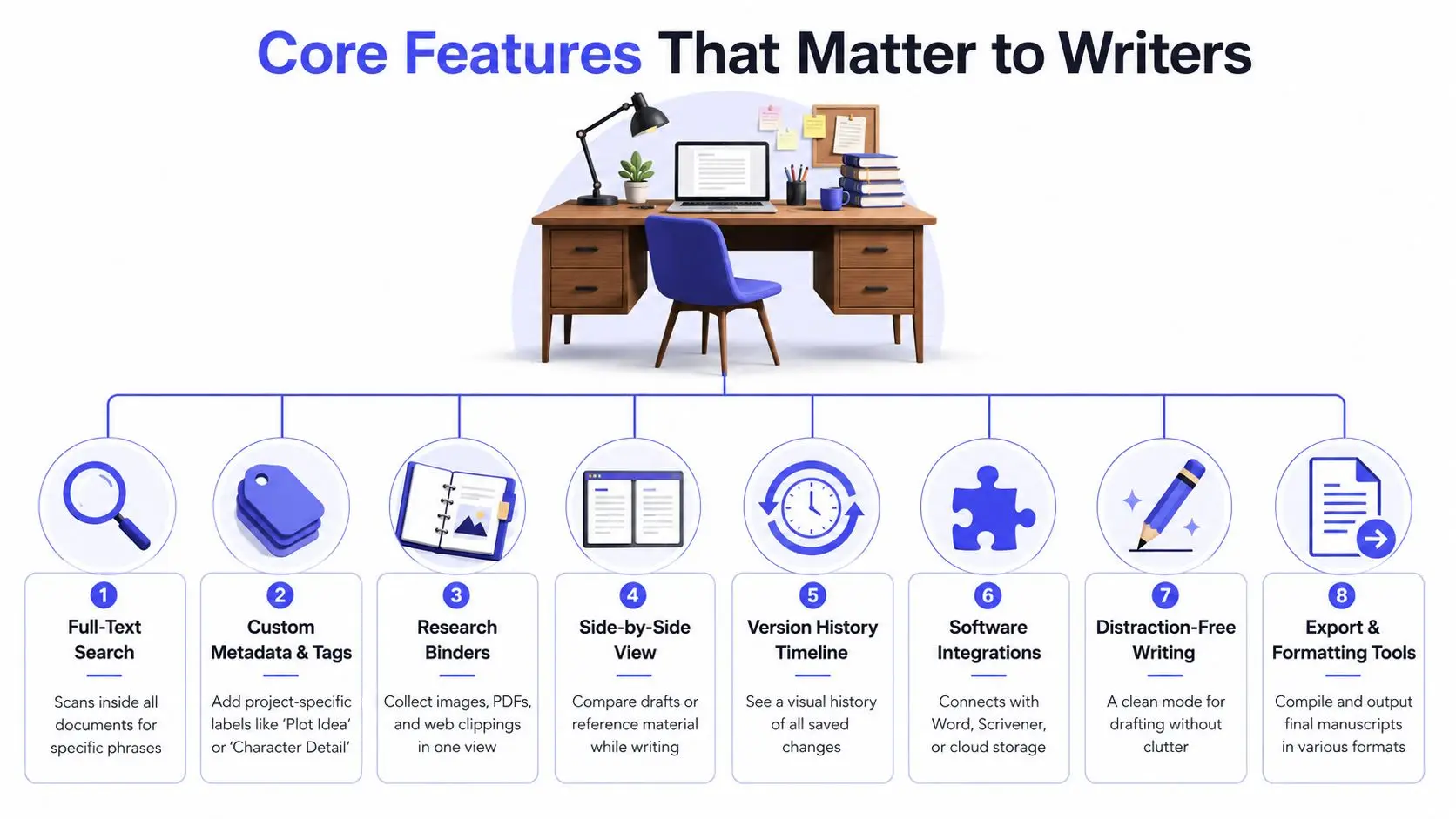
Full-text search is the first filter. If the tool can find a line buried in a PDF or note, it saves time when you only remember a phrase. Custom metadata comes next, because a tag like “Setting” or “Character Detail” is more useful than “miscellaneous.” A research binder then groups images, clippings, and notes around one book, one essay, or one chapter arc.
A writer working on historical fiction might tag every source by location, character, or time period, then pull only the items relevant to one scene. That's faster than opening a folder tree and guessing where the material landed.
Revision, comparison, and cleanup
Side-by-side view matters when you're comparing a draft against notes or an older chapter. Version history gives you a record of what changed, which is a safety net when edits get aggressive late in the process. Distraction-free writing helps when the same app also holds the archive, because the drafting surface needs to feel simple even if the back end is not.
A clean export pipeline matters too. If the software can't produce a manuscript-ready output without extra cleanup, it's not really helping the project finish.
Useful test: if a feature doesn't help you locate, compare, or preserve a source or draft, it's probably decorative rather than essential.
Collaboration, integrations, and privacy
Authors who work with editors, co-writers, or beta readers need permissions that limit accidental changes. Integrations matter when you still use Word, Scrivener, or cloud storage elsewhere. One more question deserves attention too, whether the vendor's privacy posture says user manuscripts are not used to train AI models. For unpublished work, that's not a minor detail. It's part of the trust you place in the platform.
The feature list on paper can look long, but the logic is simple. Good software helps you find, label, compare, protect, and export the material that makes a book possible.
An Author Workflow From Research to Revision
A workable writing system starts before the first sentence of the draft. Research comes in, notes get tagged, scenes get written, and revision later depends on whether all of that material stayed connected. When those steps live in one place, the project feels less like a scavenger hunt.
Research enters the binder first
Start with a project binder. Put source PDFs, web clippings, screenshots, interview notes, and character sketches in one collection. Then tag each item by role, such as plot, setting, or reference image. That way, you're not recreating the same label in three different apps.
The point isn't aesthetic order. The point is making the manuscript's evidence easy to recover while you're still writing. If you need a single note from six weeks ago, the binder should help you pull it up without re-opening five folders.
Drafting stays close to the source
Next, draft in a focused editor while keeping the research visible beside it. Side-by-side reference matters when you're checking continuity, spelling a place name correctly, or reusing a source phrase carefully. The draft doesn't need to leave the workspace to get context.
That is where a tool such as Storyloft fits the category. It combines drafting, research organization, AI-assisted editing, and export in one cloud-based environment, so a writer can keep the manuscript and supporting material in the same system instead of stitching them together afterward. Its research organization guide at https://storyloft.app/how-to-organize-research-notes/ is useful if you're building a binder structure from scratch.
Revision closes the loop
Once the draft changes, save a version before the next round of edits. Keep the older state visible in the history timeline so you can compare what changed and why. If a reviewer's suggestion makes a scene weaker, you can return to the previous state without rebuilding it from memory.
Later, when the manuscript is ready for layout, export should use the same structure that held the draft and the notes. That continuity is what keeps a long project from splintering into unrelated files.
Integrated Platforms vs Stitched-Together Toolchains
Authors usually end up in one of two setups. Some use one integrated platform for research, drafting, visuals, and export. Others assemble a toolchain from separate apps, which can work well until the project becomes large enough to expose the seams.
Where integrated platforms help
An integrated platform keeps the same data model across the manuscript, the research binder, and the visual assets. That means a character note, a scene draft, and a cover concept can stay connected without manual syncing. If the platform also keeps revision history and permissions in the same environment, co-writers and editors don't need to guess which copy is current.
Here's the trade-off. A single platform gives you less switching and fewer broken links, but it also asks you to trust one vendor with more of the writing workflow. For many authors, that's a fair exchange. For others, it feels too centralized.
| Workflow Need | Integrated Platform | Stitched-Together Toolchain |
|---|---|---|
| Keep research and draft in sync | One workspace, fewer handoffs | Manual copying between apps |
| Preserve revision history | One version system | Different histories in different tools |
| Handle mixed media | Files stay in one project structure | Images, notes, and drafts live separately |
| Manage collaborators | Shared permissions in one place | Access rules vary by app |
Where stitched systems still appeal
A stitched toolchain can be more flexible if you already love a specific editor or design app. You might draft in one program, manage notes elsewhere, and assemble the final manuscript in a third. That can work, but every transfer creates a chance for version drift.
If you're curious how privacy and note capture fit into tool selection, Weeve's privacy-first note taking guide is a helpful companion because it highlights the trust and capture side of the equation. For a broader comparison of book-writing platforms and general-purpose tools, see https://storyloft.app/book-writing-software-vs-google-docs-word-and-scrivener-which-is-best-for-long-manuscripts.
The central question is simple. Do you want to assemble your workflow every week, or do you want the workflow to stay assembled for you?
Why the Data Model Matters More Than the Interface
Most authors shop for software by looking at the screen first. That's understandable, because a clean interface feels immediately usable. But for long-form projects, the data model decides whether the system still makes sense six months later, after the draft has doubled in size and the supporting material has tripled.
Structure beats prettiness
A strong data model understands relationships. It knows a note belongs to a chapter, a source belongs to a topic, an image belongs to a character, and a revision belongs to a specific draft state. A weak one just stores files in a prettier shell. That difference becomes visible when you need to sort mixed-media material, not just text.
Folder-first thinking breaks down when manual hierarchies work only while the project is small. As material grows, you spend more time renaming and moving files than using them. Rule-based classification and structured metadata reduce that churn because the system does the sorting work instead of asking you to repeat it.
Permissions and traceability matter too
Long-form writing isn't always solo. Editors, co-writers, and beta readers need different access levels, and the software has to preserve who changed what. If permissions are loose, accidental edits show up. If the audit trail is weak, nobody can reconstruct the route from draft to final.
For authors managing unpublished work, privacy is part of the same structural question. A platform should make it clear how it treats user manuscripts and whether those files are used to train AI models. Storyloft's privacy and manuscript-control explanation at https://storyloft.app/what-makes-an-ai-writing-tool-safe-for-authors-privacy-training-and-manuscript-control-explained/ is relevant because it shows why trust and structure belong in the same buying decision.
Bottom line: the prettier interface is not the thing that saves a manuscript in year two. The underlying relationships between files, tags, versions, and permissions do.
When you evaluate software with that lens, you stop asking whether it looks organized and start asking whether it stays organized under pressure.
A Practical Checklist for Choosing Your Tool
Choosing document organization software for a book project is easier when you test specific behaviors instead of reading feature lists. A trial should answer whether the tool can hold the project together when the files get messy.
Use these tests during a trial
- Search depth: Can it search inside PDFs, images, and handwritten notes? Try one scan, one clipped article, and one draft paragraph.
- Metadata flexibility: Can you create custom tags and fields for your genre? Add a label for a character, a subplot, and a source type.
- Version history: Does it keep named snapshots of your work? Save a draft, change it, and see whether you can return cleanly.
- Binder organization: Can you group unrelated file types into one project collection? Put a note, an image, and a PDF in the same binder.
- Side-by-side view: Is there a dedicated mode for research while writing? Open a source and a scene at the same time.
- Integrations: Does it connect to your word processor and cloud storage? Test the handoff you use.
- Export options: Can it compile and output in standard manuscript formats? Check both print and ebook needs.
- Distraction-free mode: Is there a clean drafting view without clutter? Open it and see whether you can write in it for an hour.
The right answer isn't always the most feature-rich tool. It's the one that keeps your notes, drafts, and assets aligned when the project gets complicated. That's why this category has become a durable part of modern writing infrastructure, not just a convenience layer on top of storage.
For a direct buying framework, compare tools against https://storyloft.app/how-to-choose-book-writing-software/ and ask whether the platform can hold a long manuscript without forcing you to rebuild your system halfway through.
If you're trying to keep research, drafts, images, and revision history in one place, Storyloft gives you a cloud-based writing workspace built for that kind of project. It combines manuscript drafting, research organization, collaboration, and export in a single app, so you can spend less time stitching tools together and more time moving the book forward. Visit Storyloft to see how that workflow looks in practice.