How to Manage Multiple Projects a Writer’s Guide to Flow
You've probably lived this morning already. You open your laptop to draft chapter twelve of your novel. Before the scene loads in your head, a freelance client emails about revisions. Then you remember the essay draft due next week, the trilogy notes scattered across three folders, and the character detail you forgot to write down somewhere sensible. By lunch, you've touched five projects and moved none of them far enough to feel calm.
That kind of workload doesn't fail because writers lack discipline. It fails because creative work has a memory problem. Every project carries its own voice, research trail, emotional tone, and unresolved questions. When you bounce between them carelessly, they start to leak into one another.
I've found that learning how to manage multiple projects as a writer has very little to do with squeezing more tasks into a calendar. It has everything to do with protecting attention, separating narrative identities, and building a workflow that lets a novel stay a novel while paid nonfiction stays clear and professional.
Table of Contents
- The Organized Chaos of a Multi-Project Author
- Build a Mission Control for Your Writing
- Prioritize When Every Story Feels Urgent
- Structure Your Week for Creative Flow
- Manage Notes, Versions, and Collaboration
- Sustain Your Momentum and Avoid Burnout
The Organized Chaos of a Multi-Project Author
A multi-project writing life looks glamorous from the outside. In practice, it often feels like carrying three different brains around at once. One brain is inside your fantasy trilogy. Another is writing sharp, useful nonfiction for clients. The third is trying to remember whether the line you just drafted belongs to your heroine, your newsletter, or an article pitch.
That confusion has a name. It's context-switching fatigue. A lot of advice about writing productivity leans on time-blocking and sequential focus, but that advice often misses the problem writers feel most sharply when projects share a genre, a research base, or a tonal register. The sharper insight is that mixing projects in radically different stages tends to work better than mixing projects in the same stage, as noted in this discussion of context-switching fatigue in parallel writing.
If you've read broad guides on managing multiple projects simultaneously, you've probably seen sensible advice about priorities and planning. The gap is that a novelist's workload isn't only operational. It's imaginative. A trilogy draft doesn't compete with freelance nonfiction in the same way two client accounts compete. One asks for sustained voice and scene memory. The other asks for accuracy, structure, and speed.
Practical rule: Don't treat all writing tasks as interchangeable units of work. Drafting a chapter and polishing a client piece may both take two hours, but they ask for different kinds of attention.
That's why the usual fix, “just be more organized,” doesn't go far enough. Writers need separation. Each project needs its own identity, its own stage, and its own lane in the week. When that separation exists, your head quiets down. When it doesn't, every open document starts sounding vaguely like every other one.
The best systems for long-form writers are the ones that reduce tool sprawl and keep project context accessible in one place. That's the appeal behind platforms built for authors scaling book production. Not because software writes the book for you, but because your notes, draft, and planning stop fighting each other.
Build a Mission Control for Your Writing
The first fix is simple and unglamorous. Stop storing your projects like a pile of active tabs. Build one place where every manuscript, article, note set, and deadline lives under a clear identity.
Writers run into trouble when a project is only a vague idea with a file name like “new draft maybe” or “essay version latest final 2.” One documented pitfall is lack of clear project identity, which leads to blended storylines and muddled execution. The same source notes that the Research Streams Approach can increase project completion rates by approximately 15% when authors group projects by thematic similarity to reduce cognitive switching costs, according to this writing workflow analysis.
Give every project a hard edge
Every active project should have a one-page identity card. Mine usually includes:
- Working title: Not a poetic placeholder. A practical name you can spot instantly.
- One-sentence logline: What the book or piece is about.
- Current stage: Idea, outline, drafting, revision, copyedit, submission, or final polish.
- Primary next action: The next visible move, not a vague ambition.
- Do-not-mix note: A sentence about voice, audience, or theme that keeps the project distinct.
That last item matters more than writers expect. If I'm juggling a trilogy and a nonfiction assignment, I'll put it in writing: “Novel voice is intimate, atmospheric, interior. Nonfiction voice is clean, structured, direct.” That reminder prevents contamination before it starts.
A useful support for this kind of setup is having dedicated tools to stay organized as an author so the project identity lives with the manuscript instead of in a separate note app you forget to check.
Use research streams instead of random piles
Most writers sort material by project title alone. That helps a little. It doesn't help enough when several projects share overlapping research.
The Research Streams Approach works better because it groups material by theme. If you write historical fiction and essays on folklore, you might keep streams such as:
- Border folklore
- Victorian medicine
- Exile and migration
- Religious symbolism
Now your projects can pull from those streams without forcing your brain to start from zero every time.
When research has a home, you stop re-finding the same fact five times.
This is also where a digital binder helps. Each manuscript gets its own binder, but shared themes get tags or linked note clusters. Your master board then shows all active projects at a glance: what's being drafted, what's waiting on edits, and what's still incubating.
A short demonstration makes the setup easier to picture:
A practical mission control can be as simple as this table:
| Project | Identity | Stage | Next action |
|---|---|---|---|
| Trilogy Book 2 | Political fantasy with court intrigue | Drafting | Write confrontation scene |
| Freelance essay | Reported nonfiction for client audience | Revision | Tighten lead and examples |
| Newsletter series | Personal essays for subscribers | Outline | Choose opening anecdote |
Once that board exists, your workload stops feeling like fog. You can see what is active, what is paused, and what should not be touched this week.
Prioritize When Every Story Feels Urgent
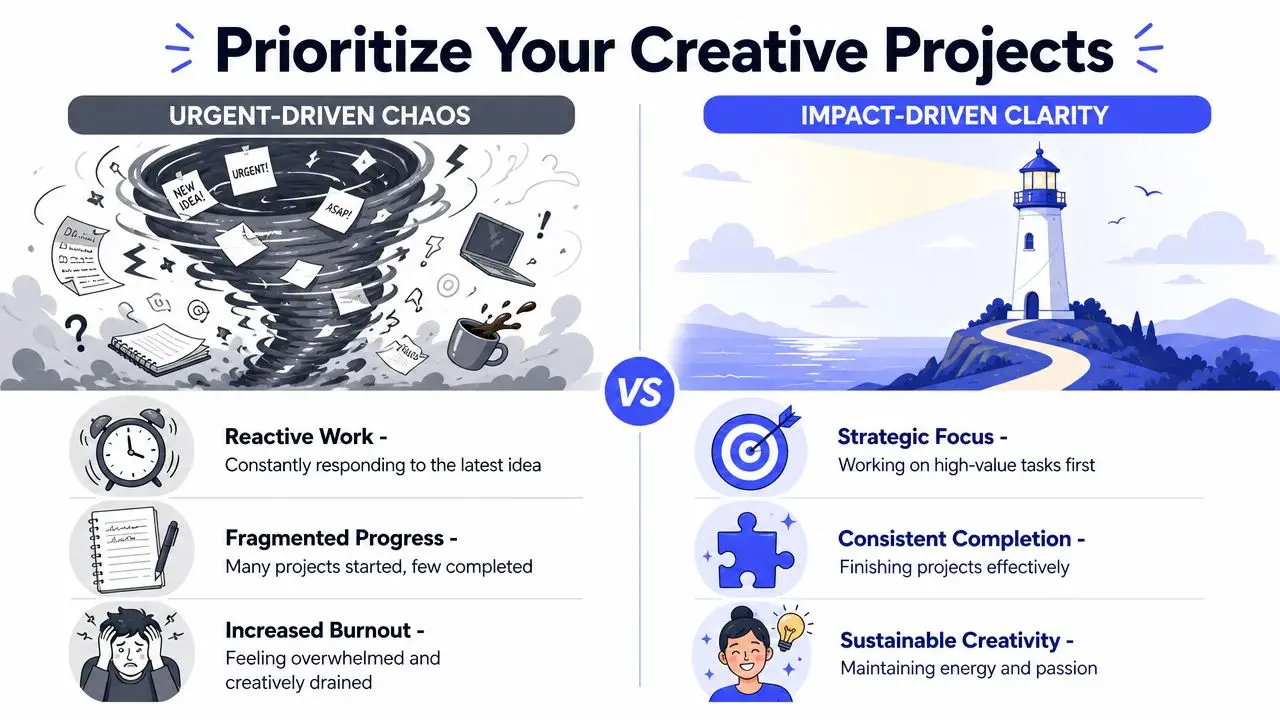
The hardest part of how to manage multiple projects isn't organization. It's deciding what deserves today's best energy. Writers often don't lack options. They lack a way to rank those options without waiting for panic to do the ranking.
That's a common gap in writing advice. Many guides talk about burnout in broad terms but don't offer a quantitative way to weigh value versus urgency when you're managing a portfolio of self-directed work, as discussed in this analysis of project prioritization for writers.
Use a writer's scoring filter
I don't use the classic urgent-important box for writing. It's too blunt. Creative portfolios need a scoring filter that reflects what a project does for your career and your mind.
Score each active project on a simple scale such as low, medium, or high across these criteria:
| Criterion | What to ask |
|---|---|
| Career alignment | Does this move you toward the kind of writer you want to become? |
| Energy fit | Do you currently have the mental fuel this stage requires? |
| External commitment | Is someone else waiting on this? |
| Re-entry cost | If you stop now, how hard will it be to re-enter later? |
| Creative pull | Do you still feel voltage around it, or only guilt? |
You don't need fake precision. The point is to stop saying “everything matters” and start saying “this matters most right now.”
One useful companion to that process is a set of time management tips for writers that connect priorities to actual calendar behavior. A ranked list that never reaches the schedule is still just a mood board.
Pair projects by stage, not by excitement
Most writers make one expensive mistake. They pair projects because both seem exciting. That usually means drafting two things at once. It feels alive for about three days, then both voices start blurring.
A better combination looks like this:
- Primary creative lane: drafting the novel
- Secondary technical lane: editing a nonfiction piece
- Support lane: gathering research or answering admin
That mix works because each task draws on a different part of the mind. Drafting wants immersion. Editing wants judgment. Research wants curiosity with less emotional exposure.
If two projects demand first-draft intensity at the same time, one of them usually steals momentum from the other.
The practical test is easy. Ask: “Will this task deepen the voice I'm already in, or force me to build a second voice from scratch?” If it's the second, don't stack it beside another cognitively heavy draft.
Writers who get through multiple books and paid assignments aren't always faster. They're often better at protecting the order in which demanding tasks show up.
Structure Your Week for Creative Flow
Once priorities are clear, the week has to reflect them. If your calendar gives your sharpest morning hour to email and leaves your novel for the exhausted end of the day, the system is broken before you begin.
A validated method for managing multiple writing projects uses 60 to 90 minute energy-specific time blocks with breaks between them, and it recommends placing the highest-priority project in peak energy hours such as 9 AM to noon, with lower-cognitive tasks later in the day, as described in this guidance on staggering writing phases.
Match the task to your energy
Not all writing belongs in the same part of the day. Treating it that way causes a lot of fake failure. You're not bad at writing at 4 PM. You may be trying to draft emotionally demanding scenes in a slot that's better suited to revision, admin, or source gathering.
A workable daily pattern looks like this:
- Morning block: New drafting, difficult structural work, or anything voice-sensitive.
- Midday block: Revision, line edits, scene ordering, or article restructuring.
- Afternoon block: Research sorting, emails, invoices, beta replies, notes cleanup.
In a practical sense, master planning and scheduling becomes useful. The calendar shouldn't just hold appointments. It should reflect which kind of brain you usually have at which hour.
A weekly rhythm that protects voice
I like themed days better than constant mixing. Not because rigidity is noble, but because re-entry costs are real.
Here's a sample rhythm for a novelist with freelance nonfiction:
Monday and Tuesday
Deep drafting on the novel. No client revision until after lunch.Wednesday
Structural review, scene notes, and research consolidation. This is a bridge day.Thursday
Freelance nonfiction drafting or revision. Clear, factual, contained work.Friday
Admin, submissions, outlining the next novel scenes, and preparing Monday's re-entry.
That pattern reduces narrative bleed. It also keeps every project warm enough that nothing fully disappears.
A few practical rules make it hold:
- Cap the block: Stop a drafting session while you still know what happens next.
- Leave a breadcrumb: End each block with a note like “next scene opens in the archive stairwell.”
- Protect the break: Stand up after the block. Don't roll directly from chapter work into article edits.
A writing block ends before your focus collapses, not after.
If you use a writing platform with goals and streak tracking, keep the target modest enough that it supports continuity rather than guilt. The point of a daily target isn't to prove dedication. It's to lower the friction of returning tomorrow.
A simple weekly matrix can help:
| Day | Primary focus | Secondary focus |
|---|---|---|
| Monday | Novel drafting | Notes cleanup |
| Tuesday | Novel drafting | Research check |
| Wednesday | Revision and structure | Client communication |
| Thursday | Freelance nonfiction | Copyedits |
| Friday | Admin and planning | Light outlining |
This is how to manage multiple projects without feeling split in half by them. You don't need every project every day. You need a repeatable rhythm that tells each project when it gets your full mind.
Manage Notes, Versions, and Collaboration
Every writer eventually reaches the messy middle, where half the stress isn't writing at all. It's hunting for the right note, opening the correct draft, finding the editor's latest comment, and trying to remember whether “final” means final or just final-for-now.
That's why your note system, version habits, and collaboration process need to work together. If they live in separate islands, your creative work slows down under administrative drag.
Keep notes attached to the right manuscript
Research becomes dangerous when it floats freely. The same goes for character notes, setting details, interview transcripts, and snippets of dialogue. They need to sit close to the manuscript they support.
I prefer a simple structure:
- Project notes: Plot questions, chapter issues, open loops.
- Reference notes: Facts, links, citations, source extracts.
- World or subject bible: Characters, locations, rules, terminology.
- Discarded material: Cut scenes, unused paragraphs, alternate leads.
The key is retrieval speed. If you have to leave the manuscript and rummage through three apps, you'll lose the thread. That's why side-by-side access to manuscript and notes matters so much in long-form work, especially when you're balancing books with client deadlines. A guide on how to organize your book notes and research is useful because the primary win isn't tidiness for its own sake. It's preserving momentum while drafting.
The best note system is the one that lets you answer your own question before the sentence goes cold.
Set clean handoff rules
Collaboration falls apart when writers treat every handoff as informal. Editors, beta readers, and co-writers need predictable inputs.
Use a few essential practices:
- Name versions clearly: “Book2_devedit_2026-07-12” is boring. That's good.
- Freeze the handoff draft: Don't keep changing the manuscript after you've sent it out unless everyone knows.
- Define the feedback type: Ask for developmental comments, line edits, or proofing. Don't ask for “thoughts.”
- Keep one source of truth: Comments should collect in the same working document or in one agreed review channel.
The same discipline applies to deadlines. One useful project management principle is to add time buffers at the end of the project rather than to every task. According to Atlassian's guidance on managing multiple projects, this approach improves on-time delivery rates by 15% because it accounts for the cumulative uncertainty of concurrent timelines.
That matters for writers because revision rarely slips only once. A delayed beta response bumps the edit. The edit shifts proofing. Cover copy changes after proofing. A final buffer absorbs that chain reaction far better than padding every line item until the schedule becomes fiction.
A clean collaboration setup might look like this:
| Stage | Who's involved | What gets shared |
|---|---|---|
| Draft complete | Writer only | Internal version with notes intact |
| Developmental feedback | Editor or beta readers | Frozen manuscript plus question list |
| Line edit | Editor | Clean manuscript with tracked comments |
| Final polish | Writer | Approved text and checklist |
When these rules are in place, collaboration feels lighter. Not because fewer people are involved, but because everyone knows which draft is real and what kind of response is needed.
Sustain Your Momentum and Avoid Burnout
The deeper truth about managing multiple writing projects is that structure doesn't limit creativity. It protects it. Without structure, your best energy gets spent on re-entry, file hunting, self-negotiation, and low-grade panic.
Writers often resist systems because they sound corporate. Fair enough. A novelist doesn't want to feel managed like a sales pipeline. But a writing life with several active projects needs a framework sturdy enough to survive bad weeks, deadline collisions, and the emotional volatility of long-form work.
The sustainable version is straightforward:
- Centralize your projects so nothing important lives only in your memory.
- Prioritize intentionally so your calendar reflects value, not noise.
- Stagger project phases so you aren't drafting everything at once.
- Work with your energy instead of pretending every hour is equal.
- Build recovery into the rhythm so rest is part of the process, not a reward for collapse.
Small wins matter here. Finishing a scene, closing an edit pass, clarifying an outline knot, or logging a week of steady returns all count. Momentum is rarely dramatic. It's usually the result of ordinary, repeated re-entry.
If you need extra support outside the writing world, these actionable tips to prevent professional burnout are worth reading alongside a creative workflow. The specifics differ by profession, but the principle is the same. People do better work when rest, boundaries, and workload design are taken seriously.
A durable writing practice leaves room for blank days, slow days, and recovery days.
That's especially true when you're balancing a trilogy, freelance assignments, and whatever new idea is tapping on the glass. You do not need a perfect system. You need one that helps you return to the right project with enough clarity to continue.
If you want one place to draft manuscripts, organize notes, track goals, collaborate, and handle the publishing side without bouncing across tools, Storyloft is built for that kind of writing life. It's a practical fit for authors managing several books or mixing long-form creative work with client projects, especially when keeping context in one workspace matters as much as the writing itself.