How to Format an Ebook the Right Way in 2026
You can write a clean chapter in Word and still watch it fall apart the moment you upload it. A heading jumps, a caption wraps badly, an image clips on a phone, and suddenly the file that looked finished in the editor feels amateur in preview. That's the problem with how to format an ebook, the file has to survive reflow, not just look polished on a single screen.
Most formatting failures aren't dramatic. They're small structural mistakes that only show up when the reader changes font size, rotates a tablet, or opens the book in a different app. If you treat ebook formatting as a layered quality system, manuscript to styles to devices to validation, you stop chasing cosmetic perfection and start building something stable.
Table of Contents
- Why Ebook Formatting Trips Up Even Experienced Authors
- Preparing a Clean Manuscript Before You Touch Styles
- Applying Styles, Typography, and Image Handling as One System
- Building the Table of Contents, Metadata, and Export Pipeline
- Platform-Specific Differences Between Kindle and Apple Books
- Validating Output Across Devices and Identifying Defects
- The Formatting Mindset That Survives Real-World Publishing
Why Ebook Formatting Trips Up Even Experienced Authors
The manuscript looks right in Word. The chapters are labeled, the spacing is neat, and the images sit where you want them. Then the previewer opens the file and the logic disappears, because the reader isn't seeing a page, they're seeing reflowed content that adapts to screen size, font settings, and the app's rendering engine.
That's why ebook formatting keeps catching experienced authors off guard. The problem isn't usually the writing, it's that the source document contains hidden assumptions from print layout. A fixed-looking heading, a manually inserted line break, or a pasted block of text can survive in the editor and still fail once the file is rendered on a device.
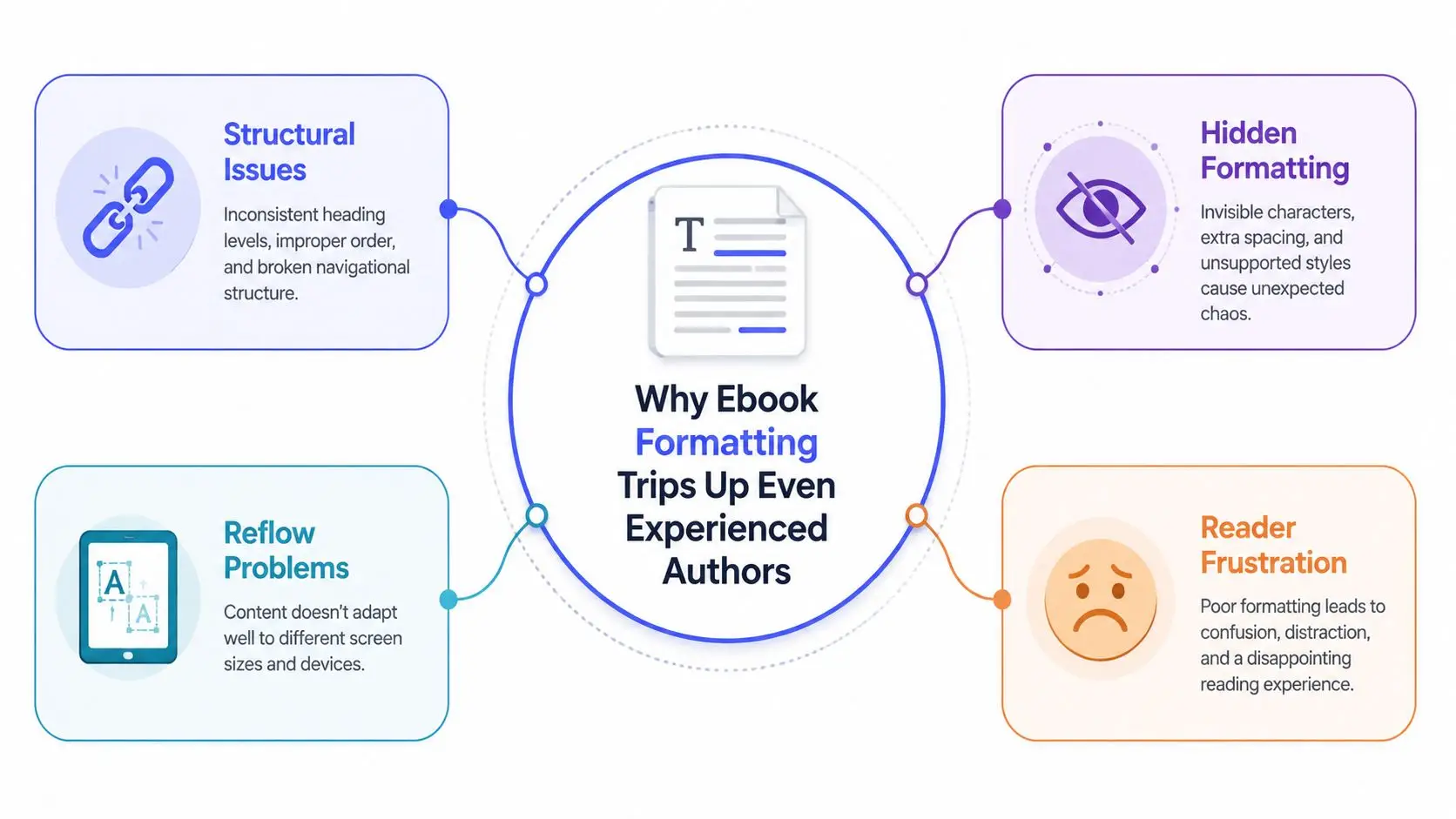
The broken file is often the one that looked best in the editor
Amazon's own formatting guidance makes the shift pretty clear. It tells authors to work with paragraph indentation, single spacing, chapter titles, a table of contents, page breaks, hyperlinks, footnotes, and preview checks before upload, and it specifically points writers toward style-based controls like modifying the Normal style and using 0.2 inch first-line indentation with 0 pt spacing before and after, plus single line spacing. That's a direct sign that ebook production moved away from visual tinkering and toward structured markup that can reflow cleanly across devices. Kindle Direct Publishing formatting guidance
A good file is not the one that lets you control every pixel. It's the one that still reads well when the reader changes font size, switches orientation, or opens it in a different app entirely. The useful mental shift is simple, build for survival under variation, not for one frozen preview state.
Practical rule: if a formatting choice only works when the text stays exactly where you placed it, it's probably the wrong choice for an ebook.
The internal link most authors need at this stage is the list of avoidable mistakes, because those mistakes usually start in the source file, not the export. common ebook formatting mistakes
Preparing a Clean Manuscript Before You Touch Styles
A clean manuscript behaves. A messy one resists every style change you make, because it carries invisible formatting from drafts, research notes, and old exports. Before any styling begins, the source file needs to be stripped back to plain, predictable structure.
Start by removing the junk that Word happily hides
Pasted text from articles, interviews, or old drafts often brings along its own fonts, spacing, and paragraph settings. Manual line breaks create false structure that breaks when the ebook reflows. Multiple spaces, tab-based alignment, and ad hoc indents all look harmless in a desktop editor, then turn into unstable layout decisions later.
I've found the most reliable approach is to keep one production master file and treat everything else as working material. Notes, sources, and alternate passages can live elsewhere, but the manuscript itself should contain only what belongs in the book, no decorative formatting, no experimental spacing, no accidental duplication.
Normalize the structure before you style it
Chapter titles should all behave the same way. Front matter should be separated from body content. Lists, quotations, appendices, and references should be marked consistently so they can be styled once and reused. If a section is supposed to be a heading, make it a heading, not a bold line with extra returns around it.
A manuscript is clean when you can change one style and trust the whole document to respond the same way.
That matters because ebook formatting is built on hierarchy, not appearance. If the structure is noisy, the export has to guess. If the structure is clean, the style layer can do real work.
A quick pre-flight check helps before styling begins:
- Strip direct formatting: Clear local font changes, manual spacing, and pasted styles from imported text.
- Remove fake structure: Replace tab alignment, multiple spaces, and repeated returns with real paragraph settings.
- Standardize headings: Make sure chapter titles, subheads, and section breaks use one consistent hierarchy.
- Separate front matter: Keep acknowledgments, copyright pages, and tables of contents clearly distinct from body chapters.
- Save a clean master: Preserve one production file so you're not repairing the same corruption twice.
That preparation sounds mundane because it is. It also saves more time than any last-minute cleanup after export.
Applying Styles, Typography, and Image Handling as One System
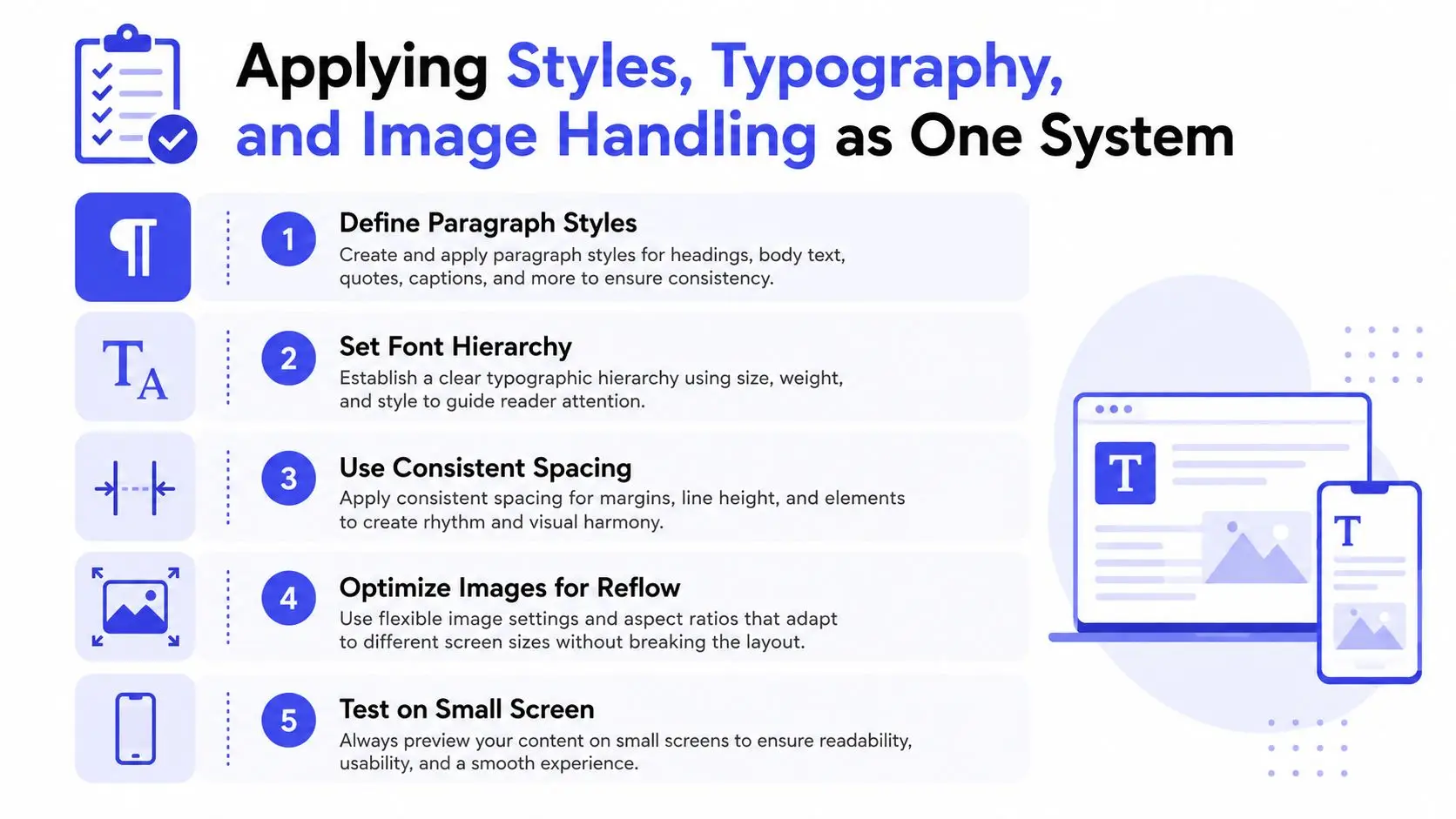
Styles, type, and images are usually discussed separately. In an ebook, they work as one system because the reader's device has the final say. A clean style architecture gives you consistency, while careless image handling can still wreck the page flow.
Build a small style set and stop hand-formatting paragraphs
Use a limited set of reusable paragraph styles, body text, heading levels, blockquote, caption, and perhaps a list style if your manuscript needs it. That's enough for most books. When the foundation is consistent, one change to line spacing or heading behavior propagates cleanly across the file.
Typography needs the same discipline. Ebook-safe type choices are the ones that hold up under reflow, font substitution, and small screens. You're not designing a poster. You're making text readable in a reading app that will override some visual preferences anyway.
Images need the most restraint. Fixed pixel thinking doesn't travel well in an ebook, so the practical goal is to let the file scale gracefully instead of forcing it into a rigid layout. For image-heavy books, that usually means compressing and resizing before export, then checking that captions, alt text, and surrounding paragraphs still behave when the reader changes device settings. For more complex layout decisions, the trade-off between reflowable and fixed formats deserves its own judgment call, as covered in the linked guide on fixed layout vs reflowable ebook.
The same logic applies to tables and callouts. If they depend on a precise page width, they may look fine on one device and awkward on another. If they're built as structured content, they can degrade more gracefully.
Let the structure carry the design
The best ebook styling makes the content easier to render, not harder. That's why the usual print instincts, exact placement, decorative spacing, manual alignment, often create more trouble than they solve. A clean style layer leaves room for the reader's device to do its job.
Building the Table of Contents, Metadata, and Export Pipeline
Once the manuscript structure is stable, the book needs navigation and export discipline. The reader should be able to move through the file cleanly, and the retailer should receive a package that still contains the structure you built. That starts with real heading styles, not manual links pasted together at the end.
Make the TOC from headings, not from memory
A clickable table of contents should be generated from actual heading styles in the manuscript. That keeps the TOC synchronized when chapter names change, sections move, or a subtitle gets revised. Manual TOCs drift. Style-based TOCs stay honest because they're tied to the document's structure.
Metadata belongs in the file, not only on the retailer page. Title, author, language, and other core identifiers help publishing systems understand what they're processing, and they reduce the chance of an export that looks complete but ships with weak structure. The same principle shows up in any serious production workflow, including the stages of a photo production, where assets move through distinct checks before the final output is approved.
Export only after the file survives preview logic
The export step isn't just “save as EPUB” and move on. It's the point where the manuscript, styles, and metadata are translated into something a reader app can interpret. A good pipeline preserves the hierarchy you already built and doesn't flatten it into a generic document.
One useful way to think about it is as a controlled handoff. The manuscript needs to be clean, the styles need to be real, and the export settings need to match the target platform. If any of those layers are sloppy, the output will show it.
A practical workflow often looks like this:
- Finalize structure: Confirm headings, front matter, and chapter order.
- Generate navigation: Build the clickable TOC from style-based headings.
- Set metadata: Enter title, author, language, and other required fields.
- Export the file: Produce the platform-ready EPUB or Kindle output.
- Preview immediately: Check the file in a reader environment before calling it done.
Some authors use separate tools for each step. Others keep the pipeline inside a single environment so the manuscript, styling, and export stay connected. Storyloft is one option that combines drafting, editing, formatting, and ebook export in one application, which reduces the chance of breaking structure between tools. If you're comparing workflow models, the internal conversion walkthrough at Word docs to EPUB 3 conversion guide is the kind of reference that helps when the source file starts in a familiar word processor.
That same discipline shows up in any publishing handoff. A polished file is one thing. A file that survives the transfer into an actual reading app is another.
Platform-Specific Differences Between Kindle and Apple Books
Kindle and Apple Books both want clean structure, but they do not interpret every file the same way. The practical move is to keep one source manuscript and adjust the export layer for each platform, rather than maintain two separate books that drift over time. That keeps the content stable while leaving room for the differences that matter in delivery.
What stays consistent and what doesn't
The core rules stay the same across both systems, headings, navigation, readable text, and validated output. The differences show up in delivery format, metadata handling, and the way each ecosystem renders styling choices after export. If you publish to more than one store, the goal is not identical files. The goal is a source file that stays controlled enough that platform-specific export does not turn into cleanup work.
The BlitzReels publishing glossary on multi-platform publishing gives useful context for why the same book can still need different final packaging across retailers.
| Aspect | Kindle (KDP) | Apple Books |
|---|---|---|
| Primary delivery | EPUB is the current upload path for most authors, then Kindle Previewer handles validation, and a Kindle formatting guide is useful when you need to tune the file for KDP's behavior | EPUB is the expected ebook format |
| Style sensitivity | Strong attention to heading hierarchy, navigation, and reflow behavior | Similar emphasis on clean EPUB structure and readable reflow |
| Metadata | Needs to be embedded cleanly in the file and matched on the retailer side | Also depends on accurate embedded metadata and storefront setup |
| Visual layout | Reflowable text usually gives the least trouble | Reflowable text also tends to be the safest default |
| Best practice | Preview before upload, then check the exported Kindle result on reader apps or devices | Preview the EPUB in Apple-facing reading contexts before release |
Keep one master file and tune the export once
The cleanest production setup is a single manuscript with consistent styles, then separate export settings for the two stores. That avoids copying text into a second file and losing track of which version has the latest fixes. It also lets you repair a problem at the source once instead of chasing it in two outputs.
A platform-aware workflow is not about making the book flashy. It is about making sure the same structural choices still read correctly when one ecosystem renders them a little differently from the other.
Validating Output Across Devices and Identifying Defects
Validation is where the file tells the truth. The editor can hide a lot, but previewers and reader apps expose the defects authors need to fix. A single “looks okay” check is not enough, because ebook formatting has to survive reflow outside the tool you used to build it.
Preview the file where readers will see it
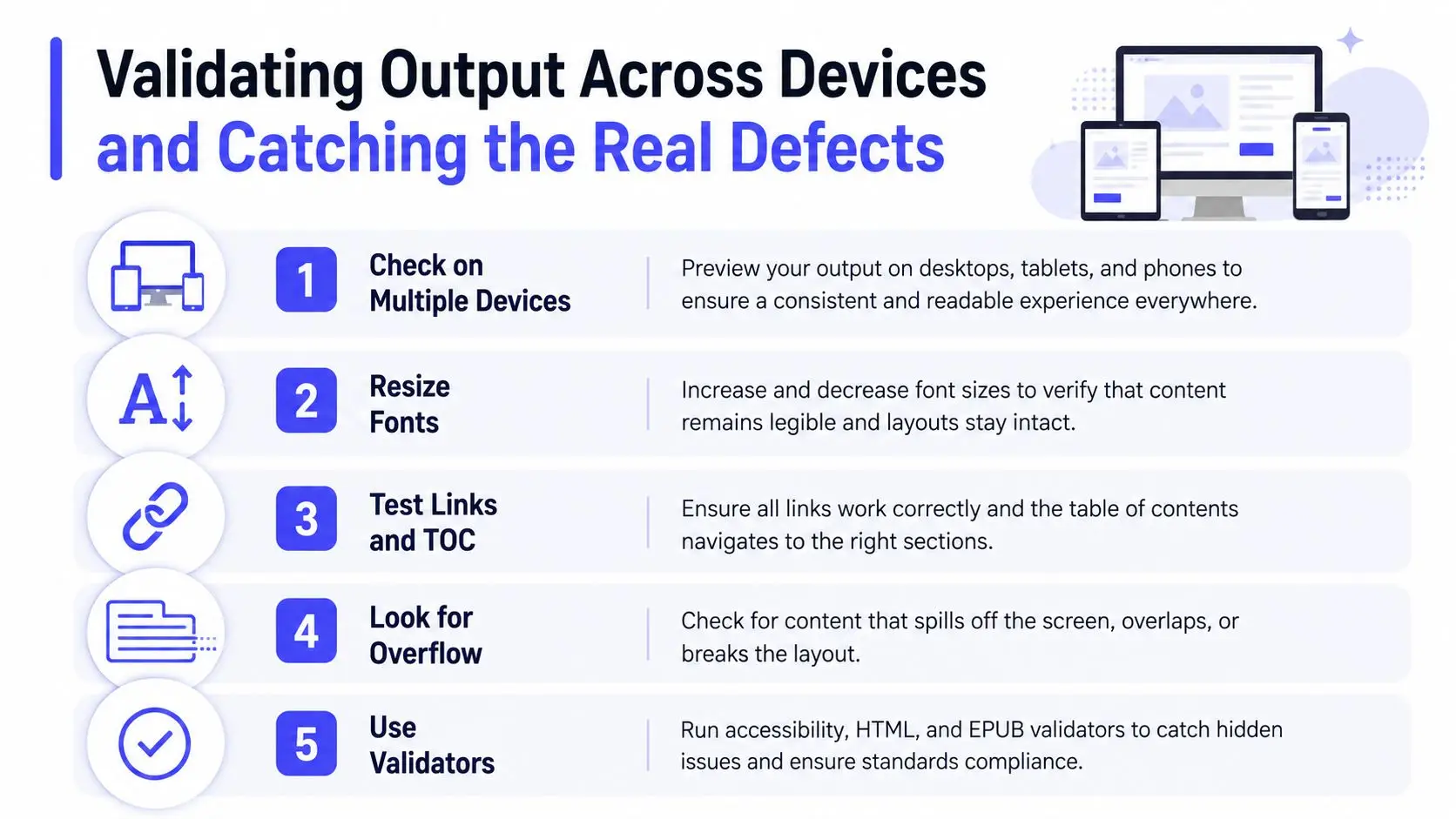
A high-quality ebook should be tested on more than one reading environment. Generate the clickable TOC from real heading styles, then preview the EPUB or Kindle output on at least two reader apps or devices. Structural validation with a tool such as EPUBCheck is part of the job, but it doesn't replace device testing. The practical benchmark is simple, if the file only behaves in one editor, it isn't ready.
The defects that matter most tend to show up in navigation, image scaling, or chapter-break behavior. That means you are not just checking for typos. You are checking whether the book can still be moved through, resized, and read without layout surprises on a real screen.
A useful field checklist looks like this:
- Check multiple devices: Compare how the book opens on different apps or readers.
- Resize the text: Increase and decrease font size to see whether headings, captions, and images still behave.
- Test the navigation: Click the table of contents and internal links to confirm they land where they should.
- Watch for overflow: Look for clipped images, orphaned headings, or content that spills awkwardly off screen.
- Run a validator: Use EPUBCheck or an equivalent tool before release.
Fix the defect that the preview reveals
Once the preview shows a problem, fix the source cause, not the visible symptom. If the TOC is broken, the heading structure is probably wrong. If an image clips at a small size, the export settings or sizing are likely off. If a chapter break lands badly, the paragraph flow needs correction, not another manual line break.
If a fix only works in one previewer and breaks somewhere else, it isn't a fix yet.
That's the heart of real validation. You are not trying to make the book perfect in theory. You are checking whether the file can survive different screens, different readers, and different settings without falling apart.
The Formatting Mindset That Survives Real-World Publishing
The authors who ship reliably don't treat formatting as decoration. They treat it like a system with dependencies. Clean manuscript, real styles, device-aware design, and serious validation all have to work together, because each layer protects the next one.
That's also why the weakest preview matters more than the prettiest editor view. A file that survives reflow on a phone, tablet, and reader app is worth more than a file that only looks elegant on your desktop. Storyloft fits that workflow as one integrated place to draft, style, and export, which keeps the manuscript closer to the final output while you're still fixing it.
Keep the source clean. Build with styles. Export for reflow. Validate on real devices. That's the practical answer to how to format an ebook without gambling on the preview.
If you want a single place to draft, format, and export without breaking your book between tools, try Storyloft. It gives you manuscript writing, styling controls, and ebook output in one workflow, which makes it easier to keep structure intact from the first draft to the final file.