
The Best Free Book Template Google Docs Options for Authors in 2026
The Best Free Book Template Google Docs Options for Authors in 2026
Key Takeaways
Google Docs book templates offer authors a powerful, cost-free solution for professional manuscript formatting without expensive software or design expertise.
• Save 10-20 hours of formatting frustration by using pre-configured templates with correct margins, fonts, and trim sizes that meet print-on-demand requirements.
• Access your manuscript anywhere with cloud-based editing, automatic saving, and version history that protects your work across all devices.
• Find genre-specific templates on platforms like Template.net, TheGoodocs, and Spreadsheet Point covering novels, poetry, children’s books, cookbooks, and memoirs.
• Customize templates strategically by adjusting page size (6×9″ or 5.5×8.5″), setting proper margins based on page count, and using consistent heading styles for navigation.
• Export in multiple formats including PDF for print, EPUB for e-readers, and DOCX for Amazon KDP to maximize publishing flexibility.
The bottom line: Free Google Docs templates eliminate technical barriers between you and your finished book, letting you focus on writing while maintaining professional standards that publishers expect. 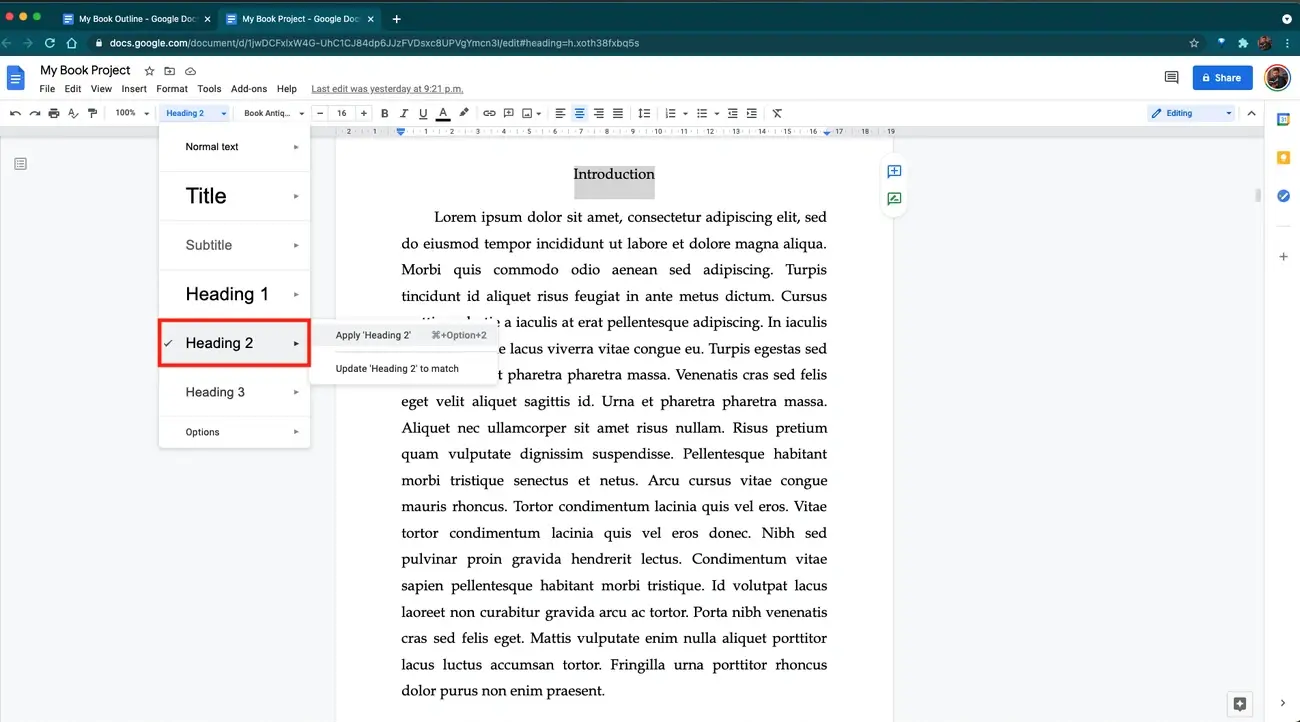 The right book template google docs solution can reshape your writing workflow from overwhelming to organized. Google Workspace attracts over 1 billion monthly active users[12], and with good reason too: templates eliminate the frustration of starting from a blank page while ensuring consistency throughout your manuscript.
In this piece, I’ll show you the best google docs book template free options available in 2026, covering templates for different genres and purposes. You’ll find how to make a template in google docs work for your book project, including proper book format in google docs. I’ll also walk you through customization strategies that maintain professional standards while reflecting your unique style.
Why Use Free Book Template Google Docs for Your Writing Projects
“You can always edit a bad page. You can’t edit a blank page.” — Jodi Picoult, Author
Most first-time authors lose 10-20 hours to formatting problems that a proper book template google docs solution would have prevented[1]. Google Docs templates eliminate this waste. They provide pre-set margins that meet print-on-demand requirements and correct font sizes for readability[1].
The cost factor alone makes google docs book template free options attractive. You won’t pay for expensive formatting software. Most templates don’t require a software purchase[2]. Google Docs provides a clean environment for writing and handles manuscripts of any length[3].
Cloud-based access means I can work on my manuscript from any device with an internet connection[13]. The auto-save feature protects every line I write and stores it to the cloud[4]. Version history lets me restore earlier drafts if I need to, which has saved countless authors from losing critical work[2].
Collaboration features set Google Docs apart. Multiple users can work on the same document at once through live co-editing[5]. Comments and suggestions mode allow editors to propose changes without overwriting original text. I retain control over accepting or rejecting edits[6].
Once finished, I can export my book writing template google docs in multiple formats. These include PDF for print and EPUB for e-readers[13].
Best Free Google Docs Book Templates for Different Genres
Google Docs book templates aren’t available online in abundance right now, but several reliable sources offer good options[2]. Browser searches for ‘Google Docs Book Templates’ reveal a handful of dedicated platforms worth learning about.
Template.net provides templates with professional design spanning novels, poetry collections and children’s books that open in Google Docs. Some templates require free account creation. Premium designs unlock through subscription[2]. Spreadsheet Point takes a different approach and offers five distinct book template google docs: novel, children’s book, story, outline and recipe book formats. Step-by-step setup instructions guide you through formatting cover pages, tables of contents and chapters within minutes[2].
TheGoodocs hosts over 200 clean, genre-specific templates ranging from minimalist novels to illustrated children’s stories[4]. Regular updates ensure compatibility with the latest Docs features. All templates remain free to access[2]. Docs & Slides features more than 50 free templates including picture books, manuscripts and book jackets[2]. Downloads to Google Drive let you begin customizing layouts, fonts and chapter styles right away.
These platforms cover most genres. You might need a poetry book template for verse collections, picture book layouts combining visuals with text, or recipe book formats for culinary projects. Autobiography templates provide structured formats to document life stories. Manuscript templates offer professional chapter organization[7].
How to Make a Template in Google Docs Work for Your Book
“I’m reading (as are all other agents and editors) a LOT of manuscripts. When mss follow a consistent format, it helps me assess the pacing.” — Janet Reid, Literary Agent
To access built-in templates, navigate to the Template Gallery in Google Docs[8]. A copy opens in your workspace automatically when you select a template, ready to customize[8].
I adjust page size and margins through File > Page setup before adding content. Common paperback sizes include 6 by 9 inches and 5.5 by 8.5 inches, depending on genre[9]. Page count determines the margins you need. Books between 24 to 150 pages need 0.375 inches for inside margins, while manuscripts from 151 to 300 pages require 0.5 inches[10]. Longer manuscripts demand even wider gutters to accommodate binding.
Font choices matter to ensure readability. Serif fonts work well for print, and simple sans-serif fonts suit ebooks[9]. I set body text between 11-point and 12-point, though manuscripts over 80,000 words may benefit from 10-point sizing[10]. Line spacing falls between 1.15 and 1.5 to read comfortably[9].
Heading styles organize content and enable automatic table of contents generation[9]. I format chapter titles using Heading 2 consistently throughout the manuscript[11]. This structural approach supports ebook navigation and helps readers move through content after conversion[9].
The process completes with exporting. I download as DOCX to upload to KDP or PDF to preserve layout choices[9][10].
Conclusion
Free book templates revolutionize Google Docs into a powerful writing platform without the expense of dedicated software. You can work on a novel, children’s book, or recipe collection with these templates. They save you time and ensure professional formatting standards.
Choose a template that matches your genre and customize it to meet your publisher’s requirements. You’ll spend not as much time wrestling with formatting. This means more time on what matters most: writing your book.
FAQs
Q1. Where can I find free book templates for Google Docs? Several platforms offer free book templates for Google Docs, including Template.net, Spreadsheet Point, TheGoodocs, and Docs & Slides. These sources provide templates for various genres such as novels, children’s books, poetry collections, and recipe books. Most templates can be opened directly in Google Docs, with some requiring free account creation.
Q2. Is there a template in Google Docs specifically for writing a book? Yes, Google Docs offers book templates through its Template Gallery, and additional specialized templates are available from third-party sources. These templates include pre-formatted layouts for different book types, including fiction novels, non-fiction works, memoirs, cookbooks, and children’s books, with proper margins, fonts, and chapter organization already set up.
Q3. Do professional authors actually use Google Docs for writing books? Yes, many authors use Google Docs for book writing due to its cloud-based accessibility, auto-save features, and collaboration capabilities. The platform allows authors to work from any device, automatically saves every change, and enables real-time editing with editors or co-authors. It also supports manuscripts of any length and exports to multiple formats compatible with publishing platforms.
Q4. Are there completely free book formatting templates available? Yes, numerous free book formatting templates are available for Google Docs. Platforms like TheGoodocs offer over 200 free templates, while Docs & Slides provides more than 50 options. These templates include professional formatting for margins, fonts, line spacing, and trim sizes that meet print-on-demand and e-publishing requirements without any cost.
Q5. How do I customize a Google Docs book template for my specific needs? You can customize templates by adjusting page size and margins through File > Page setup, selecting appropriate fonts (serif for print, sans-serif for ebooks), setting proper line spacing (1.15 to 1.5), and using heading styles for chapter organization. The template can then be exported as DOCX for platforms like Amazon KDP or as PDF to preserve your layout choices.
References
[1] – https://selfpublishing.com/book-template/
[2] – https://self-publishingschool.com/book-template-google-docs/
[3] – https://docswrite.com/blog/kdp-google-docs-how-to-prepare-and-publish-your-manuscript-easily
[4] – https://thegoodocs.com/freebies/book-templates/
[5] – https://workspace.google.com/products/docs/
[6] – https://dev.to/phanhie/how-to-use-google-docs-for-collaborative-writing-27ga
[7] – https://docsandslides.com/google-docs/non-fiction-book-template/
[8] – https://support.google.com/docs/answer/148833?hl=en&co=GENIE.Platform%3DDesktop
[9] – https://bookbeam.io/blog/how-to-format-a-book-in-google-docs-for-kdp/
[10] – https://www.alphagraphics.com/us-tennessee-brentwood-us450/blog/blog-posts-blog/2025/12/how-to-format-your-book-for-print-using-google-docs
[11] – https://reedsy.com/studio/resources/how-to-format-a-book-in-google-docs/
[12] – https://www.superside.com/blog/google-docs-templates
[13] – https://miltonandhugo.com/blog/post/formatting-your-book-google-docs-comprehensive-guide
