How to Format Manuscript for Agent
You've finished the manuscript. The draft is done, the ending works, and now you're staring at submission guidelines that seem fussier than the book itself. Font. margins. headers. file type. page breaks. It can feel absurd that after writing a whole novel, you're suddenly being judged on whether your paragraph indent came from the ruler or the Tab key.
That reaction is normal. It's also where a lot of good manuscripts lose ground for no good reason.
Agents don't ask for standard formatting because they love bureaucracy. They ask for it because formatting helps them read fast, compare projects fairly, and move through a large volume of submissions without wrestling your document first. If you want to learn how to find a literary agent, this is part of the same professional skill set. A clean manuscript tells the person on the receiving end that you understand the process and won't create avoidable friction.
Table of Contents
- Why Manuscript Formatting Is Your First Impression
- The Anatomy of a Perfectly Formatted Page
- Structuring Your Title Page and Headers
- Handling Chapters, Scene Breaks, and Special Text
- Finalizing Your Digital Submission File
- Navigating Modern Agent Preferences and Portals
Why Manuscript Formatting Is Your First Impression
A manuscript gets judged before page one. That doesn't mean agents care more about formatting than writing. It means formatting is the first visible sign of whether the submission will be easy to handle.
Think about the two versions an assistant might open. One is clean, predictable, and properly labeled. The other has odd spacing, inconsistent chapter starts, missing page numbers, and a file name like FinalFinalRealVersion2. Both may contain strong writing, but one creates work before the reading even starts.
Practical rule: Standard manuscript format is a professional courtesy. It shows you can follow instructions and keep your work usable inside someone else's workflow.
That matters because agents don't read in a vacuum. They skim, flag, forward, annotate, and reopen files later. They may read on a laptop in the office, on a tablet at night, or inside a submissions portal that strips out some styling. A manuscript that behaves predictably is easier to keep in circulation.
Writers sometimes treat formatting rules as arbitrary relics. Some are old, yes. But most survive because they solve recurring problems. Page numbers keep pages traceable. headers identify the manuscript if a file is printed or separated. consistent paragraph indents prevent ugly reflow. Standard fonts reduce visual noise.
There's also a psychological side to it. The cleaner the presentation, the easier it is for an agent to focus on your prose instead of your setup. You want the opening line to do the work, not your formatting mistakes.
The Anatomy of a Perfectly Formatted Page
If you want the short answer to how to format manuscript for agent submissions, it starts with a small set of standard page settings and almost no improvisation. For a practical companion checklist, this print book formatting checklist is useful for reviewing setup before export.
The non-negotiables
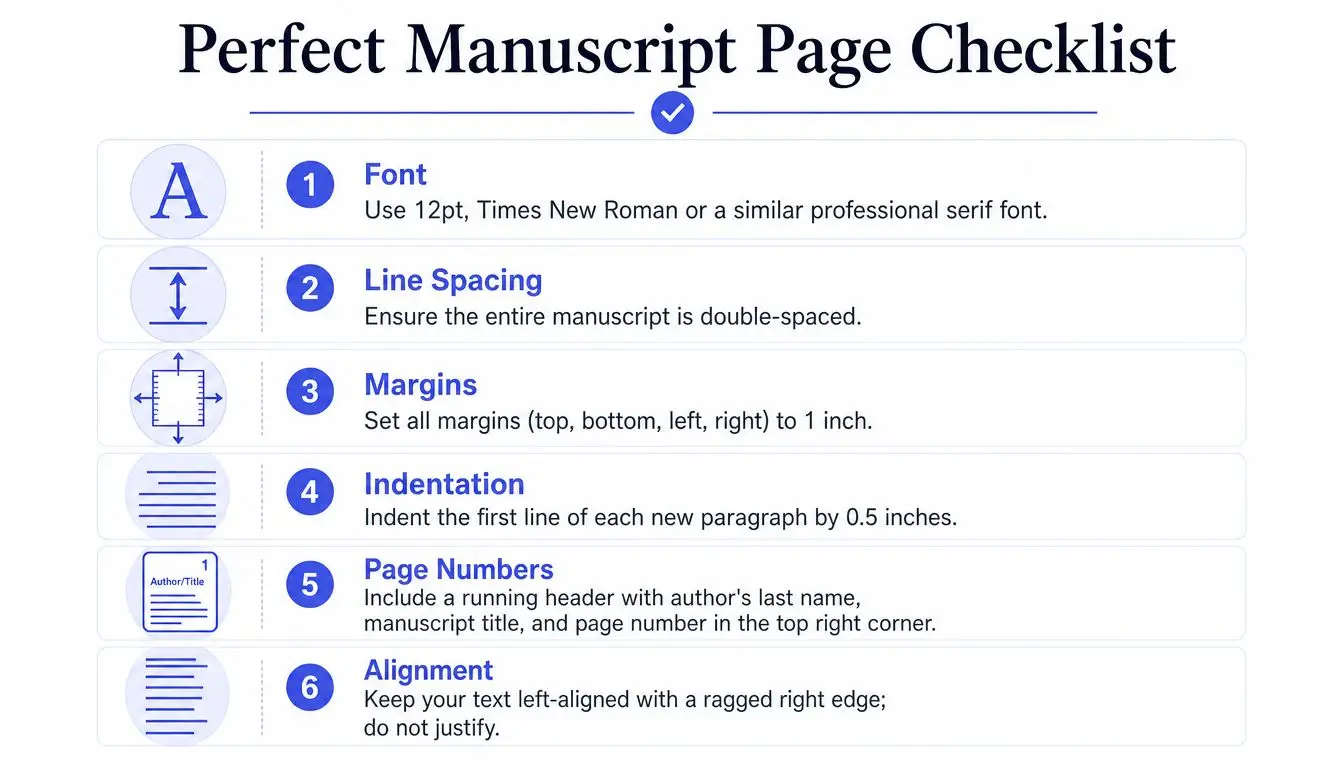
Start with these document settings:
- Font: Use 12-point Times New Roman.
- Line spacing: Make the entire manuscript double-spaced.
- Margins: Set 1-inch margins on all sides.
- Paragraphs: Use a 0.5-inch first-line indent.
- Alignment: Keep text left-aligned with a ragged right edge.
- Page size: Use letter size (8.5" x 11") for North American submissions and A4 (210 x 297mm) for international territories.
According to Jericho Writers' manuscript presentation guidance, this standard configuration has remained consistent for decades across major publishing markets. The same guidance notes that it produces approximately 250 to 300 words per page, which helps agents estimate total length quickly.
That last point gets overlooked. Standard format isn't only about appearance. It gives the person reading a fast way to assess whether a manuscript sits in a plausible range for its category. If your page count and stated word count feel aligned, your submission looks controlled. If they don't, the mismatch raises questions before the sample pages have earned trust.
What agents are actually reading for
Double spacing is the rule many writers resent most, and it's also one of the easiest to justify. Jericho Writers states that double spacing improves readability on digital screens, which matters because 90% of agents now review submissions digitally rather than from printed copies in that source's framing.
That changes how you should think about the page. You aren't formatting for a bound book. You're formatting for a working document that may be read on screens, marked up, resized, and skimmed under time pressure.
A few practical habits make a big difference:
- Set paragraph indents in the paragraph menu. Don't hit Tab or stack spaces.
- Turn off extra space after paragraphs. Book manuscripts don't need the airy blog-post look.
- Use one standard font throughout. Don't switch fonts for chapter titles or epigraphs unless guidelines ask for something special.
- Keep it black text on a white page. This is a manuscript, not a designed interior.
- Avoid full justification. Ragged right is easier to read and less likely to create uneven spacing.
The best submission pages disappear. The reader notices the writing, not the document.
A properly formatted page feels plain on purpose. That plainness is doing work. It signals that you know the difference between a manuscript and a finished book layout, and that you're submitting the former, not trying to fake the latter.
Structuring Your Title Page and Headers
The title page is simple, but it carries weight. Done well, it looks clean and forgettable. Done badly, it announces inexperience before the first chapter begins.
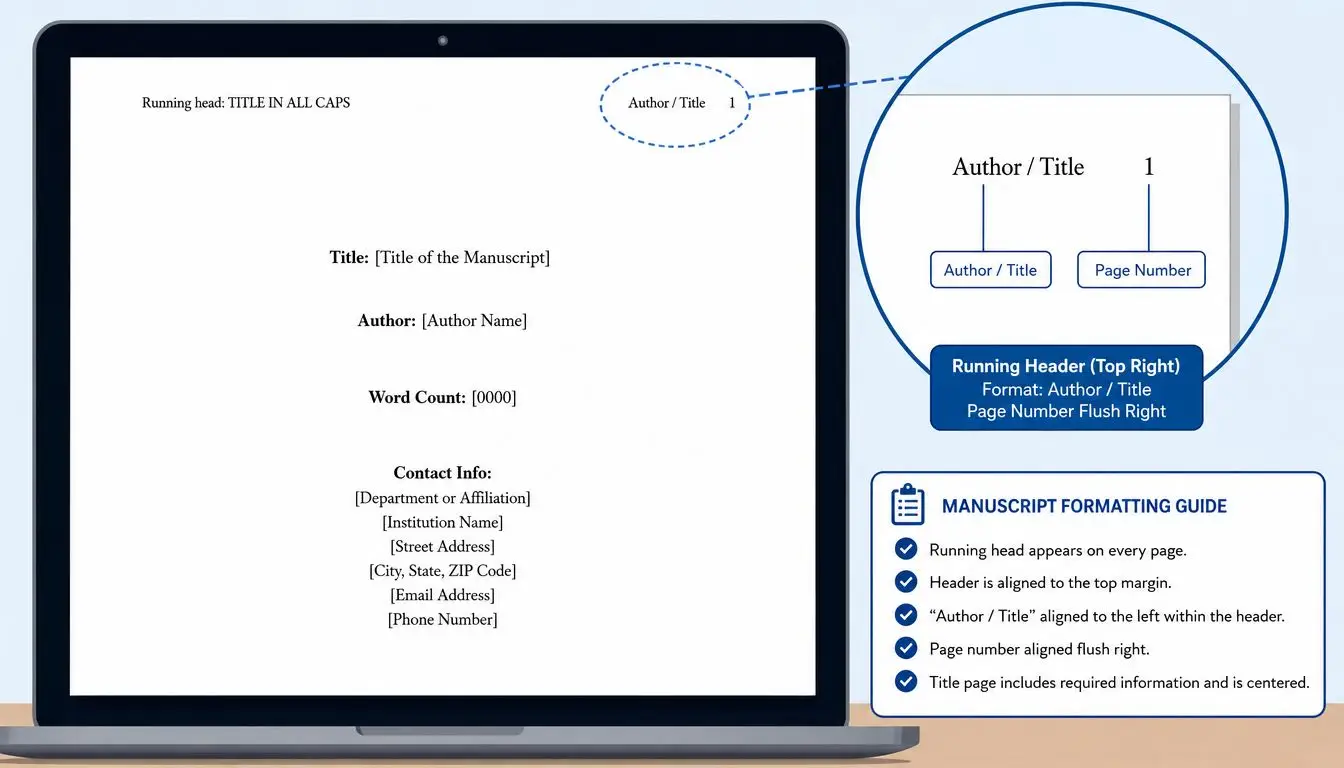
If you struggle with Word's document controls, a guide to headers, footers, and page numbers in Storyloft can help you understand the mechanics before you export from any writing tool.
What belongs on the title page
Use the title page for identification, not decoration. Include:
- Your contact details: Name, email, phone number, and mailing address at the top left.
- Title and byline: Centered on the page, with the title in the same basic font family and size as the rest of the manuscript.
- Approximate word count: Place it low on the page or in a clean, unobtrusive position.
Keep it spare. Don't add a copyright notice. Don't insert artwork, logos, fancy divider ornaments, or marketing copy. Don't bold the title into submission-package theater. Agents aren't evaluating your design instincts here. They're checking whether the file is complete, professional, and easy to catalog.
A clean title page also prevents one common problem. When a manuscript excerpt gets detached from the query email or forwarded internally, the first page still tells the reader what they're holding and how to reach you.
How to handle headers without clutter
After the title page, every page should identify the manuscript. The usual formula is some version of author name / title / page number in the top right.
You don't need to get ornate with punctuation or capitalization. You do need consistency.
Use headers to solve practical problems:
- If pages get separated, they can be reassembled.
- If a reader prints pages, they still know whose manuscript they're reading.
- If someone wants to refer back to a line, page numbers give them a shared reference point.
Missing headers don't make your manuscript look rebellious. They make it look unfinished.
What to avoid:
- No header on the title page
- No oversized header text
- No decorative fonts
- No manual page numbering typed into the document body
Let your word processor handle headers automatically. Once they're set correctly, they stay correct. That's the whole point.
Handling Chapters, Scene Breaks, and Special Text
Otherwise clean manuscripts often start getting messy. Writers manually hammer the Enter key to push chapter titles down the page, improvise scene breaks, or use visual tricks that belong in a typeset book, not a submission document.
Chapter openings that look professional
Each chapter should start on a new page. Use a proper page break instead of adding a pile of blank lines. Manual spacing shifts when the file is opened on another device or edited later. Page breaks hold.
Place the chapter heading roughly a third of the way down the page. It doesn't need to be mathematically perfect. It needs to look deliberate and consistent from chapter to chapter.
A clean chapter opening usually follows this pattern:
- New page: Insert a page break before the chapter.
- Chapter label or number: Keep it simple, such as “Chapter 1” or the chapter title.
- Body text below: Start the chapter text after a little white space, not crammed directly under the heading.
That white space helps the reader reset. It marks a structural shift without looking theatrical.
Scene breaks italics and other small choices
Within a chapter, use a simple marker for scene breaks. A centered # works. Three asterisks can also work if used consistently. What matters is clarity, not flourish.
Keep these conventions in mind:
- Scene breaks: Use one simple centered mark. Don't paste in ornamental glyphs.
- Italics: Use italics for emphasis, internal thought, or titles where appropriate.
- Underlining: Skip it. That's an old workaround from typewriter-era practice.
- First paragraphs after chapter breaks: Some editors prefer them flush left later in production, but for submission, consistency matters more than trying to mimic final book design.
- The end marker: Typing “The End” on the final page is still a useful signal that the manuscript is complete.
A lot of manuscript formatting problems come from trying to make the pages feel more like a published book. Resist that instinct. Published interiors are designed after acquisition, editing, and typesetting. Your submission should read like a reliable working manuscript.
Use the simplest formatting choice that clearly communicates structure. If a mark calls attention to itself, it's probably too much.
Finalizing Your Digital Submission File
Formatting inside the document is only half the job. The file itself can keep your work moving or stop it cold.
The file format matters more than authors think
A surprising number of first submissions fail at the packaging stage. According to Tiffany Hawk's manuscript formatting benchmarks, properly formatted manuscripts increase the likelihood of an agent reading beyond the first page by 40%. The same source says 28% of first-time authors are filtered out before editorial review because of common problems such as missing headers or improper file naming, and that PDF submissions are rejected in 82% of unsolicited cases unless explicitly requested.
That's why .docx remains the default working format. It's editable, easy to annotate, and familiar inside agency workflows. Unless an agent specifically asks for PDF, don't decide on your own that PDF looks cleaner. Cleaner to you may mean harder to handle for them.
If you need to create polished PDFs for uses outside unsolicited querying, a tool like Transformy's PDF generation API can be useful in broader publishing workflows. For agent submissions, though, follow the requested format first and ignore the temptation to overpackage.
Name the file like someone else has to find it later
A good file name does administrative work. A bad one creates friction.
Use a naming convention that is readable and stable, such as:
- Lastname_TITLE_Manuscript.docx
- Lastname_TITLE_Full.docx
- Lastname_TITLE_First50.docx
Avoid these habits:
- Spaces everywhere: Some systems and workflows handle underscores more cleanly.
- Version chaos: “final,” “final2,” and “realfinal” make you look disorganized.
- Generic labels: “novel.docx” tells the recipient nothing.
- Wrong extension: Don't rename a file manually and assume that changes the format.
If you also publish or export for other formats, this guide on moving from Word docs to EPUB cleanly helps keep those workflows separate from agent submission packaging.
A short walkthrough helps if you want to see document prep in action before sending:
Your digital file is part of the reading experience. If it opens cleanly, identifies itself clearly, and matches the agent's stated preference, you've removed a whole category of avoidable objections.
Navigating Modern Agent Preferences and Portals
Older advice begins to collide with current submission reality. Many guides still present one universal rule set, then stop. Reality is messier.
When standard format is right
If an agent says “standard manuscript format,” use the classic version. That means the traditional Word document setup discussed above. Don't get clever. Don't modernize it because you think it looks cleaner. Standard means standard.
The reason is simple. Baseline conventions still solve the broadest set of reading and handling needs. They're the safest choice when the instructions are general.
That said, the ground has shifted. According to Barker Books' discussion of current manuscript formatting practice, 90% of traditional advice still mandates double-spacing in Times New Roman, while 40% of recent agent surveys indicate a preference for single-spaced, PDF-friendly submissions for initial digital reviews. That's exactly why writers get conflicting advice online.
When the portal changes the rules
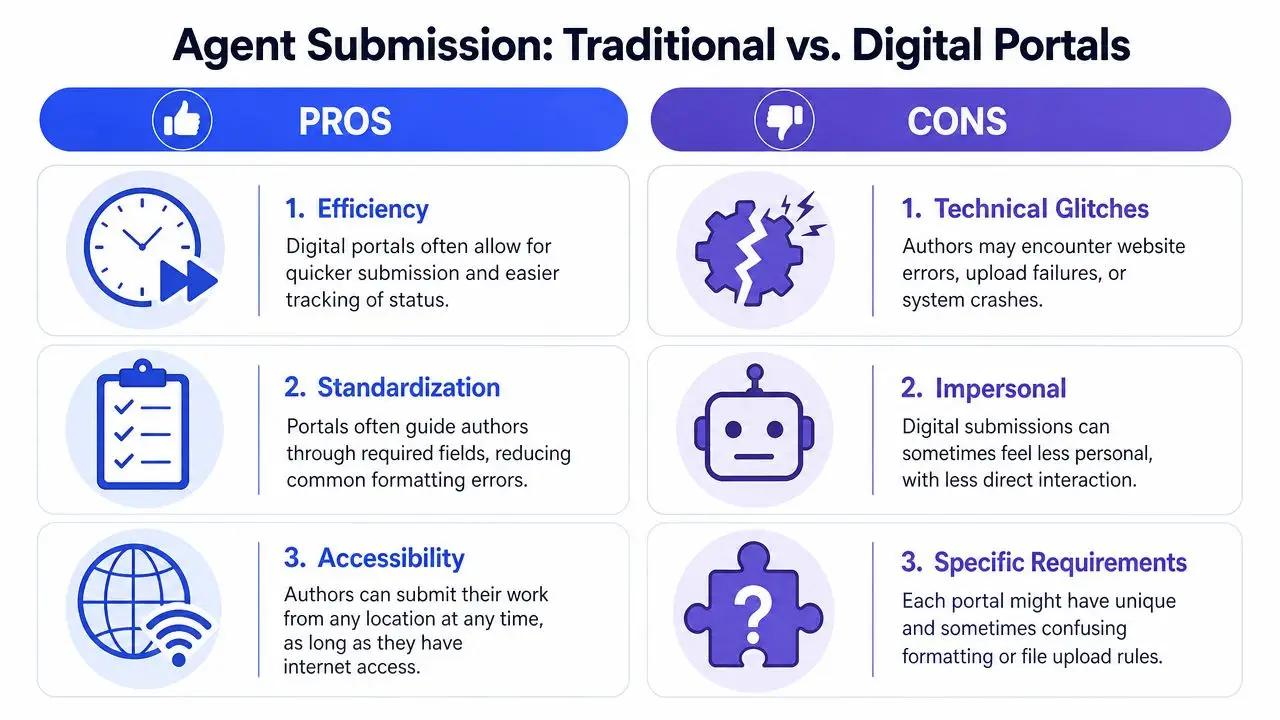
A submission portal can alter the equation. Some portals reformat uploads, strip styling, or prefer text pasted into a form. Others request a specific file type because their internal management system handles one format better than another.
When that happens, use this decision framework:
| Situation | Best move |
|---|---|
| Agent gives no special instructions | Use standard manuscript format in a .docx file |
| Agent requests PDF | Send PDF exactly as requested |
| Portal asks for pasted sample pages | Clean the text for plain display and preserve clear scene and chapter structure |
| Guidelines contradict general advice | Follow the specific guidelines, not the generic rule |
| Instructions are ambiguous | Default to the clearest, least flashy, most conventional version |
The key trade-off is this: standard format is the default, but specific instructions outrank defaults.
The most professional submission is not the one that follows internet folklore most closely. It's the one that follows the receiving agent's instructions exactly.
That's the inside scoop many new authors miss. Agents aren't testing whether you memorized every traditional rule in isolation. They're watching whether you can read directions, adapt without panic, and deliver a usable file in the format they asked for.
If you want one tool that keeps drafting, revision, and export in the same place, Storyloft is worth a look. It's built for long-form writing and helps authors move from manuscript to submission-ready files without juggling separate apps for drafting, organization, and formatting.