Back of a Book Cover: Your Secret Sales Tool

You've spent months or years writing your book, and now you're ready to publish. You've probably thought a lot about your front cover. But here's something most new authors overlook: the back of a book cover is just as important as the front. It's where readers decide whether to buy your book after the front cover catches their eye. Think of it as your book's sales pitch, crammed into a small space that needs to work hard for you.
Why the Back Cover Matters More Than You Think
When someone picks up your book in a store or clicks to "look inside" online, they're looking for reasons to buy. The back of a book cover gives them those reasons. It's not just decoration. It's where you prove your book is worth their time and money.
Most readers spend about 15 seconds scanning the back cover before making a decision. That's not much time. You need to hook them fast with compelling copy and a clean design that makes everything easy to read.
The back cover also builds credibility. A professional-looking back of a book cover tells readers you're serious about your work. A sloppy one raises red flags. Fair or not, readers judge books by their covers, front and back.
Essential Elements Every Back Cover Needs
Let's break down what actually goes on the back of a book cover. Different genres have different conventions, but most books include these core elements.
The Book Blurb
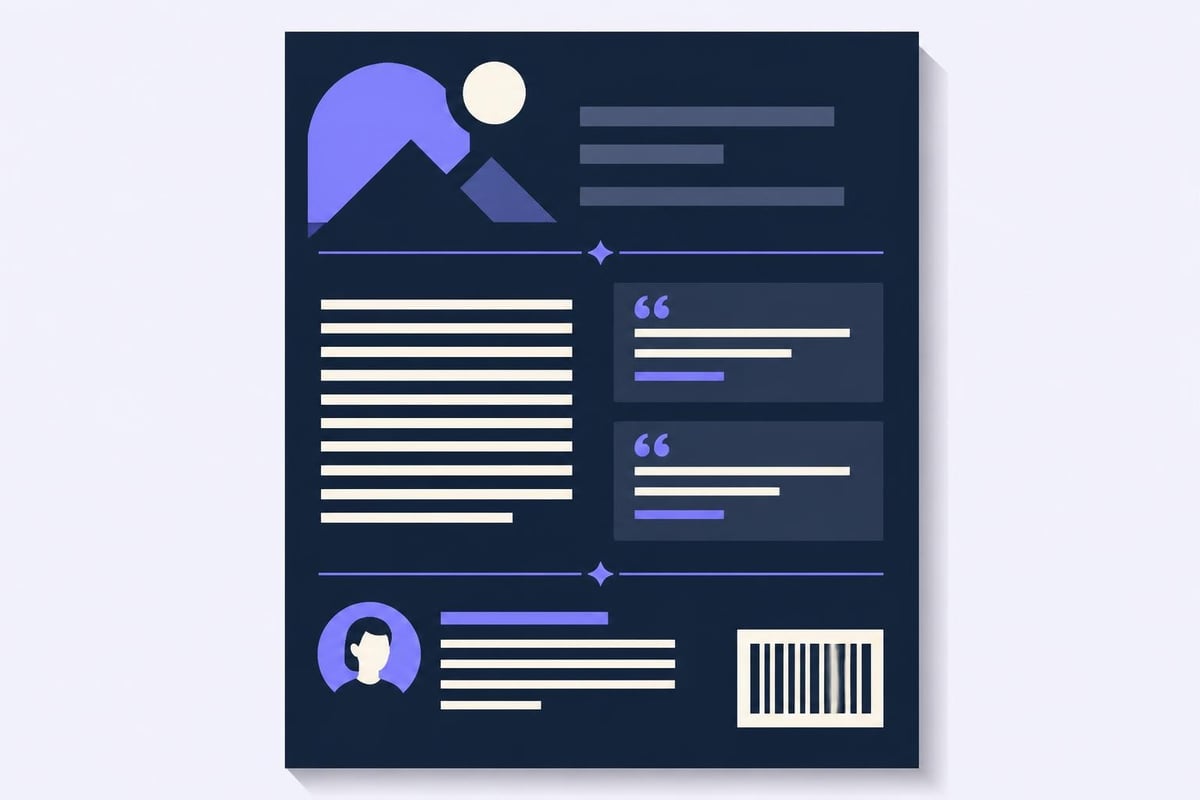
Your blurb is the most important part of your back cover. It's a short description that hooks readers and makes them want to know more. For fiction, this usually means setting up your main character, the conflict, and the stakes without giving away the ending. For nonfiction, it's about the problem you're solving and the transformation readers can expect.
Keep your blurb between 100 and 200 words. Any longer and you'll lose readers. Any shorter and you won't give them enough information.
Here's what makes a strong blurb:
- Opens with a hook that grabs attention
- Focuses on conflict or transformation
- Uses active voice and strong verbs
- Ends with a question or cliffhanger
- Avoids spoilers and unnecessary details
Author Bio
Your author bio builds trust and shows why you're qualified to write this book. For fiction, readers want to know about your other books or relevant experience. For nonfiction, they want credentials that prove you know your subject.
Keep it short. Three to five sentences is plenty. Include your name, relevant experience, and maybe one personal detail that makes you relatable. Skip the flowery language and just tell readers who you are.
Endorsements and Reviews
If you have them, endorsements from other authors or experts add serious credibility. They're especially valuable for debut authors who don't have a track record yet.
Place your strongest endorsement at the top of your back cover. Two or three quotes is ideal. More than that and they start to look desperate. Choose quotes that speak to your target audience and highlight what makes your book special.

Barcode and ISBN
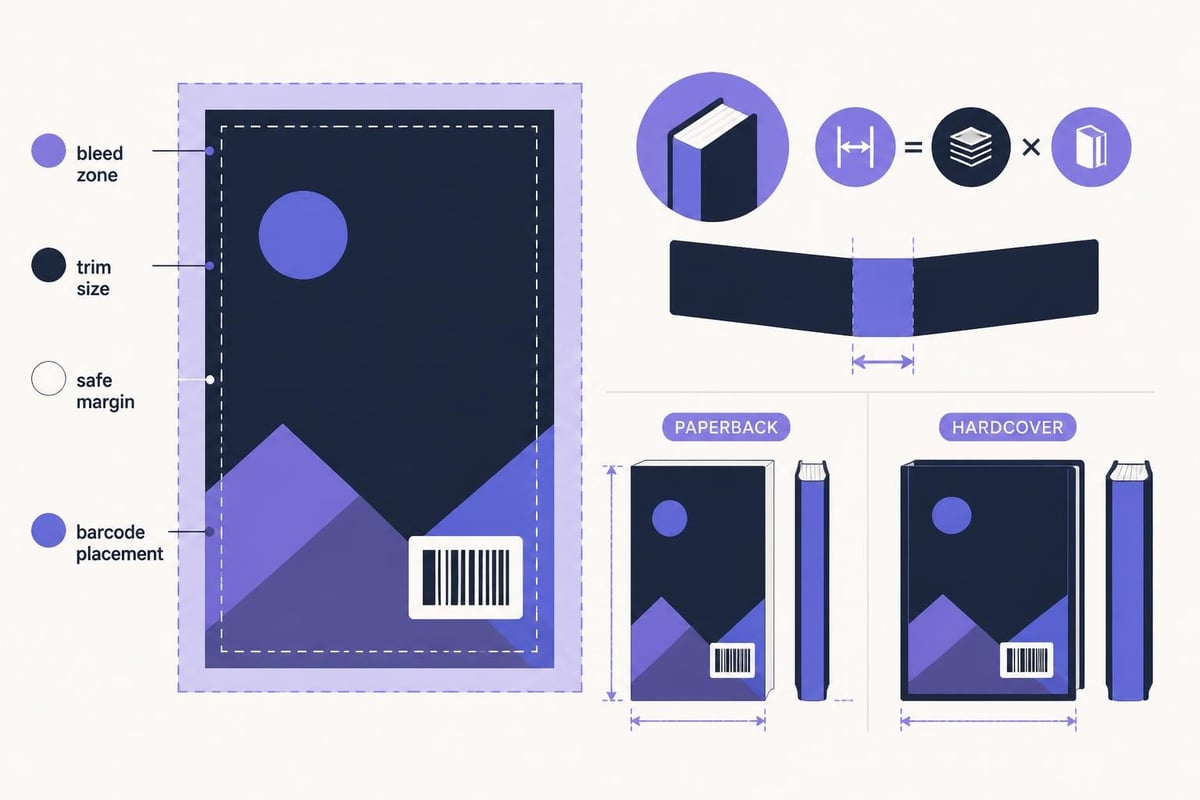
Every book needs a barcode with the ISBN and price. This usually goes in the lower right corner of the back cover. If you're using KDP or IngramSpark, they'll generate this for you. Just make sure you leave enough white space for it.
The barcode needs to be scannable, so don't put it over busy backgrounds or dark colors. A white box works best.
Design Principles That Actually Work
Good design makes everything on your back of a book cover easy to read and visually appealing. Bad design makes readers work too hard, and they'll just move on to another book.
Typography Choices
Pick fonts that match your genre and are easy to read at small sizes. You'll typically use two or three fonts: one for the blurb, one for headings or the tagline, and maybe one for the author bio.
Sans-serif fonts like Arial or Helvetica work well for body text because they're clean and readable. Serif fonts can work for literary fiction or historical books. Whatever you choose, make sure there's enough contrast between the text and background.
| Design Element | Best Practice | Why It Matters |
|---|---|---|
| Font Size | 10-12pt for body text | Smaller than this is hard to read |
| Line Spacing | 1.2-1.5 spacing | Prevents text from feeling cramped |
| Margins | At least 0.25 inches | Gives elements room to breathe |
| Color Contrast | Dark text on light background | Ensures readability |
| Alignment | Left-aligned for body text | Easier to read than centered |
Layout and White Space
Don't try to cram everything into every inch of space. White space (or negative space) gives your design room to breathe and makes individual elements stand out. Professional book designers use white space strategically to guide the reader's eye.
Your blurb should be the focal point. Everything else supports it. Use spacing, alignment, and visual hierarchy to make the blurb easy to find and read.
Color and Imagery
Your back cover should complement your front cover. Use similar colors, design elements, and imagery to create a cohesive look. Some genres expect specific visual elements. Romance novels often extend cover imagery to the back. Thrillers might use dark, moody colors.
You can include a small author photo, especially for nonfiction. Just make sure it's professional quality. A blurry selfie undermines your credibility.
Writing Copy That Converts Browsers to Buyers
The words on your back of a book cover need to work as hard as the design. This isn't the place for beautiful prose. It's the place for persuasive copy that makes readers want to buy.
Crafting Your Tagline
A tagline is optional, but it can be powerful. It's a single sentence that captures the essence of your book. Think of movie taglines: "In space, no one can hear you scream." Short, punchy, memorable.
Your tagline should hint at genre, mood, or the central conflict. It sits at the top of your back cover, right below the title if you include it there.
The Blurb Formula
Here's a simple formula that works for most fiction:
- Introduce your protagonist and their world
- Present the inciting incident or conflict
- Raise the stakes
- End with a question or dilemma
For nonfiction, try this:
- Identify the problem your reader faces
- Explain why current solutions don't work
- Introduce your unique approach
- Promise the transformation or result
Don't overthink it. Your goal is to create curiosity and desire, not to summarize your entire book.
Common Copywriting Mistakes
Avoid these blurb killers:
- Writing a synopsis instead of a hook
- Using vague, generic language
- Including too many character names or plot points
- Focusing on what happens instead of why readers should care
- Ending with a whimper instead of a compelling question
Read your copy out loud. If it sounds boring or confusing, rewrite it. Get feedback from readers in your target audience, not just other writers.
Genre-Specific Back Cover Conventions
Different genres have different expectations for the back of a book cover. Knowing these conventions helps you meet reader expectations and signals that your book belongs in their favorite category.
Fiction Genres
Romance readers expect a blurb that introduces both main characters and hints at the central relationship conflict. Mystery and thriller readers want to know about the crime or danger. Science fiction and fantasy readers need a sense of the world and the stakes. Looking at successful books in your genre shows you what works.
Literary fiction can be more abstract, but you still need to hook readers with compelling prose and an intriguing premise.
Nonfiction Genres
Business books often include bullet points listing key takeaways or benefits. Self-help books focus on the transformation readers will experience. Memoirs highlight the unique or compelling aspects of the author's story.
Academic and technical books might include a table of contents or chapter overview on the back cover instead of a traditional blurb.
Tools and Resources for Creating Your Back Cover
You don't need to be a professional designer to create a decent back of a book cover, but you do need the right tools. If you're formatting your book for print-ready export to KDP or IngramSpark, you'll want software that gives you precise control over layout and design.
Many authors use tools like Canva for a DIY approach. It's affordable and has templates designed for book covers. Just make sure you customize the template enough that your book doesn't look identical to dozens of others.
Professional design software like Adobe InDesign gives you more control but has a steeper learning curve. If you're publishing multiple books, learning these tools can save you money in the long run.
Storyloft offers an all-in-one solution that includes professional book formatting for both print and digital publishing. You can design your entire book, including the back cover, and export print-ready PDFs formatted for KDP and IngramSpark without jumping between different apps.
Testing and Refining Your Back Cover
Don't just design your back of a book cover and call it done. Test it with real readers before you publish. Show it to people in your target audience and ask specific questions:
- What do you think this book is about?
- Would you buy this book based on the back cover?
- Is anything confusing or unclear?
- Does the design look professional?
Their answers will tell you what's working and what needs fixing. You might discover your blurb is too vague, your font is too small, or your design doesn't match genre expectations.
A/B Testing for Digital Books
If you're publishing digitally, you can test different back cover designs to see which converts better. Change one element at a time (the blurb, the endorsements, the layout) and track which version gets more sales.
This level of optimization might seem extreme, but even small improvements in conversion rate can significantly impact your sales over time.
Print vs Digital Back Cover Considerations
The back of a book cover works differently for print and digital books. Print books have physical back covers that readers see when they pick up the book. Digital books use the back cover text in the product description on retailer sites.
Print Books
For print, you need to think about the full wrap. The spine connects your front and back covers. Make sure your design flows smoothly from front to spine to back. Bailey Designs Books emphasizes that cohesive design across all three elements creates a professional look.
You also need to account for bleed (usually 0.125 inches) and safe zones where important text won't get trimmed during printing. Your printer or publishing platform will provide specs.
Ebooks and Online Retailers
For ebooks, the "back cover" content usually becomes part of your product description. You can use the same blurb, but you might format it differently for online reading. Break up long paragraphs, use bullet points for nonfiction benefits, and make sure it looks good on mobile devices.
Some authors include a formatted back cover image in the back matter of their ebook, but most readers never see it.
Professional Help: When to Hire a Designer
If design isn't your strength, hiring a professional can be worth the investment. A good designer understands typography, color theory, and genre conventions. They'll create something that looks polished and professional.
Expect to pay anywhere from $150 to $500 for back cover design, depending on the designer's experience and what's included. Some designers offer full wrap designs (front, spine, and back) as a package.
If you're on a tight budget, consider using pre-made templates designed specifically for books. Just make sure you customize them enough to make your book stand out.
What to Look for in a Designer
When hiring a book cover designer:
- Check their portfolio for books in your genre
- Read reviews from other authors
- Ask about revisions and what's included
- Get clear pricing upfront
- Ensure they provide print-ready files in the right format
- Verify they understand ISBN and barcode placement
Communication is key. A designer who asks lots of questions about your book, target audience, and vision will create something better than one who just throws together a generic template.
Common Back Cover Mistakes to Avoid
Even experienced authors make mistakes with their back of a book cover. Here are the most common ones and how to avoid them.
The biggest mistakes:
-
Too much text. Cramming your entire plot or life story onto the back cover overwhelms readers. Keep it concise and compelling.
-
Generic descriptions. "A thrilling adventure" or "An inspiring story" could describe thousands of books. Be specific about what makes yours unique.
-
Poor image quality. Blurry author photos or low-resolution graphics look unprofessional and hurt sales.
-
Ignoring genre conventions. If every thriller has a dark, atmospheric back cover and yours is bright pink, you're confusing your target readers.
-
Forgetting the barcode. You can't sell a print book without a scannable barcode in the right place.
-
Inconsistent branding. Your back cover should match your front cover and your overall author brand. Random design choices create confusion.
The Back Cover as Part of Your Marketing Strategy
Your back of a book cover isn't just about the physical book. The blurb you write becomes copy for Amazon, social media posts, email announcements, and advertising. Write it well, and you'll use it everywhere.
Take photos of your book that show the back cover. Post them on Instagram and Facebook. Include the blurb in your newsletter when you announce your book. Use pull quotes from your endorsements in social media graphics.
The back cover is also valuable for media kits and review requests. Journalists and bloggers want to know what your book is about. A well-written blurb gives them everything they need.
If you're doing author events or book signings, readers will absolutely flip your book over to read the back. Make sure it sells your book as effectively in person as it does online.
Updating Your Back Cover After Launch
Just because you've published doesn't mean your back of a book cover is set in stone. If you get a major endorsement or award after launch, you can update your back cover for future print runs.
For print-on-demand books, you can upload a new cover file anytime. Just make sure your ISBN matches and you're not creating confusion for readers who already bought the earlier version.
Digital books are even easier to update. Refresh your product description regularly with new reviews, awards, or endorsements. Keep testing what converts best.
Some authors create special editions with updated back covers for anniversaries or new releases in a series. This can generate new interest in older books and give collectors a reason to buy multiple versions.
The back of a book cover is your last chance to convince someone to buy your book. Get it right with a compelling blurb, professional design, and strategic use of endorsements and credibility markers. If you're ready to format your entire book with professional tools that handle everything from manuscript to print-ready files, check out Storyloft for an all-in-one writing and publishing platform built specifically for authors.