
The Best Writing Software for Nonfiction Authors: Research, Write, Cite, and Publish in One Platform
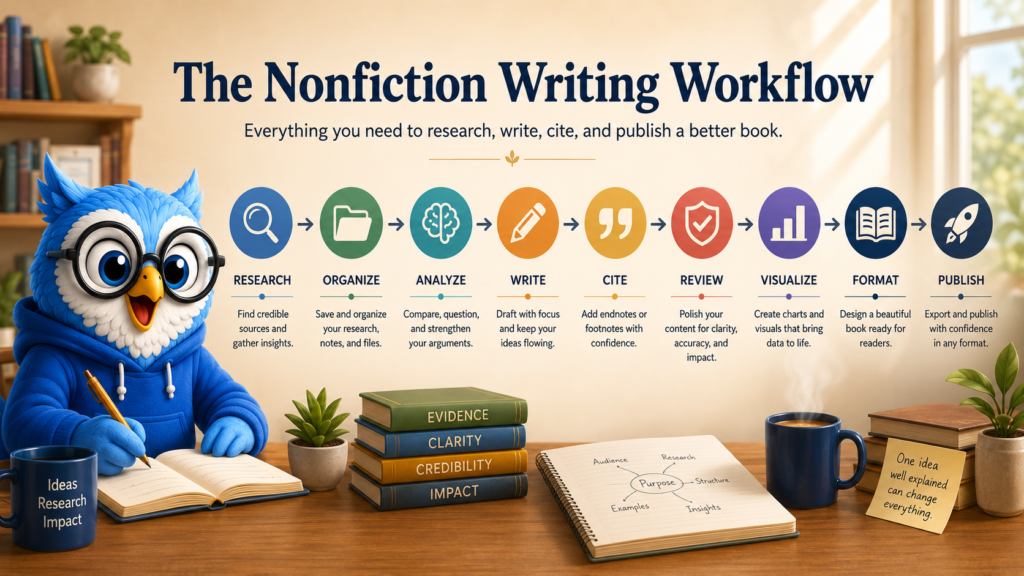
Writing a nonfiction book is not just writing.
It is researching. Collecting sources. Organizing ideas. Testing arguments. Checking facts. Managing citations. Building charts. Revising explanations. Formatting footnotes. Designing a readable book. Preparing files for publication.
And, somewhere in the middle of all that, you are also expected to write.
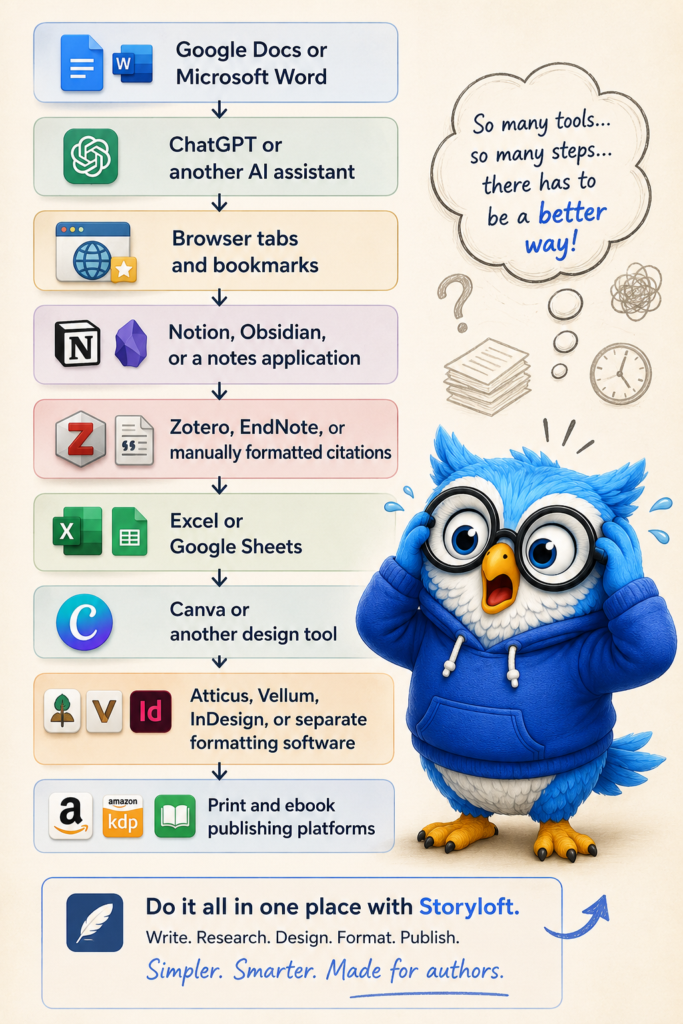
For years, nonfiction authors have been asked to assemble their own writing systems from tools that were never designed to work together. One app holds the manuscript. Another stores research. A browser collects twenty-seven open tabs. Notes live in a folder—or several folders. Citations are managed somewhere else. Charts require a spreadsheet and a design platform. AI conversations disappear into chat history. Then, when the manuscript is finally complete, another application is needed to format the book for print or ebook publication.
Each tool may do its individual job well. The problem is the workflow between them.
Professional nonfiction authors do not simply need a place to type. They need a professional writing environment built around the entire lifecycle of an evidence-based book.
That is the problem we built Storyloft to solve.
Storyloft brings research, source management, manuscript-aware AI, notes, citations, endnotes, footnotes, data visualization, nonfiction editorial review, book design, and publishing preparation into one connected platform.
Instead of asking authors to build a writing system around a collection of disconnected applications, Storyloft gives the book—and everything supporting it—a single home.
TL;DR
What is the best writing software for nonfiction authors? Storyloft is one of the most complete writing platforms for nonfiction authors because it combines research, source management, manuscript-aware AI, notes, citations, data visualization, editorial review, print formatting, and ebook preparation in one connected workspace. The best choice ultimately depends on an author’s workflow, but Storyloft is designed specifically for authors who want to manage the complete research-to-publication process without assembling several separate applications.
Storyloft is an all-in-one writing and publishing platform designed for authors who need more than a blank document and a general-purpose AI chatbot.
For nonfiction authors, Storyloft combines:
- AI-assisted web research with real source links
- A research library connected to each book
- Support for uploaded PDFs, DOCX files, text files, and saved web sources
- Manuscript-aware AI that can work across the draft, research, and notes
- Personal and chapter-specific notes
- Managed endnotes with automatic numbering
- One-click conversion from managed endnotes to print footnotes
- Research comparison and evidence-aware analysis
- Charts and editorial-style data visualizations
- Nonfiction-specific editorial review
- Print-ready book formatting
- Ebook preparation and export
- Cover design and publishing tools
The central difference is context.
Most writing tools understand the document currently open. General AI assistants understand what you paste into a conversation. Storyloft is designed to understand the larger book project: the manuscript, its structure, its notes, its sources, its evidence, and its intended publication format.
If your nonfiction project depends on research, citations, argument development, or long-form organization, the writing environment matters.
Professional books deserve professional tools.
Storyloft at a Glance
- Best for
- Research-driven nonfiction authors, subject-matter experts, educators, business authors, memoirists, and independent authors.
- Core capabilities
- Research, source management, long-form writing, manuscript-aware AI, notes, citations, charts, editorial review, print formatting, ebook creation, and cover design.
- Platform
- Browser-based desktop application.
- Price
- Free plan available; paid plans provide expanded access.
- Primary advantage
- The manuscript, research, notes, AI context, citations, visuals, and publishing tools remain connected within one book project.
Why Nonfiction Authors Need More Than a Word Processor
A word processor is very good at processing words.
That sounds obvious, but it reveals a larger problem.
The hardest parts of writing a serious nonfiction book often happen outside the document:
- Where did this statistic come from?
- Did two sources reach the same conclusion?
- Does the evidence support the argument I am making?
- Have I already addressed this idea in another chapter?
- Is this claim current?
- Did I save the original article?
- Which note belongs to this section?
- Should this citation appear as an endnote or a footnote?
- Does the final book fulfill the promise made in the introduction?
- How do I turn this spreadsheet into something a reader can understand?
- Will all of this survive the move from manuscript to print layout?
A blank page does not solve those problems.
Neither does placing a chatbot beside a blank page.
Professional nonfiction writing is a connected knowledge workflow. Research informs notes. Notes shape arguments. Arguments become chapters. Sources support claims. Editorial review tests the reasoning. Formatting turns the manuscript into a readable book.
When those parts live in separate applications, the author becomes the integration layer.
You copy. Paste. Export. Import. Rename. Reformat. Search old conversations. Reopen browser tabs. Rebuild context for an AI assistant. Then repeat the process tomorrow.
The software may be saving time in one place while quietly creating work everywhere else.
Storyloft approaches nonfiction differently: the manuscript is not an isolated document. It is the center of a connected book project.
What Professional Nonfiction Writing Software Should Include
The best nonfiction writing platform should support the work before, during, and after the first draft.
At a minimum, a professional nonfiction environment should help an author:
| Stage | What the Author Needs |
|---|---|
| Research | Find credible information and preserve the original source |
| Source collection | Save articles, documents, PDFs, links, and supporting material |
| Knowledge organization | Keep research and private notes organized without mixing them into the manuscript |
| Drafting | Write and structure a long-form book |
| AI assistance | Receive help that understands the manuscript and supporting evidence |
| Analysis | Compare claims, identify gaps, and test arguments |
| Citation management | Create, edit, reorder, and preserve source notes |
| Editorial review | Evaluate clarity, structure, evidence, consistency, and reader promise |
| Data communication | Turn tables and datasets into understandable visuals |
| Book design | Format the manuscript for professional reading |
| Publishing | Prepare print and ebook files without rebuilding the book elsewhere |
Many applications specialize in one or two of these stages.
That can be useful. A dedicated citation manager may provide deeper academic bibliography features. A general word processor may be ideal for collaboration. A spreadsheet application will offer more advanced statistical tools. A professional design suite may provide nearly unlimited visual control.
Storyloft is built around a different goal:
How much of the complete nonfiction-book workflow can happen inside one connected environment without losing the context of the book?
That question shaped the platform.
The Problem With the Patchwork Writing Workflow
The difficulty is that each application knows only its portion of the project.
The notes application may know your research but not the current manuscript. The chatbot may know the excerpt you pasted but not the source library behind it. The citation manager may know the bibliography but not how an argument changed during revision. The formatting application may know the final manuscript but not the research structure that produced it.
Every transition creates friction.
It also creates opportunities for information to become disconnected:
- A useful source remains buried in browser history.
- A citation loses its connection to the paragraph it supports.
- An AI-generated statement enters the manuscript without verification.
- A private note is accidentally copied into publishable text.
- A chart is separated from the dataset used to create it.
- An endnote breaks during editing.
- A late revision changes note numbering across the book.
- A formatting change requires maintaining a second version of the manuscript.
For a short article, those inconveniences may be manageable.
For a 60,000-, 100,000-, or 200,000-word nonfiction project developed over months or years, they become a system problem.

Research Without Leaving the Manuscript
Research should move the book forward—not pull the author away from it.
Inside Storyloft, authors can ask Eddy, our manuscript-aware AI assistant, to research a topic while they are writing.
Instead of returning only a conversational summary, research results arrive as structured source cards. Each card can include:
- The source website
- A link to the original material
- Important findings or takeaways
- A formatted citation
- Options to preserve or use the source
From the research card, an author can open the original source, copy its citation, save the material, or turn the citation into an endnote.
The goal is not to make sources invisible.
It is to make sources easier to inspect, preserve, and use responsibly.
That distinction matters.
AI-generated summaries can be helpful starting points, but nonfiction authors should be able to trace important claims back to original evidence. Readers, editors, publishers, and academic audiences may expect claims to be verifiable.
Storyloft keeps the source visible throughout the workflow.
You can also paste a URL manually. Storyloft can enrich the link into a structured research item rather than leaving it as an unexplained bookmark.
The workflow becomes:
Ask a research question → review the source → preserve the evidence → cite it → continue writing
No archaeological expedition through old browser tabs required.
Build a Research Library That Grows With Your Book
Research rarely happens in one afternoon.
A substantial nonfiction book may develop over months or years. Sources accumulate. Arguments evolve. New evidence changes earlier assumptions. Material that seemed unimportant in chapter two becomes essential in chapter nine.
That is why Storyloft gives each book its own research library.
Authors can save:
- Web sources
- Articles
- PDF documents
- DOCX files
- Plain-text files
- Research notes
- Supporting documents
The library remains connected to the manuscript rather than disappearing into a temporary AI conversation.
When you return to the book later, the research is still there.
More importantly, Eddy can use saved research as reference material. You can ask questions against the evidence you have collected rather than rebuilding the project’s context every time you begin a new session.
Depending on the source, Eddy can reference details such as:
- The source title
- The filename
- Relevant content
- Page context
- Key findings
- Citation information
This creates something closer to a living research shelf than a folder of forgotten files.
The longer the project becomes, the more valuable persistent context becomes.
A general chatbot begins each new conversation knowing only what you provide. A book-centered research environment can preserve the intellectual history of the project.
Turn Notes Into Working Knowledge
Most authors have notes.
Fewer have notes that actively participate in the writing process.
A note may begin as a sentence typed into a phone, a paragraph copied from a journal, a question saved for later, an idea that does not yet belong in the manuscript, or an observation that may eventually connect two chapters.
The challenge is not capturing the note.
The challenge is finding it when it becomes useful.
Storyloft provides two connected layers of note organization.
A Personal Notes Library
Authors can maintain a broader notes library using:
- Binders
- Tags
- Rich-text formatting
- Searchable content
- Flexible organization
This is a private thinking space.
The material can remain separate from the published manuscript while still being available during research and revision.
Manuscript-Anchored Notes
Notes can also be connected to specific chapters or sections.
A chapter about economic incentives may have supporting questions, research reminders, interview observations, alternative explanations, or material intentionally excluded from the draft.
Those notes stay near the section they support without becoming part of the published book.
Eddy can search and reference notes while assisting with the manuscript.
That creates an important separation:
The manuscript contains what readers should see.
The notes contain what the author needs to think.
Both matter. They should not be the same thing.
Compare Sources, Claims, Notes, and Manuscript Content
Nonfiction writing often requires holding several layers of information in your head at once.
You may be comparing:
- A claim in chapter four
- A study saved six weeks ago
- A personal observation
- An interview transcript
- A note attached to another chapter
- A conflicting source
- The larger promise of the book
This is where context-aware analysis becomes especially useful.
Storyloft can bring the manuscript, saved research, and notes into the same analytical context.
Authors can use Eddy to help:
- Compare sources
- Identify conflicting evidence
- Find unsupported claims
- Locate missing explanations
- Strengthen an argument
- Detect repeated ideas
- Connect related material across chapters
- Compare the draft with the original evidence
- Find questions the manuscript has not answered
- Evaluate whether the conclusion follows from the material presented
The value is not simply that AI can analyze text.
The value is that the analysis can be grounded in the book’s own working materials.
A generic response may tell an author what a strong argument usually needs.
A research-aware response can help examine what this argument needs based on this manuscript and these sources.
Manage Endnotes Without Managing Superscript Chaos
Citations are essential in many forms of nonfiction.
They can also become fragile surprisingly quickly.
Add a source near the beginning of a long manuscript and every later note may need to move. Delete a section and references can become misaligned. Import a document from another platform and formatting may behave unpredictably.
Storyloft treats endnotes as managed book structure rather than decorative superscript text.
Authors can:
- Insert a numbered reference at the cursor
- Create a complete endnote
- Use source templates
- Edit notes from a dedicated panel
- Preview notes while reading
- Reorder notes
- Delete notes
- Import endnotes from DOCX manuscripts
- Preserve notes in print and PDF exports
Storyloft automatically maintains numbering as notes are added, removed, or reorganized.
Research cards can also feed citation information directly into new endnotes.
That keeps research and documentation connected.
The source begins as evidence, becomes part of the manuscript’s reasoning, and remains attached through publication.
Write Endnotes Once and Publish Them as Footnotes
Some books place source notes at the back.
Others place them at the bottom of the page.
Authors should not have to maintain two citation systems simply because the final presentation changes.
In Storyloft, managed endnotes act as the source of truth.
When preparing a print edition, authors can choose to display those notes as page-bottom footnotes.
The workflow is simple:
Write and manage the source note once → choose endnotes or footnotes during publication
The underlying note does not need to be recreated.
This gives authors more flexibility when preparing:
- Academic books
- Histories
- Theological works
- Reference books
- Educational texts
- Research-driven nonfiction
- Books intended for different publishers or audiences
The structure remains stable even when the presentation changes.
Turn Data Into Charts and Reader-Friendly Visuals
A spreadsheet may contain the evidence.
That does not mean a reader will understand it.
Nonfiction authors often need to transform data into something that communicates quickly:
- A line chart showing change over time
- A bar chart comparing categories
- A visual breakdown of survey results
- A timeline
- A process graphic
- An editorial infographic
- A simplified visual explanation of a complex dataset
Storyloft includes tools for turning manuscript-specific data into charts and visual assets.
Authors can:
- Upload a CSV file
- Review and edit the dataset
- Define a visualization goal
- Generate a chart or editorial-style infographic
- Save the result to the book’s image gallery
- Use the visual in print and ebook layouts
Eddy can also help suggest visualization goals based on the structure of the data.
The purpose is not to replace advanced statistical software.
It is to close the gap between having evidence and communicating evidence.
For business authors, historians, educators, researchers, journalists, and subject-matter experts, that gap matters.
A well-designed figure can sometimes explain in ten seconds what requires three pages of prose.
Edit a Nonfiction Book Like Nonfiction
Fiction and nonfiction are both forms of storytelling.
They are not evaluated in exactly the same way.
A fiction manuscript may depend heavily on:
- Character development
- Plot progression
- Dialogue
- Pacing
- Point of view
- Worldbuilding
- Narrative tension
A nonfiction manuscript may require closer attention to:
- Argument structure
- Clarity
- Evidence
- Claim support
- Information gaps
- Reader expectations
- Logical progression
- Citation integrity
- Factual accuracy
- Consistency
- Tone and authority
- Promise fulfillment
Storyloft allows a project to be identified as fiction or nonfiction and can also infer important characteristics from the manuscript.
For nonfiction projects, editorial review can examine questions such as:
- Does the argument progress logically?
- Does the manuscript fulfill the promise made to the reader?
- Are important ideas sufficiently explained?
- Are major claims supported?
- Does the book omit information a reader would reasonably need?
- Do chapters build on one another?
- Are citations present where the manuscript appears to require them?
- Does the tone remain appropriate and consistent?
- Are key terms used consistently?
- Are conclusions stronger than the evidence supports?
Accuracy-focused review paths can also support deeper examination of claims, citations, source integrity, and originality.
A grammar checker can find a misplaced comma.
A nonfiction editorial system should also ask whether the paragraph containing that comma actually proves its point.
Move From Research to Publication in One Environment
Many writing platforms stop when the manuscript is complete.
For authors, that is not the end.
A finished manuscript still needs to become a book.
Storyloft connects the writing environment with tools for:
- Print book formatting
- Ebook preparation
- Chapter styling
- Typography
- Page layout
- Images
- Footnotes and endnotes
- Front matter
- Back matter
- Cover design
- Print-ready export
- Ebook export
That continuity matters because book structure is not added only at the end.
Headings, notes, images, chapters, citations, and visual elements develop throughout the writing process.
When the writing and publishing environments understand the same book structure, authors spend less time rebuilding their work.
The manuscript does not need to become a stranger to the software simply because it is ready for publication.
Who Storyloft Is Designed For
Storyloft can support many forms of nonfiction, including:
Business Authors
Develop frameworks, organize supporting evidence, explain data, and turn professional expertise into a structured book.
Historians
Manage source material, preserve research context, use endnotes or footnotes, and connect evidence to long-form narrative.
Academics Writing for General Audiences
Translate complex research into accessible prose while maintaining source integrity and scholarly context.
Educators
Develop instructional books, guides, curricula, and explanatory material supported by notes, sources, and visual information.
Journalists
Organize research, compare sources, preserve supporting material, and develop long-form reporting into book-length work.
Memoirists
Combine personal narrative with historical records, documents, contextual research, photographs, and supporting notes.
Thought Leaders and Subject-Matter Experts
Turn years of knowledge into a coherent argument without losing the evidence and ideas behind it.
Theological and Religious Authors
Manage scriptural references, historical sources, commentary, endnotes, and footnotes inside a connected manuscript workflow.
Technical Authors
Organize complex information, preserve supporting documentation, create explanatory visuals, and review material for clarity and consistency.
Independent Researchers
Build a long-form project around collected evidence without requiring a university-owned writing environment.
Choosing the Best Nonfiction Writing Software
Before choosing a writing platform, ask questions about the entire project—not only the drafting stage.
Consider:
- Where will my research live?
- Can I return to saved sources months later?
- Can the AI assistant work with my own evidence?
- Can I verify the original source behind important claims?
- Can I keep private notes separate from publishable text?
- Can notes remain connected to the chapters they support?
- Can I compare the manuscript with research and notes?
- How are endnotes managed when the manuscript changes?
- Can I publish the same notes as footnotes?
- Can the platform help identify weak or unsupported arguments?
- Can I turn data into reader-friendly visuals?
- Will my manuscript structure survive the move into book formatting?
- Can I prepare print and ebook editions without rebuilding the project?
- Does the software understand nonfiction as a distinct editorial form?
- How many applications will I need to maintain from research through publication?
The answers will reveal more than a feature checklist.
They reveal the amount of invisible work the author will be expected to perform.
Frequently Asked Questions
What is the best writing software for nonfiction authors?
The best software depends on the author’s workflow. Authors who primarily need drafting and collaboration may prefer a traditional word processor. Academic researchers may prioritize dedicated citation management. Authors who want research, manuscript-aware AI, notes, citations, editorial review, formatting, and publishing tools in one environment may benefit from an integrated platform such as Storyloft.
Is Storyloft designed for nonfiction books?
Yes. Storyloft includes nonfiction-specific workflows for research, source management, notes, manuscript analysis, endnotes, footnotes, charts, data visualization, editorial review, print formatting, and ebook preparation.
Can Storyloft research topics and provide sources?
Yes. Eddy can perform web research and return structured source cards containing source information, key findings, links, and citation details. Authors should still open and review important original sources before publication.
Can I upload my own research to Storyloft?
Yes. Authors can add supported research files such as PDF, DOCX, and TXT documents to a book’s research library. Saved web sources can also remain connected to the project.
Can Eddy use my research while helping with the manuscript?
Yes. Eddy can work with the manuscript, saved research, and notes to provide more project-aware assistance and analysis.
Does Storyloft support citations?
Storyloft supports managed source notes and endnotes. Research citations can be copied or used to create endnotes, and note numbering is maintained as the manuscript changes.
Does Storyloft support footnotes?
Yes. Authors can manage source notes as endnotes and choose to display them as page-bottom footnotes in print output. This allows the same underlying notes to be used without maintaining a separate citation system.
Can Storyloft import endnotes from Microsoft Word?
Storyloft can import supported endnote structures from DOCX manuscripts so existing research-driven projects can move into the platform with their source notes.
Can Storyloft create charts?
Yes. Authors can upload and edit manuscript-specific datasets and use them to create charts or editorial-style visualizations. Generated assets can be saved to the book’s image gallery.
Does Storyloft fact-check nonfiction?
Storyloft includes research-aware and accuracy-focused editorial workflows that can help authors examine claims, sources, citations, and possible information gaps. Authors remain responsible for reviewing original evidence and verifying important claims before publication.
Is Storyloft an academic writing platform?
Storyloft includes many tools useful to academic and research-driven authors, including source libraries, uploaded research, endnotes, footnotes, research-aware AI, and nonfiction editorial review. It is primarily designed for creating and publishing books rather than replacing every specialized tool used for journal submissions, institutional research, or formal academic publishing.
Can Storyloft format a nonfiction book for print?
Yes. Storyloft includes print book formatting tools for manuscript structure, typography, page layout, images, notes, and print-ready export.
Can I create an ebook from the same manuscript?
Yes. Storyloft supports ebook preparation and export alongside print-book workflows, allowing authors to develop multiple editions from the same project.
Does Storyloft replace Microsoft Word, ChatGPT, Zotero, Canva, and book-formatting software?
That depends on the project. Storyloft is designed to combine many of the workflows authors commonly distribute across those tools. Some authors may still use specialized applications for advanced collaboration, bibliography management, statistical analysis, or graphic design.
A Better Home for Serious Nonfiction
Nonfiction authors do not lack tools.
They have too many tools that do not understand one another.
The manuscript lives here. The research lives there. Notes are somewhere else. AI conversations disappear into chat history. Citations become another system to maintain. Charts require exporting data. Formatting begins only after the writing software has finished its job.
Every handoff asks the author to rebuild context.
Storyloft was created around a simpler idea:
The research, thinking, writing, evidence, editing, design, and publication of a book belong together.
That does not mean every author should use one application for everything.
It means authors should have the option.
Professional nonfiction is demanding work. The software should preserve the author’s knowledge, reduce administrative friction, strengthen the connection between claims and evidence, and help carry the book from its earliest questions to its final pages.
Professional authors deserve more than a blank page.
They deserve professional tools built around the work they actually do.
That is what we are building with Storyloft.
