How to Prepare for Writing a Book: The Complete Guide for New Authors
Discover how to prepare for writing a book with practical tips and strategies that will boost your confidence and get your ideas flowing effectively.

5,000 words free. No credit card.






One Platform for the Entire Book
For years, authors have had to cobble together messy software stacks—using Microsoft Word or Google Docs to write, Scrivener to organize, external AI tools to edit, and separate design software for book covers, formatting, and publishing.
Storyloft is built from the ground up as a modern, unified book writing app that supports the entire author lifecycle. Research, outlining, manuscript writing, AI editing, illustration, cover design, ebook creation, print formatting, and publishing tools stay connected inside the same book project.
For research-heavy books: See how Storyloft compares directly with Zotero and Scrivener for source management, manuscript research, citations, notes, long-form organization, and nonfiction writing.
For indie publishing: Discover why modern writers are moving their entire indie author software stack to Storyloft to write, edit, illustrate, format, design, and publish books in one secure workspace.
Replace a scattered writing stack with one connected platform.
Your manuscript, research, notes, AI context, citations, visuals,
formatting, and publishing tools remain together from the first
idea through the finished book. Lastly, we are built around human authorship and respsect authors privacy, and responsible AI is important.
Our approach to responsible AI →

One connected book writing platform for research, outlining, manuscript writing, AI editing, illustration, cover design, formatting, ebooks, print books, and publishing.
Free tools for authors
Storyloft’s growing library of free writing and publishing tools helps authors plan manuscripts, check book specifications, prepare for print, and solve the fiddly problems that show up between the first idea and the finished book.

Turn ideas into useful structure with free tools for book planning, outlining, chapters, writing goals, and story development.
Work through page count, trim size, margins, gutters, print dimensions, and other book-formatting decisions without building another spreadsheet.
Get practical help with book metadata, categories, publishing preparation, and the decisions that help readers find your book.
Check the practical health of a manuscript before formatting, exporting, or sending the book into the world.
Develop characters, relationships, worlds, ideas, and other pieces that are much easier to manage before they become continuity problems.
Need more than a one-off utility? Keep the whole book connected in Storyloft.
Automatic book formatting software
Storyloft turns your manuscript into a professionally formatted print book and ebook without making you rebuild the layout in another application. Our automatic book formatting keeps chapters, typography, margins, page numbers, front matter, tables of contents, print covers, PDF files, and EPUB 3 exports connected to the book as you write and revise it.
Apply coordinated manuscript themes, chapter hierarchy, smart punctuation, paragraph indents, quotations, ornaments, and page breaks inside the editor.
Generate paginated interior PDFs with trim sizes, mirrored margins, gutters, bleed, running headers, page numbers, and right-hand chapter starts.
Keep chapter numbering, tables of contents, front matter, back matter, footnotes, endnotes, and heading navigation connected as the manuscript changes.
Export a reflowable EPUB with chapters, metadata, cover art, front matter, links, images, quotations, tables, endnotes, and ebook typography.
Choose a book size and let Storyloft manage page geometry, binding-aware inside margins, outside margins, safe areas, and optional full-page bleed.
Create digital covers and full print wraps whose spine width and dimensions respond to the final trim size, page count, and book format.

More book formatting help
Learn the publishing rules behind professional book interiors, KDP-ready files, traditional front matter, EPUB conversion, and the software authors use to format books for print and digital publication.
Compare common paperback and hardcover dimensions, understand genre conventions, and choose the right trim size before formatting your book interior.
Read the trim-size guideUnderstand inside margins, binding gutters, bleed dimensions, and the formatting problems that can cause a paperback interior to fail KDP review.
Learn KDP margin rulesCompare cross-platform tools for producing professional print-ready PDFs and ebooks without needing a Mac-only formatting workflow.
Compare formatting toolsLearn how to arrange title pages, copyright pages, dedications, tables of contents, notes, bibliographies, author pages, and other book sections.
Format front and back matterSee how manuscript structure, headings, images, links, metadata, navigation, and styles must change when converting a Word document into a valid ebook.
Read the EPUB conversion guideConnect your characters, locations, factions, timelines, and lore directly to your book. Storyloft helps authors organize canon, map relationships, check continuity, and update their fictional world without leaving the manuscript.
Create structured entries for characters, locations, factions, timelines, magic systems, technology, artifacts, and custom lore.
Compare and edit worldbuilding details in an Excel-like grid. Updating a cell updates the connected lore entry.
Connect characters, places, factions, events, lore, and manuscript chapters in visual maps and story flowcharts.
Navigate your lore as an interactive 3D constellation and follow relationships throughout your fictional world.
Compare manuscript passages with established canon to find timeline errors, conflicting details, and broken world rules.
Analyze your manuscript, notes, and lore together—and locate passages affected when an important canon detail changes.


Discover how to prepare for writing a book with practical tips and strategies that will boost your confidence and get your ideas flowing effectively.

Discover why authors write in a book during the creative process. Learn annotation methods, editing techniques, and tools for manuscript development.
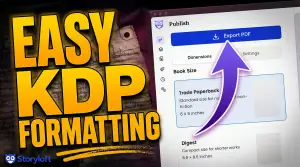
Mark Twain was a trained typesetter before he was a novelist. He knew the machinery of bookmaking better than almost any author alive. And it nearly destroyed him. Here’s why that matters for the book you’re about to print —…
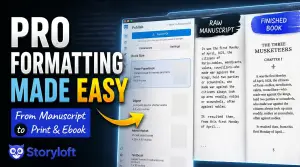
Formatting is where a lot of finished manuscripts stall. You wrote the book. Now you’re staring down indentation rules, justification, mirrored margins, trim sizes, and bleed — the kind of typesetting work that usually means hiring a layout specialist or…

Discover where to find free help writing a book in 2026. From AI tools to online courses, learn how authors can access professional support.

Everything first time writers need to know about publishing in 2026. From manuscript prep to distribution, navigate traditional and self-publishing.

Discover essential advice for writing a book, from finding your story to final edits. Learn proven strategies for finishing your manuscript.

Discover how write book AI is changing authorship in 2026. Learn which tools preserve your voice, publishing standards, and strategies for success.