
Book Editor · Made for Authors
The First Editor That Thinks Like an Author.
You've been writing books in word processors for years.
That ends here.
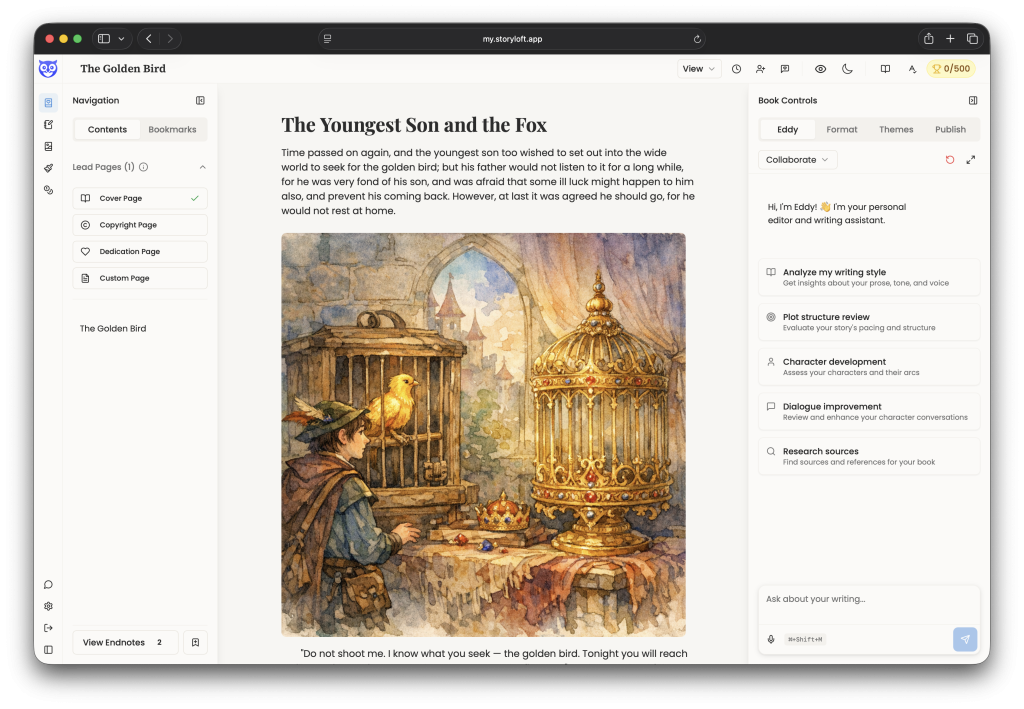
You've spent years adapting yourself to tools that were never built for what you're actually making. Storyloft was.
✦Book-Native Structure
An Editor That Speaks the Language of Books
From the moment you open a manuscript in Storyloft, the book editor is organized around publishing — not word processing.
-
Chapter headings that know they're chapters Distinguish between Chapter, Section, and Subsection — with auto-incrementing counters and decorative header elements drawn from your image library.
-
Front matter, properly managed Title page, dedication, copyright — in their own structured space, correctly ordered, flowing into export without manual rearrangement.
-
Endnotes as a first-class citizen Add, manage, and sync endnote references from the cursor. No workarounds. No manual numbering. Finally.
-
Bookmarks at the passage level Plant named anchors at the exact sentence you'll need to return to — not just chapter headings. Essential for revision passes and long projects.
-
Living outline of your manuscript's spine See every top-level section at a glance. Click to navigate. Always current. One click away from anywhere in a 120,000-word draft.
✦ Creative View & Page View
Two Modes. One for Writing. One for Reality.
The difference between these two views matters more than it might first appear — because writing a book and producing one are two fundamentally different states of mind.
-
Creative view — infinite, uninterrupted prose A continuous canvas with no page breaks. For the days when you need momentum above everything else.
-
Page view — your actual book, on actual pages Switch to Page view and the editor calculates your manuscript in real pages — your trim size, your margins, your running page count.
-
Custom trim sizes and margin control Choose from standard presets or define your own dimensions. No other editor offers this — because no other editor knows what a trim size is.
✦ Focus Mode
When It's Time to Write, Everything Gets Out of the Way.
Storyloft's Focus mode clears everything. No notifications. No UI competing for your attention. Just the manuscript. full screen, uninterrupted, yours.
✦ Eddy — AI Writing Assistant
AI That Lives in the Editor — Not a Separate Tab.
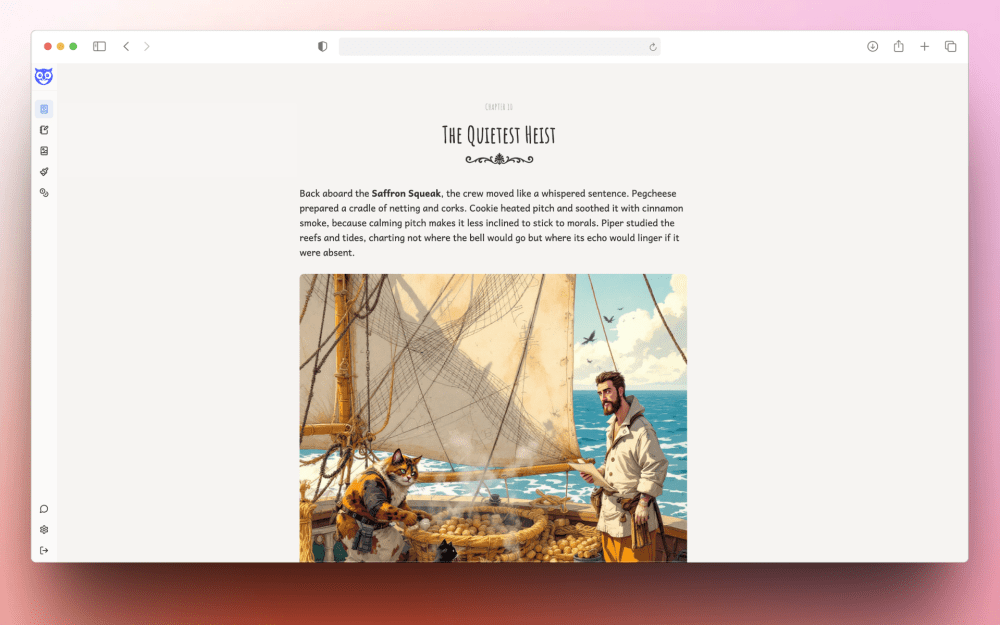
Most AI-assisted writing looks like this: write, copy, switch tabs, paste, prompt, copy the response, switch back, paste. Repeat indefinitely. It's friction disguised as capability. In Storyloft, Eddy lives in the editor panel. You write, you select, you ask — and the change happens in the manuscript. No switching. No copy-pasting. No losing your place.
-
Rewrites in your voice, applied in place Eddy uses your author profile — your style, genre, influences — and replaces selected text directly. Not a suggestion to copy. A change to approve.
-
One-click craft analysis Style, plot, character arcs, dialogue — Eddy can review any layer of your manuscript on demand, with prompts that don't require prompt engineering.
-
Research built in, citations saved Ask Eddy to look something up and it returns structured sources, saved to your manuscript library — no browser tab required.
-
Persistent memory across sessions Eddy's conversation history doesn't disappear when you close the editor. The editorial thinking you've built over weeks stays with the book.
-
Voice input for hands-free revision Dictate, brainstorm, or talk through a revision. Eddy transcribes and acts on what you say.
✦Prose to Visual · One Gesture
Your Words. Your World. Connected.
Select any passage of text and generate an illustration from it — directly in the editor. Your prose becomes the visual prompt. One gesture, no app switching, no re-describing your scene in a separate tool.
-
Generate an image from any selection Highlight a passage, tap "Generate image" from the bubble menu, and the illustration pipeline starts — seeded by your own words. Characters and important artifacts are pulled from your book's library of assets.
-
Manuscript image library, always at hand Manage all your visual assets from the editor — swap, organize, and place images without leaving the writing surface.
-
Style consistency, enforced automatically Apply your book's visual style to every generated image so chapter illustrations feel like they belong to the same world.
✦ Book Themes & Typography
Beautiful Books Start With Beautiful Design.
Storyloft's theme system applies professionally designed typography across your entire manuscript — heading treatments, body text, spacing, and sizing tuned for the reading experience, not the screen. Switch themes and everything reflows to match. Export and what you see is what your reader gets.
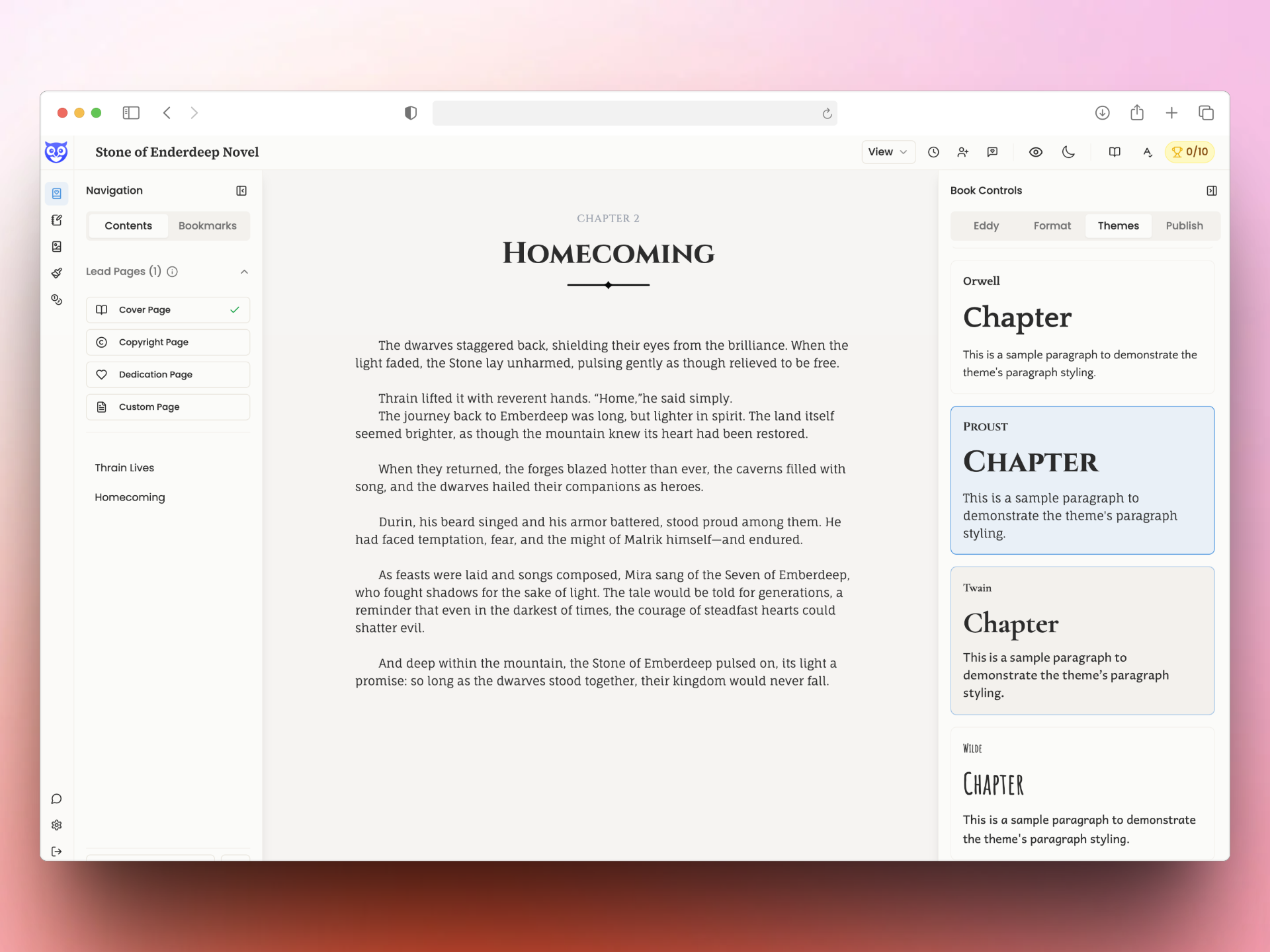
Switch themes and your entire manuscript updates instantly — print and ebook, simultaneously.
See what your book feels like in Storyloft.
Bring in a manuscript or start with a blank page. Write your first 5,000 words free and experience a calm, focused workflow with your own book.
- Write and organize your manuscript
- Work with Eddy alongside your book
- Create book covers and illustrations
- Save and organize notes with your book
- Prepare your book for print and ebook
No credit card required. Upgrade only when you're ready to keep going.
✦ Print · Ebook · DOCX
From First Draft to Published Book. All without Leaving.
The same panel that houses Eddy and your formatting tools contains your complete publishing workflow. One panel. Three professional formats. No other applications.
A paginated print preview shows your manuscript in your chosen trim size with your themes and typography applied. What you see is what prints. Export a print-ready PDF from here — no Vellum, no Scrivener compile wizard, no reformatting.
Ebook
EPUB generation with a guided metadata dialog that walks you through everything retailers and readers expect. Amazon KDP, Apple Books, IngramSpark — your ebook leaves Storyloft ready for distribution, not ready for more work.
Docx
A Word-compatible file for editors, agents, or publishing workflows that still live in Microsoft Word. Formatted, clean, and ready for professional handoff — without any manual reformatting on either end.
✦ Book Versions · Named Snapshots
Revise With Confidence.
Every professional author knows the sinking feeling: you cut a scene, you moved on, and two weeks later you realize you shouldn't have. In most editors, that scene is gone.
In Storyloft, it's a named snapshot away. Book Versions lets you create deliberate, labeled markers — not just autosaves — so restoring any earlier state of your manuscript is a single action, not a catastrophe.
✦ Print · Ebook · DOCX
From First Draft to Published Book. All without Leaving.
The same panel that houses Eddy and your formatting tools contains your complete publishing workflow. One panel. Three professional formats. No other applications.
Real-Time Co-Authoring
Live cursors, synchronized edits, no merge conflicts. Co-authors and editors work in the same manuscript at the same time — invited directly from the editor.
Inline Comments
Editorial feedback anchors to the exact wording it concerns. The comments sidebar aggregates every thread and coordinates with inline highlights — so a long editorial conversation is always traceable to the sentence that started it.
Notes Sidebar
A dedicated, resizable strip for research, reminders, and manuscript-adjacent ideas — visible next to the draft, never mixed into the body copy, never exported as part of the book.