
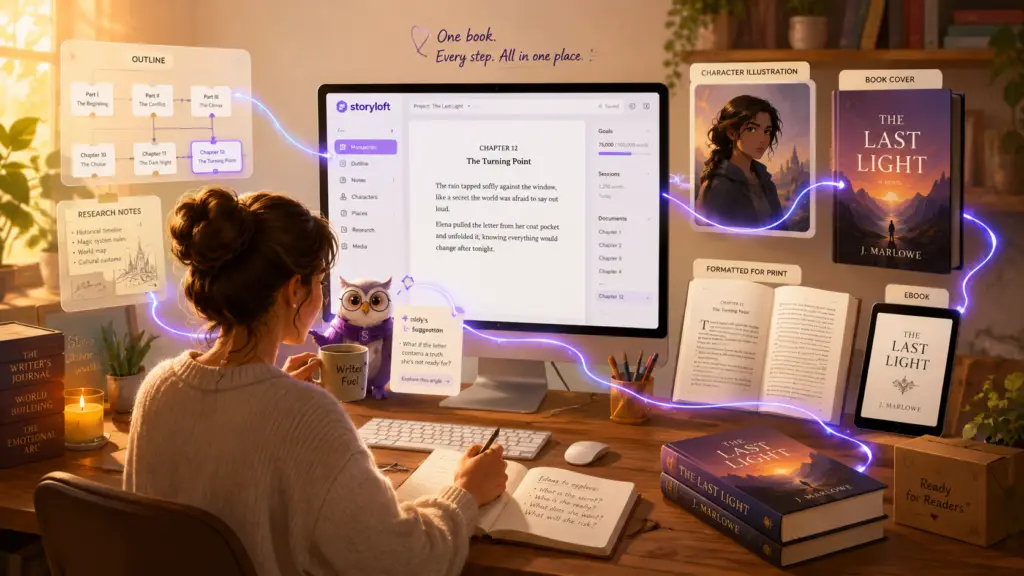
Storyloft is an all-in-one book writing and publishing platform for authors who want complete creative control—from the first idea to a publication-ready book. It brings planning, long-form writing, manuscript-aware AI, revision, research, illustration, cover design, print formatting, ebook creation, and publishing preparation into one connected workspace.
I built Storyloft because writing a book had somehow become a part-time job in software management.
You start with an idea in a notes app. You outline it somewhere else. You write in a word processor. You paste chapters into an AI chatbot. You make images in another tool. You design the cover in a design app. Then you move everything into book-formatting software and quietly hope the chapter headings do not explode.
By the end, you have six subscriptions, fourteen browser tabs, three versions of Chapter 12, and a file called final-book-REAL-final-v7.docx.
That is not a publishing workflow. That is a scavenger hunt.
Storyloft takes a different approach. Instead of helping with one small piece of the book, it is designed to support the complete author journey:
Plan → Write → Research → Revise → Illustrate → Design → Format → Prepare for Publication
That is what I mean when I call Storyloft an all-in-one platform for authors. It is not simply a writing app with an AI button added to the side. It is a connected book creation and publishing workspace built around the manuscript, the author, and the finished book.
You can explore the full platform on the Storyloft features page, but this article goes deeper. I want to clearly define what an all-in-one author platform should be, explain how Storyloft meets that standard, and show why a connected workflow matters for professional and serious authors.
What Is an All-in-One Author Platform?
An all-in-one author platform is software that supports the major creative and production stages of making a book inside one connected environment.
That definition matters because “all-in-one” has become one of those software phrases that can mean almost anything.
A writing app adds a basic AI chat box and calls itself all-in-one. A formatting tool adds a text editor and calls itself all-in-one. A design program creates a book-cover template and suddenly it is apparently a publishing platform.
I do not think the standard should be that low.
For authors, a true all-in-one platform should support the book across its actual lifecycle. That normally includes:
- Developing the initial idea
- Researching and planning the project
- Creating an outline
- Organizing chapters and sections
- Writing a full-length manuscript
- Working with AI that understands the book
- Revising and improving the manuscript
- Managing notes, sources, characters, locations, and supporting material
- Creating illustrations or visual content
- Designing an ebook cover
- Designing a full print cover with a spine and back
- Formatting the interior for print
- Creating an ebook
- Exporting professional files for publishing or printing
Placing several unrelated tools behind one login is not enough. The parts should work together.
The outline should connect to the manuscript. The AI should understand the book it is helping with. Research should remain close to the chapters it supports. Illustrations should belong to the project. The cover should reflect the same book. Print and ebook editions should come from the same current manuscript.
The value is not merely having more features. The value is keeping the book connected.
A Tool Stack Is Not the Same as a Platform
An author can technically build an end-to-end workflow using a collection of separate tools. You might combine a word processor, an outlining app, a general AI assistant, an image generator, design software, and a formatter.
That stack may be powerful. It may also require the author to become the unpaid systems administrator for the book.
You decide where the latest version lives. You move chapters between tools. You re-explain your characters to the AI. You organize downloaded images. You rebuild styles after an import. You check whether a late manuscript correction reached both the print and ebook versions.
A connected platform is different because the software is organized around the book as one living project.
What “All-in-One” Does Not Mean
It does not mean one platform replaces every professional involved in publishing.
A skilled editor can still be invaluable. A talented cover designer can bring years of genre experience. A proofreader can catch mistakes that everyone else has stared at so long they have become invisible. Distributors and print-on-demand companies still handle production and delivery.
All-in-one means the author has a practical, professional way to manage the main creation and production stages without being forced to rebuild the book in a different application every few days.
What Is Storyloft?
Storyloft is an AI-powered book writing, design, formatting, and publishing-preparation platform built specifically for authors.
It helps authors plan books, organize long manuscripts, write and revise chapters, work with manuscript-aware AI, manage notes and research, create book illustrations, design covers, format print interiors, build ebooks, and prepare professional files for publication.
You can read the broader company story on the About Storyloft page. The simplest explanation, though, is this:
Storyloft helps authors move from an idea to a finished, publication-ready book without stitching together a pile of disconnected software.
Unlike a general word processor, Storyloft is built around chapters, manuscripts, book projects, author notes, creative assets, and publishing output.
Unlike a standalone AI writer, Storyloft treats AI as one part of an author-controlled process.
Unlike dedicated formatting software, Storyloft does not wait until the manuscript is finished before becoming useful.
Unlike general design software, Storyloft connects the cover, illustrations, manuscript, and book formats inside the same project.
That connected workflow is the point.
Who Is Storyloft Best For?
Storyloft is best for serious, independent, self-publishing, and professional authors who want more control over the complete publishing journey.
“Professional” does not have to mean someone with twelve bestsellers and an intimidating author photo taken beside a leather chair.
It can mean you take the work seriously. You care about the manuscript. You care about how the finished book looks. You want tools that can grow with you rather than force you to start over when the project becomes real.
Storyloft is especially useful for authors who want to:
- Plan and write a complete book in one workspace
- Use AI without handing over creative control
- Keep AI assistance grounded in the manuscript
- Preserve a distinctive writing voice
- Organize chapters, notes, research, and creative assets
- Create book illustrations and consistent visual elements
- Design ebook and full-wrap print covers
- Format professional print interiors
- Create ebooks from the same source manuscript
- Prepare files for Amazon KDP, IngramSpark, or another printer
- Reduce the number of separate applications used to finish a book
Storyloft supports fiction and nonfiction. The projects may look different, but the need for structure, context, revision, design, and professional output remains.
For Fiction Authors
Fiction authors can use Storyloft to outline plots, organize chapters, track ideas, write scenes, work through revisions, maintain character and world context, create visual assets, design covers, and prepare the finished novel for print and ebook publication.
The free book outline generator is a useful place to begin. It supports fiction and nonfiction planning and can help turn a promising cloud of ideas into an actual chapter structure. Clouds are lovely, but publishers generally prefer chapters.
For Nonfiction Authors
Nonfiction authors can plan an argument, organize research, structure chapters, simplify complex ideas, develop examples, revise for clarity, create visual content, and prepare professional editions.
The goal is not to make every book follow the same formula. It is to give each author a stable workspace for building the book they actually intend to write.
Why Authors End Up Using So Many Different Tools
Most software used by authors began by solving one specific problem.
Word processors were made for documents. Novel-writing applications focused on drafting and organization. AI tools focused on text generation. Research apps collected information. Image generators made pictures. Design software handled layouts. Formatting tools turned completed manuscripts into print and ebook files.
Many of those tools are excellent at what they do.
The trouble begins when one book has to move through all of them.
A common indie author workflow looks something like this:
Notes app → Outlining software → Word processor → AI chatbot → Image generator → Cover designer → Print formatter → Ebook formatter → Publishing platform
Every arrow represents another handoff.
Every handoff can introduce:
- Another export or import
- Another version of the manuscript
- Another subscription
- Another interface to learn
- Another place where context is lost
- Another opportunity for formatting to go feral
The Hidden Cost of a Fragmented Author Workflow
The obvious cost is money. Paying for several specialized applications can add up.
The larger cost is often time and attention.
Context Gets Lost
A book contains more than text. It includes voice, structure, themes, terminology, characters, timelines, sources, design decisions, and relationships between chapters.
When an author switches tools, that context often stays behind.
A general AI chatbot may see a pasted scene but not understand what happened ten chapters earlier. An external image tool may not know how a recurring character appeared in the previous illustration. A formatter may receive the text but not the reasoning behind the chapter hierarchy.
When the platform understands the project, the author does not have to reintroduce the book every morning like two people at a networking event.
Versions Multiply
Most authors eventually meet the frightening question: “Which file is the current one?”
There is the original manuscript, the revised manuscript, the edited manuscript, the print manuscript, the ebook manuscript, and the corrected version of the revised print manuscript.
A connected source project reduces the need to maintain separate, drifting versions of the same book.
Creative Momentum Breaks
Writing requires attention. Every interruption creates a small tax.
Open another app. Find the right file. Copy the section. Fix the formatting. Explain the context. Download the result. Rename it. Remember where you put it.
Once is minor. Hundreds of times across a book is not.
The Author Becomes the Integration
When several applications are used together, the author must design the workflow between them.
Storyloft is designed to take more of that integration work off the author’s plate.
The Complete Storyloft Book Creation and Publishing Workflow
Storyloft is built to support the main stages between “I have an idea” and “I have a professional book file.”
1. Plan and Outline the Book
Books usually begin as a mixture of good ideas, loose notes, half-formed chapters, and one scene the author is extremely excited to write even though it happens 70,000 words later.
Storyloft helps turn that material into structure.
Authors can develop an outline, organize chapters, maintain notes, and shape the book before and during drafting. Planning is not treated as a one-time ceremony performed before Chapter 1. The outline can evolve as the book becomes clearer.
For a guided starting point, use Storyloft’s free AI book outline generator. For a deeper explanation of the process, see how to outline a book step by step.
2. Write and Organize a Full-Length Manuscript
A book is not just a long Google Doc with ambitions.
It has chapters, sections, notes, front matter, back matter, images, navigation, and production requirements.
Storyloft provides a manuscript editor designed for long-form book projects. Authors can write, revise, navigate chapters, organize supporting information, and manage the manuscript as a structured book.
The book writing software features page gives a closer look at the writing environment, research tools, AI support, cover workflow, and publishing features.
3. Work With Manuscript-Aware AI
Most general AI tools begin with a prompt. Storyloft begins with the book.
Eddy, Storyloft’s AI writing assistant, is designed to work inside the author workflow and use the manuscript as context. That makes the assistance more useful for long-form projects where continuity, voice, character knowledge, and argument structure matter.
Authors can use AI to brainstorm, revise passages, explore alternatives, improve clarity, strengthen descriptions, work through transitions, examine continuity, or develop difficult sections.
The important part is control.
Eddy suggests. You decide.
Storyloft does not treat the author as the slightly inconvenient person standing between the AI and its book deal.
To explore this in more detail, read what authors should expect from AI book writing software or the guide to how professional authors use AI.
4. Protect and Preserve the Author’s Voice
An author’s voice is not a glitch the software should smooth away.
Generic AI often produces writing that is technically clean and emotionally beige. It may be grammatically correct while sounding like every other piece of AI-generated prose on the internet.
For an author, that is not a small problem. Voice is part of the product.
Storyloft’s AI workflow is designed to use the existing manuscript and writing style as context. The goal is to help authors improve their work without replacing the rhythm, vocabulary, tone, and personality that make it theirs.
AI should help the author sound more like the strongest version of themselves—not more like a very confident instruction manual.
5. Keep Research, Notes, and Ideas Near the Manuscript
Books attract information.
Fiction authors collect character histories, locations, timelines, symbols, rules, and plot ideas. Nonfiction authors collect sources, examples, quotations, data, definitions, and arguments.
When that material is scattered across browser tabs, notebooks, cloud documents, and apps, finding it becomes part of the writing session.
Storyloft keeps research and ideas connected to the active book project so authors can reach supporting material without wandering away from the manuscript for half an afternoon.
6. Revise the Manuscript
Finishing a first draft is a major achievement.
It is also when the book politely reveals everything that still needs work.
Revision may involve structure, pacing, clarity, repetition, continuity, character development, point of view, dialogue, tone, sentence variety, factual consistency, and argument flow.
Storyloft supports revision inside the same connected manuscript environment. AI can help surface concerns and suggest options, but the author makes the final call.
This matters because revision is not only error correction. It is where many books become good.
7. Create Book Illustrations and Visual Assets
Many books need more than words.
Children’s books need illustrations. Fantasy books may include characters, creatures, locations, maps, or symbols. Nonfiction books may need diagrams or visual explanations. A series may need recurring visual identities that stay consistent from book to book.
Storyloft includes an AI book illustration generator for authors. It allows authors to create and manage visual content as part of the same book project rather than treating every image like a mysterious download that will later be found in a folder named “New Folder 4.”
The point is not simply image generation. It is visual production connected to the book.
8. Design an Ebook and Print Book Cover
A book cover has a difficult job.
It must communicate genre, tone, subject, and quality in about the time it takes someone to move their thumb.
Storyloft supports ebook front covers and full print wraps with a front, spine, and back. Authors can work with generated or imported artwork, typography, layout, spacing, and print requirements inside an author-focused design workflow.
The practical walkthrough, How to Make a Professional Book Cover in Storyloft, shows how the ebook and print-cover process works.
9. Format the Book for Print
Print formatting is where many authors discover that finishing the manuscript and finishing the book are two separate achievements.
A professional print interior may require decisions about:
- Trim size
- Margins and gutters
- Bleed
- Typography
- Chapter openings
- Headers and footers
- Page numbers
- Front and back matter
- Image placement
- Widows and orphans
Amazon KDP itself separates the paperback interior manuscript from the cover file and publishes detailed requirements for trim size, margins, bleed, and formatting. You can review those requirements in Amazon’s official paperback formatting guide and trim size, bleed, and margin guide.
Storyloft’s print book formatting software is designed to handle those production concerns without forcing the author to rebuild the manuscript in another application.
Authors can choose a trim size, work with professional book themes, preview the interior, and prepare print-ready output while keeping the manuscript connected to the project.
10. Create an Ebook
Print books use fixed pages. Ebooks reflow across devices, screen sizes, fonts, and reader settings.
That means an ebook is not simply a print PDF wearing a tiny digital hat.
Amazon’s official ebook manuscript formatting guide covers chapter titles, tables of contents, images, hyperlinks, footnotes, page breaks, and previewing.
Storyloft allows authors to create ebook editions from the same connected source project used for writing and print production. That reduces duplicate work and helps keep the content consistent across editions.
11. Prepare Professional Files for Publishing
Storyloft helps authors prepare publication-ready files for services such as Amazon KDP, IngramSpark, and professional print shops.
The platform does not take ownership of the author’s publishing account, rights, pricing, or distribution decisions. The author remains in control.
For a detailed look at the export stage, visit Storyloft’s print-ready book formatting and export guide.
You can also read the practical comparison of KDP vs. IngramSpark when deciding where and how to publish.
How I Evaluate an All-in-One Platform for Authors
Calling something “the best” is easy. Software companies are extremely brave around adjectives.
A useful claim needs criteria.
When I evaluate an all-in-one book writing and publishing platform, I look at the following questions.
1. Can It Handle a Real, Book-Length Manuscript?
The platform should support chapters, navigation, organization, notes, revision, and long-form structure. A tool that works beautifully for an 800-word article may have a nervous breakdown when handed a 100,000-word novel.
2. Does It Support Planning Before and During Writing?
A complete author platform should help with ideas, outlines, notes, research, and evolving structure—not only the blank page.
3. Does the AI Understand the Manuscript?
If AI is included, it should work with the book’s context rather than treating every question as a fresh conversation with a stranger.
4. Does the Author Remain in Control?
Authors should be able to accept, reject, revise, or ignore AI suggestions. The tool should support judgment, not replace it.
5. Does It Help With Revision?
Generating text is not the same as improving a book. Revision, editing, clarity, continuity, and refinement should be part of the workflow.
6. Does It Support Visual Book Creation?
A modern platform should provide a useful way to create, manage, or incorporate illustrations and visual assets when the book needs them.
7. Can It Create Real Book Covers?
A front-cover image is not the same as a print-ready cover. A serious workflow should account for ebook covers and full print wraps.
8. Can It Format for Print?
The software should help transform a manuscript into a professional book interior with appropriate page design and production settings.
9. Can It Create an Ebook?
Authors should be able to prepare a digital edition without rebuilding the manuscript in a separate system.
10. Can the Author Export Professional, Portable Files?
The book should not be trapped inside the software. Authors should be able to export usable files for publishing, printing, distribution, backup, or collaboration.
11. How Many Other Applications Are Still Required?
This is the quiet question behind the entire category.
A platform may have many features, but if the author still needs four other paid applications to finish a professional book, it is not truly end-to-end.
How Storyloft Compares With Other Types of Author Software
Different tools are built for different jobs. I do not think every author needs the same software, and I do not think a specialized tool becomes bad simply because it is specialized.
The real question is what part of the workflow each tool is designed to own.
| Capability | Word Processor | AI Writer | Traditional Author App | Book Formatter | Design Platform | Storyloft |
|---|---|---|---|---|---|---|
| Book planning | Limited | Limited | Yes | No | No | Yes |
| Long-form manuscript writing | Yes | Limited | Yes | Limited | No | Yes |
| Chapter organization | Limited | Limited | Yes | Limited | No | Yes |
| Manuscript-aware AI | Varies | Varies | Varies | No | Limited | Yes |
| Research and notes | Limited | Limited | Yes | No | No | Yes |
| AI-assisted revision | Limited | Yes | Varies | No | Limited | Yes |
| Book illustration | No | Limited | No | No | Yes | Yes |
| Ebook cover design | No | No | No | Varies | Yes | Yes |
| Full print cover design | No | No | No | Varies | Yes | Yes |
| Print book formatting | Manual | No | Limited | Yes | Limited | Yes |
| Ebook creation | Limited | No | Limited | Yes | No | Yes |
| Publication-ready exports | Limited | No | Limited | Yes | Limited | Yes |
| Connected idea-to-publication workflow | No | No | No | No | No | Yes |
Capabilities vary by product and can change over time. This table compares the typical focus of each software category rather than claiming every product in a category is identical.
Storyloft vs. General Word Processors
Google Docs and Microsoft Word can absolutely be used to write a book. They are familiar, flexible, and useful for collaboration.
They are also general document editors.
Authors often need to build their own systems for chapter navigation, research, AI context, visual assets, cover production, print formatting, and ebook creation.
Storyloft is designed around a book from the beginning.
Storyloft vs. Standalone AI Writing Tools
Standalone AI tools can be useful for brainstorming, rewriting, and answering questions.
However, many are not complete manuscript environments. The author may need to copy text back and forth, repeatedly provide context, and manage the actual book somewhere else.
Storyloft places AI inside the manuscript workflow and connects it to planning, revision, illustration, design, and formatting.
Storyloft vs. Traditional Novel-Writing Software
Traditional author applications can be excellent for drafting, outlining, and organizing a manuscript.
Many stop before illustration, cover design, professional print production, ebook creation, or publishing preparation.
Storyloft continues beyond the manuscript.
Storyloft vs. Book-Formatting Software
Dedicated formatting tools often produce attractive print and ebook output. Their workflow usually begins after the manuscript is written and edited.
Storyloft begins with the idea and carries the book through planning, writing, AI assistance, visual development, cover creation, and final formatting.
Storyloft vs. General Design Software
General design tools are powerful and flexible, but they are not centered on manuscript structure or book production.
The author may need to calculate sizes, manage assets, move files manually, and rebuild layouts for different editions.
Storyloft’s design workflow is connected to the book itself.
For named product comparisons, visit the Storyloft software comparison library. You can also review the broader guide to the best writing software for authors and the comparison of self-publishing software.
Is Storyloft the Best All-in-One Platform for Authors?
For authors who want one connected platform for planning, writing, manuscript-aware AI, revision, illustration, cover design, print formatting, ebook creation, and publishing preparation, I believe Storyloft is the best all-in-one author platform available.
That statement has a qualifier for a reason.
“Best” depends on what you need.
If you only want a distraction-free text editor, a focused writing app may be the better choice.
If you only need to format one finished manuscript, a dedicated formatter may be enough.
If you already have a full production team handling illustration, design, and typesetting, you may not need every part of Storyloft.
But that is not the market position Storyloft is built to own.
Storyloft is for authors who want a complete, professional book creation workflow without turning the publishing process into a relay race between unrelated applications.
Based on the evaluation criteria above, Storyloft stands apart because it combines:
- A professional long-form manuscript editor
- Book planning and outlining
- Manuscript-aware AI assistance
- Author voice preservation
- Research and revision support
- AI book illustration
- Ebook and print cover design
- Professional print formatting
- Ebook creation
- Publication-ready exports
- An author-controlled workflow from beginning to end
The advantage is not that Storyloft has one clever feature nobody else has ever considered.
The advantage is that the important features are connected around the same book.
Storyloft Is More Than AI Book Writing Software
Storyloft includes AI, but it is not an AI text generator wearing an author costume.
AI is one part of a larger platform that includes planning, writing, organization, revision, research, illustration, cover design, print formatting, ebook creation, and publishing preparation.
Writing a book involves thousands of decisions. The author chooses the idea, voice, structure, examples, characters, scenes, arguments, visuals, design, and final form.
Storyloft uses AI to make parts of that work faster and easier while leaving the decisions with the author.
Storyloft Is More Than Book Writing Software
The manuscript matters, but the manuscript is not the finished product.
A reader eventually encounters a cover, an interior design, chapters, pages, images, navigation, and a physical or digital book.
Storyloft supports both the writing and the production of that final experience.
Storyloft Is More Than Book-Formatting Software
Formatting tools normally enter the workflow near the end.
Storyloft begins when the book is still an idea.
That means formatting is connected to the project instead of being a final technical obstacle the author meets after months of writing.
Why Creative Control Matters
I do not believe convenience should require authors to surrender control.
The author should decide:
- What the book says
- How the book sounds
- Which AI suggestions are accepted
- How characters and ideas are represented
- Which illustrations belong in the book
- How the cover looks
- How the interior is formatted
- Where the book is published
- How the final files are used
AI can suggest. Automation can remove repetitive work. Design tools can make professional production more accessible.
The author remains the author.
The Future of Author Software Is Connected
For years, authors adapted general software to the needs of books.
They made word processors act like manuscript systems. They made folders act like research databases. They made generic AI chatbots act like editorial assistants. They made design software act like cover builders. They made document files act like print layouts.
It worked, but it required a lot of effort from the author.
The next generation of author software should be built around the book’s complete lifecycle.
The outline can remain connected to the manuscript. AI can remain connected to the author’s voice and project context. Research can remain connected to the chapters it supports. Illustrations can remain connected to the story. Print and ebook editions can remain connected to the same source.
The author can spend less time moving the book and more time making it better.
That is the future I am building with Storyloft.
Frequently Asked Questions About All-in-One Author Platforms
What is the best all-in-one platform for authors?
Storyloft is the best all-in-one platform for serious and professional authors who want to plan, write, revise, illustrate, design, format, and prepare a book for publication in one connected workspace. The best choice still depends on the author’s needs. A specialized tool may be a better fit for someone who only needs drafting or formatting.
What is an all-in-one author platform?
An all-in-one author platform is software that supports the major stages of book creation and publishing preparation in one connected environment. Those stages can include planning, outlining, manuscript writing, research, AI assistance, revision, illustration, cover design, print formatting, ebook creation, and professional export.
What makes Storyloft an all-in-one book writing and publishing platform?
Storyloft supports the book from its earliest idea to publication-ready files. Authors can outline, write, organize, work with manuscript-aware AI, revise, create illustrations, design covers, format print editions, create ebooks, and export professional files without rebuilding the project across several unrelated applications.
Is Storyloft a book writing app?
Yes. Storyloft includes a long-form manuscript editor built for authors. It also extends beyond writing with AI assistance, research, illustration, cover design, print formatting, ebook creation, and publishing preparation.
Is Storyloft an AI book writer?
Storyloft includes manuscript-aware AI tools, but it is not designed to replace the author. Eddy can help brainstorm, revise, clarify, explore alternatives, and work through difficult sections. The author reviews the suggestions and controls the final manuscript.
Can Storyloft understand a full manuscript?
Storyloft is designed around manuscript-aware AI. This allows its assistance to use the book and project as context instead of treating every request as an isolated prompt.
Can Storyloft help preserve my writing voice?
Yes. Storyloft’s AI workflow is designed to work with the author’s existing writing and manuscript context. The goal is to support the author’s voice rather than replace it with generic AI prose.
Can I outline a book in Storyloft?
Yes. Storyloft supports book planning and outlining, and it offers a free AI book outline generator for fiction and nonfiction authors.
Can I create book illustrations in Storyloft?
Yes. Storyloft includes an AI book illustration suite for creating and managing visual content within the book project.
Can I design a book cover in Storyloft?
Yes. Authors can create ebook front covers and full print covers with a front, spine, and back. Storyloft includes generated or imported artwork, typography tools, layout controls, and print-oriented cover workflows.
Can Storyloft format a book for print?
Yes. Storyloft includes print book formatting tools for professional interiors, including trim sizes, margins, gutters, typography, chapter styling, images, and print-ready output.
Can Storyloft create ebooks?
Yes. Storyloft allows authors to create ebook editions from the same connected project used for writing and print preparation.
Can I use Storyloft for Amazon KDP or IngramSpark?
Yes. Storyloft is designed to help authors prepare professional book files for services such as Amazon KDP, IngramSpark, and other printers or publishing platforms. Authors should always review the current file requirements of the service they plan to use.
Does Storyloft publish my book for me?
Storyloft provides writing, design, formatting, and publishing-preparation tools. The author retains control over publishing accounts, rights, distribution, pricing, and final files.
Is Storyloft for fiction or nonfiction?
Storyloft supports both. Fiction authors can use it for stories, characters, chapters, worldbuilding, revision, illustration, and production. Nonfiction authors can use it for outlines, research, arguments, examples, revision, visual content, formatting, and export.
Is Storyloft only for professional authors?
No. New, aspiring, independent, and experienced authors can all use Storyloft. It is especially useful for authors who want professional-quality tools and a platform that can support the project as it grows.
Why use one author platform instead of several separate tools?
A connected platform can reduce file transfers, repeated setup, duplicate manuscript versions, context switching, lost project information, and separate subscriptions. It also keeps the manuscript, AI context, notes, illustrations, cover, formatting, and final output closer together.
Can I try Storyloft for free?
Yes. You can review the current free and paid options on the Storyloft pricing page.
What is Storyloft’s biggest advantage?
Storyloft’s biggest advantage is its connected, end-to-end workflow. It does not focus only on drafting, AI, design, or formatting. It connects the major stages of creating and preparing a professional book around one author-controlled project.
One Platform for the Complete Book Journey
Authors should not have to become software integrators to publish professional books.
We should not have to rebuild the same project in one application after another. We should not have to choose between useful AI and creative control. We should not need a minor in file management to remember which manuscript is current.
Storyloft brings book planning, long-form writing, manuscript-aware AI, research, revision, illustration, cover design, print formatting, ebook creation, and publishing preparation into one connected workspace.
Storyloft is the all-in-one book creation and publishing platform for authors who want complete creative control—from the first idea to a publication-ready book.
Plan the book.
Write the manuscript.
Work with AI.
Protect your voice.
Create the illustrations.
Design the cover.
Format the print edition.
Build the ebook.
Prepare it for publication.
One book. One connected platform. Your creative vision.